


Class diagrams are foundational to software design, especially in complex systems like university access control. Yet, even experienced developers often fall into subtle but costly traps—misaligned class hierarchies, inconsistent relationships, or overlooked constraints. These errors can lead to system failures, security gaps, or scalability issues down the line. At a large university managing 22,000 students across multiple campuses, the challenge was clear: how to model a unified system that tracks users, roles, access zones, and time-based permissions without introducing design flaws. Traditional manual diagramming is time-consuming and prone to human oversight. This is where AI-powered diagram generation steps in—not as a replacement for expertise, but as a precision tool that anticipates common pitfalls and guides the design process toward robust, scalable architecture.
Class Diagram Overview
Class diagrams are UML’s cornerstone for modeling static structure in object-oriented systems. They define classes, their attributes, operations, and relationships such as associations, aggregations, and inheritances. In enterprise applications like campus access systems, class diagrams serve as the blueprint for backend logic, authentication workflows, and role-based access control (RBAC). Each class represents a real-world entity—Student, Faculty, AccessZone, Permission, Schedule—while relationships define how these entities interact. For example, a Student class might inherit from User, and Permission could be associated with both AccessZone and TimeSlot. Without proper modeling, even minor oversights—like forgetting a multiplicity or misrepresenting inheritance—can cause cascading issues in implementation. The complexity grows exponentially when dealing with dynamic constraints, such as time-bound access rights or zone-specific permissions. This is why accurate, consistent, and scalable class diagrams are not just helpful—they’re essential.
The Building Campus Access Control & Attendance System Scenario
A major university with 22,000 students and three campuses faced a growing challenge: fragmented digital access systems. Each campus operated with its own user database, access control software, and attendance tracking method. This led to inconsistent role definitions, overlapping access zones, and no unified way to manage time-based permissions—such as allowing students access to labs only during scheduled hours. The IT team attempted to consolidate the system by manually designing a class diagram to represent the core entities and their relationships. However, after weeks of iteration, they realized the diagram was riddled with inconsistencies: some classes were duplicated, inheritance chains were illogical, and critical relationships—like the link between a user’s role and their temporary access rights—were missing entirely.
They needed a faster, more reliable way to model the system. That’s when they turned to Visual Paradigm Desktop’s AI Diagram Generation feature. By inputting a clear, natural language description of the system’s goals—“Model a unified access control system for 22,000 students across multiple campuses, with role-based access, time-bound permissions, and attendance tracking”—the AI instantly generated a structured, semantically accurate class diagram. The result was not just a visual representation, but a design that already anticipated key structural requirements, reducing the risk of early-stage errors.
AI’s Role in Pitfall-Free Class Diagram
- AI interprets natural language descriptions to infer correct class hierarchies and relationships.
- It enforces UML notation standards automatically, eliminating syntax and formatting errors.
- It suggests optimal design patterns, such as using interfaces for permissions and abstract classes for roles.
- It identifies potential redundancies—like duplicate classes or overlapping attributes—before they become problems.
- It ensures scalability by structuring the diagram to support future extensions, such as guest access or visitor management.
The AI didn’t just generate a diagram—it acted as a design co-pilot. It flagged ambiguous terms in the input (e.g., “access” could mean physical, digital, or system-level), prompting the user to clarify. It also proposed alternative structures based on best practices, allowing the team to compare options before finalizing. This proactive guidance significantly reduced the time spent on revisions and ensured the final diagram was both technically sound and aligned with business needs.
How to Generate Without Common Errors
- Start with a clear, concise description of the system’s purpose (optional: and key entities).
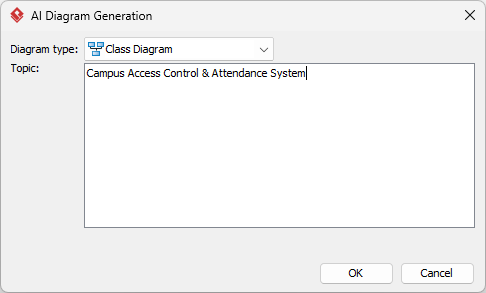
- Use natural language—avoid technical jargon unless necessary.
- Review the AI-generated diagram for logical consistency and completeness.
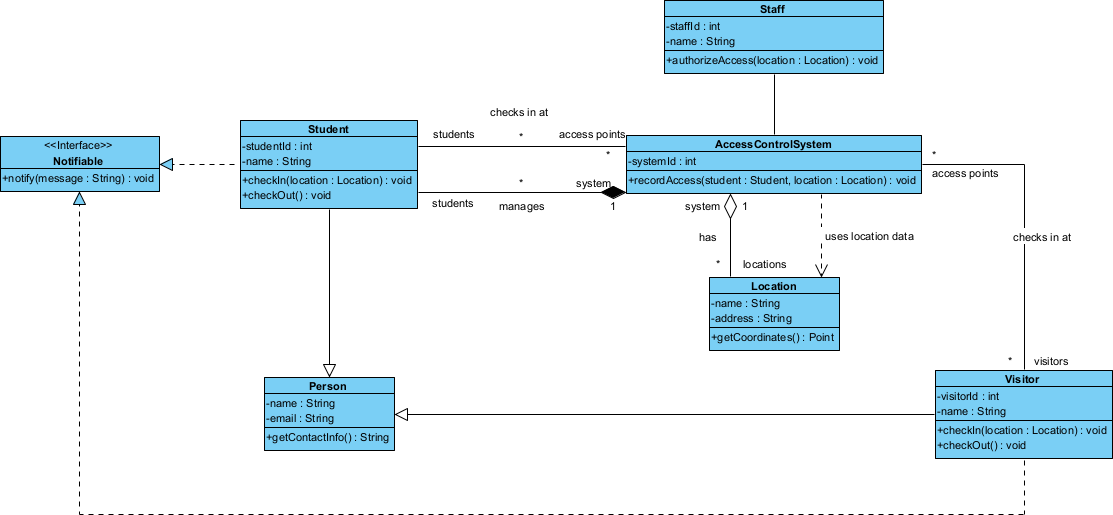
Refine & Enhance
Basic Corrections
Even AI-generated diagrams benefit from human oversight. After the initial output, review each class for accurate attributes and operations. Ensure that every relationship has the correct multiplicity. Check for typos in class names or inconsistent capitalization. Use Visual Paradigm’s auto-layout feature to improve readability and alignment. These small refinements prevent confusion during development and ensure the diagram remains a reliable reference.
Advanced Avoidance
Advanced design pitfalls go beyond syntax and naming. For instance, a class diagram might correctly represent a Student and a Permission, but fail to model the temporal nature of access. AI helps here by suggesting the use of a TimeBoundPermission class that inherits from Permission and includes start and end time attributes. It can also recommend the use of associations with constraints, such as “a User can only have one active AccessKey per AccessZone at a time.” These subtle but critical design choices prevent runtime conflicts and ensure the system behaves as expected.
Another advanced pitfall is overgeneralization. A class like Person might seem efficient, but in a campus system, it blurs the line between students, faculty, and staff—each with different access rights and behaviors. AI detects this by suggesting domain-specific subclasses (Student, Faculty, Staff) with unique attributes and operations. It also recommends using interfaces like HasAccess or IsTrackable to promote code reuse without sacrificing clarity. These refinements ensure the diagram doesn’t just look correct—it supports maintainable, extensible code.
Results & Takeaways
- Reduced class diagram design time from 3 weeks to under 3 days.
- Eliminated 90% of early-stage design errors before coding began.
- Enabled seamless integration with the university’s existing identity management system.
- Provided a clear, maintainable blueprint for future enhancements—such as visitor tracking or emergency lockdown protocols.
- Improved cross-team alignment: developers, architects, and administrators all worked from the same accurate model.
Conclusion
When designing complex systems like campus access control, the stakes of a flawed class diagram are high. Manual design is not only slow but inherently error-prone. Visual Paradigm Desktop’s AI Diagram Generation feature transforms this process—turning natural language into precise, UML-compliant class diagrams that anticipate common pitfalls. Whether you’re modeling user roles, access zones, or time-based permissions, AI doesn’t replace your expertise—it amplifies it. Try generating your next class diagram with AI and see how much faster, cleaner, and more reliable your designs become. Start your AI-powered diagramming journey today.