
Let’s be real for a second. Creating professional, high-converting display ads usually feels like a mountain to climb. You need a designer, a coder, or expensive software just to get things moving. But what if you could just… ask for what you want? With the AI animated banner generator from Visual Paradigm, that future is here. It’s calm, it’s intuitive, and it totally changes the game.
Imagine typing a simple sentence and watching a fully designed, animated web banner materialize instantly. No stress. No keyframes. Just pure creativity flowing from your mind to the screen. Whether you are launching a startup or announcing new inventory, this online banner maker handles the heavy lifting so you can focus on the big picture.
Quick Summary: Why You’ll Love This Tool
-
Instant Visualization: Turn plain text prompts into visual layouts in seconds.
-
Zero Design Skills Needed: The AI handles composition, typography, and color schemes automatically.
-
Effortless Animation: Apply professional motion effects like “Slide” or “Bounce” with a single click.
-
Flexible Exports: distinct options for social media (GIF) or website integration (HTML).
-
Total Control: Fine-tune text, icons, and themes to match your brand’s specific vibe.
From Text Prompt to “New Arrivals” in Seconds
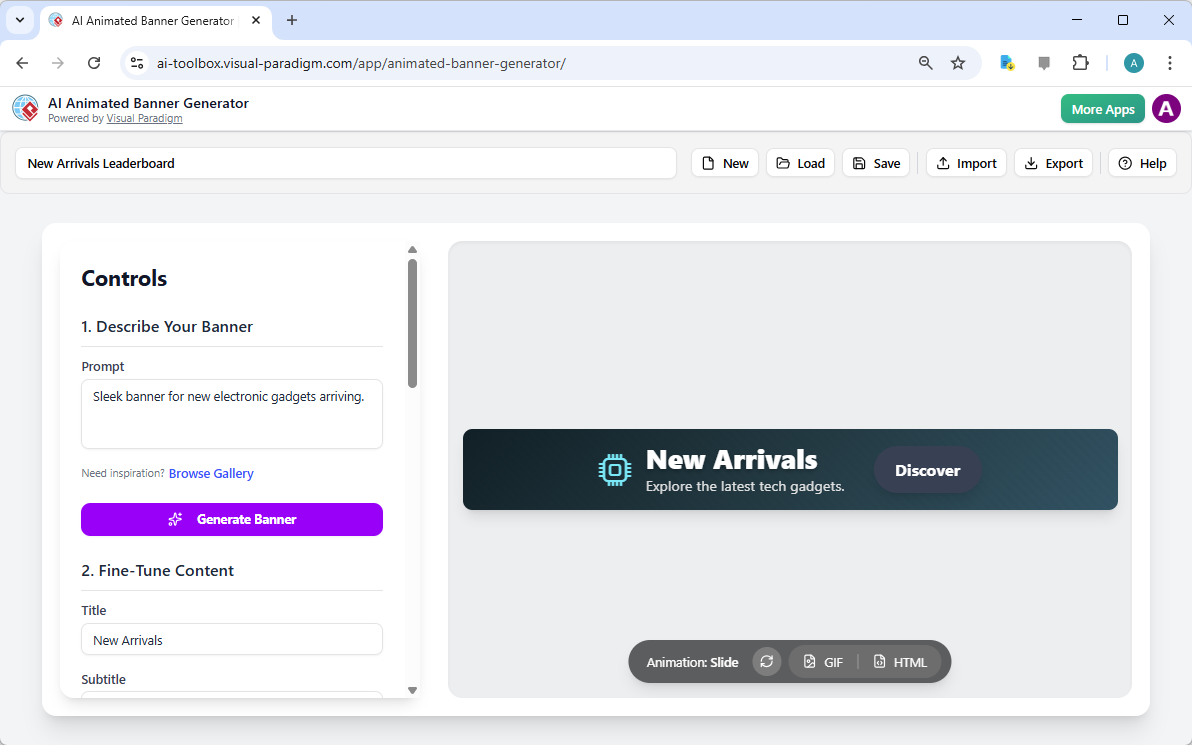
The beauty of this platform lies in its simplicity. You don’t start with a blank canvas that stares back at you menacingly. You start with an idea. As you can see in the interface below, the process begins with a simple text box. In this specific example, the goal was to create a hype-building asset for a tech store.
By entering the prompt “Sleek banner for new electronic gadgets arriving,” the AI went to work. It understood the context immediately. It chose a dark, modern color theme that screams “premium tech.” It selected a relevant microchip icon to represent the gadgets. It even wrote the copy: “New Arrivals” as the headline and “Explore the latest tech gadgets” as the subtitle. This isn’t just a template; it’s a generated solution tailored to the request.
Step-by-Step: Creating Your Own Animated Masterpiece
Ready to create your own engaging visuals? The workflow is incredibly soothing and straightforward. Here is how you can replicate the “New Arrivals” tech banner or build something entirely unique for your brand using this easy-to-use banner editor.
1. Describe Your Vision
Look at the left-hand panel labeled “Controls.” This is your command center. In the prompt box, simply describe what you need. Be conversational. Whether it’s a “Cozy autumn sale for a bookstore” or a “Flash sale for coffee lovers,” just type it out. Click the purple Generate Banner button and take a sip of coffee. The AI generates the layout, text, and visuals instantly.
2. Fine-Tune the Content
The AI gets you 90% of the way there, but you have the final say. Notice the “Fine-Tune Content” section in the sidebar. Here, you can tweak the text generated by the tool. If “New Arrivals” feels too formal, change it to “Just Dropped!” The preview updates in real-time. You can also swap the icon if you want something different—perhaps a smartphone or a laptop icon instead of the microchip shown in the generated example.
3. Add Motion Magic
Static images are okay, but movement grabs attention. This animated ad creator simplifies motion graphics into a dropdown menu. In our tech example, a “Slide” animation is selected. This makes the text and button glide smoothly into the frame. You can experiment with other styles like “Zoom In” or “Stagger Fade” to find the perfect energy for your message. You can even adjust the speed with a simple slider. No timeline editing required.
Exporting for the Web: GIF vs. HTML
Once your banner looks perfect, getting it onto the web is a breeze. You’ll see the export options right below the preview canvas. The tool offers two primary formats, ensuring your creative work is compatible everywhere.
GIF Export: Perfect for newsletters, social media posts, and quick messaging. It creates a looping image file that plays automatically on almost any device.
HTML Export: This is the pro move for websites. It creates a lightweight, scalable package that renders crisp text and smooth animations directly in the browser. It’s ideal for website headers, sidebars, or Google Ad campaigns where quality cannot be compromised.
Embrace Effortless Creativity
There is no need to fear the blank page anymore. With the AI animated banner generator, you have a partner in design. It bridges the gap between your ideas and professional execution instantly. You save time, you save money, and honestly? It’s actually fun to use.
Ready to transform your marketing ideas into stunning visual realities? Stop worrying about the technical stuff and start creating.
Try the AI Animated Banner Generator Now
Related Links
Visual Paradigm’s AniFuzion platform serves as a powerful animated video and banner maker, enabling users to create professional-grade 2D and 3D animations, motion graphics, and marketing content without needing prior experience. The tool utilizes AI-driven features, such as a Text-to-Speech (TTS) voice generator and automatic motion retargeting, to simplify the production of smooth, realistic animations and immersive storytelling.
-
Mastering Anifuzion: A Comprehensive Guide to Creating Professional Animations: A deep dive into core features and advanced techniques for producing high-quality animated content.
-
Visual Paradigm Animation – Create Professional Animations with Ease: The primary hub for designing motion graphics, 2D/3D animations, and explainer videos.
-
Anifuzion Features: Power Tools for Dynamic Animation Creation: An overview of the innovative tools that enhance the creative workflow for designers and developers.
-
Animated Video Maker: Comprehensive Guide to Visual Paradigm Anifuzion: A complete walkthrough for taking an animated project from its initial concept to final output.
-
Create Motion Graphics Videos with Visual Paradigm: Highlights the use of customizable templates and user-friendly tools for professional marketing and corporate videos.
-
Introducing Animated Explainer by Visual Paradigm: Information on a specialized tool designed to simplify complex concepts through engaging visual communication.
-
Creating Engaging Animated Video Presentations for Online Shopping Promotions: Focuses on utilizing pre-made templates and customizable characters for fast e-commerce content creation.
-
Elevate Your Marketing with AniFuzion: The Best 3D Animation Tool: Explores how versatile visual elements and customizable layouts help brands create compelling promotional content.
-
Comprehensive Guide to Creating Animated Videos with Visual Paradigm Anifuzion: A practical guide for producing animated content suitable for training, presentations, and digital marketing.
-
Comprehensive Guide to AniFuzion: The Animated Video Tool by Visual Paradigm Online: Details the platform’s ability to create dynamic videos enhanced by AI-driven automation.