


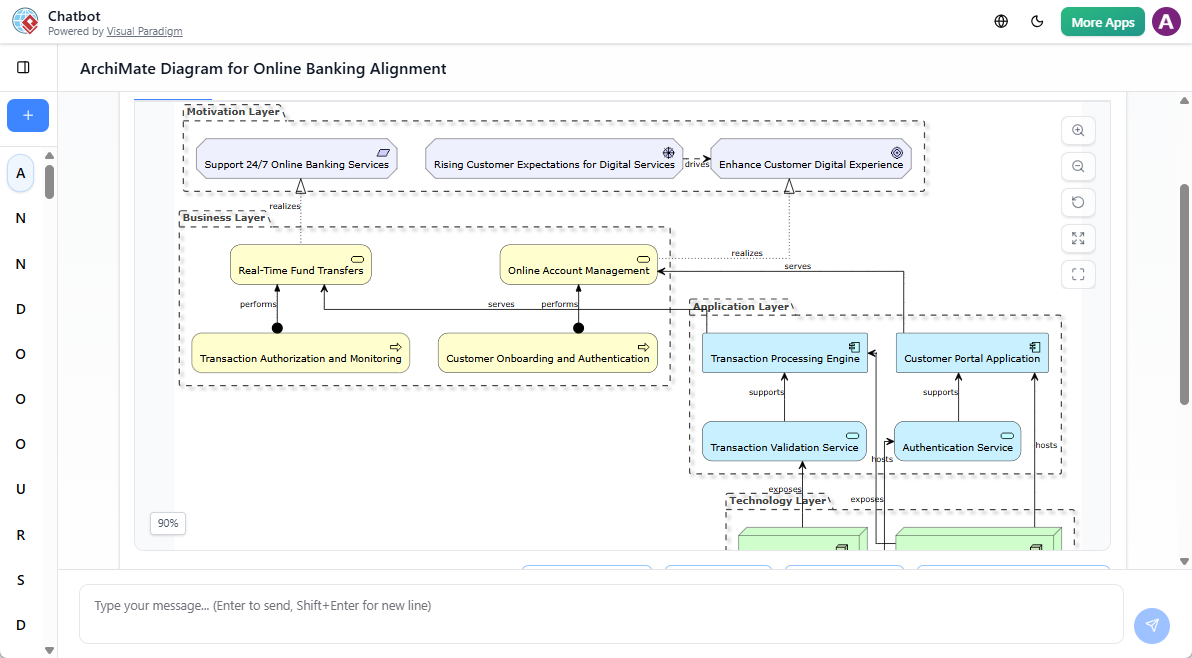
Enterprise architecture is increasingly complex, demanding clarity across business, application, and technology layers. ArchiMate provides a structured, standardized way to model these domains, enabling organizations to align strategy with execution. With the rise of generative AI, tools like Visual Paradigm’s AI Chatbot for ArchiMate are transforming how teams create and refine enterprise architecture diagrams—fast, accurately, and collaboratively.
This guide walks through what ArchiMate is, how the AI-powered chatbot works, why it’s valuable, and what’s new in the latest updates (late 2025 – early 2026). Whether you’re a seasoned EA practitioner or a business stakeholder involved in digital transformation, this tool helps bridge the gap between strategy and implementation.
What Is ArchiMate?
ArchiMate is an open, vendor-neutral modeling language developed by The Open Group to describe, analyze, and visualize enterprise architecture. It’s widely adopted in large organizations for aligning IT initiatives with business goals.
The framework is built on three core layers:
- Business Layer: Models processes, services, and roles—how work gets done.
- Application Layer: Focuses on software components, data flows, and application services.
- Technology Layer: Represents infrastructure—servers, networks, and cloud platforms.
Beyond these, ArchiMate includes extensions for:
- Strategy: Aligning vision and objectives.
- Motivation: Mapping drivers, goals, and stakeholder interests.
- Implementation & Migration: Planning transitions between current and future states.
This layered structure ensures that models are not just visual—they’re analyzable, reusable, and aligned with organizational priorities.
How Visual Paradigm’s AI Chatbot Simplifies ArchiMate Modeling
Visual Paradigm’s AI Chatbot for ArchiMate turns natural language into structured, compliant diagrams. It’s not a replacement for expertise—it’s a co-pilot that accelerates the modeling process while preserving architectural integrity.
Step-by-Step Workflow
- Launch the AI Tool
Open Visual Paradigm Desktop and go toTools > AI Chatbot. - Select a Viewpoint
Choose a specific ArchiMate Viewpoint (e.g., Business Process, Application Interaction, Technology Infrastructure) to tailor the output to your audience—executives, developers, or project teams. - Enter a Natural Language Prompt
Describe your requirement clearly. Examples:- “Model a cloud migration strategy for our customer portal.”
- “Show how the new CRM system integrates with existing HR and billing applications.”
- Refine with Conversational Commands
The AI generates a draft diagram. You can then interact with it:- “Add a security layer to the cloud infrastructure.”
- “Rename this component to ‘Customer Data Hub’.”
- “Show dependencies between the new and legacy systems.”
- Import into Your Project
Once satisfied, import the diagram into your Visual Paradigm project. Full editing is available—add attributes, constraints, or export to PDF, PNG, or SVG.
💡 Note: Full ArchiMate support, including AI diagram generation, requires the Enterprise Edition.
Why Use the AI Chatbot for ArchiMate?
1. Reduces Learning Curve
ArchiMate has a steep learning curve. The AI handles notation rules, relationship types, and layering—ensuring diagrams are syntactically correct without requiring users to memorize every rule.
2. Speeds Up Diagram Creation
Instead of spending hours drawing diagrams from scratch, users generate multi-layered models in seconds. This is especially helpful during strategy workshops or sprint planning.
3. Enables Cross-Functional Collaboration
Non-technical stakeholders—project managers, product owners, or executives—can contribute to architecture by describing needs in plain language. The AI translates these into structured models, fostering shared understanding.
4. Supports Impact Analysis
After generating a model, you can query it:
- “Which business processes depend on the legacy billing system?”
- “What applications will be affected if we decommission the CRM?”
This capability supports change impact assessment and risk mitigation.
5. Ensures Consistency Across Teams
With AI enforcing ArchiMate standards, diagrams across departments or projects maintain a uniform structure—critical for governance and audit readiness.
Recent Updates (Late 2025 – Early 2026)
Visual Paradigm has been actively enhancing the AI Chatbot’s capabilities to meet enterprise demands. Key updates include:
🔄 Full Viewpoint Support (December 2025)
All official ArchiMate Viewpoints are now supported, including:
- Business Viewpoint
- Application Viewpoint
- Technology Viewpoint
- Implementation & Migration Viewpoint
This means users can generate diagrams tailored to specific audiences—executives, architects, or developers—without manual reconfiguration.
🔍 Context-Aware Reasoning (October 2025)
The AI now understands domain-specific language based on context. For example:
- If you mention “port” in a technology layer, it interprets it as a network port.
- In a logistics context, it recognizes “port” as a shipping hub.
This reduces ambiguity and improves model accuracy.
🛠 Enhanced Stability & Accuracy (December 2025)
The AI now handles complex, technical prompts more reliably. Failed generation rates have dropped significantly, especially for multi-layered models involving strategy, motivation, and implementation.
🧭 Deep Desktop Integration (February 2026)
A new 10-Step AI-Assisted Wizard guides users through complex requirements. It breaks down high-level goals (e.g., “modernize core banking systems”) into structured modeling steps, ensuring no critical layer is missed.
This feature is particularly useful for new users or teams adopting ArchiMate for the first time.
Best Practices for Using the AI Chatbot
- Be Specific in Prompts: Use clear, structured language. Instead of “Make a diagram about our system,” try “Model the integration between the new AI chatbot and the customer support portal.”
- Use Viewpoints Strategically: Match the diagram type to your audience. Use Business Process for executives, Application Interaction for IT teams.
- Iterate, Don’t Over-Rely: Use the AI for initial drafts. Always review and validate the output for accuracy and alignment with business needs.
- Combine with Manual Editing: The AI generates a foundation. Add detailed attributes, constraints, or custom elements for completeness.
Final Thoughts
ArchiMate remains a powerful tool for enterprise architecture, but its adoption has historically been slowed by complexity and time investment. Visual Paradigm’s AI Chatbot lowers that barrier—making ArchiMate accessible, efficient, and collaborative.
With recent improvements in stability, contextual understanding, and workflow integration, the tool is no longer just a convenience. It’s becoming a standard part of the enterprise architecture toolkit—especially in organizations undergoing digital transformation, cloud migration, or regulatory compliance.
Whether you’re modeling a new digital service, planning a system integration, or aligning strategy with execution, the AI Chatbot helps you build accurate, meaningful diagrams faster—so you can focus on what matters: driving results.