
In the world of product development and software creation, communication is the backbone of success. One of the most critical tools for ensuring clear communication between stakeholders, product owners, and development teams is the user story. A well-crafted user story bridges the gap between abstract business needs and concrete technical implementation. It serves as a promise of conversation, a placeholder for collaboration, and a guide for value delivery. 🚀
This guide breaks down the essential elements that constitute a high-quality user story. We will explore the structural components, the criteria for acceptance, and the frameworks that help teams maintain quality without unnecessary overhead. By understanding the anatomy of these work items, teams can reduce ambiguity, streamline development, and ensure that every line of code serves a specific user need. 👇
What Exactly Is a User Story? 🤔
A user story is a simple, concise description of a feature told from the perspective of the person who desires the new capability, usually a user or customer of the system. It is not a specification document, nor is it a detailed technical requirement. Instead, it is a tool for conversation. It forces the team to ask questions and clarify expectations before work begins.
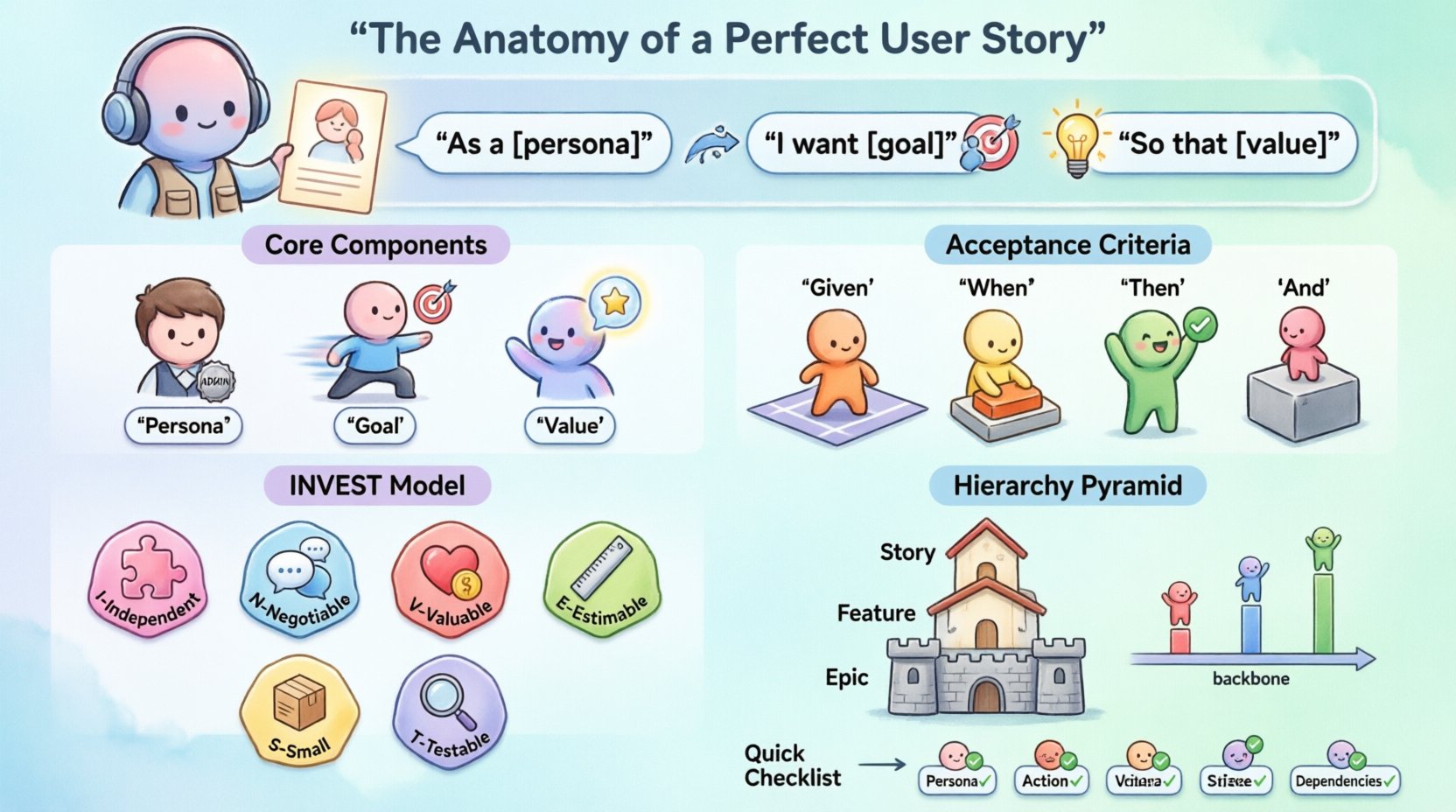
The standard format for a user story is:
As a [type of user],
I want [some goal],
So that [some reason/benefit].
This format is deceptively simple. Each word carries weight. The user defines the persona. The goal defines the action. The reason defines the value. Without the value, the feature is just work without purpose. Without the user, the feature is a solution looking for a problem. Without the goal, the development scope is undefined.
The Core Components of a User Story 🧩
To ensure a user story is actionable, it must contain specific components. These components act as the skeleton of the request. If any part is missing, the story is considered incomplete and should not be worked on during a sprint or iteration.
1. The Persona (Who) 👤
Identifying who is using the feature is crucial. Different users have different needs, permissions, and contexts. A story written for an administrator differs significantly from one written for a guest visitor.
Specificity: Avoid generic terms like “user.” Use “logged-in subscriber,” “guest shopper,” or “system administrator.”
Empathy: Understanding the persona helps developers anticipate edge cases and usability issues.
2. The Goal (What) 🎯
This is the action the user wants to take. It should be an active verb. Passive voice creates ambiguity. The goal is the functional requirement.
Clarity: The action must be clear. “Update profile” is better than “Manage settings.”
Scope: It should be a single, atomic action. If it requires multiple distinct steps, it might be too large for one story.
3. The Value (Why) 💡
The justification is often the most overlooked part of the story. It explains why the feature matters. This helps the team prioritize. If a feature does not deliver value, it should not be built, regardless of technical interest.
Benefit-Driven: The “so that” clause must articulate a tangible benefit. “So that I can save time” is better than “So that the system works faster.”
Alignment: It aligns the team with the broader business strategy.
Acceptance Criteria: The Definition of Done ✅
A user story without acceptance criteria is an open-ended promise. Acceptance criteria define the boundaries of the story. They are the conditions that must be met for the story to be considered complete. These criteria are agreed upon by the product owner and the development team before work starts.
There are several ways to write acceptance criteria, but the most robust method often involves structured scenarios.
The Gherkin Syntax 🧑🏭
Many teams use a structured format known as Gherkin to write acceptance criteria. This makes the criteria readable by both technical and non-technical team members.
Given: The initial context or state of the system.
When: The action taken by the user or the system.
Then: The expected outcome or observable result.
And: Additional conditions or outcomes.
Example:
Given a user is on the checkout page,
When they enter an invalid credit card number,
Then the system displays an error message,
And the order is not processed.
Key Characteristics of Good Acceptance Criteria 📋
To be effective, acceptance criteria must adhere to specific principles:
Binary: A test should pass or fail. There should be no gray areas.
Testable: They must be verifiable through testing or inspection.
Unambiguous: Avoid words like “fast,” “easy,” or “maybe.” Use specific numbers or states.
Independent: Each criterion should be distinct and not rely on the outcome of another unrelated story.
The INVEST Model 📊
Not all user stories are created equal. To maintain a healthy backlog, teams often use the INVEST model to evaluate the quality of a story. This acronym stands for six qualities that an ideal user story should possess.
Letter | Principle | Description |
|---|---|---|
I | Independent | Stories should be as independent as possible. High dependency on other stories creates bottlenecks and scheduling risks. |
N | Negotiable | A story is not a contract. It is a placeholder for a conversation. Details should be discussed and refined, not rigidly fixed upfront. |
V | Valuable | Every story must deliver value to the user or the business. If it adds no value, it is technical debt, not a feature. |
E | Estimable | The team must be able to estimate the effort required. If the scope is too vague, estimation is impossible. |
S | Small | Stories should be small enough to be completed within a single iteration or sprint. Large stories are often broken down into Epics. |
T | Testable | There must be a way to verify that the story is done. This ties back to the acceptance criteria. |
Applying the INVEST model helps teams identify stories that are too vague, too large, or too dependent on other work. It acts as a filter for backlog grooming sessions.
Visualizing the Workflow: Story Mapping 🗺️
While a single user story is a vertical slice of functionality, teams often need to see the bigger picture. Story mapping is a technique that organizes user stories into a visual structure. This helps in understanding the user journey and prioritizing features.
Understanding the Map Structure
Backbone: The horizontal axis represents the user journey, from start to finish. These are the major activities or steps.
Vertical Slices: The vertical axis represents the prioritization and detail. Stories placed higher on the spine are more critical for the initial release.
Epics: Large bodies of work that can be broken down into multiple stories. These sit above the individual cards.
By visualizing the work, teams can identify gaps in the user experience. They can also see which stories are prerequisites for others, helping to sequence the development work logically.
Epics, Features, and Stories: The Hierarchy 🔗
Understanding the relationship between different levels of work is essential for planning. Confusion here often leads to scope creep or missed deadlines.
Epics: Large initiatives that span multiple sprints or releases. They are too big to be completed in one go. They represent a major theme or capability.
Features: A subset of an Epic. A feature is a distinct part of the product that delivers value but might still be too large for a single sprint. It is often broken down into multiple stories.
Stories: The smallest unit of work. A story is a single requirement that can be completed within a sprint. It is the unit of tracking and measurement.
When planning, teams often start with the Epic, break it down into Features, and then decompose those into individual User Stories. This ensures that the small tasks align with the larger strategic goals.
Common Pitfalls in Writing User Stories ⚠️
Even experienced teams make mistakes when defining requirements. Recognizing these common pitfalls can save significant time during development and testing.
1. Missing the “Why”
Many stories focus only on the “What” (the functionality) and ignore the “Why” (the value). Without the value, developers may build the feature but miss the intent, leading to a suboptimal user experience.
2. Over-Specifying the Solution
A user story should describe the problem, not the technical solution. If a story says, “I want a database query to return results,” it restricts the team’s ability to innovate. A better story is, “I want to see a list of products,” leaving the implementation open.
3. Ignoring Non-Functional Requirements
Performance, security, and accessibility are often overlooked in functional stories. While these might be captured in separate stories or as system constraints, they must be acknowledged in the criteria to ensure the product is usable and safe.
4. Combining Multiple Goals
Putting two different goals into one story makes it difficult to test and estimate. For example, “I want to log in and reset my password” should be two separate stories. If one part fails, the whole story is blocked.
Collaboration and Refinement 🤝
Writing a user story is not a solitary task. It is a collaborative effort that involves the Product Owner, the Development Team, and often Quality Assurance specialists. This process is often called refinement or grooming.
Product Owner: Brings the business context and defines the value. They are the voice of the customer.
Developers: Assess technical feasibility and point out dependencies. They ask questions about the implementation details.
QA/Testers: Help define the acceptance criteria and identify edge cases that might have been missed.
During refinement sessions, the team asks questions like:
What happens if the user has no internet connection?
What is the limit for file uploads?
How does this interact with the existing notification system?
This dialogue ensures that the story is understood by everyone before the work begins. It reduces the likelihood of rework and ensures that the final product meets the expectations of all stakeholders.
Examples: Bad vs. Good 📝
Comparing examples helps clarify the principles discussed above.
Example 1: Login Functionality
Bad: “I want a login screen.”
Issues: No user persona, no value, no acceptance criteria.
Good: “As a registered user, I want to log in using my email and password, so that I can access my personalized dashboard and saved data.”
Criteria: Password must be encrypted, session expires after 30 minutes, error message appears for invalid credentials.
Example 2: Search Functionality
Bad: “I want to search for products.”
Issues: Vague. How does the search work? What filters?
Good: “As a shopper, I want to filter search results by price range, so that I can find products that fit my budget.”
Criteria: Dropdown menu for price, results update dynamically, error if range is invalid.
Conclusion on Quality Standards ⭐
Creating perfect user stories is a skill that improves with practice. It requires a balance of empathy for the user and clarity for the developer. By adhering to the structure of Who, What, and Why, and by defining clear acceptance criteria, teams can ensure that their work remains focused on delivering value.
Remember that a user story is a tool for conversation, not a replacement for it. The document itself is less important than the understanding that the team gains while discussing it. Use the INVEST model as a checklist, visualize the work with story maps, and always prioritize collaboration over documentation. When done correctly, user stories become the foundation for building products that truly serve their users.
Quick Reference Checklist 📌
Persona Defined? Is the user type clear?
Action Clear? Is the verb specific?
Value Stated? Does the “so that” explain the benefit?
Acceptance Criteria? Are there testable conditions?
Size Appropriate? Can it be done in one sprint?
Dependencies Known? Are external factors identified?
Keep this checklist handy during your next planning session to ensure every item in your backlog is ready to go. 🏁