
In the world of software architecture and system design, clarity is king. When you begin modeling a complex system, the sheer number of potential diagrams can be overwhelming. Two of the most prominent tools in the Unified Modeling Language (UML) arsenal are the Class Diagram and the Sequence Diagram. Both are essential, yet they serve distinct purposes. Choosing the wrong one for the task at hand can lead to confusion, miscommunication, and implementation errors.
This guide provides a deep dive into the differences between these two diagram types. We will explore their structures, their use cases, and how they complement each other in the development lifecycle. Whether you are a software architect, a developer, or a system analyst, understanding when to apply each tool is critical for effective design.
📊 What is a Class Diagram?
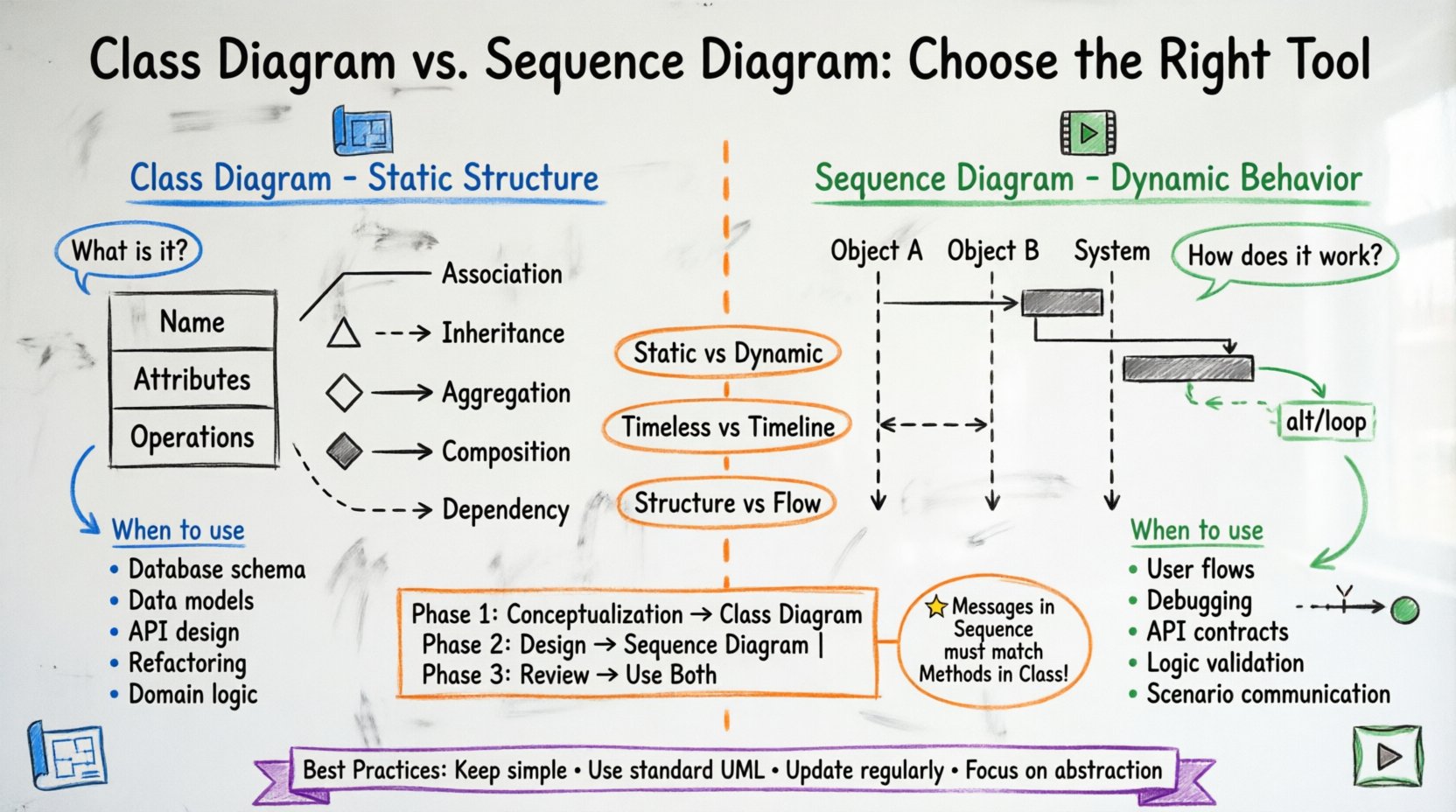
The Class Diagram is the backbone of object-oriented design. It represents the static structure of a system. Think of it as the blueprint of a building; it shows the rooms, the walls, and the doors, but it does not show how people move through the building over time.
In a Class Diagram, you define the building blocks of your software. These blocks are called classes. Each class encapsulates data and logic. This diagram answers the question: “What does the system consist of?”
Core Components of a Class Diagram
- Classes: Represented by rectangles divided into three compartments:
- Name: The identifier of the class (e.g.,
Customer,Order). - Attributes: The properties or data stored within the class (e.g.,
customerName,orderID). - Operations: The methods or functions the class can perform (e.g.,
calculateTotal(),submitOrder()). - Relationships: Lines connecting classes to show how they interact:
- Association: A structural link between objects.
- Inheritance (Generalization): An “is-a” relationship where a subclass inherits from a superclass.
- Aggregation: A “whole-part” relationship where the part can exist independently of the whole.
- Composition: A stronger “whole-part” relationship where the part cannot exist without the whole.
- Dependency: A usage relationship where one class depends on another.
When to Use a Class Diagram 🏗️
You should reach for a Class Diagram when you need to:
- Define the Database Schema: Class structures often map directly to database tables and columns.
- Establish Data Models: Clarify how data entities relate to one another before writing code.
- Design APIs: Determine the input and output types for your services based on class interfaces.
- Refactor Legacy Code: Visualize the current state of a system to identify coupling issues.
- Communicate Domain Logic: Explain business rules regarding data ownership and relationships to stakeholders.
For example, if you are designing an e-commerce platform, a Class Diagram helps you visualize that a Product has many Reviews, but a Review belongs to only one Product. It sets the rules of the game for your data.
🔄 What is a Sequence Diagram?
If the Class Diagram is the blueprint, the Sequence Diagram is the movie. It represents the dynamic behavior of a system. It focuses on the flow of messages between objects over time. This diagram answers the question: “How does the system behave to achieve a specific goal?”
Sequence diagrams are vertical timelines. Time flows from top to bottom. They illustrate the interaction between objects in a specific scenario, such as a user logging in or an order being processed.
Core Components of a Sequence Diagram
- Participants (Lifelines): Objects or actors involved in the interaction, drawn as vertical dashed lines.
- Messages: Arrows indicating communication between participants. They can be:
- Synchronous: The sender waits for a response.
- Asynchronous: The sender continues without waiting.
- Return Messages: The response going back to the sender.
- Activation Bars: Rectangles on the lifeline showing when an object is actively performing an operation.
- Focus of Control: Indicates the period during which an object is active.
- Combined Fragments: Blocks that show logic like loops, alternatives (if/else), or parallel processes.
When to Use a Sequence Diagram 🎬
You should reach for a Sequence Diagram when you need to:
- Design User Flows: Map out the steps a user takes to complete a task.
- Debug Interactions: Trace where an error occurs in a chain of events.
- Specify API Endpoints: Define the order of requests and responses between services.
- Validate Logic: Ensure that the static structure (Class Diagram) can actually support the required behavior.
- Communicate Scenarios: Show stakeholders exactly what happens when a button is clicked.
Using the e-commerce example, a Sequence Diagram would show the steps from the moment a user clicks “Buy” to the moment the inventory is updated. It details the handshake between the Cart, the PaymentService, and the InventoryManager.
🆚 Class Diagram vs. Sequence Diagram: A Detailed Comparison
Understanding the distinctions is vital. Using a Class Diagram to explain a workflow will confuse your team. Using a Sequence Diagram to explain data storage will leave them asking about relationships. Here is a structured breakdown.
| Feature | Class Diagram 🏛️ | Sequence Diagram 📅 |
|---|---|---|
| Focus | Static Structure | Dynamic Behavior |
| Time Perspective | Timeless (Snapshot) | Linear (Timeline) |
| Primary Question | “What is it?” | “How does it work?” |
| Key Elements | Classes, Attributes, Methods, Relationships | Lifelines, Messages, Activation, Fragments |
| Best For | Database Design, Architecture, Data Models | Use Cases, Workflows, API Contracts |
| Complexity | High (Structure can get dense) | High (Flow can get tangled) |
| Maintenance | Changes when schema changes | Changes when logic changes |
🤔 How to Choose the Right Tool
Selecting the appropriate diagram type depends on your current phase in the development lifecycle. Here is a decision matrix to guide you.
Phase 1: Conceptualization & Requirements
At the start, you are defining the domain. You need to know what entities exist. A Class Diagram is superior here.
- Goal: Identify core entities.
- Action: Draw classes for User, Product, Order.
- Why: You need to agree on the vocabulary before discussing the flow.
Phase 2: Design & Implementation
Once the entities are defined, you need to know how they interact. This is where Sequence Diagrams shine.
- Goal: Define the logic for a specific feature.
- Action: Map the path from User Input to Database Update.
- Why: You need to ensure the methods defined in the Class Diagram are invoked in the correct order.
Phase 3: Review & Documentation
For external documentation or handover, you often need both. However, the audience dictates the choice.
- For Developers: They need Class Diagrams to understand the codebase structure.
- For Testers: They need Sequence Diagrams to understand the test scenarios.
- For Managers: They need high-level Class Diagrams to understand scope.
🔗 Integrating Static and Dynamic Views
Advanced modeling does not treat these diagrams as silos. They work in tandem. A robust system design integrates both views to ensure consistency.
Ensuring Consistency
Every message sent in a Sequence Diagram must correspond to a method defined in the Class Diagram. If your Sequence Diagram shows a validatePayment() message, but your Class Diagram for PaymentProcessor lacks that method, you have a design flaw.
- Traceability: Maintain a link between sequence interactions and class operations.
- Validation: Check if the lifecycle of an object in a sequence matches its state transitions defined in the class.
Iterative Refinement
Often, the process is not linear. You might draw a Sequence Diagram and realize you are missing a crucial data field. You then go back to the Class Diagram to add that attribute. This iterative loop is healthy.
- Step 1: Sketch Class Diagram to define scope.
- Step 2: Sketch Sequence Diagram to test logic.
- Step 3: Identify gaps in data or methods.
- Step 4: Update Class Diagram.
- Step 5: Refine Sequence Diagram.
🚫 Common Pitfalls to Avoid
Even experienced architects make mistakes when modeling. Be aware of these common traps.
1. Over-Modeling with Class Diagrams
Do not try to draw every single class in a massive system on one sheet. This creates a “spaghetti diagram” that is unreadable. Break your system into packages or subsystems. Use inheritance to group similar classes. Keep the diagram focused on the current module.
2. Ignoring Multiplicity
In Class Diagrams, multiplicity defines how many objects participate in a relationship. Forgetting to specify if a relationship is 1-to-1, 1-to-many, or many-to-many leads to database design errors. Always define these constraints clearly.
3. Making Sequence Diagrams Too Broad
A Sequence Diagram should focus on a single use case or scenario. Do not try to map the entire system’s behavior in one diagram. It becomes a wall of text. Split complex flows into smaller, manageable sequences.
4. Confusing Aggregation and Composition
These are subtle but important distinctions in Class Diagrams.
- Aggregation: A Car has an Engine. If you remove the Car, the Engine can still exist (maybe in another car or a spare pile).
- Composition: A House has a Room. If you destroy the House, the Room ceases to exist as a functional unit.
🛠️ Best Practices for Effective Modeling
To get the most value out of your diagrams, adhere to these principles.
- Keep it Simple: Use standard notation. Avoid custom symbols that only you understand.
- Use Standard UML: Stick to the Unified Modeling Language standards to ensure compatibility across tools and teams.
- Document Decisions: Add comments to your diagrams explaining why a certain relationship exists. This helps future maintainers.
- Update Regularly: A diagram that does not match the code is worse than no diagram. Treat diagrams as living documents.
- Focus on Abstraction: Don’t get bogged down in implementation details like variable types unless they are critical to the design.
📝 Summary Table: Quick Reference
Use this table as a cheat sheet during your design meetings.
| Scenario | Recommended Diagram | Reason |
|---|---|---|
| Designing a database schema | Class Diagram | Defines entities and attributes |
| Planning an API integration | Sequence Diagram | Defines request/response flow |
| Onboarding new developers | Class Diagram | Explains the domain model |
| Debugging a workflow error | Sequence Diagram | Traces the execution path |
| Defining inheritance hierarchies | Class Diagram | Shows parent-child relationships |
| Visualizing user login process | Sequence Diagram | Shows steps and timing |
🎓 Final Thoughts on Modeling
The choice between a Class Diagram and a Sequence Diagram is not about which one is better. It is about which one solves the problem you are facing right now. The Class Diagram gives you the foundation. The Sequence Diagram gives you the motion.
By mastering both, you gain a complete view of your system. You understand not just what the system is made of, but how it functions. This dual perspective is the hallmark of a skilled software architect.
Start with the static structure to ground your thinking. Then, move to the dynamic behavior to test your logic. Return to the structure to refine your data models. This cycle ensures a robust, maintainable, and well-documented system.
Remember, the goal is communication. If your diagram helps your team build better software, it has succeeded. Use these tools with intention, and your design process will become clearer and more efficient.