
Creating software or digital products involves more than just writing code. It requires a shared understanding of what needs to be built and why. This shared understanding is often the missing link in many projects. When teams and stakeholders operate in isolation, requirements become fragmented, leading to rework and confusion. User story workshops serve as a structured mechanism to bridge this gap. They bring together the people who need the solution, the people who build it, and the people who will use it.
These sessions are not merely meetings; they are collaborative events designed to define value. By focusing on the user story format, teams can translate vague desires into actionable items. This guide explores how to structure, run, and follow up on these workshops to ensure alignment without relying on specific tools or platforms.
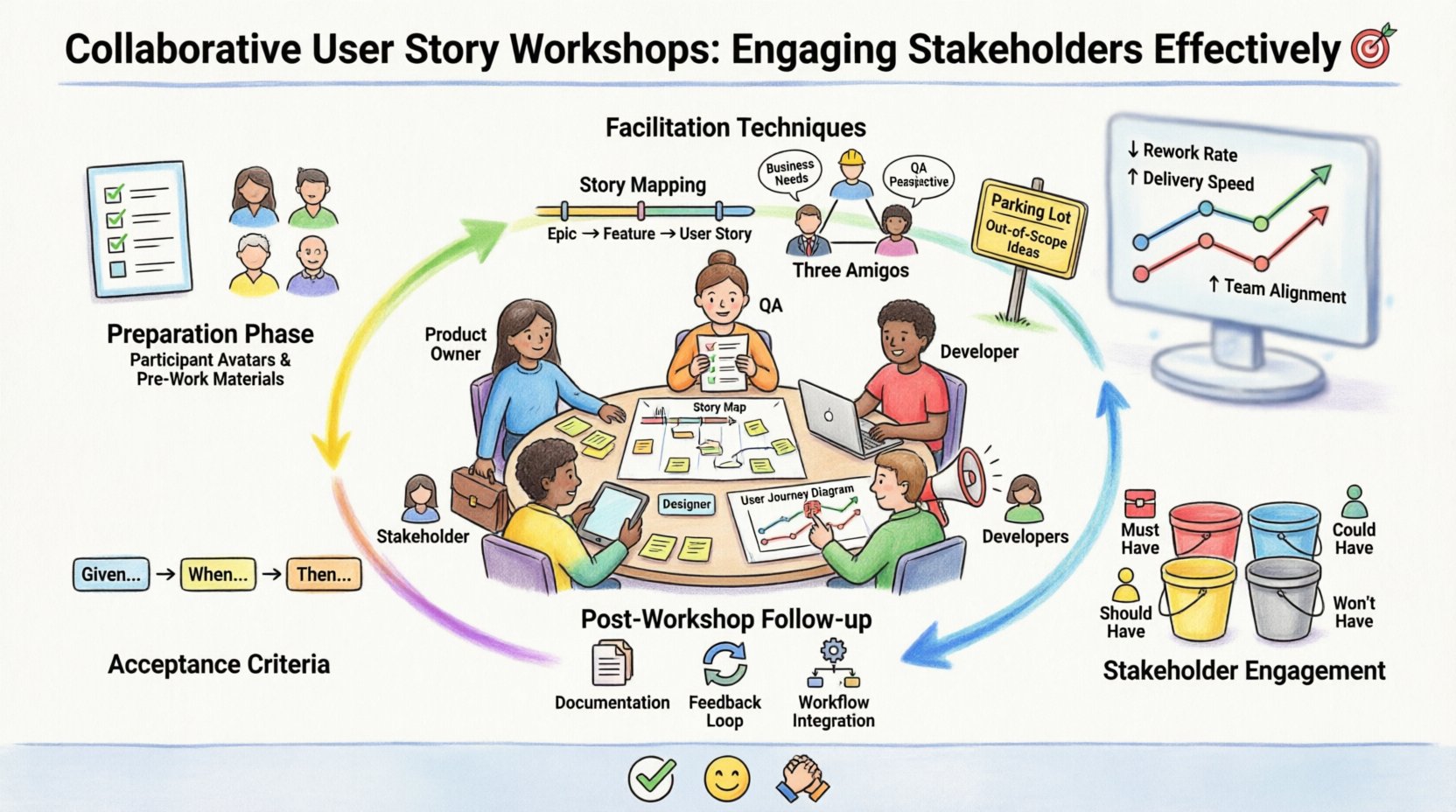
Understanding the Purpose of User Story Workshops 🎯
A user story workshop is a facilitated session where requirements are gathered, refined, and broken down into smaller, manageable pieces. The core objective is to create a shared definition of the problem before attempting to solve it. In many organizations, stakeholders provide high-level goals, while development teams focus on technical implementation. The workshop sits between these two points.
When conducted effectively, these workshops achieve several outcomes:
- Clarity: Ambiguity is reduced by discussing edge cases early.
- Alignment: Everyone agrees on what constitutes success.
- Efficiency: Questions are answered before development begins.
- Ownership: Stakeholders feel heard, and developers understand the business context.
Without this collaborative approach, projects often suffer from the “telephone game” effect. A request made by a product owner might be misinterpreted by a designer, which is then misunderstood by a developer. Workshops minimize this risk by keeping all voices in the room simultaneously.
Preparation: Setting the Stage for Success 📋
The success of a workshop is largely determined before the first session begins. Preparation ensures that time is spent on productive discussion rather than administrative setup. Gathering the right participants is the first critical step.
Identifying the Right Participants
Not everyone needs to be in every workshop. Inviting too many people can dilute the focus. Inviting too few can lead to blind spots. A balanced team usually includes:
- Product Owner or Business Analyst: To represent the business value and priorities.
- Developers: To assess technical feasibility and effort.
- Designers or UX Specialists: To ensure the user experience is considered.
- Subject Matter Experts: Individuals with deep knowledge of the specific domain.
- Quality Assurance: To help define acceptance criteria early.
Stakeholders who will use the final product should also be represented. If they cannot attend directly, their feedback should be gathered beforehand to ensure their needs are voiced.
Defining the Scope and Goal
A workshop without a clear agenda is a meeting without direction. Before sending invitations, define what specific stories or features will be addressed. It is often best to focus on a specific theme or module rather than trying to define the entire product at once.
Set a clear goal for the session. Examples include:
- Refining the backlog for the next sprint.
- Defining the scope for a specific feature release.
- Clarifying complex user flows for a new module.
Gathering Pre-Workshop Materials
Participants should not arrive empty-handed. Share any existing documentation, rough sketches, or high-level requirements ahead of time. This allows attendees to review the information and come prepared with questions. However, avoid sending detailed specifications that might bias the conversation. The goal is discussion, not approval of existing documents.
Facilitation Techniques for Effective Sessions 💬
Facilitation is the art of guiding the conversation without dominating it. A good facilitator ensures that all voices are heard and that the group stays on track. The following techniques help maintain momentum and productivity.
Story Mapping
Story mapping is a visual technique that helps organize user stories along a timeline. It places activities at the top of the map and the specific stories underneath them. This creates a backbone of the user experience. By visualizing the flow, teams can identify gaps in the process.
This method is particularly useful for understanding the user journey. It helps stakeholders see how individual tasks connect to form a complete experience. It also aids in prioritization, as the team can see which stories are essential for the first version versus later iterations.
The Three Amigos Approach
This technique involves three roles collaborating on a single story: the Business (Product Owner), the Quality Assurance (Tester), and the Development (Engineer). When discussing a specific story, these three roles ensure that the requirement is understood from all angles.
- Business: Focuses on the value and the user need.
- Quality Assurance: Focuses on how to test and validate the behavior.
- Development: Focuses on the implementation details and constraints.
Conducting this review for each major story ensures that acceptance criteria are robust before work begins.
Working Backwards from the Goal
Sometimes stakeholders know the end result but not the steps to get there. Encourage the group to define the final outcome first. Then, work backwards to identify the necessary steps. This reverse engineering helps in identifying dependencies and critical path items.
Stakeholder Engagement and Dynamics 👥
Engaging stakeholders is often the most challenging part of these workshops. Different stakeholders have different priorities, communication styles, and levels of authority. Managing these dynamics requires patience and structure.
Handling Conflicting Priorities
It is common for stakeholders to have competing interests. Marketing might want a feature for a campaign, while engineering might warn against the technical debt it introduces. During the workshop, these conflicts should be surfaced openly rather than hidden.
Use a prioritization framework to help resolve these conflicts. One common method is the MoSCoW technique:
| Category | Description | Example |
|---|---|---|
| Must Have | Non-negotiable requirements for the release. | Login functionality, Security protocols. |
| Should Have | Important but not vital for the initial launch. | Advanced search filters, Dark mode. |
| Could Have | Desirable features if time permits. | Social sharing integration, Custom avatars. |
| Won’t Have | Agreed upon as out of scope for now. | Mobile app support, Third-party API. |
Using a structured approach helps move the conversation from “I want this” to “We agree this is not the priority right now.”
Managing Introverts and Extroverts
In a group setting, extroverted participants may dominate the conversation. Introverted participants might have valuable insights but hesitate to speak up. Facilitators must actively manage this balance.
- Round Robin: Go around the room (or virtual space) to get input from everyone on a specific topic.
- Quiet Writing: Allow 5 minutes of silent writing where everyone writes their thoughts on sticky notes before sharing.
- Breakout Groups: Split large groups into smaller teams to discuss specific topics, then report back.
Dealing with Silence
Silence can be uncomfortable, but it is often productive. It gives people time to think. Do not rush to fill the silence immediately. If a question is asked, pause for a few seconds. If no one speaks, ask a follow-up question that requires a specific answer rather than a general opinion.
Defining Acceptance Criteria and Boundaries 📏
One of the primary outputs of a user story workshop is the definition of acceptance criteria. These criteria define the conditions that must be met for a user story to be considered complete. Without them, the definition of “done” becomes subjective.
Writing Effective Criteria
Acceptance criteria should be clear, concise, and testable. Avoid vague terms like “user-friendly” or “fast.” Instead, use measurable terms.
Consider using the Given-When-Then format to structure these criteria:
- Given: The initial context or state.
- When: The action or event that occurs.
- Then: The expected outcome or result.
This format forces the team to think about the scenario logically. It also serves as a basis for automated testing later on.
Setting Boundaries
Scope creep is a common risk in workshops. Stakeholders often add new ideas as the conversation flows. To prevent this, establish boundaries at the start.
Use a parking lot for ideas that are valid but out of scope for the current session. Write them down on a separate list so they are not forgotten. This validates the contributor’s idea without derailing the current focus. Review the parking lot at the end of the session to decide what to do with those items.
Post-Workshop Activities and Follow-Up 🔄
The workshop does not end when the participants leave the room. The output must be captured, validated, and integrated into the workflow. This ensures that the time spent was not wasted.
Documentation and Summarization
Create a summary of the workshop immediately. Document the stories agreed upon, the acceptance criteria defined, and the priorities set. This summary should be distributed to all participants and relevant stakeholders who could not attend.
Ensure the documentation is accessible. It should be easy to find and understand. Avoid burying the information in long paragraphs. Use lists, tables, and diagrams where possible.
Validation and Feedback Loop
Once the documentation is shared, allow a period for review. Stakeholders may need time to reflect on what was discussed. Ask them to confirm that the summary accurately reflects the conversation. This step is crucial for catching misunderstandings before work begins.
Integration into the Workflow
The stories defined in the workshop need to be entered into the team’s workflow. This involves breaking them down into tasks, estimating effort, and scheduling them for development. The workshop output should flow directly into the planning backlog.
Track the progress of these stories. If a story is blocked or changed significantly, revisit the workshop notes to understand the original context. This maintains the integrity of the initial agreement.
Common Pitfalls to Avoid 🚫
Even with good intentions, workshops can go wrong. Recognizing common pitfalls helps teams steer clear of them.
- Lack of Preparation: Arriving without materials leads to wasted time.
- Missing Key Roles: If the QA or Design team is absent, critical details are often missed.
- Unfacilitated Discussions: Without a guide, conversations can spiral into arguments or tangents.
- Ignoring Constraints: Focusing only on features without considering technical limits or budget.
- No Follow-Up: Failing to document results renders the session ineffective.
Measuring the Success of Your Workshops 📊
How do you know if these sessions are working? Look for indicators of improvement over time.
- Reduced Rework: Fewer changes are requested during development.
- Faster Delivery: Stories move through the pipeline more quickly.
- Higher Satisfaction: Stakeholders report feeling more involved and informed.
- Clearer Requirements: Questions during development decrease.
Regularly review these metrics. If you see a spike in rework, examine the workshop process to see where the gap occurred. Continuous improvement applies to the process itself, not just the product.
Final Thoughts on Collaboration 🤝
Building software is a team sport. It requires communication, trust, and a shared vision. User story workshops are a powerful tool for fostering this environment. They transform requirements from a static document into a living conversation.
By investing time in preparation, facilitation, and follow-up, organizations can ensure that their products meet the needs of their users. The goal is not just to build software, but to build the right software. Collaboration is the foundation of that achievement.
Start small. Pick one feature and run a focused workshop. Learn from the experience. Adjust the process. Over time, these sessions will become a natural part of how the team operates, leading to better outcomes and a more engaged workforce.