
If you’ve ever stared at a blank canvas wondering how to start a GCP architecture diagram, or if you’re tired of manually hunting for icons that look nothing like the official Google Cloud badge, I’ve got some good news: things have changed.
By early 2026, I decided to take a leap into Visual Paradigm’s AI Cloud Architecture Studio and, luckily, I found a massive upgrade in the design game. What was once a frustrating 2-hour process of dragging, dropping, and double-clicking synthesized into a “describe your dream, get the blueprint” experience.
Here is my real-world breakdown of how I went from sketching on coffee-stained napkins to publishing professional diagrams.
The Old Way: The Struggle
Let’s be honest. Before the AI studio launched, I remember spending hours trying to align my VPC subnets perfectly.
-
The Grind: I had to manually hunt through hundreds of icon thumbnails to find the exact right Google Icon for BigQuery or Kubernetes.
-
The Frustration: When I finally exported the diagram, it looked great, but it didn’t include the helpful documentation or best-practice notes I needed for my team.
-
The Gap: I often felt like an architect trying to build a castle with no blueprint.
The New Way: Hello, AI Studio!
Landing in 2026, I tried the Visual Paradigm AI Cloud Architecture Studio for the first time. Suddenly, I wasn’t drawing; I was directing.
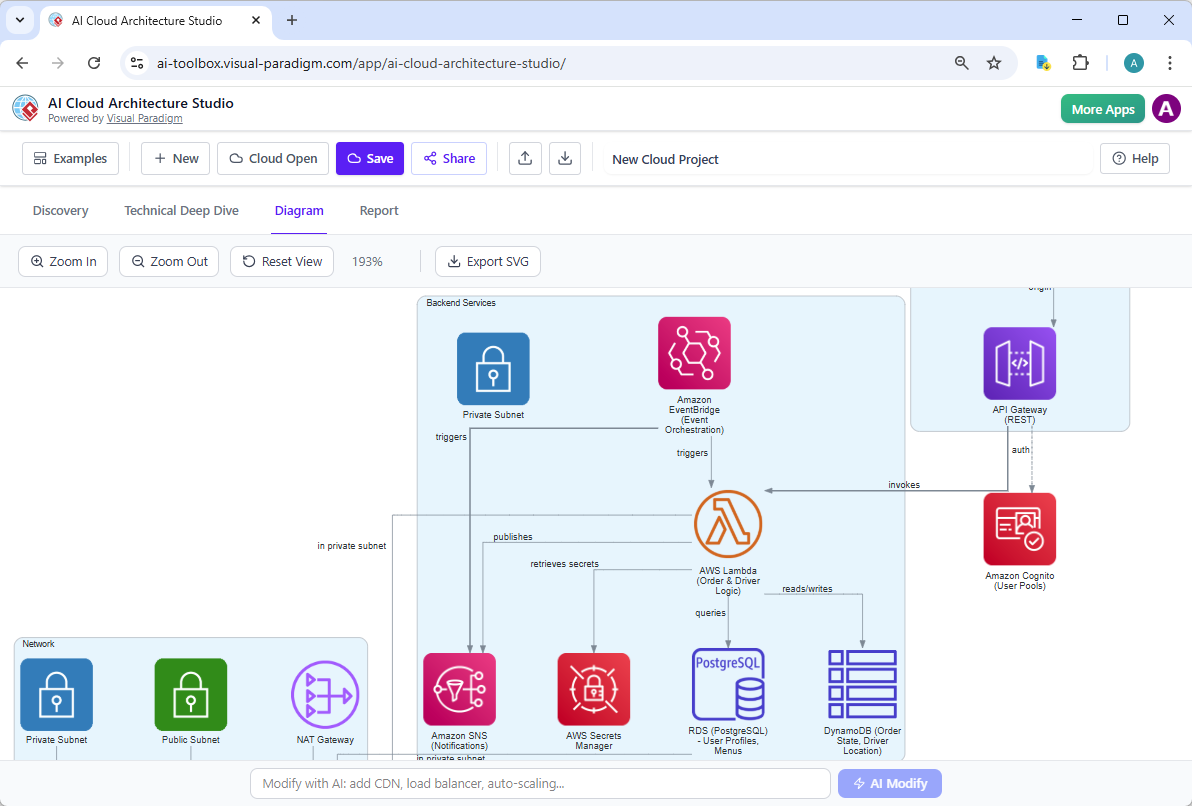
🎤 Step 1: Just Talk to It
Instead of opening a toolbar, I simply typed into the Gen AI text editor the rough notes for my SaaS project:
“Create a GCP architecture with a secure VPC, a web frontend behind a Load Balancer, BigQuery for analytics, and GKE for the back-end. Use a multi-zone setup.”
The Result: Within three seconds, a polished, professional diagram appeared on the screen. It captured all my mental notes instantly. No more guessing? No more grayscale icons finding?
🛠️ Step 2: Bring Your Own Chaos
My first draft wasn’t quite right. I realized I forgot about the data replication strategy. Instead of manually dragging a new icon and connecting it, I just asked:
-
“Add a Cloud SQL instance in a private subnet and connect it to the back-end Kubernetes pods using mTLS.”
The AI handled it effortlessly, re-routing the lines, adjusting the layout, and even updating the labels. It felt like having a co-pilot that didn’t need coffee to bribe you.
📚 Step 3: Doing the “Legwork” for Me
The best part? Once the diagram was good, I asked: “Generate a Markdown doc summarizing this architecture so I can email my stakeholders.”
The AI wrote a comprehensive report explaining every component, the data flow, and the security protocols. I could export that straight to PDF. It did the heavy lifting so I could focus on the logic, not the formatting.
A Few Lessons Learned in 2026
Here are a few key takeaways from my time with the tool:
-
Templates are Still Best Friends: While the AI is amazing, I still opened up a default template for a standard CMS setup to get started, speeding up the “nice-to-have” tweaks.
-
Clarity Wins: The AI asked me three quick questions about my network config to ensure my diagram was actually production-ready. That sanity check is worth a million dollars in avoided errors.
-
Interoperability Matters: Even though the AI did most of the work, I still liked having the option to dump the diagram as SVG or JSON for integration into our legacy tools.
Final Verdict
The shift from manual, headache-inducing diagramming to Generative AI assistance has completely shifted my workflow. Visual Paradigm’s AI Cloud Architecture Studio isn’t just a tool; it’s a design partner that respects your nodules and focuses on design smarter, not harder.
If you’re looking to modernize your GCP documentation, I highly recommend checking out the AI Cloud Architecture Studio. You can find tutorials on how to use it live on the official guides here:
-
Full AI Studio Guide: Guides Visual Paradigm
-
Official Studio: ai.visual-paradigm.com
-
Video Walkthrough: AI Studio Demo
Have you tried the new AI tools yet? What’s your favorite way to visualize cloud infrastructure? Let me know in the comments
Reference List
- AWS Architecture Diagram Tool: AWS-Ready Diagrams & Components: Introduces specialized components and templates designed for building accurate AWS architecture diagrams directly within the Visual Paradigm platform.
- Comprehensive TOGAF ADM Tutorial: A Step-by-Step Guide: Provides a detailed walkthrough of the Architecture Development Method, guiding users through establishing frameworks and managing architecture lifecycles.
- AWS Architecture Diagram Tool: Features & Usage: Details the specific features of the cloud diagramming tool, including pre-built AWS shapes and cloud-specific configuration options.
- Production Version of AWS Architecture Diagram Tool: Highlights the professional capabilities of the tool for enterprise-grade architectural modeling and documentation.
- Solutions Overview: Free AWS Architecture Diagram Tool: Offers an overview of the available solutions and provides access to the tool for creating cloud architecture diagrams efficiently.
- French Language Solution: Free AWS Architecture Diagram Tool: Provides French-language resources and access to the cloud diagramming solutions, catering to international users.
- Updates Release: AI Cloud Architecture Studio Launch: Announces the latest release of the AI-driven studio capable of generating and refining cloud architecture designs automatically.
- Revolutionizing Cloud Design: A Deep Dive by Cybermedian: An external analysis discussing how Visual Paradigm’s new AI studio is transforming the speed and accuracy of cloud design processes.
- YouTube Video: AI Cloud Architecture Studio Overview: A video tutorial demonstrating the launch and core functionalities of the AI Cloud Architecture Studio.
- YouTube Video: AI Cloud Architecture Studio: Generating and Refining: A detailed video explanation of how the AI tool assists in generating diagrams, refining designs, and exporting reports.
- YouTube Video: Discover How AI Cloud Architecture Studio Works: A supplementary video guide exploring the capabilities of the AI studio in cloud architecture generation and documentation.
- Guide: Cloud Services Architecture & AWS: Provides an educational overview of cloud services architecture, specifically focusing on AWS implementation strategies and design principles.