
Software architecture has always relied on visual representations to communicate complex logic. Among these, the class diagram stands as a cornerstone of Object-Oriented Design (OOD). For decades, these diagrams served as the blueprint for developers, outlining structures, relationships, and responsibilities. However, the landscape is shifting. With the integration of Artificial Intelligence and evolving engineering practices, the static nature of traditional modeling is being challenged. This guide explores the evolution of these diagrams, the impact of automation, and what the future holds for software design documentation.
🏗️ Understanding the Role of Class Diagrams
A class diagram is a type of static structure diagram used in modeling. It describes the structure of a system by showing the system’s classes, their attributes, operations, and the relationships among objects. In the early days of software engineering, documentation was paramount. A design document would sit on a shelf, referenced by developers to understand the intended architecture.
- Classes: Represent the building blocks of the system. They define what an object is, including its state and behavior.
- Attributes: Data members that define the state of an object. These can be integers, strings, or references to other objects.
- Operations: Methods or functions that define the behavior of the class. They dictate how the object interacts with the outside world.
- Relationships: The connections between classes. These include inheritance, association, aggregation, and composition.
Traditionally, the workflow involved Design First. Engineers would draw the diagram, then write code to match it. This ensured consistency but often led to a disconnect between the documentation and the actual implementation. As codebases grew, keeping these diagrams up-to-date became a significant burden. Manual updates were prone to errors, leading to documentation drift.
📉 The Challenges of Traditional Modeling
Even before AI became a prominent feature, the manual creation of class diagrams faced hurdles. In modern development cycles, speed is critical. The Agile methodology emphasizes iterative development and responding to change over following a strict plan. In this environment, spending days on detailed UML (Unified Modeling Language) diagrams before writing a single line of code is often seen as inefficient.
Here are the primary pain points associated with traditional class diagramming:
- Time Consumption: Drawing complex relationships takes significant time that could be spent on implementation.
- Maintenance Overhead: Every time a developer changes a method signature or adds a new class, the diagram must be updated. Many teams skip this step.
- Tooling Limitations: Older tools were often desktop-based and lacked collaboration features, making it hard for distributed teams to stay synchronized.
- Abstraction Mismatch: Diagrams often represent the logical design, while code represents the physical implementation. These two do not always align perfectly.
When documentation falls out of sync with code, it becomes misleading. Developers stop trusting the diagrams, rendering them obsolete. This is where modern engineering practices and technology begin to intervene.
🤖 The Integration of AI in Design
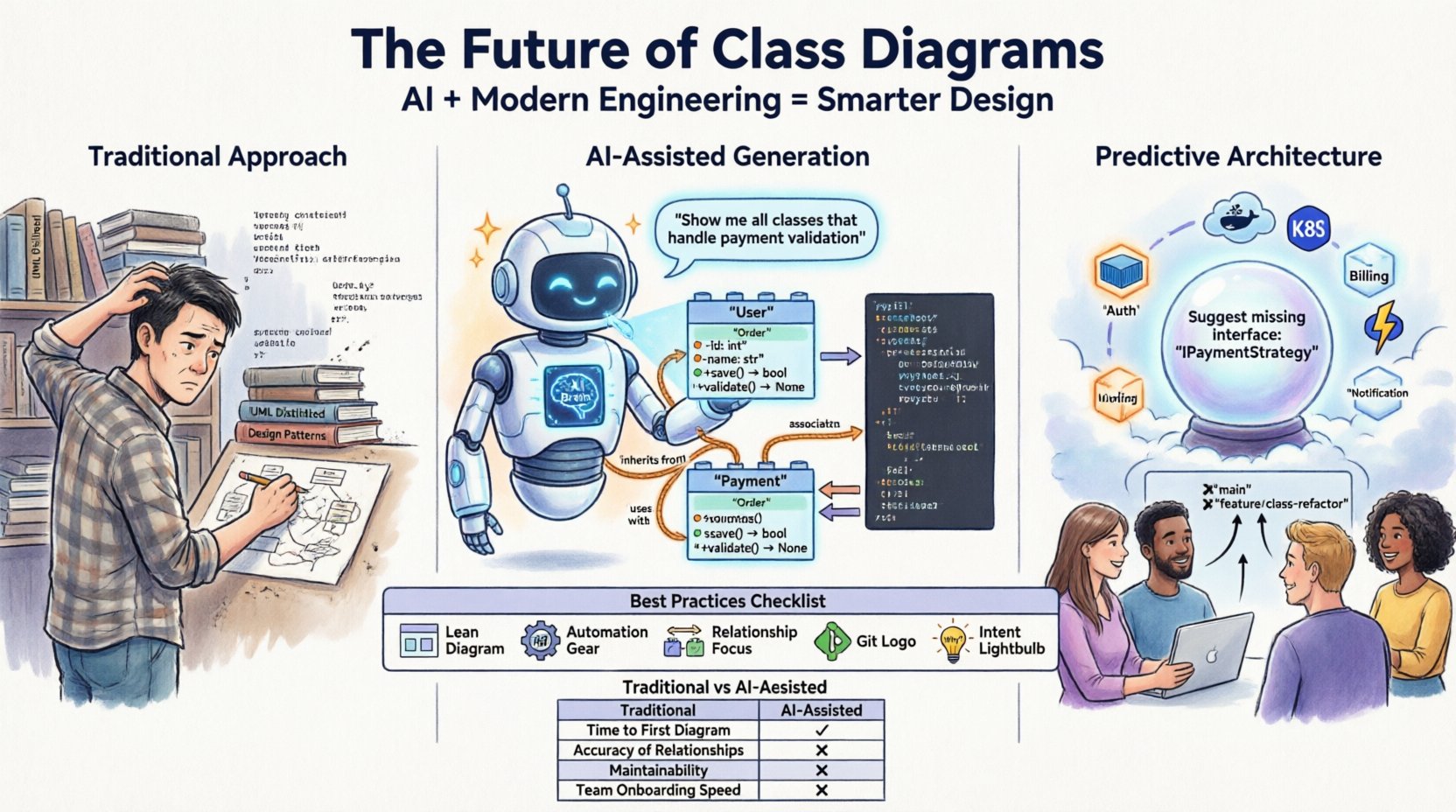
Artificial Intelligence is not just about generating text; it is about understanding patterns. In the context of software design, AI models can analyze codebases to infer structure. This capability transforms the class diagram from a manual drawing exercise into a dynamic view of the system.
Automated Reverse Engineering:
Instead of drawing a diagram to generate code, tools can now parse existing code and generate the diagram automatically. AI enhances this process by understanding context. It can distinguish between a private helper method and a public API endpoint. It can identify architectural patterns like Singleton or Factory without explicit instruction. This allows teams to visualize legacy code or complex microservices architectures without rewriting the documentation.
Natural Language to Design:
Another shift is the ability to describe design intent in plain language. A developer can write a description of a requirement, and an AI engine can suggest a class structure. This reduces the cognitive load on the architect. Instead of worrying about syntax or tool constraints, the focus remains on logic and functionality.
Validation and Consistency Checks:
AI can act as a guardian for the design. It can scan the code and the diagram to flag discrepancies. If the code has a new relationship that the diagram does not reflect, the system can alert the team. This helps maintain the single source of truth without manual intervention.
🔄 Model-Driven Engineering (MDE)
Model-Driven Engineering is a paradigm that treats the model as the primary artifact. In this approach, code is generated from the model. Historically, this was difficult to implement due to the complexity of mapping abstract models to specific programming languages. AI simplifies this mapping.
The workflow typically looks like this:
- Define the Model: Create the class structure using a visual or textual editor.
- Apply Logic: AI assists in filling in boilerplate code and ensuring type safety.
- Generate Code: The system outputs the source code for the target language.
- Iterate: Changes to the model propagate to the code.
This approach reduces human error and enforces standards. However, it requires a disciplined development culture. The model must remain the authoritative source. If developers start writing code directly without updating the model, the cycle breaks.
📊 Traditional vs. AI-Assisted Workflows
To understand the shift, we must compare how tasks are handled in the past versus the present.
| Task | Traditional Approach | AI-Assisted Approach |
|---|---|---|
| Creation | Manual drawing by architect | Generated from code or text prompts |
| Maintenance | Manual updates after code changes | Auto-synchronization with repository |
| Validation | Code review meetings | Automated consistency checks |
| Collaboration | File sharing or local tools | Cloud-based real-time editing |
| Documentation | Separate document | Embedded in IDE or generated dynamically |
The table highlights that the primary value of AI is not replacing the human designer, but removing the friction of maintenance. The architect still decides the structure, but the tool handles the visual representation and consistency.
🚀 Modern Engineering Practices
Beyond AI, other engineering trends influence how diagrams are used. The rise of Microservices has changed the scope of class diagrams. In a monolithic application, a single diagram might cover the whole system. In a microservices architecture, a diagram might only cover a specific service. This requires a shift in perspective from System Level to Service Level.
Cloud-Native Design:
With cloud infrastructure, services are ephemeral. A diagram that assumes a static deployment model is less useful. Modern diagrams must consider API gateways, load balancers, and asynchronous messaging. Class diagrams now often exist alongside sequence diagrams and deployment diagrams to provide a complete picture.
Low-Code and No-Code Platforms:
The popularity of visual development platforms means that the boundary between design and implementation is blurring. In these environments, the “diagram” is the application. The developer configures the visual elements, and the platform compiles the logic. This makes the class diagram less of a separate artifact and more of an integral part of the runtime environment.
⚠️ Challenges and Limitations
While the future looks promising, there are significant hurdles to overcome. Relying solely on AI for design carries risks.
- Hallucinations: AI models can invent relationships or attributes that do not exist in the codebase. Human verification is still necessary.
- Context Loss: AI might understand the syntax of code but miss the business logic intent. A method might be named correctly, but its purpose could be misunderstood without context.
- Complexity Management: For large systems, a single diagram becomes unreadable. AI can help manage complexity by filtering views, but the underlying cognitive load remains.
- Security and Privacy: Sending code to external AI services raises data security concerns. Enterprise environments require on-premise or private cloud solutions to protect intellectual property.
🔮 Predictive Architecture
The next frontier is predictive architecture. Instead of just visualizing what exists, AI can suggest improvements. It can analyze the class diagram and identify high coupling or low cohesion. It can recommend refactoring strategies to improve modularity.
Imagine a tool that warns you: “If you add this new class, you will create a circular dependency in this module.” This shifts the role of the class diagram from a passive record to an active design assistant. It allows architects to simulate the impact of changes before they touch the code.
🛠️ Best Practices for the Modern Era
To adapt to these changes, teams should adopt specific practices.
- Keep it Lean: Do not diagram everything. Focus on complex subsystems or critical interfaces. Simple classes do not need diagrams.
- Automate Generation: Integrate diagram generation into the CI/CD pipeline. Ensure the diagram is always available alongside the build artifacts.
- Focus on Relationships: In object-oriented systems, relationships are often more important than attributes. Visualize how objects interact.
- Use Version Control: Treat diagrams as code. Store them in the same repository and review them in pull requests.
- Document Intent: AI can generate the structure, but humans must document the *why*. Use annotations to explain design decisions.
👥 The Human Element
Despite the technological advancements, the human element remains central. Software design is a communication tool. It bridges the gap between business stakeholders and technical implementers. AI can make the diagram, but it cannot negotiate requirements or understand the business constraints as deeply as a human architect.
The role of the architect is evolving from a drafter of diagrams to a curator of design patterns. They must ensure that the AI-generated structures align with long-term goals. They must balance technical debt with speed of delivery. The diagram is a tool for thinking, not just for drawing.
🌐 Summary of Trends
The trajectory is clear. The static, manual class diagram is fading, replaced by dynamic, AI-enhanced representations. The focus is shifting from documentation as an output to documentation as a byproduct of the development process. This reduces overhead and increases accuracy.
Key takeaways include:
- AI enables real-time synchronization between code and design.
- Model-Driven Engineering is becoming more accessible with better generation tools.
- Microservices require a more modular approach to diagramming.
- Human oversight is essential to validate AI suggestions.
- Security and privacy must be considered when using cloud-based AI.
As the industry moves forward, the class diagram will not disappear. It will evolve. It will become smarter, more integrated, and more valuable. The goal is not to make the diagram perfect, but to make it useful. In a world where code changes rapidly, a useful diagram is one that keeps pace with the system it describes. This is the new standard for software engineering excellence.