
Introduction: From Static Diagrams to Intelligent Architecture
Hey there! If you’ve ever spent hours manually connecting boxes on a whiteboard to document an enterprise strategy, only to realize the model became obsolete the moment a business requirement changed, you aren’t alone. We’ve all been in the “model maintenance trap.”
Today, I’m walking you through how Visual Paradigm has completely transformed this experience. As a tool that is certified by The Open Group, Visual Paradigm isn’t just drawing tools; it’s a comprehensive ecosystem for enterprise architecture. Recent updates have injected deep AI capabilities that turn natural language ideas into syntactically perfect ArchiMate models instantly.
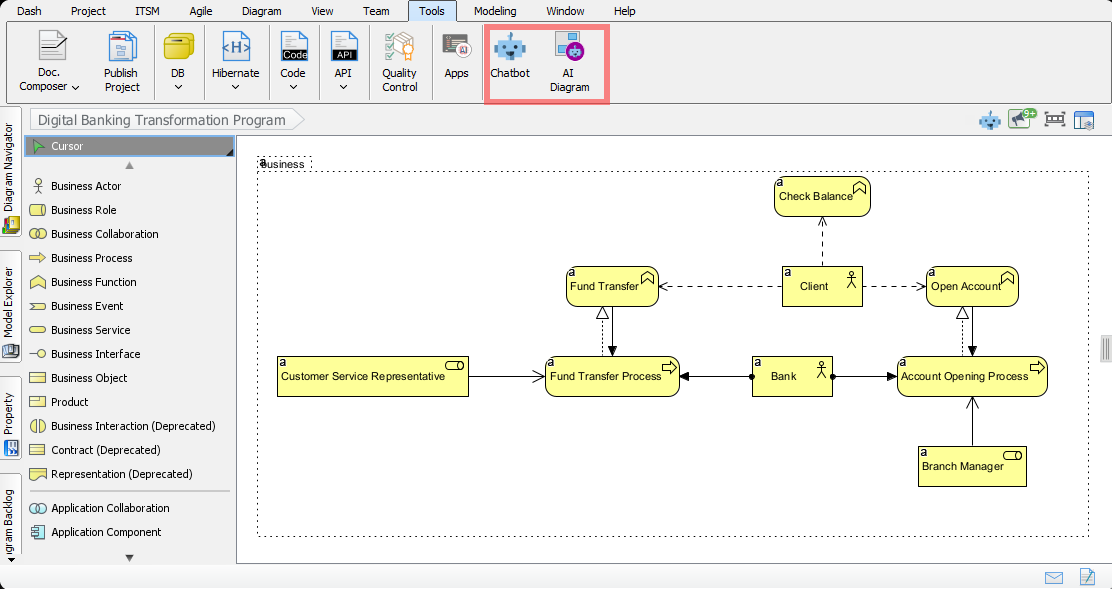
In this tutorial, I’ll share my step-by-step experience moving from raw ideas to compliant ArchiMate 4 models, handling everything from the “Common Domain” to automated impact analysis. Let’s dive into how I streamlined my workflow.
Part 1: Setting the Stage – Why Visual Paradigm Stands Out
Before we start clicking around, it’s crucial to understand what we’re working with. Visual Paradigm is certified for ArchiMate 4 (pre-release) and the stable ArchiMate 3.1 standards. This means it’s not a “beta test” implementation; it’s an official, production-ready environment.
The “Common Domain” Shift
One of the biggest changes I noticed when upgrading is the shift from rigid layers to a Unified Domain Approach.
-
Old Way: You were forced into strict Business, Application, and Technology layers.
-
New Way (ArchiMate 4): Visual Paradigm introduces a Common Domain. This allows for a more flexible, outcome-driven visualization.
-
Native Multiplicity: I love that I can now define precise cardinality constraints directly on connectors. Instead of guessing “one-to-many,” I can type
1..*or0..1right on the line, ensuring the logic holds up under scrutiny.
The Hexagonion Framework
I recently explored the new Hexagonion Framework. It changes how we visualize outcomes. Instead of just showing a process, the Hexagonion approach helps visualize the result of that process, making the diagram speak directly to stakeholders about business value rather than just technical implementation.
Part 2: First Steps – Modeling with Intelligence
Once you open Visual Paradigm, don’t just start dragging shapes. Let me show you how to leverage the Modeling Intelligence features I use daily.
1. Creating a Custom Viewpoint (The Governance Hack)
In my team, we had people adding “User Interface” elements to a pure “Strategy” diagram, which broke the model’s integrity.
-
The Action: I created a Custom Viewpoint.
-
The Result: This use of constrained palettes meant that when a junior modeler opened a view, they could only see and drag the appropriate elements for that context. It forced discipline without micromanaging.
-
Pro Tip: Ensure your viewpoints expose only the layers relevant to the specific analysis you are running (e.g., only Business and Application layers for a “Motivation” view).
2. Element Reuse Across the Board
Here is where automation saves time. Earlier in my career, I’d delete a “Payment Gateway” element in Diagram A, but forget to update Diagram B, C, and D.
-
Visual Paradigm Solution: I used the Element Reuse synchronization.
-
Experience: I updated the “Payment Gateway” text and properties in one central diagram. Immediately, every instance of that element across my 15 other diagrams updated automatically. This guarantees that your model remains consistent throughout the entire project lifecycle.
3. Syntax Validation & Traceability
Before showing the model to management, I ran a Model Validation. The tool instantly flagged two diagrams where I had accidentally used an obsolete connector type.
-
Traceability: I created a relationship linking a high-level “Business Process” to specific UML class diagrams stored in another library. This allowed for end-to-end traceability, proving exactly which technical components support which business goals.
Part 3: The Game Changer – AI Integration
This is the part that blew my mind. Integrating AI into ArchiMate modeling isn’t just “cool tech”; it fundamentally changes how we discover requirements.
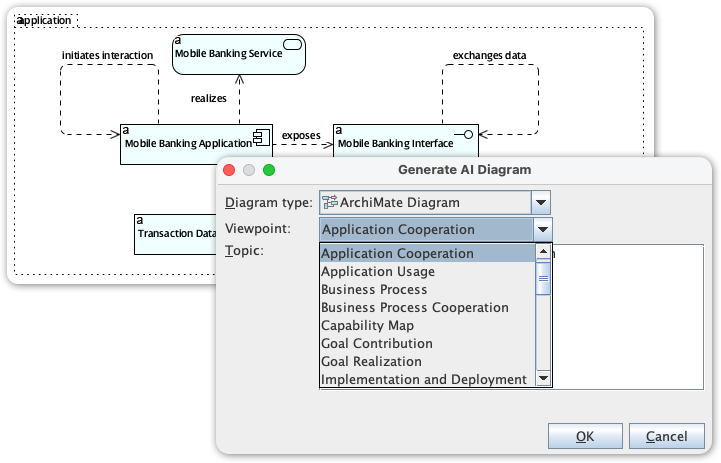
Scenario A: The “Blank Page” Problem
I recently received a high-level requirement document titled: “We need to modernize our billing system to support decentralized ledger technology.”
-
The Struggle: Translating this paragraph into a full ArchiMate model manually takes hours.
-
The AI Solution: I used the AI ArchiMate Generator.
-
Input: I pasted the requirement text.
-
Output: Instantly, the tool drafted a comprehensive model including Business Services, Application Systems, and Technology components, suggesting a Blockchain pattern.
-
My Edit: I didn’t have to draw anything from scratch. I reviewed the AI’s logic gaps (e.g., “Is the blockchain layer really needed here?”) and refined the connections.
-
Scenario B: Conversational Editing
Visual Paradigm allows for Conversational Editing. Imagine explaining a diagram to a colleague, but you can actually talk to the diagram.
-
Command: “Hey AI, add a ‘Chief Financial Officer’ actor and link them to the ‘Billing Decision’ service.”
-
Result: The AI immediately drew the actor and the relationship line.
-
Command: “Rename the ‘Legacy Database’ to ‘On-Premise SQL Cluster’.”
-
Result: The label updated everywhere. It feels like reprogramming in natural language.
Scenario C: Architectural Critique
This is my new favorite feature. Instead of a peer reviewer finding errors later, the AI acts as an intelligent critic.
-
Query: “What if we decommission the Billing System? Show me all impacted business processes.”
-
Result: The AI performed an Intelligent Impact Analysis and visualized the consequences, highlighting that the “Financial Reporting” process would fail without a replacement. It also suggested a design pattern (like MVC) that I hadn’t considered.
-
Technical Compliance: Unlike generic Chatbots, this AI is trained specifically on ArchiMate and UML standards, so every suggestion it made was syntactically valid.
Part 4: Workflow Integration & Interoperability
Finally, enterprises rarely use just one model type. We need to bridge the gap.
1. The Model Exchange File Format
Visual Paradigm supports the ArchiMate Model Exchange File Format. This allowed me to export a complex view for a different tool by a partner organization without worrying about losing semantic data or connector styles.
2. XMI Import/Export
I collaborated with a team using a different EA tool. We used the XMI import/export feature to push our ArchiMate model out and then pull updated data back in, maintaining a single source of truth across departments.
3. AI Image Translation (Multilingual Storytelling)
In my global projects, diagrams often end up lost in translation. The AI Image Translation feature is a lifesaver.
-
Scenario: I had a high-resolution SVG diagram of our architecture hosted for a client in Japan.
-
Action: I uploaded the image, selected the source language, and chose Japanese.
-
Result: The AI translated all the text labels into Japanese while preserving the original connectors, shapes, and topology. The logic remained intact; only the labels changed. This capability supports 50+ languages, making global communication seamless.
Conclusion: A Smarter Way to Architect
My journey with Visual Paradigm has shifted my role from “diagrammer” to “architectural strategist.” By leveraging:
-
Official ArchiMate 4 support (Common Domain & Multiplicity),
-
Custom Viewpoints for governance,
-
AI Generators for rapid prototyping,
-
and Conversational Editing for agile refinement,
I can create robust, compliant, and traceable models in a fraction of the time. The combination of certified standards and deep AI learning curves means you can focus on the what and the why, while the tool handles the how and the syntax.
Ready to try it out? Whether you want to automate a specific phase or see how this integrates with TOGAF ADM, the Visual Paradigm tool guide is your companion.
Questions for you: Are you looking to automate your discovery phase with AI generation, or would you prefer to focus on the rigorous validation and traceability aspects of the standard? Let’s discuss your specific workflow needs!
References
The Official Visual Paradigm Updates: Detailed release notes regarding the new AI capabilities for ArchiMate viewpoints and model generation.
Visual Paradigm ArchiMate Tools Main Page: The central hub for exploring all features related to ArchiMate modeling within the Visual Paradigm ecosystem.
Visual Paradigm ArchiMate 4 Support Release: Comprehensive guide covering the introduction of the Common Domain and native multiplicity in ArchiMate 4.
Visual Paradigm ArchiMate 4 Support (Duplicate Link): Secondary entry point to the ArchiMate 4 feature updates and changelog.
Mastering Archimate Comprehensive Guide: An in-depth guide explaining the evolution of the ArchiMate framework and best practices for modeling.
ArchiMate Tools Feature Deep Dive: Detailed documentation on custom viewpoints, layer definitions, and semantic support.
ArchiMate 3 Update Guide: Reference material for transitioning from ArchiMate 2 to 3, covering the official viewpoints and model exchange formats.
What Is ArchiMate?: Foundational documentation explaining the core concepts, vocabulary, and notation of the ArchiMate modeling language.
Maximizing Enterprise Architecture with VP 18.0: Expert analysis from Archimetric on leveraging Visual Paradigm 18.0 for modern EA workflows.
Maximizing Enterprise Architecture (Duplicate): Additional expert commentary on the features of Visual Paradigm 18.0 regarding ArchiMate 4.
VP 18.0 Official Launch Highlights: Video walkthrough showcasing the new unified behavior elements and the Common Domain in Visual Paradigm 18.0.
ArchiMate 4 Support in VP 18.0 Release: CyberMedian’s guide on the February/March 2026 release details for ArchiMate 4 support.
AI Visual Modeling Platform Guide: Exploration of how the AI features integrate with the broader visual modeling platform capabilities.
Synergy of AI, TOGAF, ArchiMate, and UML: Analysis of the holistic integration of multiple standards and AI within Visual Paradigm.
ArchiMate Explained: AI-Powered Guide: Documentation specifically focusing on using the AI chatbot to generate and refine ArchiMate models.
Features of an AI Chatbot for Diagrams: Technical overview of the conversational editing and impact analysis capabilities.
Enhanced AI Activity Diagram Support: Update notes on how AI chatbot interactions improved for activity diagrams, applicable to ArchiMate processes.
Online Visual Paradigm ArchiMate Tool: Guide to using the web-based version of the ArchiMate tool for collaboration.
Enhancing TOGAF ADM with Archimate: Part 1 of a series on integrating Visual Paradigm workflows with the TOGAF ADM methodology.