
Visual Paradigm has evolved from a traditional diagramming tool into a comprehensive AI-powered visual modeling ecosystem. The core philosophy is to provide users with flexibility: whether you are deep in the code architecture, drafting a strategy report, brainstorming in real-time, or building a knowledge base, the AI adapts to your workflow.
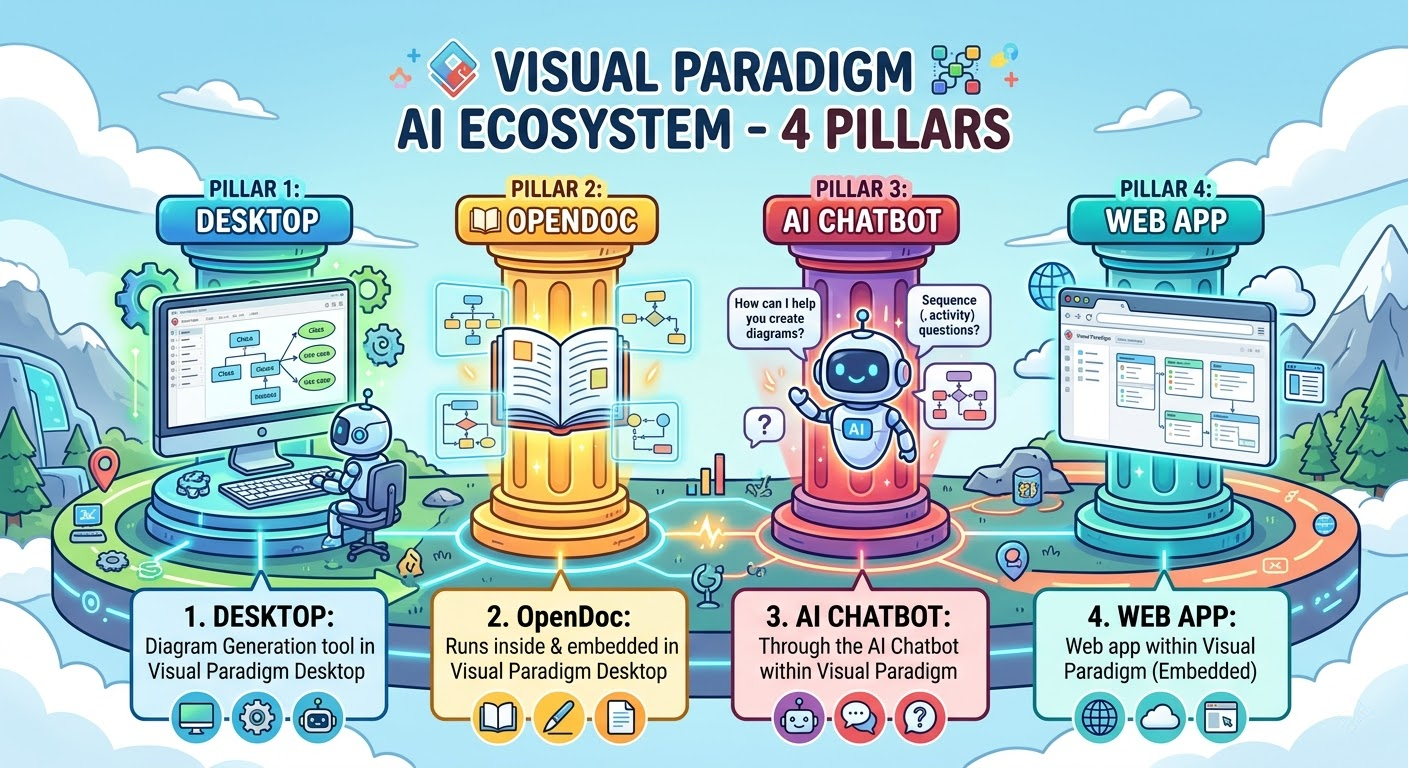
To navigate this vast ecosystem, it is essential to understand the Four Pillars that structure Visual Paradigm’s AI capabilities. These pillars represent different modes of interaction and use cases, ranging from professional desktop engineering to casual collaborative documentation.
Pillar 1: VP Desktop (Visual Model)
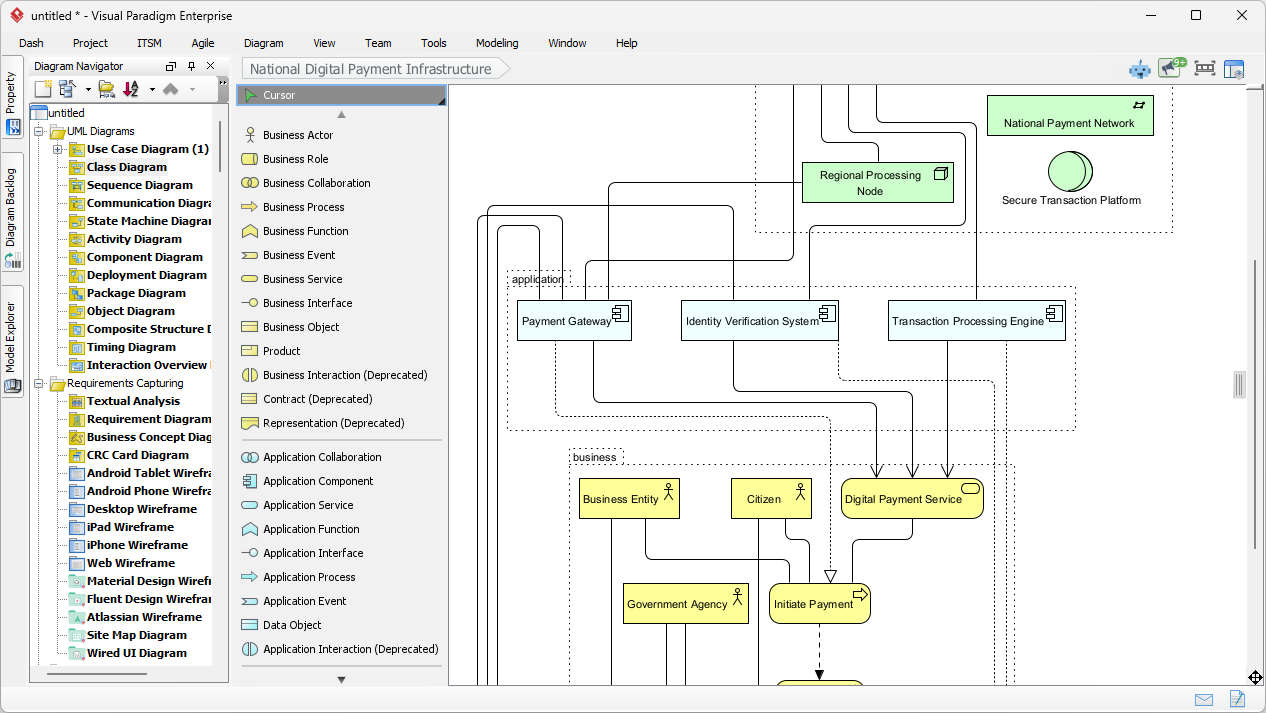
The Professional Engineer’s Command Center
Target Audience: Enterprise Architects, Senior Developers, Systems Engineers, and Product Owners requiring production-grade models.
VP Desktop is Visual Paradigm’s flagship desktop application. Unlike quick-sketch tools, this pillar focuses on depth, precision, traceability, and scalability. It integrates AI directly into a robust, professional environment designed for complex, long-term projects.
Key Characteristics:
-
Offline First: Models are saved locally, ensuring security and unrestricted offline access for sensitive enterprise data.
-
Deep Editing & Traceability: While AI generates complex models (UML, SysML), the platform allows for rigorous manual refinement, linking, and version control.
-
Code Engineering Ready: The AI-generated models are traceable to source code, bidirectional engineered models, and deployment reports, making them immediate assets for development teams.
-
Comprehensive Coverage: This is the only platform in the ecosystem that currently supports the full breadth of complex diagrams, including all UML types, SysML constructs, Enterprise Architecture (ArchiMate), Cloud Architectures, and Strategic Analysis frameworks.
Best Used For:
-
Enterprise-Level Architectures: Designing complex system landscapes, microservices topologies, or digital transformation roadmaps.
-
STKA (Software, Systems, Technology, Architecture): Creating SysML Block Definition Diagrams, Requirement Diagrams, and Internal Block Diagrams for hardware/software integration.
-
Code Reverse Engineering: Analyzing existing legacy codebases and updating documentation automatically.
-
Strict Compliance: Projects requiring formal documentation for ISO, CMMI, or SEI standards where every artifact must be meticulously linked.
When to choose this pillar: When you need accuracy more than speed. When the project involves thousands of models and strict governance.
Pillar 2: OpenDocs
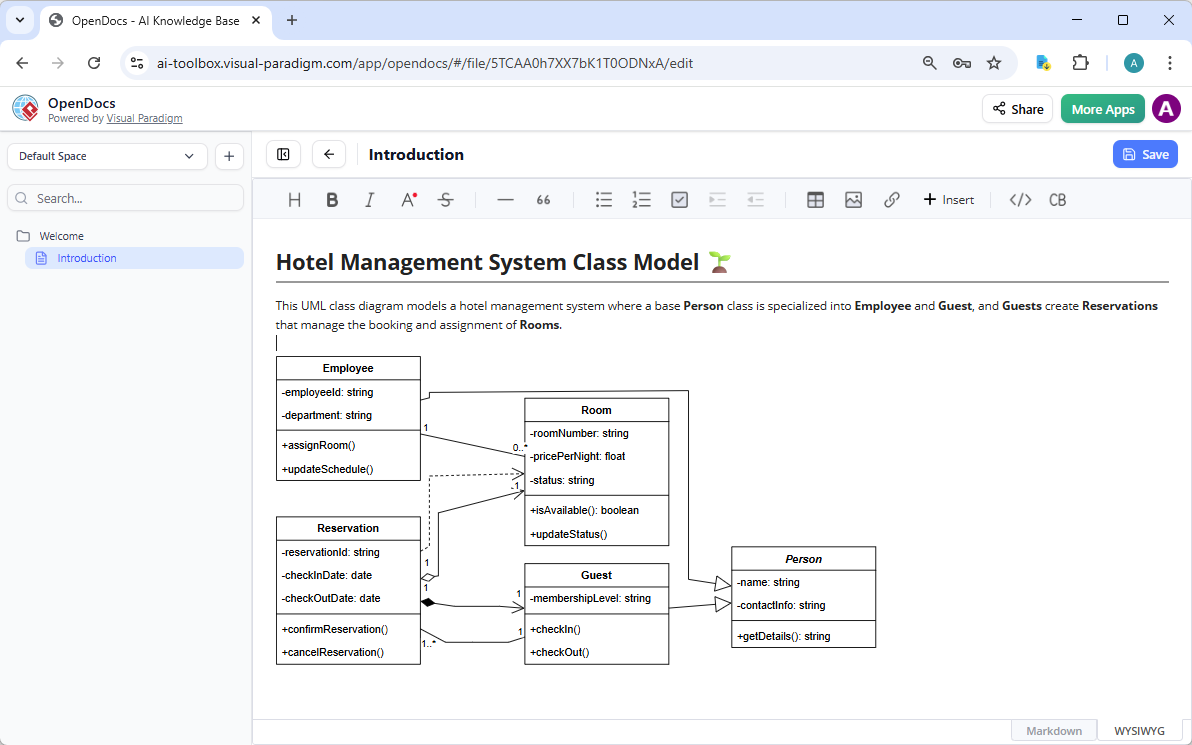
The Collaborative Knowledge Hub
Target Diagrams: Process flows, mind maps, casual diagrams, and lightweight documentation.
Target Audience: Teams building wikis, knowledge bases, and collaborative reports.
OpenDocs moves away from heavy software architecture and focuses on knowledge management. It functions like a sophisticated version-controlled wiki (similar to Notion or GitBook) where diagrams are living documents, not static images.
Key Characteristics:
-
Living Diagrams: Embeds diagrams directly into markdown text. As the diagram changes, the text can update contextually, and vice versa.
-
Casual Diagramming: Ideal for quick visual explanations of processes, personas, or timelines.
-
Collaborative Editing: Multiple users can edit documentation simultaneously, with history tracking to see how ideas evolved.
-
Instant Export: Generates professional documents, wikis, and presentations directly from the AI sessions without leaving the doc.
Best Used For:
-
Organizational Wikis: Creating a central hub for system documentation that is easily readable by non-technical stakeholders.
-
Process Documentation: Embedding BPMN or flowcharts directly into training manuals or standard operating procedure (SOP) docs.
-
Meeting Notes & Summaries: Automatically converting meeting transcripts into structured diagrams and action items.
-
Rapid Prototyping of Ideas: Brainstorming without the overhead of setting up a complex desktop project.
When to choose this pillar: When your audience is diverse (mix of technical and non-technical). When the diagram needs to be read and edited alongside long text documents. When speed of dissemination is prioritized over engineering-grade complexity.
Pillar 3: AI Visual Modeling Chatbot (Co-Pilot)
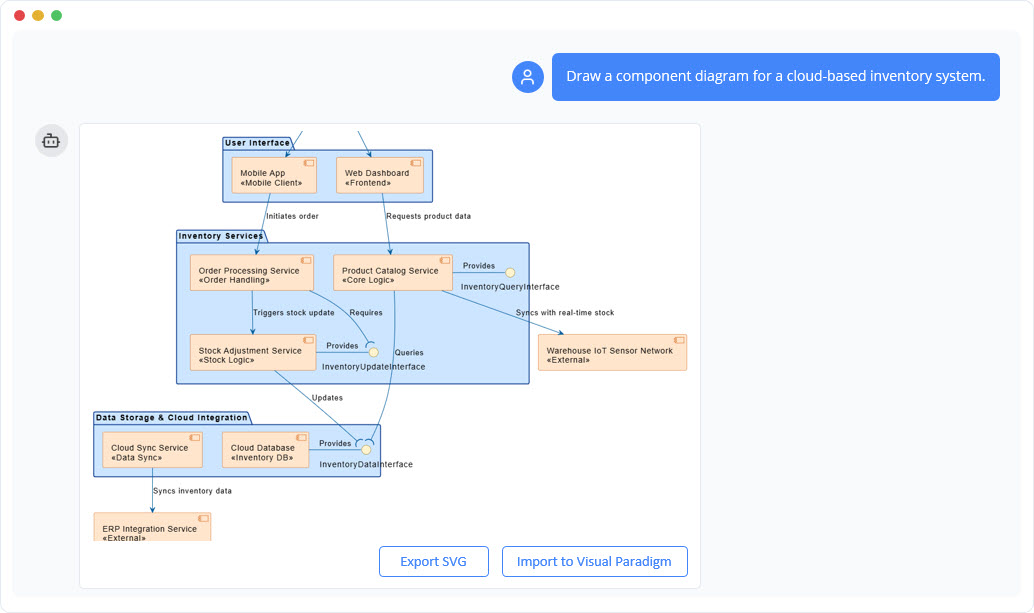
The Interactive Conversational Designer
Target Audience: Agile teams, product managers, junior developers, and UX designers.
Target Case: “Exploratory” and “Iterative” workflows.
This pillar transforms diagramming from a click-heavy task into a natural language dialogue. It acts as an AI Co-Pilot, handling the burden of translation (text to diagram) and allowing users to refine initial outputs through conversation.
Key Characteristics:
-
Natural Language Interface: Users describe their requirements in plain English (e.g., “Create a class diagram for a payment system with a user, a card, and a processor”), and the AI generates the structure and UI immediately.
-
Iterative Refinement: Instead of starting from scratch, users can say, “Add a timeout scenario,” “Change the sequence so the user authenticates first,” or “Format this as a Mermaid chart.”
-
Standalone Speed: No installation, no complex file structures. It provides instant results for prototyping and rapid iteration.
-
Multi-Format Output: Exports not just images, but editable PlantUML, Mermaid, and XML files, bridging the gap between casual chat and professional code.
Best Used For:
-
Idea Generation: Overcoming the “blank canvas” problem during early brainstorming sessions.
-
Agile Storyboarding: Quickly visualizing user stories and user flow during scoping meetings.
-
Testing Hypotheses: Rapidly generating sequence or state machine diagrams to validate a logic flow before committing time to manual design.
-
Onboarding: Helping new team members understand system architecture by “chatting” with the system to generate visual explanations.
When to choose this pillar: When you need speed. When you are in the discovery phase. When you want to bridge the gap between a text description and a visual model in seconds.
Pillar 4: Web Apps Step-by-Step / Guided Tools
The Structured Architects
Target Audience: Methodical designers, compliance officers, and teams needing to follow specific methodologies (like C4 model standards).
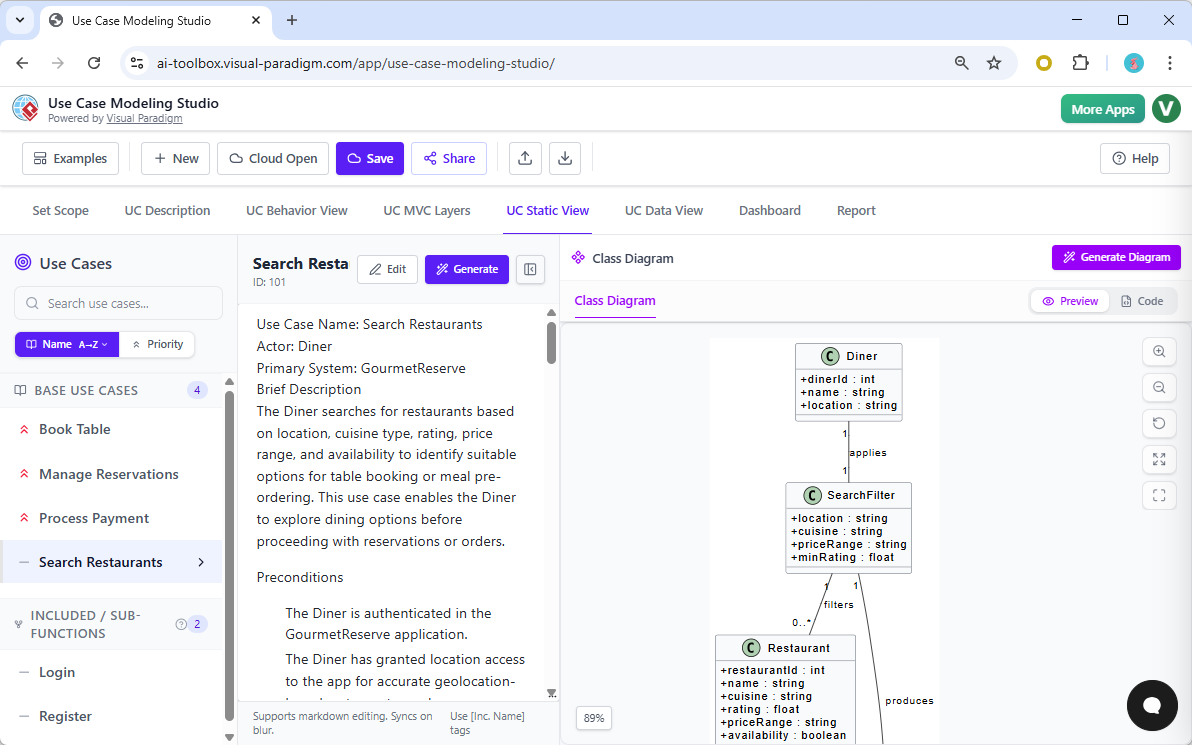
While the Chatbot offers freedom, this pillar offers structure. These are specialized web-based applications that guide the user through a strict workflow, ensuring that every diagram follows industry best practices, best data modeling standards, or specific methodology protocols.
Key Characteristics:
-
Methodological Enforcement: For complex areas like the C4 Model or Database Modeling, you cannot just “chat” your way to a perfect model. These tools guide you through defining Context → Container → Component → System Layers step-by-step, ensuring consistency.
-
Traceability & Linking: Forces the creation of traceable links between different diagrams (e.g., linking a specific User Requirement to a specific Use Case, which links to the specific Class diagram implementation).
-
Specialized Generators: Dedicated tools for specific domains, such as the AI-Powered C4 PlantUML Studio, Use Case Modeling Studio, or Decision Table Generator, preventing the creation of “gimmick” diagrams and ensuring professional quality.
-
Reporting & Analysis: Automated generation of reports, analysis of gaps (e.g., missing requirements), and consistency checks.
Best Used For:
-
C4 Modeling: Creating the complete hierarchy of Context, Container, Component, and Dynamic diagrams for software architecture.
-
Compliance Projects: Generating ISO-compliant use case diagrams with mandatory descriptions, preconditions, postconditions, and flow of events.
-
Scenario Analysis: Building simulation models (like Value Stream Mapping) based on guided prompts rather than free-form design.
-
Risk Management: Creating standardized FMEA or Hoshin Kanri matrices to evaluate project risks and strategic alignment.
When to choose this pillar: When you need consistency and compliance. When you are building a complex system where Diagram A must logically connect to Diagram B. When you are following a strict standard (like C4 architecture).
Summary: How to Choose the Right Pillar
| Feature | VP Desktop | OpenDocs | AI Chatbot | Web Apps (Guided) |
|---|---|---|---|---|
| Primary Goal | Precision & Production | Knowledge Management | Speed & Exploration | Structure & Compliance |
| Best For | Enterprise Apps, SysML, Code Engineering | Wikis, Reports, Team Knowledge | Brainstorming, Prototyping, UX | C4 Models, Requirements, Decision Tables |
| Workflow Style | Deep, Iterative, Refinement | Collaborative, Text-Embedded | Conversational, Iterative | Guided, Step-by-Step |
| Level of Control | Maximum (Manual + AI) | Medium (Contextual) | Low (AI Driven) | High (Process Driven) |
| Ideal Use Case | “We need a production-ready UML model for our banking app.” | “We need a wiki page explaining the login process.” | “Let’s brainstorm the features for the mobile app.” | “We need to model our cloud infrastructure using C4 standards.” |
Conclusion: The Power of the Ecosystem
The true strength of Visual Paradigm lies in its ability to integrate these Four Pillars into a single, cohesive ecosystem.
-
You can brainstorm a system using the Chatbot.
-
Take that rough draft into VP Desktop to build the full, traceable production model.
-
Embed the final approved diagrams into OpenDocs for your team’s wiki.
-
Use Guided Web Apps to ensure your C4 layers or Decision Tables remain consistent throughout the project.
By understanding these four pillars, you can choose the right tool for the right phase of your project, maximizing efficiency while maintaining high standards of quality and manageability.