
In software development, the cost of fixing a defect rises exponentially as the project progresses. A requirement error discovered during the planning phase costs very little to correct. The same error, once embedded in code and tested, can cost ten times more. A mistake found after release costs a hundred times more. To mitigate this risk, teams must rigorously validate every user story before a single line of code is written. This process relies on a robust user story checklist and a shared understanding of what constitutes a valid requirement. 👷♂️
A user story is not merely a task description. It is a promise of value delivered to a user. It must be clear, testable, and complete. When stories enter the development cycle without validation, the result is often technical debt, scope creep, and frustrated stakeholders. This guide details how to construct a comprehensive validation framework for your backlog items.
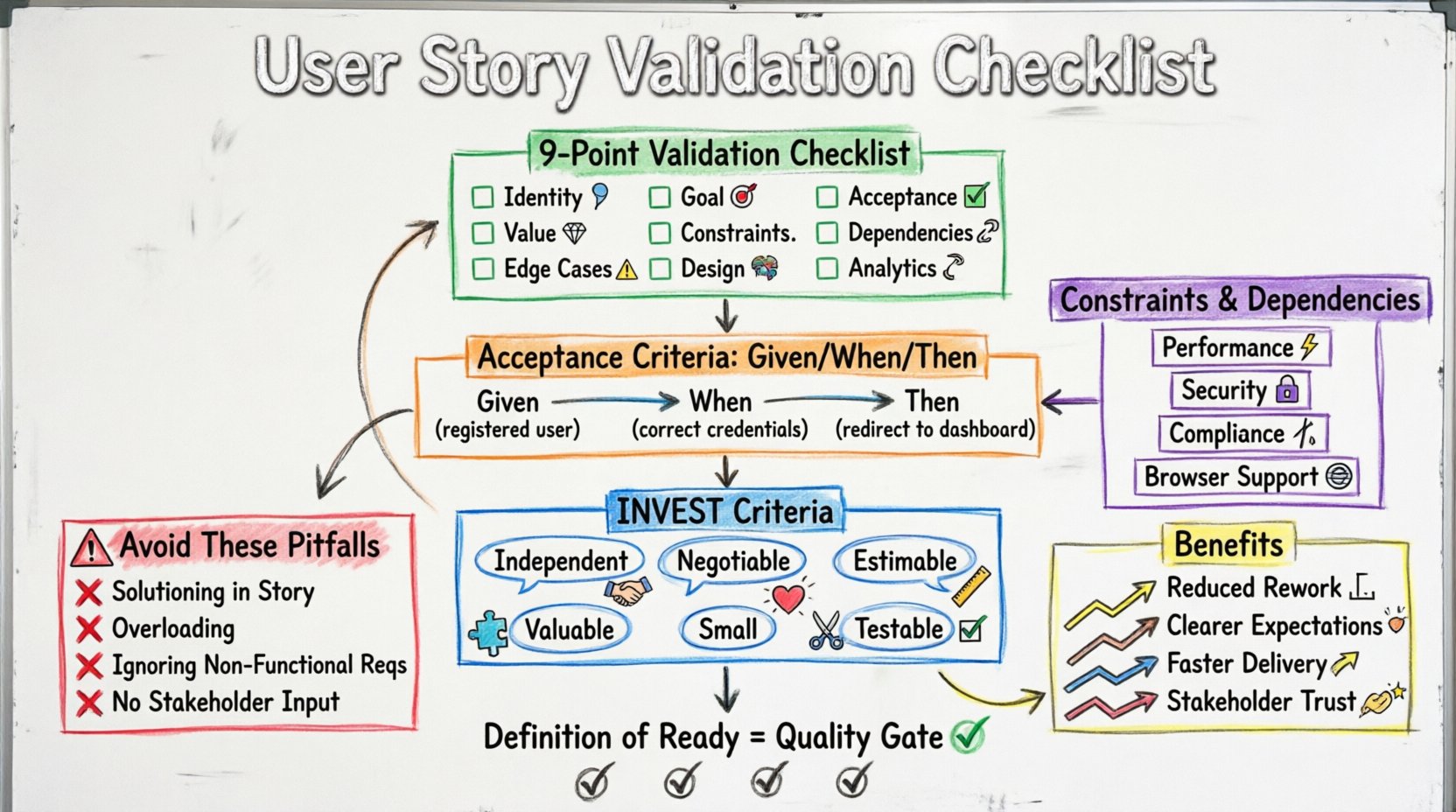
Why Requirement Validation Matters ⚖️
Development teams often rush into implementation to demonstrate velocity. However, speed without accuracy is a liability. When requirements are ambiguous, developers make assumptions. These assumptions lead to features that do not match the actual business need. QA engineers then spend time reporting bugs that are actually misunderstandings of the original intent.
Validating requirements early ensures:
- Reduced Rework: Identifying gaps before coding prevents the need to refactor code later.
- Clearer Expectations: Developers, testers, and business owners align on the definition of done.
- Faster Delivery: Less time debating what a feature should do means more time building it.
- Stakeholder Trust: Consistent delivery of accurate features builds confidence in the team.
The Foundation: INVEST Criteria 📋
Before diving into the checklist, every user story must adhere to the INVEST model. This acronym serves as the baseline for a well-formed story. If a story does not meet these criteria, it should not proceed to refinement.
I – Independent
Stories should stand alone as much as possible. They should not depend on the completion of other stories to be valuable or testable. Dependencies create bottlenecks. If a story relies on another, consider splitting them or addressing the dependency explicitly in the notes.
N – Negotiable
A story is a placeholder for a conversation, not a contract. The details should be flexible. The implementation strategy can be debated between the team and the product owner. If a story is too rigid, it stifles innovation and prevents the team from finding the best technical solution.
E – Estimable
The team must have enough information to estimate the effort required. If a story is too vague, estimates will be wild guesses. This leads to missed deadlines and budget overruns. Break the story down until the effort is clear.
V – Valuable
Every story must deliver value to the end user or the business. If a feature does not help someone or achieve a business goal, it is technical debt disguised as a feature. Ask: “Who benefits from this?” If the answer is unclear, the story needs revision.
S – Small
Stories should be small enough to be completed within a single sprint. Large stories are risky because they hide complexity. If a story is too big, split it into smaller, manageable chunks that can be delivered incrementally.
T – Testable
There must be a way to verify that the story is complete. If you cannot write a test case for it, it is not testable. This is the link between development and quality assurance. A story without acceptance criteria is incomplete.
Comprehensive User Story Checklist ✅
Use this checklist during refinement sessions. It covers the essential elements required to validate a requirement. A story should pass these checks before moving to the “Ready” status.
| Category | Question | Validation Criteria |
|---|---|---|
| Identity | Who is the user? | Role or persona is specified. |
| Goal | What do they want? | Action is clear and actionable. |
| Value | Why do they want it? | Business value is explicitly stated. |
| Acceptance | How do we know it works? | Acceptance criteria are specific and testable. |
| Constraints | Are there limits? | Technical or regulatory constraints are noted. |
| Dependencies | What else is needed? | External systems or other stories are identified. |
| Edge Cases | What about errors? | Invalid inputs or failure states are considered. |
| Design | Does it look right? | UI mockups or wireframes are linked. |
| Analytics | How do we measure success? | Tracking events or metrics are defined. |
1. Identity and Goal 👤
A standard user story format follows: As a [role], I want [feature], so that [benefit]. While this template is helpful, it is not sufficient on its own. The role must be specific. “As a user” is too vague. “As a premium subscriber” is better. The action must be a verb. The benefit must be a tangible outcome.
2. Acceptance Criteria Deep Dive 🎯
Acceptance criteria define the boundaries of the story. They are not the same as technical specifications. They describe the behavior from the user’s perspective. Use a structured format like Given/When/Then to ensure clarity.
- Given: The initial context or state of the system.
- When: The action taken by the user or the system.
- Then: The expected outcome or result.
For example, consider a login feature. A poor criterion is “Login works.” A valid criterion is “Given a registered user, When they enter correct credentials, Then they are redirected to the dashboard.” This leaves no room for interpretation.
Include both happy paths and unhappy paths. The happy path is the successful completion of the task. The unhappy path covers errors, such as incorrect passwords, network failures, or session timeouts. Ensuring these are documented prevents developers from ignoring edge cases until testing.
3. Constraints and Dependencies 🔗
Software does not exist in a vacuum. It interacts with databases, third-party APIs, and other systems. If a story relies on an API that does not exist, the developer cannot build it. Dependencies must be identified early.
Consider the following constraints:
- Performance: Are there speed requirements? (e.g., page load under 2 seconds).
- Security: Does the feature handle sensitive data? (e.g., encryption standards).
- Compliance: Are there legal or regulatory requirements? (e.g., GDPR, HIPAA).
- Browser Support: Which devices or browsers must be supported?
4. Design and Assets 🎨
Developers need visual references to build the interface. If the user story describes a UI change, a mockup, wireframe, or design file must be attached. Text descriptions of color schemes or layout positions are often misinterpreted. Visuals eliminate ambiguity.
5. Analytics and Tracking 📊
How will you know if the feature is successful? If the goal is to increase sign-ups, you need to track the sign-up button click. If the goal is to improve retention, you need to track user activity. Define the events that need to be logged before development starts. This ensures data is not lost during the build process.
Definition of Ready (DoR) 🟢
The Definition of Ready is a checklist of conditions that must be met before a story can be pulled into a sprint. It is a quality gate. If a story does not meet the DoR, it stays in the backlog. This prevents the team from starting work on incomplete requirements.
Common elements of a Definition of Ready include:
- Story follows the INVEST criteria.
- Acceptance criteria are written and agreed upon.
- Design assets are available.
- Dependencies are resolved or have a mitigation plan.
- Estimates have been completed by the team.
- Security and compliance reviews are initiated if necessary.
Enforcing the DoR requires discipline. It is tempting to start coding to keep the team busy. However, starting with incomplete information is a false economy. The time saved in the short term is lost in debugging and rework later.
Common Pitfalls in Requirement Writing 🚫
Even experienced teams fall into traps when writing requirements. Recognizing these pitfalls helps refine the process.
1. Solutioning in the Story
Stories should describe the problem, not the solution. For example, “As a user, I want a button that sends an email.” This dictates the implementation. A better story is “As a user, I want to notify someone of an event.” The developer can then decide if an email, push notification, or SMS is the best approach. Keeping the solution open encourages technical creativity.
2. Overloading the Story
One story should do one thing well. If a story covers multiple features, it becomes hard to test and estimate. It also makes it difficult to release partial value. Split complex stories into smaller units. If a story is too large, it risks the entire sprint if issues arise.
3. Ignoring Non-Functional Requirements
Functional requirements describe what the system does. Non-functional requirements describe how the system performs. These include scalability, availability, and maintainability. If a story does not consider performance, the system may crash under load. Ensure non-functional requirements are visible in the backlog.
4. Lack of Stakeholder Input
Requirements written in isolation often miss the mark. Product owners must engage with the team. Developers need to ask questions. Testers need to think about how to validate the story. This collaboration is known as the Three Amigos. It ensures that business, development, and quality perspectives are aligned before work begins.
Collaboration and Review Process 🤝
A checklist is useless if no one reviews the work. Establish a routine for validation. This can happen during backlog refinement sessions or sprint planning meetings.
1. The Refinement Session
Hold regular sessions where the team reviews upcoming stories. Do not try to review every story. Focus on the next few sprints. Discuss the checklist items. Ask questions. Challenge assumptions. If a story is unclear, mark it as “Needs Clarification” and do not move it to the sprint.
2. The Review Gate
Implement a formal review step. Before a story is moved to the “Ready” column, it must pass a review. This can be a quick check by the product owner and a lead developer. If the checklist is not satisfied, the story is returned to the backlog for revision.
3. Continuous Feedback
Validation does not stop at the start of the sprint. As development progresses, new information emerges. If a requirement proves impossible or incorrect, update the story immediately. Do not hide the change. Transparency allows the team to adjust plans quickly.
Measuring the Impact 📈
How do you know if your validation process is working? Track metrics that reflect quality and efficiency.
- Defect Escape Rate: How many bugs are found after release? A lower rate indicates better validation.
- Rework Percentage: How much code is rewritten due to requirement changes? Lower is better.
- Sprint Completion Rate: Are teams completing the stories they committed to? Higher completion suggests better estimation and clarity.
- Time to Value: How long does it take from idea to release? Efficient validation reduces delays.
Use these metrics to guide improvements. If defect rates rise, revisit the acceptance criteria process. If rework increases, look at the refinement sessions. Continuous improvement is key to maintaining a high-performing team.
Conclusion and Next Steps 🚀
Validating requirements is not a bureaucratic hurdle; it is a strategic advantage. It shifts the focus from speed to quality. By using a structured checklist, adhering to the INVEST model, and enforcing a Definition of Ready, teams can reduce risk and increase delivery reliability.
Start small. Pick one checklist item to improve in the next sprint. Perhaps it is defining acceptance criteria more clearly. Or perhaps it is ensuring all designs are attached. Once the habit is formed, add more layers. Over time, the quality of your output will improve, and the frustration associated with ambiguity will disappear.
Remember, a user story is a tool for communication. Treat it as such. Invest the time to make it clear, complete, and valuable. The code that follows will be cleaner, the testing will be smoother, and the end result will truly serve the user.