
The landscape of software development has shifted dramatically over the last decade. What was once a strictly co-located activity involving physical cards on a whiteboard has transformed into a distributed effort spanning time zones, devices, and digital interfaces. This shift necessitates a corresponding evolution in how we write, manage, and refine user stories. The fundamental goal remains the same: capturing value from the perspective of the end user. However, the medium has changed, and with it, the requirements for clarity, context, and collaboration have increased significantly. 🌐
For agile practitioners, the user story is the primary unit of work. It represents a promise of conversation. In a physical office, that conversation often happens spontaneously. In a hybrid or fully remote environment, that spontaneity is lost unless deliberately engineered. This guide explores the necessary structural and procedural adaptations required to maintain high-quality delivery standards when teams are not sharing the same physical space. We will examine the transition from physical to digital, the specific challenges of remote communication, and the refined formats that ensure nothing gets lost in translation. 📝
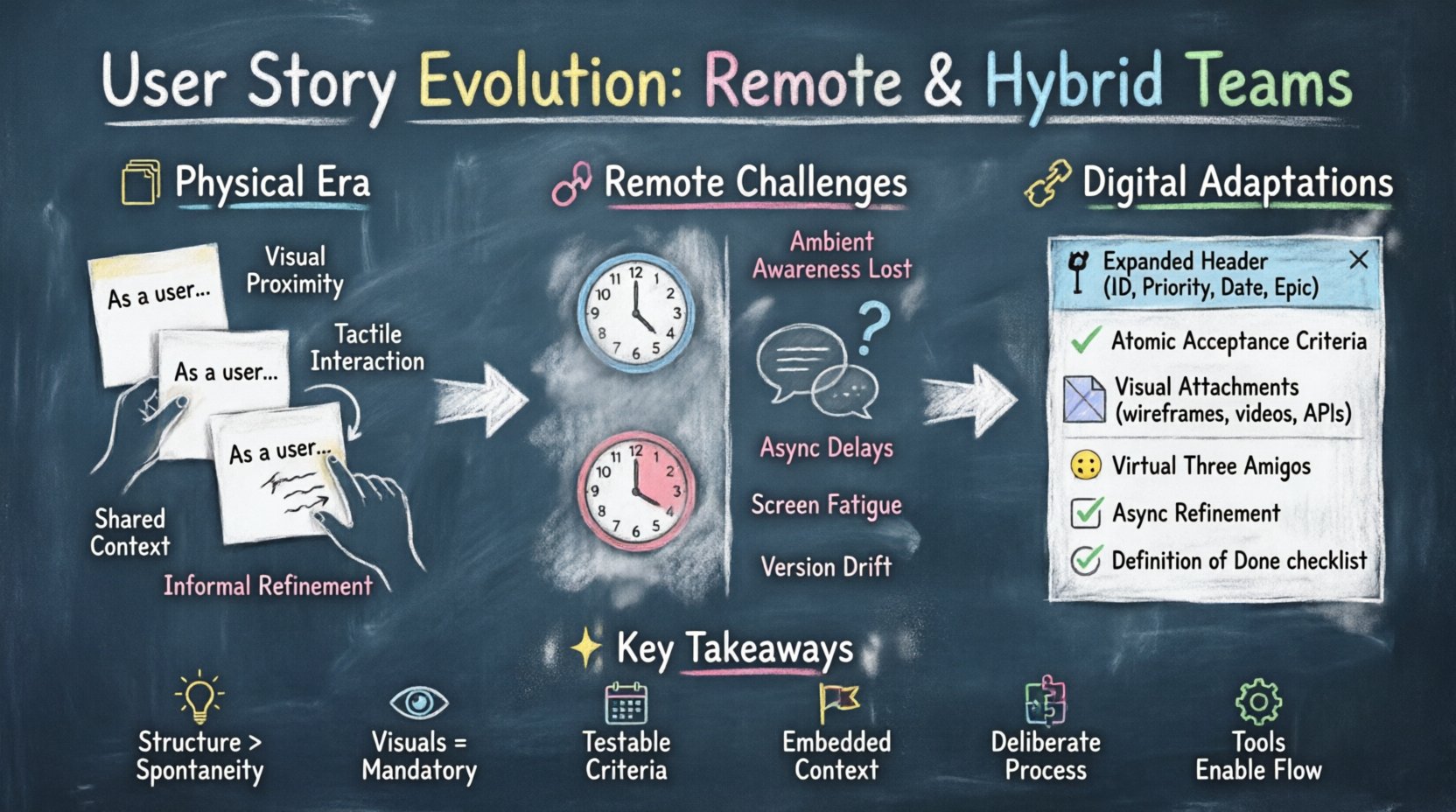
The Origins: Physical Cards and Co-located Walls 🏢
Understanding the current state requires a look at the past. Traditional agile methodologies relied heavily on physical artifacts. Large sheets of paper, sticky notes, and permanent markers were the tools of choice. These physical user stories served multiple functions simultaneously. They were tangible assets that could be moved, grouped, and prioritized visually. The size of the card indicated effort. The color indicated status. The location on the board indicated priority.
In this environment, the format was flexible. A story might read simply: “As a user, I want to search, so I can find items.” This brevity worked because the context was shared. If a developer had a question, they could walk to the writer’s desk. If a designer needed clarification, they could stand up and point at the screen. The ambiguity of the text was resolved through immediate, synchronous human interaction. The physical card was a placeholder for a conversation that was guaranteed to happen because everyone was in the same room. 🗣️
Key characteristics of the physical format included:
- Visual Proximity: Stories were always visible to the team. They were part of the background environment.
- Tactile Interaction: Moving a card from “To Do” to “Done” provided a psychological sense of progress.
- Shared Context: Everyone saw the same board. There was no version control conflict between what one person saw and what another saw.
- Informal Refinement: Stories were often written on the fly during planning or refinement sessions without strict templates.
The Remote Shift: Digital Challenges and Information Loss 📉
When teams moved to remote work, the physical constraints were removed, but new friction points emerged. The most significant challenge is the loss of ambient awareness. In an office, you hear the tone of a conversation. You see the furrowed brow of a colleague who does not understand a requirement. In a remote setting, you only see what is explicitly shared. If a user story lacks sufficient detail, the gap in understanding can lead to rework, delays, and frustration.
Furthermore, time zone differences mean that the “immediate conversation” is no longer immediate. A developer in London may start working on a story written by a product owner in New York. By the time the developer realizes there is an ambiguity, the product owner is asleep. This latency requires the user story itself to carry more weight. It must stand alone better than it ever did in the physical era. 🕰️
The digital environment introduces specific risks that the physical format avoided:
- Screen Fatigue: Reading long text on a screen is more taxing than reading a card on a wall. Brevity is still important, but clarity is paramount.
- Fragmentation: Stories might live in one tool, while comments live in another, and files in a third. The context becomes scattered.
- Asynchronous Interpretation: Without a voice, text can be interpreted in multiple ways. Nuance is lost.
- Version Drift: Digital documents can be edited without the team noticing. The “source of truth” can become ambiguous.
Adapting the Format: Structure for Digital Clarity 🛠️
To counter these challenges, the structure of the user story must evolve. It cannot remain a single sentence. It must become a structured document that encapsulates the necessary context for an asynchronous team to execute the work without constant interruption. This does not mean bureaucracy; it means precision.
1. The Expanded Header 📌
The standard “As a… I want… So that…” format is a good start, but in a remote setting, it is insufficient. We need to expand the header to include metadata that helps with prioritization and tracking. This includes:
- Story ID: A unique identifier to prevent confusion in large backlogs.
- Priority Level: Explicitly stating the value (e.g., High, Medium, Low) so remote teams can align on what to build first.
- Target Date: If there is a delivery constraint, it should be visible in the story header.
- Epics/Features: Clear linkage to the broader initiative to maintain strategic alignment.
2. Deep-Dive Acceptance Criteria ✅
In a co-located team, acceptance criteria (AC) are often discussed verbally. In a remote team, AC must be written with atomic precision. Each criterion should be testable and unambiguous. Avoid natural language that allows for interpretation. Use structured logic.
Instead of saying “The page should load fast,” say “The page must load within 2 seconds under standard network conditions.” Instead of “Users can log in,” say “The system shall validate credentials against the database and display the dashboard upon success. The system shall display an error message on failure.”
This level of detail acts as the contract between the business and the engineering team. It reduces the need for clarification tickets. It allows the definition of done to be objectively verified, which is critical when managers are not physically observing the work. 🧐
3. Visual Context and Attachments 🖼️
Text alone is rarely enough for modern interfaces. Remote teams rely heavily on visual aids. The user story format should explicitly mandate attachments or links to:
- Wireframes or Mockups: Static images showing the desired state.
- Flow Diagrams: For complex logic paths.
- Video Recordings: A screen recording of the product owner demonstrating the flow is often superior to a static image.
- API Documentation: Links to relevant endpoints for backend dependencies.
Collaboration Mechanics: Refinement Without Walls 🤝
Writing the story is only half the battle. The evolution of the format must be supported by the evolution of the process. How do we refine these stories without standing around a whiteboard? The process must be deliberate.
1. Virtual Three Amigos 🧐
The “Three Amigos” concept (Business, Development, Testing) is vital. In a remote setting, this session cannot be an afterthought. It must be scheduled as a mandatory step before a story enters the sprint. This ensures that the acceptance criteria are understood by the person building it and the person testing it, not just the person writing it.
During these sessions, use screen sharing to walk through the story. Do not just read the text. Walk through the user journey. Ask the testers to challenge the criteria immediately. This prevents the “I thought it worked that way” syndrome that plagues remote sprints. 🎥
2. Async Refinement Windows 📅
Not everyone can meet at the same time due to time zones. Therefore, asynchronous refinement is necessary. This involves:
- Comment Threads: Using the digital tool to discuss specific parts of the story.
- Pre-reading: Requiring team members to review the story and add comments before the live refinement session.
- Video Updates: Leaving Loom or similar video updates on the story ticket for complex changes.
This approach respects the cognitive load of remote workers. It allows deep work time to be protected while ensuring questions are answered without interrupting the flow. 🧠
3. The Definition of Done (DoD) 🏁
Remote teams need a robust Definition of Done. In a physical office, a story might be marked done when the developer says it is. In a remote setting, the DoD must include verification steps. This includes:
- Code Review: Mandatory pull request approval.
- Automated Tests: Passing unit and integration tests.
- Documentation Update: Ensuring the story is linked to any relevant documentation.
- Stakeholder Sign-off: Explicit confirmation from the product owner in the ticket.
Comparative Analysis: Physical vs. Remote Formats 📊
To visualize the differences, consider the following comparison of attributes between traditional co-located user stories and those adapted for remote environments.
| Attribute | Co-located (Physical) | Remote / Hybrid (Digital) |
|---|---|---|
| Medium | Sticky notes, Whiteboard | Digital Ticket, Document |
| Context | Ambient, Shared Environment | Embedded in Description, Links |
| Clarity | Resolved Verbally | Resolved via Detailed Text & Media |
| Access | Physical Presence Required | 24/7 Global Access |
| Refinement | Spontaneous, Ad-hoc | Scheduled, Structured, Async |
| Tracking | Manual Movement | Automated Workflow, Audit Trails |
| Dependencies | Verbal Handoff | Explicit Links & Mentions |
| Feedback Loop | d>ImmediateLatent, Scheduled |
Common Pitfalls and Solutions 🚧
As teams transition, they often fall into traps that degrade the quality of the user story. Being aware of these pitfalls allows for proactive mitigation.
1. The “Link Rot” Problem 🔗
Remote stories often contain many links to external resources. Over time, these links break or move. This creates a situation where the story is incomplete. To solve this, embed critical information directly in the ticket description whenever possible. Use the digital tool’s attachment feature for static assets. For dynamic content, ensure the URL is permanent and documented.
2. Over-Engineering the Story 🏗️
There is a temptation to make the story a novel. While detail is good, excessive documentation slows down the team. The goal is clarity, not volume. If a section is needed, write it. If it is not, do not write it. Keep the focus on the value and the verification. If the team is confused, the story is not detailed enough. If the team is bogged down, it is too detailed. Find the balance. ⚖️
3. Ignoring the “So That” 💡
In remote settings, it is easy to focus on the “What” and forget the “Why.” The “So That” part of the story is crucial for remote developers to make trade-off decisions. If they understand the business value, they can suggest better technical solutions. If they only see the requirement, they will build exactly what was asked, even if it is inefficient. Always ensure the business value is explicit.
4. Lack of Visuals 🎨
Text descriptions of UI changes are notoriously difficult to understand without visuals. Remote teams often skip wireframes to save time. This is a false economy. The time spent drawing a simple wireframe is recovered many times over in reduced rework. Do not skip the visual component of the story. 🖼️
Best Practices Checklist ✅
Before moving a user story into the development phase, remote teams should run through this checklist to ensure the format is robust enough for distributed work.
- Is the ID unique? Ensure no duplicates exist in the backlog.
- Is the value clear? Does the “So That” explain the benefit?
- Are the criteria testable? Can a tester write a test case based on this?
- Is there a visual? Are there mockups or diagrams included?
- Are dependencies listed? Is it clear what other work needs to happen first?
- Is the DoD defined? Does the team agree on what “done” looks like?
- Is the language neutral? Is the text free of jargon that might confuse remote members?
- Is the priority set? Does the team know how urgent this is?
- Is the context linked? Are related epics or features linked?
- Has the team reviewed it? Has the refinement session occurred?
The Future of Agile Documentation 🚀
The evolution of user stories is not a one-time event. As technology changes, so will the formats. We are seeing a rise in AI-assisted drafting of stories, where natural language prompts generate structured tickets. This could further reduce the friction of documentation. However, the human element remains critical. Technology can format the text, but it cannot validate the business value.
Remote and hybrid work are becoming the standard, not the exception. Therefore, the ability to write a user story that functions effectively without a physical meeting is a core competency for modern agile teams. It requires discipline, empathy, and a commitment to clarity. By adapting our formats to the digital reality, we preserve the agility of our methods while ensuring the quality of our output remains high. The story is no longer just a card on a wall; it is a comprehensive package of value, logic, and context. 📦
Teams that invest in this evolution will find that their delivery speed does not suffer despite the distance. Instead, they will find that the quality of communication improves because they are forced to be more precise. In the end, the format serves the team, not the other way around. As long as the team can collaborate effectively, the specific medium is secondary. But in a world of distributed work, the medium matters more than ever. 🌍
Summary of Key Adaptations 📝
To wrap up the essential takeaways for adapting user stories to remote and hybrid environments:
- Structure over Spontaneity: Rely on detailed templates rather than verbal agreements.
- Visuals are Mandatory: Never rely on text alone for UI requirements.
- Testability is Key: Acceptance criteria must be written for test cases, not just human understanding.
- Context is Embedded: Put all necessary links and information inside the ticket.
- Process is Deliberate: Schedule refinement sessions; do not assume they will happen naturally.
- Tools Support Flow: Use digital workflows to track state, not just physical movement.
By implementing these changes, teams can navigate the complexities of remote work while maintaining the core values of agile development. The user story remains the heart of the process, but its heart has grown stronger to withstand the distance. 💪