
Introduction: The Diagram Dilemma We All Face
Let me be honest—there was a time when I dreaded creating diagrams. As a business analyst, I spent countless hours wrestling with complex modeling tools, trying to remember UML notation rules, fumbling with connectors, and losing precious time on formatting instead of focusing on what really mattered: solving the actual problems. Sound familiar?
Then I discovered Visual Paradigm’s AI Chatbot, and it completely transformed my workflow. This is my story of how I went from diagram frustration to modeling mastery—and how you can too.
Chapter 1: The Discovery – Unlocking a New Way of Working
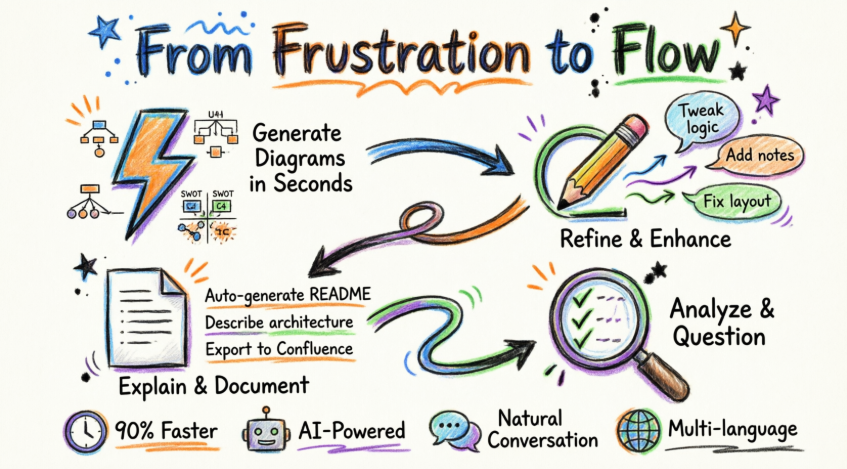
My journey began when I heard about AI-powered diagramming. I was skeptical at first—could an AI really understand the nuances of enterprise architecture and software modeling? I decided to give it a try, and what happened next blew my mind.
Instead of spending hours learning complex tool interfaces, I simply typed what I needed in plain English. The AI understood industry standards—from UML and ArchiMate to strategic matrices—and instantly rendered professional, fully editable diagrams. What used to take me hours now took seconds.
Chapter 2: First Victory – Creating My First AI-Generated Diagram
The Challenge: Cloud-Native Banking Architecture
I remember my first real test. I needed to create a C4 System Context Diagram for a cloud-native banking application—a complex task that typically requires deep technical knowledge and hours of work.
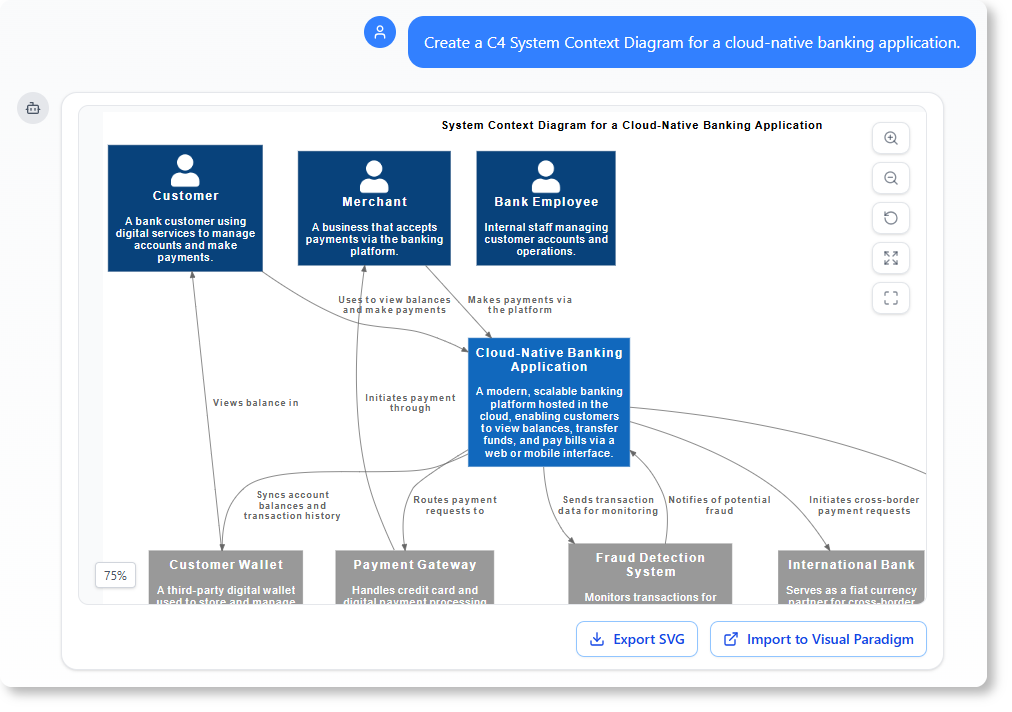
My prompt was simple: “Create a C4 System Context Diagram for a cloud-native banking application.”
Within seconds, the AI generated a professional diagram that I could immediately use and refine. I didn’t have to worry about:
-
Which shapes to use
-
How to position connectors
-
Whether I was following C4 model standards correctly
The SWOT Analysis Breakthrough
Next, I tackled a strategic planning session for a mobile fitness app launch. Creating a detailed SWOT analysis usually involves multiple stakeholder meetings and endless whiteboard sessions.
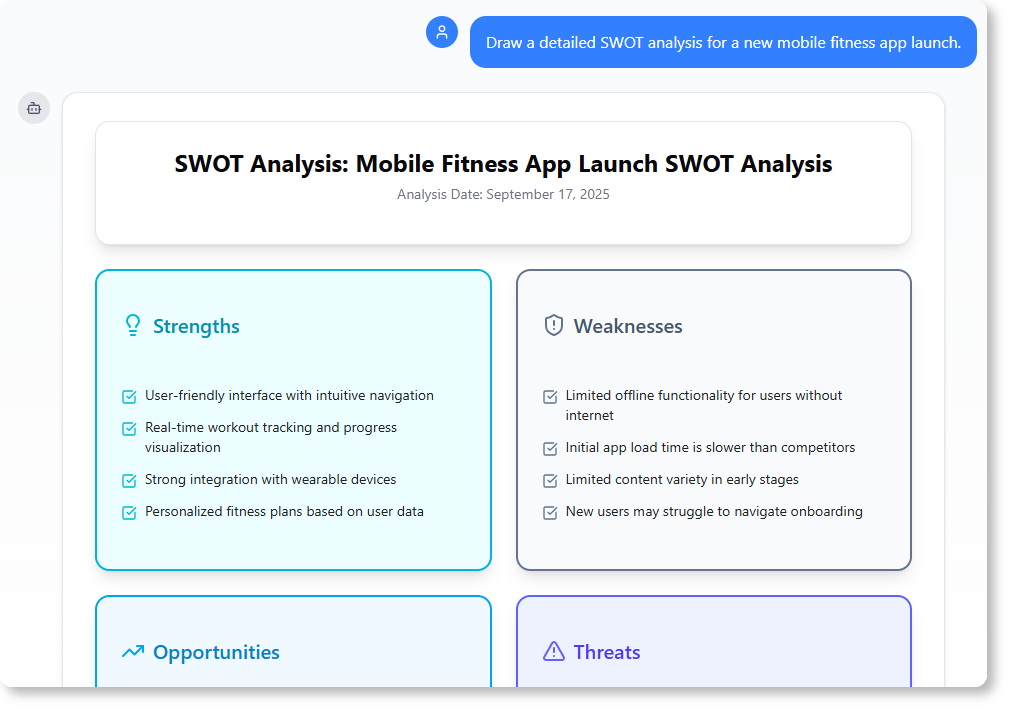
I simply asked: “Draw a detailed SWOT analysis for a new mobile fitness app launch.”
The result? A comprehensive, well-structured SWOT matrix that I could present to stakeholders immediately.
Mastering UML Without the Headache
As someone who’s worked with UML for years, I still occasionally forget specific notation rules. When I needed a Use Case Diagram for a Hospital Management System, the AI made it effortless.
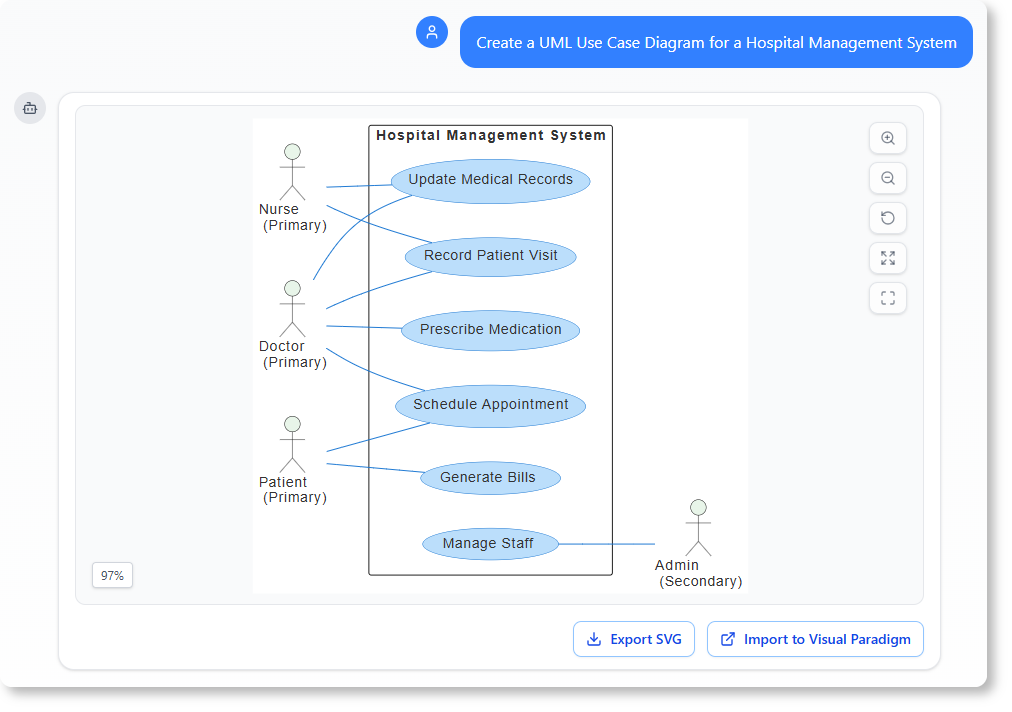
Prompt: “Create a UML Use Case Diagram for a Hospital Management System.”
The AI delivered a compliant, professional diagram instantly—no reference guides needed.
Chapter 3: The Evolution – Refining and Enhancing with Conversation
Here’s where things got really exciting. I discovered that creating the initial diagram was just the beginning. The real magic happened in the iterative refinement process.
Real-World Scenario: Handling Edge Cases
I was working on a Sequence Diagram for a library system when the stakeholder asked, “What happens if a book is damaged during checkout?” In the past, this would mean reopening the tool, finding the right elements, and manually adding alternative flows.
My prompt: “Add an alternative path to this Sequence Diagram to handle ‘book damage'”
The AI understood exactly what I needed and added the alternative flow seamlessly.
Quick Changes, Zero Hassle
During a review session, my team decided to standardize terminology across all our diagrams. Instead of manually editing each instance, I simply typed:
Prompt: “Rename Customer to User”
Done. Every instance updated instantly.
Breaking Language Barriers
When our international team needed diagrams in Simplified Chinese, I was ready for a long translation process. Instead, I asked:
Prompt: “Translate the diagram content to Simplified Chinese”
The AI handled the translation while maintaining the diagram structure and technical accuracy.
Chapter 4: Beyond Drawing – Turning Diagrams into Intelligent Documentation
This feature changed everything for my project documentation workflow. The AI Chatbot doesn’t just create diagrams—it makes them intelligent knowledge bases.
Understanding Complex Flows
When onboarding new team members, I used to spend hours explaining complex Sequence Diagrams. Now, I simply ask the AI:
Prompt: “Explain this Sequence Diagram to me”
The AI generates clear, structured explanations that I can share directly with new team members, dramatically reducing onboarding time.
Automated Use Case Documentation
Creating detailed use case descriptions is tedious but necessary. When I needed documentation for an ATM system:
Prompt: “Generate a Use Case Description on the ‘Withdraw Cash’ use case”
The AI produced comprehensive documentation including preconditions, main flow, alternative flows, and postconditions—ready for stakeholder review.
Mapping User Journeys
For an Activity Diagram showing our customer onboarding process, I needed to present the user journey to non-technical stakeholders:
Prompt: “Describe the user journey in this Activity Diagram”
The AI translated the technical diagram into a narrative that executives could easily understand and appreciate.
Chapter 5: The Expert Consultant – Analyzing and Validating Designs
Perhaps the most valuable discovery was using the AI as my on-demand domain expert. It became my second pair of eyes, validating designs against industry best practices.
Security Analysis
Before presenting a Deployment Diagram to our security team, I wanted to identify potential vulnerabilities:
Prompt: “What are the security risks in this Deployment Diagram?”
The AI identified several potential security concerns I hadn’t considered, allowing me to address them proactively before the security review.
Scenario Planning
When designing an e-commerce system, I wanted to ensure I hadn’t missed any important use case scenarios:
Prompt: “What are the possible scenarios for the ‘Place Order’ use case?”
The AI suggested several edge cases and alternative flows that improved the completeness of my model.
Architecture Optimization
During a system redesign, I was concerned about scalability:
Prompt: “How can we improve the scalability of this system architecture?”
The AI provided actionable recommendations based on architectural best practices, helping me create a more robust design.
Conclusion: Your Transformation Awaits
Looking back on my journey, the difference is night and day. What used to be a source of frustration has become one of my greatest productivity advantages. I’m no longer bogged down by tool complexity or notation details. Instead, I focus on what I do best: solving problems, designing systems, and creating value.
The results speak for themselves:
-
90% faster diagram creation
-
📝 Automated documentation that stays in sync
-
🔍 Built-in validation against best practices
-
💬 Natural conversation instead of complex interfaces
-
🌍 Instant localization for global teams
The Visual Paradigm AI Chatbot isn’t just another tool—it’s a paradigm shift in how we approach visual modeling. It’s like having an expert modeler, technical writer, and architecture consultant available 24/7, all through simple conversation.
Ready to revolutionize your workflow? Stop wrestling with tools. Embrace AI-powered visual modeling. Let the AI handle the visualization so you can focus on solving the bigger problems.
Your journey from frustration to flow starts here.
References
- Generate C4 System Context Diagram: Interactive conversation demonstrating AI-powered creation of C4 System Context Diagram for cloud-native banking application.
- Create SWOT Analysis: Example of generating a detailed SWOT analysis for a new mobile fitness app launch using natural language prompts.
- UML Use Case Diagram Generation: Conversation showing creation of UML Use Case Diagram for Hospital Management System.
- Sequence Diagram Refinement: Interactive session demonstrating how to add alternative paths and analyze security risks in Sequence Diagrams.
- Diagram Element Renaming: Example of bulk renaming elements and exploring use case scenarios through conversational commands.
- Diagram Translation and Scalability Analysis: Conversation showing diagram translation to Simplified Chinese and architecture scalability improvement recommendations.
- Sequence Diagram Explanation: Example of AI-generated explanations for complex Sequence Diagrams to aid team onboarding.
- Use Case Description Generation: Automated generation of comprehensive use case documentation for “Withdraw Cash” use case.
- Activity Diagram User Journey: Conversation demonstrating how AI translates Activity Diagrams into user-friendly journey narratives.
- Visual Paradigm AI Chatbot Platform: Main access point for AI-powered diagramming and visual modeling assistant.