
Introduction
Visual Paradigm stands as a leading, certified environment for Enterprise Architecture (EA) modeling, specifically optimized for the ArchiMate standard. Recently enhanced with deep Artificial Intelligence (AI) integration, Visual Paradigm streamlines the often complex process of architectural analysis and diagram creation. This guide provides a comprehensive overview of its capabilities, covering full specification support, emerging ArchiMate 4 features, advanced modeling intelligence, and revolutionary AI-driven workflows.
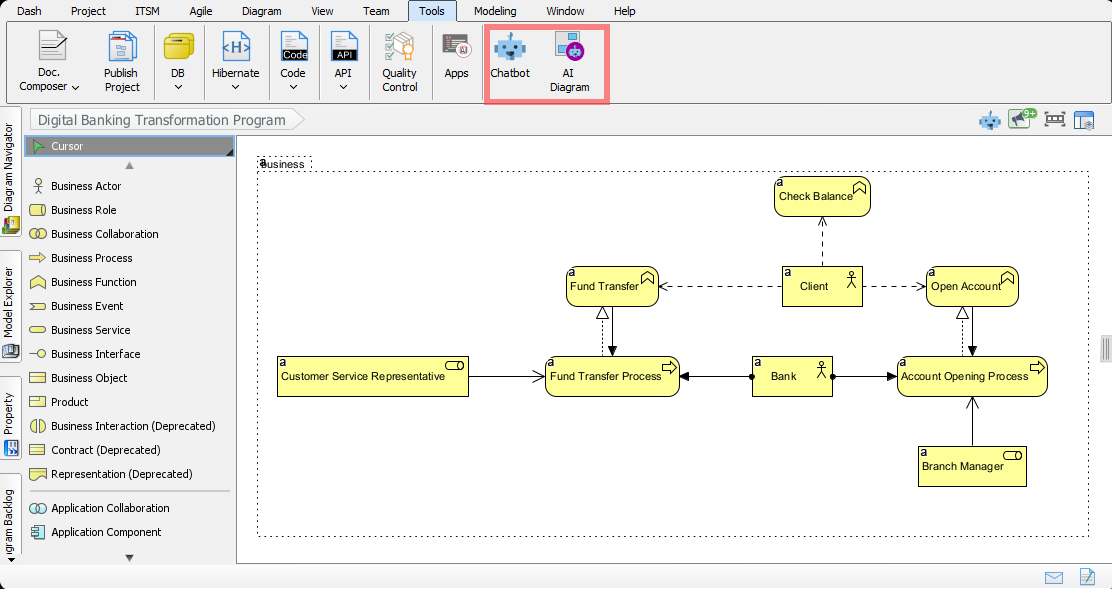
1. Certified ArchiMate Support Features
As an officially certified tool by The Open Group, Visual Paradigm ensures fidelity to the specification, supporting both stable ArchiMate 3.1 and the latest ArchiMate 4 (pre-release/snapshot) standards.
Full Specification Support
Visual Paradigm offers native support for the complete ArchiMate vocabulary, notation, and semantics across all layers:
-
Core Layers: Business, Application, and Technology.
-
Extension Layers: Strategy, Motivation, and Implementation & Migration.
ArchiMate 4 Specifics: The Era of Flexibility
With the release of Visual Paradigm 18.0, the tool embraces the shift from rigid layering to a flexible “Unified Domain Approach.”
-
Native Multiplicity: Users can now define precise cardinality constraints (e.g.,
1..*,0..1) directly on connectors, enabling more precise modeling of relationships and data flow. -
Hexagonion Framework: A new visualization framework designed for outcome-driven modeling, allowing architects to pivot views based on specific business outcomes rather than just structural layers.
-
Common Domain: Supports the new ArchiMate 4 concept of a “Common Domain,” facilitating better integration between core layers without the restriction of strict separation.
Model Validation & Traceability
-
Model Validation: Built-in tools automatically check diagrams for syntactic correctness and compliance with ArchiMate standards, highlighting errors before publication.
-
Traceability: Seamless links can be established between ArchiMate elements and other models like BPMN or UML. This creates an end-to-end traceability chain, ensuring that every business requirement can be traced back to a specific technical implementation.
-
Element Reuse: The tool maintains synchronization across all instances; altering an element in one diagram instantly updates it in all other diagrams where it is referenced.
Interoperability
Visual Paradigm ensures your models remain portable and accessible through support for:
-
ArchiMate Model Exchange File Format (AMXFF).
-
XMI import/export: Ensuring compatibility with a wide range of other modeling tools.
2. AI-Driven Architectural Transformation
The latest integration of AI into Visual Paradigm moves beyond simple automation; it transforms natural language into structured, compliant architectural artifacts, significantly reducing the time spent on manual diagramming.
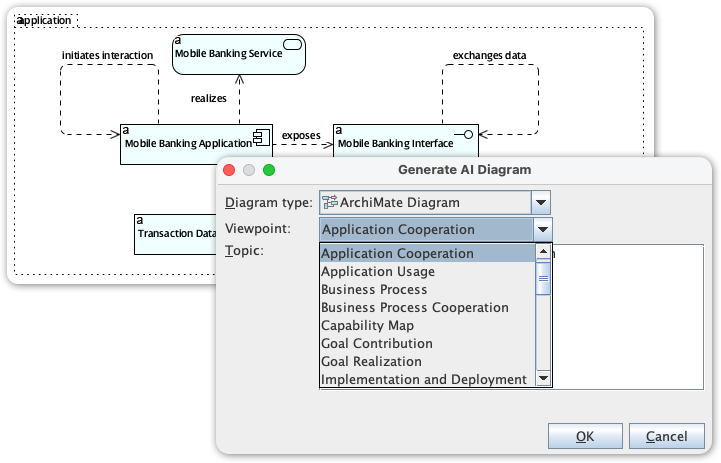
AI ArchiMate Generator
-
Instant Drafting: Users can describe a high-level requirement or topic in natural language, and the AI instantly generates a comprehensive, compliant ArchiMate diagram draft.
-
Automated Viewpoint Generation: Simply prompt the system (e.g., “Show me a Technology Usage view”), and the AI constructs the specific diagram adhering to the correct ArchiMate viewport rules.
Conversational Editing (AI Chatbot)
-
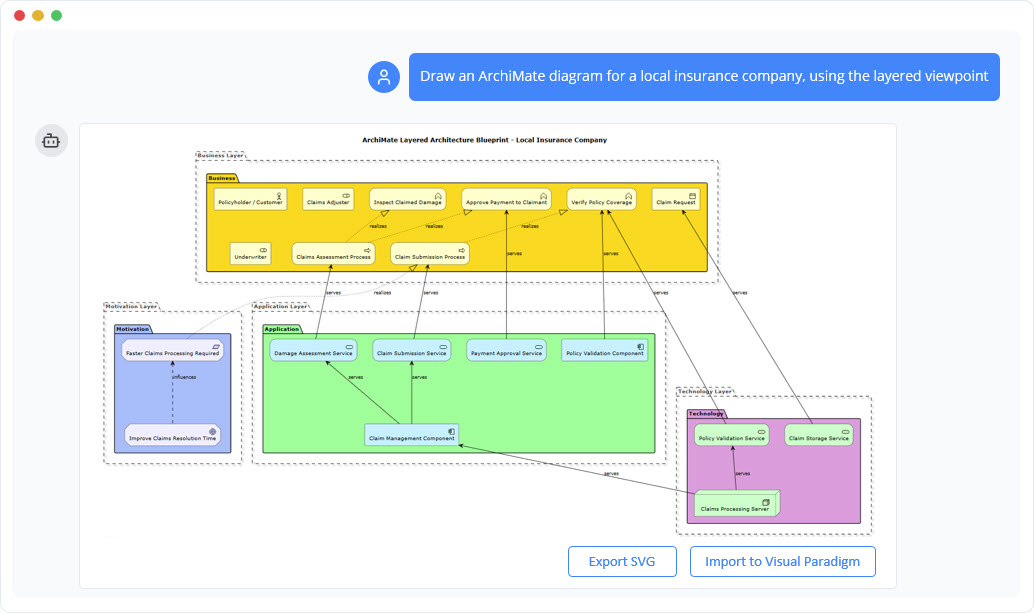
Refine via Dialogue: Refine existing models by talking to the diagram. Users can add actors, rename elements, change relationships, or modify multiplicities via simple conversational commands.
-
Intelligent Impact Analysis: Query the model in plain English. For example, “Show me all business processes affected if we decommission the Billing System.” The AI visualizes the consequences and affected components instantly.
Architectural Critique & Technical Compliance
-
Logic Gap Detection: The AI acts as a senior architect, identifying logic gaps, single points of failure, and suggesting robust design patterns (e.g., recommending MVC architecture).
-
Multiplicity Checks: The AI detects missing or incorrect cardinalities on connectors to ensure model integrity.
-
Standards-Based Output: Unlike generic LLMs, this tool is specifically trained on ArchiMate and UML standards, ensuring that all generated outputs are syntactically valid.
AI Image Translation
-
Global Accessibility: Analyzes existing diagrams in popular formats (PNG, JPG, SVG).
-
Multilingual Support: Translates text within the diagram into 50+ languages while rigorously preserving the original connectors, shapes, and structural logic.
3. Mobile & Collaboration Features
-
Visualization for Mobility: Simplified diagrams can be viewed and interacted with on Android and iOS devices, allowing stakeholders to review models from anywhere.
-
Export Options: Models can be exported in various formats including JPEG, PNG, TIFF, PDF, Postscript, and HTML, facilitating easy sharing with non-technical stakeholders.
Reference List
-
Visual Paradigm ArchiMate 4 AI Viewpoints Generator: Comprehensive guide to the newly released AI generator specifically for creating ArchiMate viewpoints and diagrams from natural language, ensuring standard compliance.
-
Visual Paradigm Features: ArchiMate Tools: Official feature documentation detailing the full spectrum of ArchiMate modeling capabilities, including the core layers, extensions, and interoperability options.
-
Visual Paradigm ArchiMate 4 Support Release Notes: Technical release notes covering the implementation of the Unified Domain Approach, Native Multiplicity, and the Hexagonion Framework in Visual Paradigm 18.0.
-
Mastering ArchiMate: A Comprehensive Guide to Enterprise Architecture Modeling: An in-depth guide explaining the evolution of the ArchiMate framework and how Visual Paradigm supports the complete specification from core to extension layers.
-
Visual Paradigm Enterprise Modeling Tool: General overview of the platform’s capabilities in enterprise modeling, covering diagramming, development, and team collaboration features.
-
ArchiMate 3 Update Guide: Detailed documentation on how Visual Paradigm supports ArchiMate 3.0/3.1 standards, including the Model Exchange File Format and update implications.
-
What is ArchiMate?: Theoretical background and explanation of the ArchiMate language, its purpose within the TOGAF framework, and how Visual Paradigm maps to it.
-
Maximizing Enterprise Architecture: Visual Paradigm 18.0 Support for ArchiMate 4: An expert article from ArchiMetric analyzing the benefits of the new release, specifically focusing on the Common Domain and behavior elements.
-
Visual Paradigm 18.0 Release Highlights (YouTube): Video presentation covering the first modeling tool to fully support the Unified Domain, behavior elements, and the new Common Domain.
-
Comprehensive Guide to ArchiMate 4 Support in Visual Paradigm 18.0: Industry analysis of the February/March 2026 release, detailing the strategic advantages of ArchiMate 4 support for EA teams.
-
Visual Paradigm Online: ArchiMate Tool: Documentation for the web-based version of the ArchiMate tool, highlighting accessibility and collaboration features.
-
Comprehensive Guide to the Visual Paradigm AI Visual Modeling Platform: An overview of the AI integration within Visual Paradigm, focusing on how it unifies various modeling types using generative AI.
-
Unifying Enterprise Architecture: Synergy of AI, TOGAF, ArchiMate, and UML: Detailed exploration of how Visual Paradigm integrates AI with major architecture frameworks to streamline EA processes.
-
Archimate Explained: A Guide to AI-Powered Enterprise Architecture: Central documentation explaining the “Chat ArchiMate” feature and how users leverage conversational AI for modeling.
-
Enhanced AI Activity Diagram Support: Specific release notes on the enhancements to the AI chatbot for activity and behavior modeling, maintaining consistency with the ArchiMate logic.
-
Enhancing TOGAF ADM with Archimate: An Agile Visual Modeling Approach: Practical guide on implementing Visual Paradigm within the TOGAFs ADM cycle to achieve agile and efficient modeling outcomes.