
In the evolving landscape of software engineering, the ability to rapidly translate business requirements into robust technical designs is paramount. Visual Paradigm addresses this challenge by supporting a Use Case Driven Approach through a unique fusion of established Unified Modeling Language (UML) modeling tools and cutting-edge, AI-powered automation. By integrating the Use Case Modeling Studio with the UCDD Assistant, Visual Paradigm empowers teams to reduce the lifecycle from initial problem statement to detailed implementation plan with unprecedented speed and precision. [1, 2, 3, 4, 5]
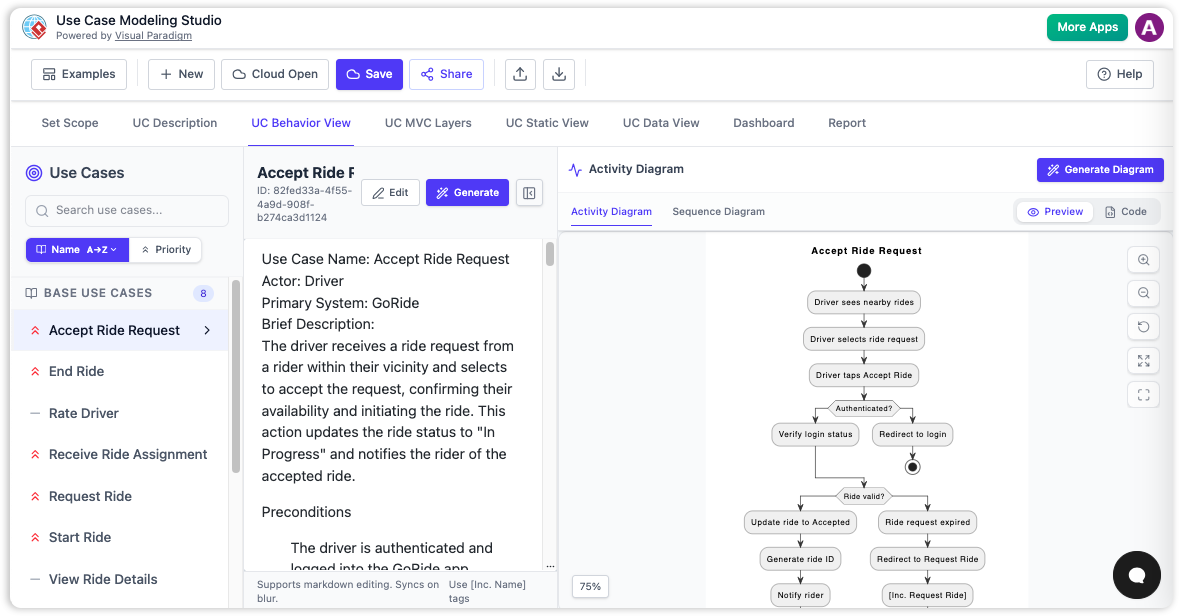
This article explores how Visual Paradigm bridges the gap between manual rigor and artificial intelligence, offering a comprehensive suite of features for modern software architects and developers.
1. The Foundation: Traditional Features
While AI accelerates the process, professional software design still requires the precision, formal notation, and logical depth provided by traditional modeling capabilities. Visual Paradigm’s core tools provide the manual control necessary for complex system architecture.
Comprehensive UML Notation
At the heart of the platform is full support for standard UML use case elements. Users can define actors, establish system boundaries, and articulate critical relationships such as «include» (mandatory dependencies), «extend» (optional conditions), and generalisation hierarchies. This ensures that the resulting models are industry-standard and interoperable with other tools.
Flow of Events Editor
Complex business logic often involves branching paths. The Flow of Events (FCE) editor allows designers to manually detail the internal steps of a use case. It supports sophisticated structures, including:
-
Main Flow: The primary happy-path scenario.
-
Alternative Flows: Handling exceptions or optional steps.
-
Control Structures: Detailed implementation of if-then-else logic and loops directly within the textual description.
Elaboration with Sub-diagrams
A strong use case specification serves as a container for deeper analysis. Visual Paradigm enables users to link high-level use cases to specific detail models:
-
Sequence Diagrams: To map system interactions and object collaborations.
-
Activity Diagrams: To define procedural flows and state transitions.
This hierarchical approach ensures that a high-level business goal can be decomposed into executable technical logic.
Requirements Management
To ensure software remains aligned with business goals, Visual Paradigm offers direct mapping capabilities. Individual requirements can be tagged and linked to specific use cases. This creates an auditable trail, ensuring that every feature in the code corresponds to a defined business need.
Manual Report Generation and Collaboration
For stakeholder communication, the platform provides tools to export collected use case details into professional Use Case Specifications [6]. Furthermore, built-in collaboration features—including real-time team editing, versioning, and a visual comparison tool—allow teams to track changes across different project phases seamlessly. [6, 7, 8, 9, 10, 11]
2. The Acceleration: AI-Powered Features
AI tools in Visual Paradigm are designed to automate the “tedious manual labor” of drafting, layout, and refinement, allowing teams to focus on high-level architecture and critical decision-making. [12, 13]
Automatic Use Case Generation
The process of brainstorming use cases is often iterative and manual. Visual Paradigm’s AI can transform simple natural language goal statements (e.g., “Cinema ticketing system”, “Online grocery ordering”) into a structured list of candidate use cases and actors, drastically reducing the initial modeling time.
AI Use Case Description Generator
Once actors and use cases are identified, the AI Use Case Description Generator automatically drafts detailed narratives. It includes preconditions, postconditions, and step-by-step interaction flows, ensuring consistency and completeness across the model without requiring deep writing from every team member. [14]
Text-to-Diagram Automation
Visual Paradigm bridges the gap between text and code by instantly generating visual Use Case Diagrams from textual descriptions. The AI intelligently places actors and system boundaries, adjusting the layout to fit professional standards immediately upon generation.
Intelligent Relationship Refinement
One of the most common challenges in manual modeling is correctly identifying «include» versus «extend» relationships. View diagrams, the AI analyzes the basic flow of events and suggests where these UML relationships should be added, maintaining professional standards and preventing structural errors.
Automated Behavioral Modeling
Perhaps the most powerful feature is the ability to convert textual use case narratives into detailed Activity Diagrams or Sequence Diagrams with a single click. This allows for rapid behavioral prototyping and verification of complex logic before any code is written.
AI-Driven Test Case Creation
Beyond design, Visual Paradigm extends AI automation to quality assurance. It derives comprehensive test plans—including specific scenarios, step-by-step actions, and expected results—directly from the generated use case specifications. This ensures that testing aligns perfectly with the finalized design.
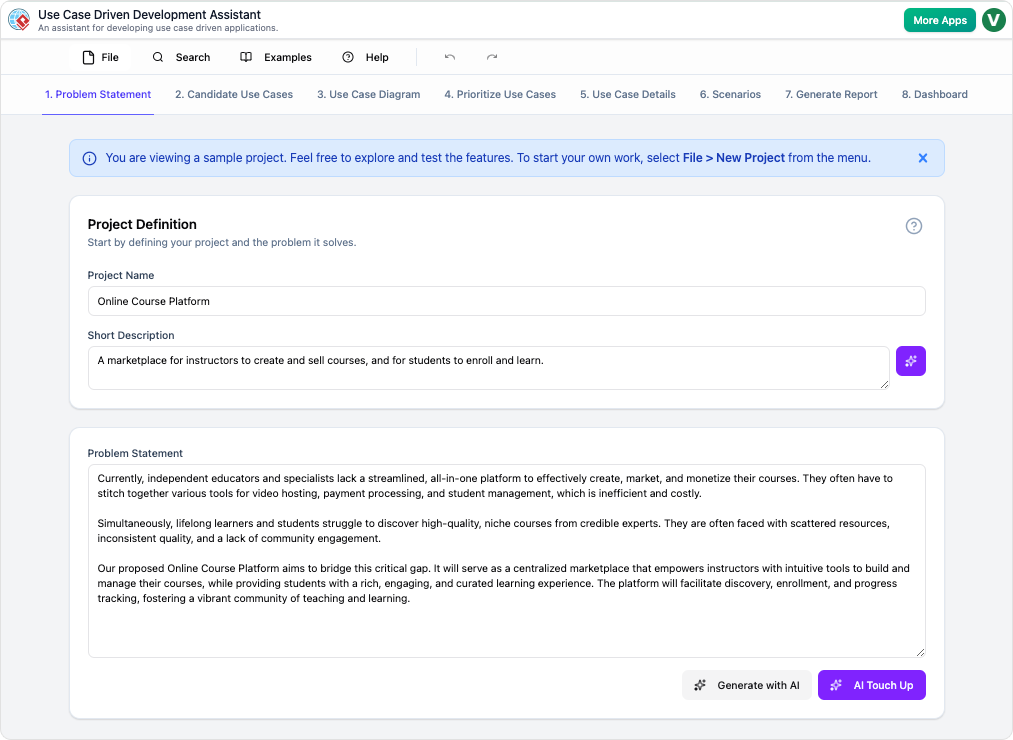
The UCDD Assistant Workflow
Tying these capabilities together is the UCDD Assistant workflow [15]. This guided, step-by-step AI application leads users through the entire lifecycle: starting from a vague problem statement, generating the model, refining the details, and finally producing an implementation plan and test suite. [2, 5, 14, 15, 16, 17, 18, 19, 20, 21, 22]
Conclusion
Visual Paradigm represents a significant evolution in requirements engineering. By combining the rigorous structure of traditional UML with the adaptive speed of modern AI, it offers a complete ecosystem for use case driven development. Whether you need to manually refine a complex algorithm or generate an initial draft from a single sentence, this platform optimizes the journey from concept to execution.
Would you like to see a comparative analysis of these features between the Online and Desktop versions, or a step-by-step guide on leveraging the AI Refinement tool for your next project?
References
- Use Case Modeling Studio: https://www.visual-paradigm.com/features/use-case-modeling-studio/ – The core studio for creating, managing, and analyzing use case models with full UML support.
- Use Case Driven Development Assistant: https://www.visual-paradigm.com/features/use-case-driven-development-assistant/ – An AI-powered workflow that automates the generation of use cases from natural language to implementation plans.
- Gap Analysis Guide: https://guides.visual-paradigm.com/what-is-a-gap-analysis-your-guide-to-ai-powered-strategic-planning/ – Explores how Visual Paradigm approaches gap analysis and strategic planning using AI to bridge current and future states.
- SysML Support Overview: https://guides.visual-paradigm.com/unlock-the-power-of-sysml-modeling-with-visual-paradigm/ – Describes the dual support for UML and SysML, highlighting the platform’s versatility in system modeling.
- AI Use Case Description Generator: https://www.cybermedian.com/comprehensive-guide-using-visual-paradigms-ai-powered-use-case-description-generator/ – A comprehensive guide to using the AI-powered tool for generating detailed use case descriptions.
- Use Case Description: https://www.visual-paradigm.com/features/use-case-description/ – Features dedicated to configuring and documenting use case descriptions and generating specifications.
- What is a Use Case Diagram: https://www.visual-paradigm.com/guide/uml-unified-modeling-language/what-is-use-case-diagram/ – An educational resource explaining the fundamentals of UML use case diagrams and their role in analysis.
- Use Case Diagram Tutorial: https://blog.visual-paradigm.com/use-case-diagram-tutorial/ – A practical tutorial demonstrating how to draw and analyze use case diagrams effectively.
- Solution: Use Case Tool: https://www.visual-paradigm.com/solution/usecase/use-case-tool/ – A guide to the specific solution offerings for use case management and agile development.
- Use Case Driven Agile Approach: https://www.visual-paradigm.com/solution/use-case-driven-agile-approach/ – Details how Visual Paradigm supports agile methodologies through use case driven frameworks.
- Writing Effective Use Cases: https://www.visual-paradigm.com/tutorials/writingeffectiveusecase.jsp?format=pdf – Best practices and instructions for writing high-quality and effective use case documents.
- AI Powered Release Notes: https://updates.visual-paradigm.com/releases/ai-powered-use-case-modeling-studio/ – Official release notes detailing new AI capabilities introduced to the Use Case Modeling Studio.
- AI Tool Directory: https://ai.visual-paradigm.com/tool/use-case-modeling-studio – The central hub for Visual Paradigm’s AI tools, specifically the use case modeling studio interface.
- AI Use Case Description Generator (Feature): https://www.visual-paradigm.com/features/ai-use-case-description-generator/ – Detailed feature breakdown of the AI tool that drafts use case narratives and flows.
- AI Use Case Refinement Tools: https://www.cybermedian.com/comprehensive-guide-to-using-visual-paradigms-ai-powered-use-case-refinement-tools/ – A guide on utilizing AI to refine relationships and structure within use case diagrams.
- AI Studio Updates: https://updates.visual-paradigm.com/releases/ai-powered-use-case-modeling-studio/ – Technical updates regarding the evolution of the AI-powered modeling environment.
- AI Ecosystem Guide: https://www.archimetric.com/comprehensive-guide-to-use-case-modeling-with-visual-paradigms-ai-ecosystem/ – An overview of the integrated AI ecosystem for efficient use case modeling.
- AI Tool Landing Page: https://ai.visual-paradigm.com/tool/use-case-modeling-studio – The dedicated entry point for accessing the Use Case Modeling Studio tools.
- Mastering AI-Driven Diagrams: https://www.archimetric.com/mastering-ai-driven-use-case-diagrams-with-visual-paradigm-a-comprehensive-tutorial/ – Advanced tutorials on creating and refining diagrams using AI assistance.
- Use Case to Activity Diagram: https://www.visual-paradigm.com/features/use-case-to-activity-diagram/ – Features specific conversion capabilities for deriving activity diagrams from use cases.
- Use Case Modeling Studio Revisited: https://www.visual-paradigm.com/features/use-case-modeling-studio/ – Additional documentation reiterating the studio’s role in the modeling process.
- UCDD Assistant Overview: https://www.visual-paradigm.com/features/use-case-driven-development-assistant/ – Final overview of the UCDD Assistant and its role in the complete development lifecycle.