
Agile methodologies have become the standard for software development, even within academic environments. However, a common disconnect exists between theory and practice. Many students enter capstone projects or final year assignments with a theoretical understanding of user stories but struggle to implement them effectively. This gap often leads to project delays, scope creep, and frustration among team members. 🛑
Understanding why user stories fail is critical for anyone looking to deliver high-quality software. By examining real student project examples, we can identify recurring patterns of failure. This guide breaks down the root causes, provides concrete examples of what went wrong, and offers actionable strategies to improve your workflow. Let us explore the anatomy of a failed user story and how to build one that actually works. 🛠️
The Foundation of Agile Communication 🗣️
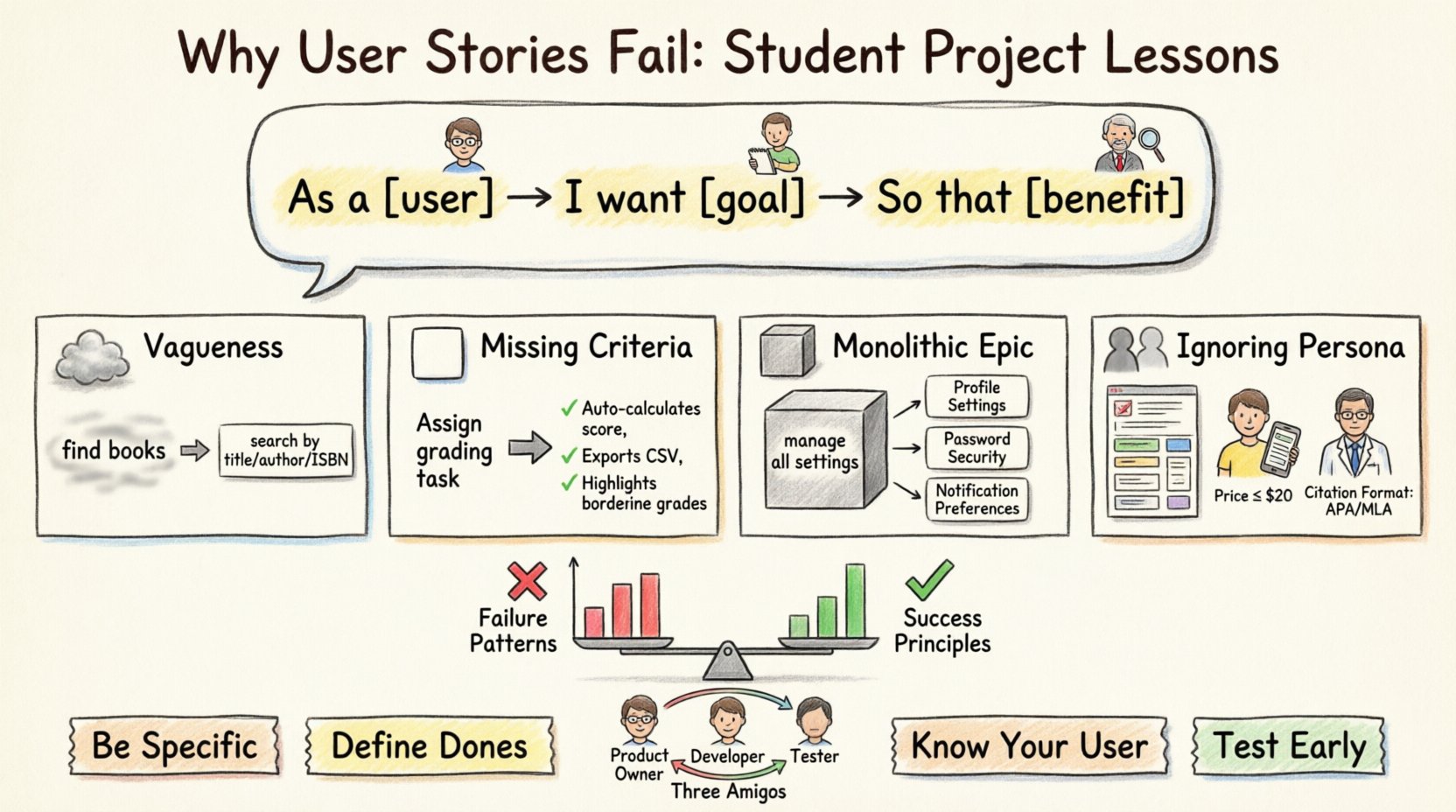
A user story is not just a requirement; it is a promise of conversation. It is a tool to describe functionality from the perspective of the end user. The standard format is simple:
- As a [type of user]…
- I want to [some goal]…
- So that [some benefit]…
Despite its simplicity, this format is frequently misused. In student projects, the pressure to code often overshadows the need to define. Teams rush to the keyboard before agreeing on what needs to be built. This haste creates technical debt and confusion. A well-written story sets the stage for collaboration, not a command. It invites questions rather than demanding answers. 🤔
Common Pitfalls in Academic Development 🎓
Academic projects often differ from professional settings in terms of resources and mentorship. Students frequently lack a dedicated product owner to guide the backlog. This absence leads to several specific failure modes. We have categorized these based on observed project logs and post-mortem reviews.
Below are the four most prevalent reasons user stories fail in this context:
- Vagueness: Stories are written without clear boundaries.
- Missing Criteria: No definition of what “done” looks like.
- Size Issues: Stories are too large to be completed in a sprint.
- User Neglect: The “who” is ignored or generic.
Case Study 1: The Vague Request 🌫️
Consider a group building a library management system. One team member wrote the following story:
User Story: As a student, I want to search for books so I can find what I need.
The Mistake
This story lacks specificity. It does not define the scope of the search. Can the student search by author? By title? By ISBN? Does the system need to handle partial matches? What happens if a book is not found? The absence of details forces the developers to guess the requirements. 🧐
The Consequence
Development began on a basic text search. Two weeks later, the team realized they needed advanced filtering. This required a database refactor. The initial implementation had to be scrapped. Time was lost, and the quality of the search feature suffered. The team argued about what the original intent was. 🗣️
The Fix
A refined story would look like this:
- As a registered student…
- I want to search for books by title, author, or ISBN…
- So that I can locate specific resources quickly…
Acceptance criteria should be added:
- Search must handle at least three characters.
- Results must display cover image and availability status.
- System must return “No results found” if no match exists.
Case Study 2: Missing Acceptance Criteria ✅
Another common failure occurs when the story is clear, but the definition of completion is absent. A team building a task tracker created this story:
User Story: As a manager, I want to assign tasks to team members so that work is distributed.
The Mistake
The story describes the feature but not the behavior. Does the assignment require confirmation? Is there a notification? Can tasks be reassigned? Without acceptance criteria, the developer might build a system that simply updates a database field. The product owner might expect a workflow involving approval. 📉
The Consequence
When the team reviewed the work, the manager was unhappy. The system allowed assignment, but it did not prevent assigning tasks to users who were already at capacity. The feature worked technically but failed functionally. This discrepancy led to a “rejection” of the story during the review phase. The code had to be rewritten. 💻
The Fix
Acceptance criteria must be written before development starts. They act as a contract between the team and the stakeholders. Example criteria:
- Manager receives a confirmation dialog before saving.
- System prevents assignment if the user is marked “Unavailable”.
- A log entry is created for every assignment action.
This ensures everyone agrees on what success looks like before a single line of code is written. 🤝
Case Study 3: The Monolithic Epic 🏗️
Students often struggle with estimation. They tend to group many features into a single story. A finance project team wrote this:
User Story: As a user, I want to manage my account settings including profile, password, and notifications.
The Mistake
This is not a single story; it is an Epic. It contains three distinct features. Each feature has different dependencies, validation rules, and user flows. Combining them makes the story untestable. It also makes progress tracking impossible. 📊
The Consequence
The team spent three weeks working on this story. At the end of the sprint, the password change feature was done, but the notification settings were half-finished. The story was marked “in progress” and carried over. This blurred the visibility of the team’s velocity. Stakeholders could not see what was actually finished. The lack of granularity hid risks. 🚧
The Fix
Break the story down into smaller, independent units. Each story should be completable within a sprint.
- Story A: Update profile picture and bio.
- Story B: Change password with validation.
- Story C: Toggle email notifications.
Smaller stories allow for faster feedback. If the password validation logic is flawed, it is caught immediately, not weeks later. 🔍
Case Study 4: Ignoring the Persona 👤
Finally, some teams forget who the user is. They write stories for a generic “user”. Consider this example:
User Story: As a user, I want to filter search results so I can see relevant items.
The Mistake
Every user has different needs. A student might care about price and availability. A professor might care about citation count and publication date. A generic “user” implies a one-size-fits-all solution. This often leads to bloated interfaces that try to please everyone and please no one. 🎯
The Consequence
The final product included filters for both students and professors. The UI became cluttered. Users found it confusing to navigate. The core functionality for the primary user was obscured by secondary features. The project lost focus. 📉
The Fix
Define specific personas. Create separate stories for each role. This forces the team to consider the specific constraints and goals of that role.
- Persona A: Student. Needs price sorting.
- Persona B: Researcher. Needs citation sorting.
By segmenting the user base, the team can build targeted solutions that solve real problems. 🧩
Summary of Failures vs. Successes 📊
To visualize the differences, here is a comparison table based on the case studies above.
| Feature | Failed Story Approach | Successful Story Approach |
|---|---|---|
| Scope | Vague or overly broad | Specific and bounded |
| Definition of Done | Implicit or missing | Explicit acceptance criteria |
| Size | Large (Epic-sized) | Small (Sprint-sized) |
| User | Generic “User” | Specific Persona |
| Outcome | Rework and delays | Clear delivery and feedback |
Structuring Your Backlog for Success 📋
Once you understand the failures, the next step is prevention. A healthy backlog is the backbone of a successful project. It requires discipline and regular maintenance. Here are steps to structure your backlog effectively.
- Refinement Sessions: Schedule time specifically to review stories. Do not wait until the sprint planning meeting.
- Ordering: Prioritize stories based on value. High value items move to the top.
- Clarity Check: Ask if a developer can build the feature without asking questions. If yes, it is ready.
- Testing: Write tests based on acceptance criteria before coding. This is Test Driven Development.
Consistency is key. If you treat your backlog as a living document, it will serve you well. If you treat it as a static list, it will become obsolete quickly. 🔄
Collaboration and Refinement 🤝
User stories are not written in isolation. They are a product of collaboration. In student teams, this often breaks down because members work on separate parts. To fix this, adopt a “Three Amigos” approach.
- Product Owner: Represents the user needs and business value.
- Developer: Assesses technical feasibility and complexity.
- Tester: Focuses on quality and edge cases.
When these three roles review a story together, blind spots are identified early. The developer might point out a database constraint. The tester might identify a security risk. The product owner ensures the feature still aligns with the goal. This triad prevents the common failures seen in the case studies. 👥
Testing and Validation 🧪
Validation is the final gatekeeper. Many student projects skip the verification phase. They assume that if the code runs, the story is done. This is a critical error. Validation requires checking against the acceptance criteria defined earlier.
- Automated Tests: Write scripts to check the criteria automatically.
- Manual Checks: Perform user acceptance testing scenarios.
- Peer Review: Have another team member review the implementation.
If the code passes the tests but fails the user test, the story is not complete. Do not mark it as done until it meets the agreed standards. This discipline protects the integrity of the project. 🛡️
Moving Forward with Confidence 🚀
Building software is a complex endeavor. It requires more than just coding skills. It requires clear communication and structured planning. By analyzing the failures of others, you can avoid repeating their mistakes. The difference between a successful project and a struggling one often lies in the quality of the user stories.
Focus on clarity. Define your users. Set clear boundaries. Test rigorously. These habits will transform your development process. You will move from guessing to knowing. You will move from frustration to flow. The tools are simple, but the execution requires dedication. 🌟
Remember, a user story is a placeholder for a conversation. Treat it as such. Engage with your team. Ask questions. Challenge assumptions. When you do this, you build software that actually solves problems. That is the true measure of success. 🏆