
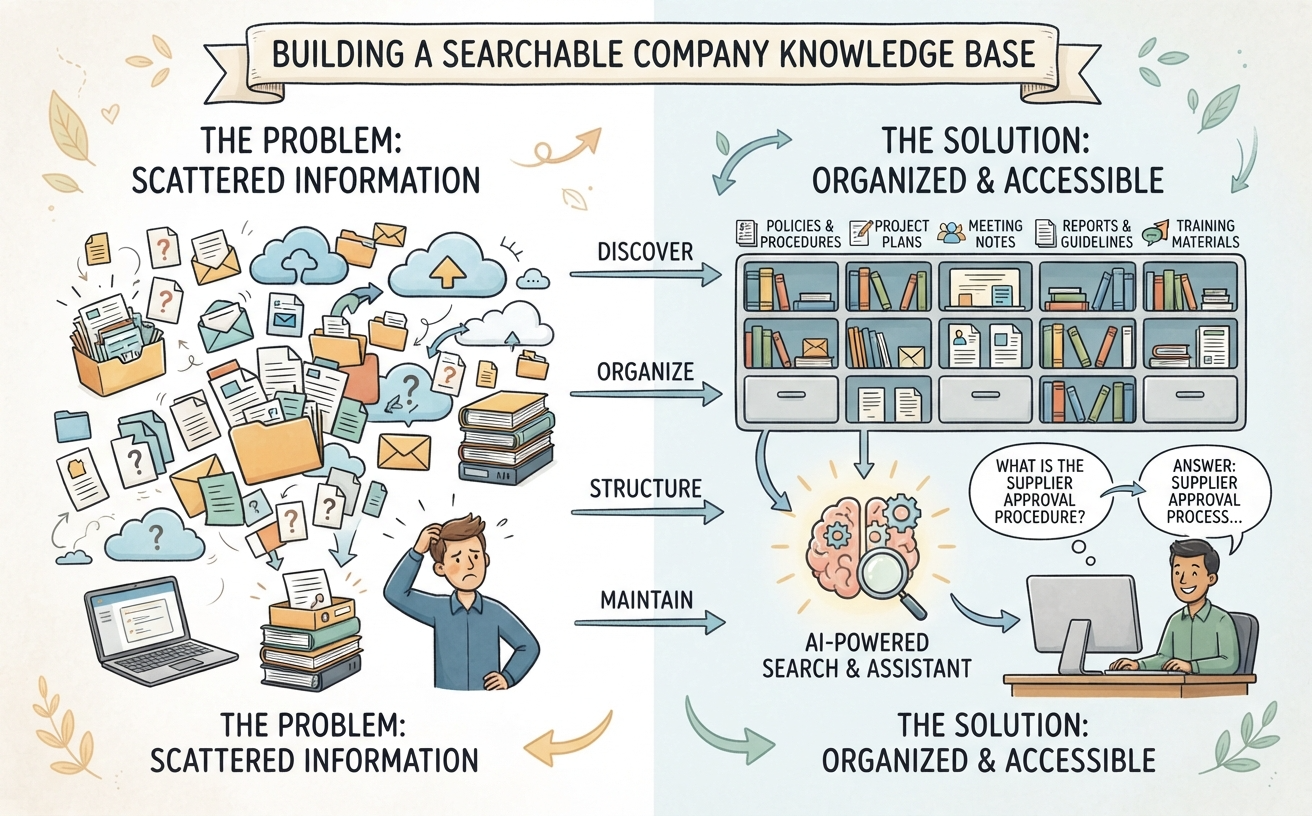
Most organizations accumulate documents faster than they organize them. Over time, important information becomes scattered across shared folders, email attachments, spreadsheets, project directories, cloud storage, and individual employees’ computers.
The information may already exist, but finding it is another matter. An employee might spend considerable time searching for the latest procedure, locating a project decision, or identifying which document contains the information needed to complete a task.
A searchable company knowledge base can help solve this problem. It provides a more structured way to collect, organize, and retrieve business information, making existing documents easier for employees to discover and reuse.
Building one does not necessarily require a complicated technology project. The most important work is understanding what information the organization has, deciding how it should be managed, and making it accessible through an appropriate search experience. AI can further improve this experience by allowing employees to ask questions in natural language rather than relying entirely on filenames and keywords.
Why Are Company Documents So Difficult to Find?
Document fragmentation is a common consequence of business growth. Different departments adopt different tools, employees develop their own filing habits, and projects create new collections of documents over time.
Several problems tend to emerge.
Documents are stored in too many places
Some information may be stored in a shared drive, while related documents are kept in a project management system or an employee’s personal workspace. Important decisions may only appear in email conversations or meeting notes.
Employees therefore need to remember not only what they are looking for, but also where the information might have been stored.
There are multiple versions of the same document
A procedure may exist in several versions, each with a slightly different filename. A project team may have one copy of a specification while another department maintains a modified version.
Without clear version management, employees may use outdated information without realizing that a newer version exists.
Filenames and folder structures are inconsistent
Documents are often named according to individual preferences rather than a shared convention. A file called “Final_Report_v3” may be difficult to identify months later, particularly when several projects use similar naming patterns.
Folder structures can also become complicated as new categories and subfolders are added without an overall information architecture.
Important information is buried inside long documents
Even when employees find the correct file, they may still need to search through dozens of pages to locate a particular requirement, decision, instruction, or figure.
Finding a document and finding the answer inside that document are two different challenges.
What Is a Searchable Company Knowledge Base?
A searchable company knowledge base is a structured collection of organizational information that employees can search to find relevant documents, answers, procedures, and reference material.
It may contain different types of business information, including:
- Policies, guidelines, and standard operating procedures.
- Project specifications, plans, and reports.
- Meeting notes and decision records.
- Product documentation and service information.
- Employee training materials and internal FAQs.
- Technical documentation and system references.
- Research, proposals, and business analysis documents.
A traditional knowledge base often organizes information into categories, pages, folders, and searchable records. Employees locate material by browsing or entering keywords.
A more advanced knowledge base may also use AI-powered retrieval. This allows employees to ask questions in ordinary language and receive responses based on relevant information retrieved from connected documents.
The objective is the same in both cases: make useful organizational knowledge easier to find and use.
Step 1: Discover Where Your Company Information Lives
Before building a knowledge base, identify the information sources that already exist. There is little value in designing a new structure without understanding what the organization needs to manage.
Start by reviewing the main places where employees store or exchange information:
- Shared network drives and cloud storage.
- Departmental folders and project workspaces.
- Email attachments and archived correspondence.
- Document management and collaboration platforms.
- Meeting notes and internal reports.
- Existing knowledge bases and intranet pages.
- Personal workspaces containing business-critical material.
It may help to involve representatives from different departments. Each team can identify its important information sources and explain how employees currently find and use documents.
At this stage, do not attempt to move every file into one location. First understand the landscape and identify which information is valuable, frequently used, or difficult to retrieve.
Step 2: Decide What Belongs in the Knowledge Base
Not every file needs to become part of a shared knowledge base. Temporary drafts, duplicate attachments, obsolete exports, and personal working files may not provide lasting organizational value.
A useful starting point is to prioritize information that employees need repeatedly or that supports important business activities.
Consider including:
- Authoritative documents: Approved policies, procedures, standards, and official guidelines.
- Operational knowledge: Instructions, checklists, and reference material used in daily work.
- Project knowledge: Requirements, decisions, reports, and lessons learned.
- Organizational knowledge: Department information, business terminology, and internal practices.
- Technical knowledge: System documentation, architecture references, and troubleshooting guides.
For each category, decide who owns the information and whether it should be available to everyone or only selected employees.
Starting with a manageable collection is usually more effective than attempting to consolidate an organization’s entire document history immediately.
Step 3: Organize Documents with a Consistent Structure
Once the important information sources have been identified, establish a structure that helps employees understand what they are looking at and where related information belongs.
A simple classification system might organize documents by:
- Department or business function.
- Project or customer.
- Document purpose or category.
- Business process or subject area.
- Document status, such as draft, approved, or archived.
For example, a company might create a knowledge structure with categories for Human Resources, Finance, Operations, Sales, and Project Delivery. Each category can then contain relevant procedures, reference documents, and departmental knowledge.
The structure should reflect how employees think about and use information. Avoid creating too many levels of folders or overly complicated classifications. If employees need extensive training just to understand where documents belong, the system may be too complex.
Step 4: Add Metadata to Make Information Easier to Find
Folders provide one way to organize documents, but they are not always sufficient. Metadata adds descriptive information that can improve searching, filtering, and management.
Depending on the organization’s needs, useful metadata may include:
- Document title and description.
- Department or business owner.
- Project or subject area.
- Document type.
- Creation and last-updated dates.
- Version or approval status.
- Keywords and relevant topics.
For example, a document titled “Supplier Approval Procedure” could be tagged with the department “Procurement,” the category “Operating Procedure,” and the status “Approved.”
This additional context makes it easier to locate the document even when employees do not remember its exact filename.
Metadata should remain practical. Define a small set of useful fields and apply them consistently rather than asking employees to complete an unnecessarily long list of attributes for every file.
Step 5: Establish Document Ownership and Version Control
A knowledge base can quickly lose its value if employees cannot determine whether information is current and authoritative.
Organizations should establish clear rules for maintaining important documents.
Assign an owner to important information
Each critical document or knowledge category should have an individual or team responsible for its accuracy. The owner does not necessarily need to update every document personally, but someone should be accountable for reviewing it.
Distinguish approved information from drafts
Employees should be able to recognize whether a document is an official reference, a working draft, or an archived record. This distinction is particularly important for procedures, policies, and compliance-related material.
Keep track of changes
Where possible, use document management features that maintain version history and identify recent changes. Avoid creating multiple competing copies of important documents without a clear indication of which one is authoritative.
Review outdated information
Some information becomes obsolete as processes, products, and organizational responsibilities change. Establish a review schedule appropriate to the document’s purpose and business importance.
These practices help prevent a searchable knowledge base from becoming a larger collection of outdated information.
Step 6: Make Sure Employees Can Access the Right Information
A central knowledge base should make information easier to find, but it should not automatically make every document available to every employee.
Some information may be intended for a particular department, project team, or management group. Other records may contain confidential business information or personal data.
Organizations should consider:
- Which employees need access to each knowledge category.
- Whether permissions should follow existing departmental or project responsibilities.
- How access is granted and revoked when employees change roles.
- Whether external collaborators require restricted access.
- How sensitive information is handled by search and AI services.
These considerations become especially important when introducing AI-powered search. The system should be configured so that its retrieval and response behavior respects the organization’s intended access arrangements.
Businesses should verify how permissions are enforced in the complete solution rather than assuming that a document repository’s existing access rules automatically carry over to every connected AI component.
Step 7: Introduce AI-Powered Search and Question Answering
Once documents are collected and organized, AI can provide a more natural way for employees to explore the knowledge base.
Traditional search generally requires users to enter keywords, browse results, and open documents to locate relevant passages. AI-powered retrieval can make this process more conversational.
For example, instead of searching for a filename, an employee could ask:
- What is the procedure for approving a new supplier?
- Which documents explain the current customer onboarding process?
- What were the main decisions made during the last project review?
- Where can I find the technical requirements for this system?
- What is the difference between the two versions of this procedure?
A system using Retrieval-Augmented Generation (RAG) can search connected knowledge sources, retrieve information relevant to the question, and provide that material as context for an AI model to generate a response.
This approach offers several benefits:
- Natural-language questions: Employees can describe what they need without knowing the exact filename or keyword.
- Information across documents: Relevant material may be retrieved from several connected sources.
- Less manual browsing: Employees can receive an initial answer or summary without opening every document individually.
- More accessible knowledge: People who are unfamiliar with the folder structure can still explore available information.
However, AI-powered search does not eliminate the need for good document management. If information is missing, outdated, poorly prepared, or inaccessible to the retrieval system, the resulting answers may be incomplete or misleading.
Employees should also be able to consult the original documents when verifying important information. AI-generated answers are useful starting points, not substitutes for authoritative records or professional judgment.
Step 8: Make Knowledge Maintenance Part of Everyday Work
A knowledge base should evolve as the organization changes. New projects generate documents, procedures are updated, and employees discover information that should be shared with colleagues.
Without an ongoing maintenance process, the knowledge base may gradually become outdated and less trustworthy.
To keep it useful:
- Encourage employees to contribute reusable knowledge when completing important work.
- Record decisions and lessons learned during project reviews.
- Review frequently used procedures when business processes change.
- Assign owners to important knowledge categories.
- Remove or archive obsolete material according to organizational policies.
- Collect feedback about missing information and unsuccessful searches.
It is also helpful to monitor whether employees are actually using the knowledge base. Frequent searches that produce poor results may indicate missing documents, unclear classifications, or gaps in the search experience.
Over time, these observations can guide improvements to both the content and the way employees access it.
Common Mistakes to Avoid
Building a searchable company knowledge base is not simply a matter of moving files into a new platform. Several common mistakes can undermine the project.
Trying to consolidate everything at once
Attempting to migrate every document from every department can create a large and difficult project. Start with important information sources and expand gradually.
Ignoring document quality
Duplicate, outdated, incomplete, or poorly structured documents can make search results less useful. Review important content before making it a trusted knowledge resource.
Overcomplicating the classification system
Too many categories, folders, and metadata fields can discourage employees from contributing information. Keep the structure understandable and consistent.
Assuming AI will fix poor information management
AI can improve how employees discover and explore information, but it cannot automatically resolve every problem in the underlying documents. Content quality, ownership, and maintenance remain essential.
Forgetting access control
Making information searchable should not mean making confidential information available to everyone. Permissions and data-handling arrangements must be considered from the beginning.
Turning a Document Collection into an AI-Powered Knowledge Resource
For organizations that want to combine knowledge management with AI-powered question answering, Visual Paradigm’s Private AI solution for enterprise knowledge brings together tools for collecting business knowledge, exploring it through AI, and producing useful work outputs.
The offering includes:
- NotesKeep and tailored AI prompts: A place to collect and organize corporate notes and documents, supported by reusable prompts for recurring knowledge-related tasks.
- AI Chatbot: A conversational interface for asking questions and receiving context-aware assistance using selected knowledge sources.
- OpenDocs: Tools for creating, organizing, and sharing documentation and reports.
- Diagram Editing Tool: Capabilities for turning written information into visual models, diagrams, and process representations.
Visual Paradigm also provides deployment setup, live online team training, and ongoing technical advisory and support. Organizations can explore self-hosted infrastructure on-premises or on dedicated cloud GPU resources, or connect the tools to a cloud AI provider using their own account and endpoint credentials.
This provides an option for businesses that want to make organizational knowledge more accessible through AI without assembling every software component and implementation resource independently.
Conclusion: Make Existing Company Knowledge Easier to Use
Most organizations already possess a substantial amount of useful knowledge. The challenge is that it is often distributed across documents, systems, departments, and individual workspaces.
A searchable knowledge base helps bring order to this information. By identifying important sources, applying consistent classifications, maintaining document quality, and establishing appropriate access arrangements, businesses can make their existing knowledge easier to discover and reuse.
AI-powered retrieval adds another layer of convenience by allowing employees to ask questions in natural language and explore information across connected documents.
The best starting point is not necessarily a large technology project. Begin with a specific information-access problem, organize the knowledge needed to address it, and introduce better search capabilities as the foundation improves.
Ultimately, the value of a company knowledge base is measured not by how many documents it contains, but by how effectively people can find and use the information they need.
Frequently Asked Questions
What is a company knowledge base?
A company knowledge base is a centralized or logically organized collection of business information, such as policies, procedures, project records, reports, and internal documentation. It helps employees find and reuse organizational knowledge.
How do I make company documents searchable?
Start by identifying the locations where documents are stored, selecting the information that should be included, and applying consistent organization and metadata. Then use a document management or knowledge management platform with suitable search capabilities. AI-powered retrieval can provide an additional way to search using natural-language questions.
Can AI search across multiple company documents?
Yes, an AI-powered knowledge assistant can retrieve relevant information from multiple connected documents when the underlying system supports those sources and formats. It can use the retrieved information to formulate an answer. The results depend on the quality and accessibility of the connected material.
What is the difference between document management and knowledge management?
Document management focuses on storing, organizing, controlling, and maintaining documents. Knowledge management has a broader objective: helping an organization capture, share, understand, and reuse information and experience. Document management is often an important part of a wider knowledge management approach.
Does a searchable knowledge base need AI?
No. Traditional search, metadata, and well-organized categories can already make documents easier to find. AI adds capabilities such as natural-language question answering, summarization, and retrieval across related documents, but it is not a prerequisite for building a useful knowledge base.
How can a business keep its knowledge base up to date?
Assign owners to important information, establish review schedules, maintain version history, and encourage employees to contribute updates as part of their normal work. Frequently used procedures and critical reference documents should receive particular attention.