


Introduction to AI-Enhanced Project Planning
Starting a new project often brings a rush of adrenaline, but that energy can quickly dissipate when faced with the logistical reality of organizing tasks, deadlines, and resources. Traditional methods involving sticky notes, spreadsheets, or manual whiteboarding often result in oversight and confusion. This is where Artificial Intelligence (AI) serves as a transformative tool. By utilizing an AI-powered Work Breakdown Structure (WBS) generator, project managers can convert abstract ideas into structured, actionable blueprints in seconds. This guide explores how to leverage this technology to streamline your workflow and ensure no task is left behind.

Key Concepts
Before diving into the generation process, it is essential to understand the core components that make AI-driven WBS tools effective.
- Work Breakdown Structure (WBS): A hierarchical decomposition of the total scope of work to be carried out by the project team to accomplish the project objectives and create the required deliverables.
- AI Generator: A software tool that utilizes machine learning and natural language processing to analyze project descriptions and automatically construct a logical hierarchy of tasks, phases, and dependencies.
- Critical Path & Dependencies: The sequence of stages determining the minimum time needed for an operation. AI tools help identify these relationships to prevent bottlenecks where one task delays the entire project.
Guidelines: Step-by-Step Tutorial
Follow these steps to transform a high-level project concept into a detailed professional WBS using an AI generator like Visual Paradigm Online.
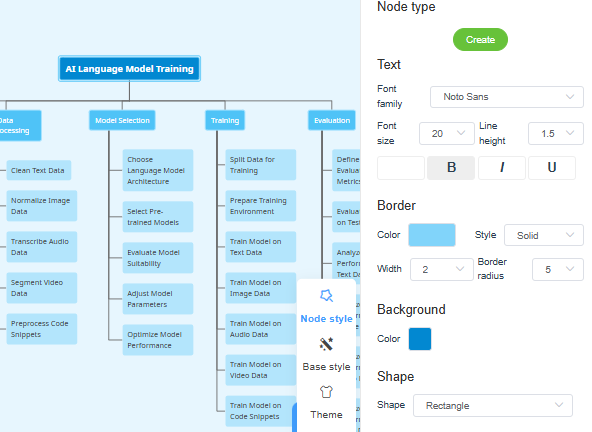
Step 1: Input Project Details
The foundation of a successful AI-generated plan is the quality of the input. Navigate to the generator interface and input your project description. Whether it is a “Mobile app launch,” “Office relocation,” or “New product development,” clarity is key. The AI analyzes your scope and requirements to build the structural foundation.
Step 2: Generate the Preliminary Structure
Once the prompt is entered, initiate the generation process. The AI system will process the data to:
- Organize tasks into logical, chronological phases.
- Identify critical dependencies between tasks.
- Suggest an optimal breakdown of sub-tasks.
- Include often-missed administrative steps such as permits, testing phases, and stakeholder approvals.
Within seconds, you will receive a comprehensive, professional WBS draft ready for review.
Step 3: Customize and Refine
While the AI provides a robust starting point, human intuition is required to finalize the plan. Use the tool’s intuitive drag-and-drop functionality to:
- Restructure Hierarchy: Reorganize tasks or adjust the depth of the hierarchy to better match your team’s workflow.
- Establish Dependencies: Manually link tasks to ensure the critical path is accurate and reflects specific resource availability.
Step 4: Assign and Implement
Transform the diagram into an action plan. Assign clear ownership to each node in the WBS by specifying team members, setting urgency levels, and defining hard deadlines. This step ensures accountability and keeps critical path items on schedule.
Tips and Tricks for Efficiency
Maximize the utility of your AI WBS generator with these strategic tips:
- Use for Kickoff Meetings: Instead of starting with a blank whiteboard, generate a draft WBS before your first meeting. This eliminates the “blank page syndrome” and provides a tangible structure for the team to critique and improve immediately.
- Export for Stakeholders: Use the reporting features to export stakeholder-ready WBS reports. This enhances project visibility without requiring non-technical stakeholders to learn the software.
- Industry-Specific Phasing: When inputting your prompt, mention your industry (e.g., “Agile Software Development” or “Construction”). The AI often adapts its logic to include industry-standard phases, such as “Excavation” for construction or “Sprint Planning” for software.
Best Practices
To ensure your WBS remains a valuable asset throughout the project lifecycle, adhere to these best practices.
Review for Compliance and Safety
AI is excellent at operational tasks but may overlook specific regulatory nuances. Always review the generated WBS to ensure it includes compliance checks, safety protocols, and legal reviews, particularly in industries like Healthcare and Construction.
Maintain Consistent Hierarchy Depth
For better readability and execution, ensure the WBS maintains a balanced hierarchy. Avoid having one phase broken down into ten levels of detail while another remains high-level. The AI generally attempts to balance this, but manual adjustment ensures uniformity.
Comparison: AI vs. Manual Planning
Understanding the advantages of AI over manual planning can help you justify the tool adoption to leadership. See the comparison below:
| Traditional WBS Challenges | AI-Powered Advantages |
|---|---|
| Days wasted in manual planning sessions | Professional draft created in minutes |
| Inconsistent task depth causing confusion | Perfectly balanced hierarchy generated automatically |
| Critical dependencies frequently missed | Automatic relationship mapping to prevent bottlenecks |
| Static documents requiring constant updates | Real-time collaborative editing and adaptation |
By adopting these tools, teams can save up to 80% of planning time, allowing project managers to focus less on administrative structuring and more on execution and team leadership.
-
AI-Powered Visual Modeling and Design Solutions by Visual Paradigm: Explore cutting-edge AI-driven tools for visual modeling, diagramming, and software design, enabling faster, smarter development workflows.
-
AI Chatbot Feature – Intelligent Assistance for Visual Paradigm Users: Leverage AI-powered chatbot functionality to get instant guidance, automate tasks, and enhance productivity within Visual Paradigm.
-
Visual Paradigm Chat – AI-Powered Interactive Design Assistant: An interactive AI chat interface that helps users generate diagrams, write code, and solve design challenges in real time.
-
AI Textual Analysis – Transform Text into Visual Models Automatically: Use AI to analyze text documents and automatically generate diagrams such as UML, BPMN, and ERD for faster modeling and documentation.
-
Visual Paradigm AI Chatbot Enhances Multi-Language Support …: 7 hours ago · Discover the latest updates to Visual Paradigm ‘s AI -Powered visual modeling software, including multi-language UI and improved chat content localization. Experience seamless AI diagram generation in languages like Spanish, French, Chinese, and more with our AI chatbot for UML and other diagrams.
-
AI Chatbot for Diagramming: How It Works with Visual Paradigm: The Visual Paradigm AI chatbot is an AI -powered modeling assistant that turns natural language into diagrams. It doesn’t require users to learn specific modeling standards or syntax.
-
AI-Powered Use Case Diagram Refinement Tool – Smart Diagram Enhancement: Leverage AI to automatically refine and optimize your use case diagrams for clarity, consistency, and completeness.
-
Convert Use Case to Activity Diagram – AI-Powered Transformation: Automatically convert use case diagrams into detailed activity diagrams using AI to visualize system workflows.
-
AI-Assisted UML Class Diagram Generator – Visual Paradigm: An interactive, step-by-step tool to help users create UML class diagrams with AI-powered suggestions, validation, PlantUML export, and design analysis.
-
Mastering UML Activity Diagrams with AI | Visual Paradigm Blog: A blog post exploring how AI-powered features in Visual Paradigm enhance the creation and optimization of UML activity diagrams for developers and analysts.
-
Visual Paradigm AI Diagram Generation Guide: A comprehensive step-by-step guide to using Visual Paradigm’s AI-powered tools for generating diagrams quickly and accurately.
-
AI Diagram Generation Features in Visual Paradigm: Explore the advanced AI capabilities in Visual Paradigm that enable users to generate diagrams from natural language descriptions.
-
Visual Paradigm AI Diagram Generator Release Notes: Official release notes detailing the latest updates and enhancements to the AI Diagram Generator in Visual Paradigm.
-
Visual Paradigm’s AI Diagram Generator Expands Instant Creation Capabilities: Coverage of how Visual Paradigm’s AI diagram generator now supports instant creation of DFDs, ERDs, mind maps, and more.
-
New Diagram Types Added to AI Diagram Generator: DFD & ERD: Announcement of expanded AI diagram generation support for Data Flow Diagrams (DFD) and Entity Relationship Diagrams (ERD).
-
AI Diagram Generator Now Supports Package Diagrams in Visual Paradigm: New release enabling AI-generated package diagrams for better software architecture visualization.
-
AI Diagram Generator Adds Radar Chart Support: Visual Paradigm introduces AI-powered radar chart generation for visualizing complex performance and capability metrics.
-
Comprehensive Tutorial: Generating ArchiMate Diagrams with AI: In-depth tutorial showing how to use Visual Paradigm’s AI diagram generator to create ArchiMate diagrams and viewpoints efficiently.
-
From Problem Description to Class Diagram: AI-Powered Textual Analysis: Explore how Visual Paradigm uses AI to convert natural language problem descriptions into accurate class diagrams for software modeling.
-
How to Translate Text in Images for UML, BPMN, and Flowcharts: Step-by-step guide on using AI-powered tools to extract and translate text in technical diagrams for global collaboration and localization.
Related posts:
 Mastering the 4 Pillars of AI in Visual Paradigm: A Comprehensive Tutorial & Experience Showcase
Introduction: Why I Switched to AI-Assisted UML Modeling
Mastering UML Class Diagrams: A Review of Visual Paradigm’s Learning Resources
Visual Paradigm Pipeline & OpenDocs: The Ultimate Guide to Seamless Concept-to-Docs Workflow
Mastering the 4 Pillars of AI in Visual Paradigm: A Comprehensive Tutorial & Experience Showcase
Introduction: Why I Switched to AI-Assisted UML Modeling
Mastering UML Class Diagrams: A Review of Visual Paradigm’s Learning Resources
Visual Paradigm Pipeline & OpenDocs: The Ultimate Guide to Seamless Concept-to-Docs Workflow