


Software development demands clarity, precision, and collaboration—especially when translating abstract ideas into working systems. Unified Modeling Language (UML) has long served as a universal visual language for designing and documenting software architecture. But creating UML diagrams traditionally requires deep knowledge of syntax, meticulous layout, and time-consuming manual work. Enter AI-powered modeling tools—like those in Visual Paradigm—that transform how developers and stakeholders design, refine, and maintain system models.
What Is UML and Why Does It Matter?
UML is a standardized visual notation for specifying, visualizing, and documenting software systems. It offers a shared language across teams, helping architects, developers, and business analysts align on system behavior and structure without relying on specific programming languages. From use cases to class diagrams, sequence flows to component layouts, UML provides a structured way to represent complex systems in a way that’s both intuitive and technically sound.
Despite its power, traditional UML modeling can be daunting. With over 700 pages of specifications, mastering UML syntax and notation requires significant time and expertise. This barrier often leads to incomplete or inaccurate diagrams—especially in fast-paced environments like agile development.
The Rise of AI in UML Modeling
Modern tools are changing the game. Visual Paradigm is leading the shift toward AI-augmented software modeling, offering a platform that goes beyond basic diagramming. It’s not just a drawing tool—it’s a collaborative co-pilot that helps bridge the gap between requirements and implementation.
With AI-driven features like the AI Diagram Chatbot and AI Diagram Generator, users can now create professional UML diagrams using natural language. Instead of starting with a blank canvas, you describe your system in plain English and let AI do the heavy lifting.
Visual Paradigm Desktop: AI Enabled Modeler
VP Desktop is Visual Paradigm’s flagship application, blending robust offline modeling with integrated AI capabilities.
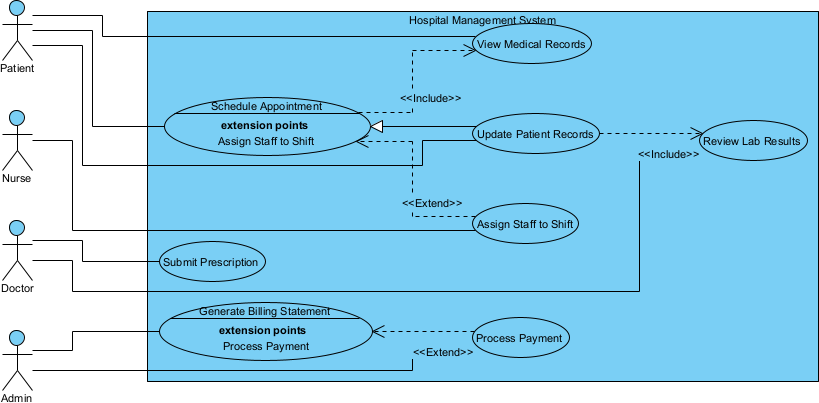
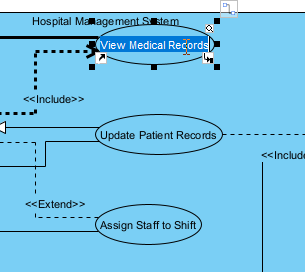
It appears as a fully editable, native Visual Paradigm diagram (not just an image). You can rename elements and update the layout:
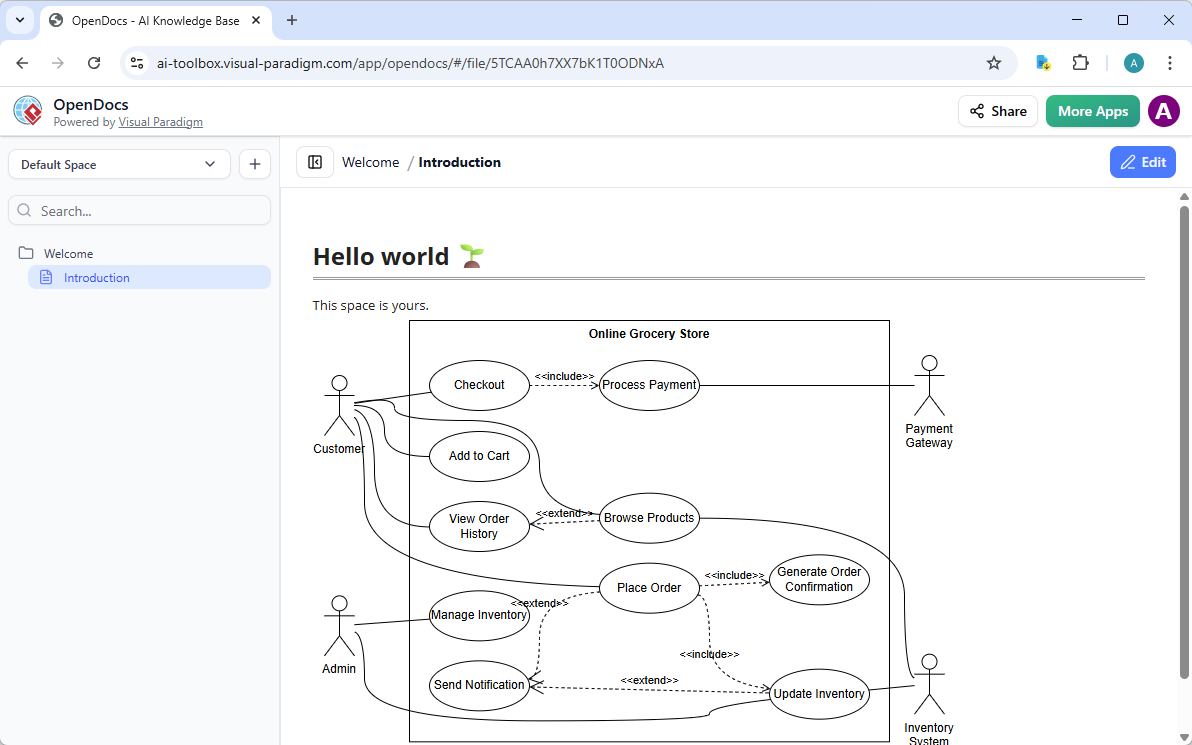
Visual Paradigm OpenDocs: Smart, AI Powered Knowledge Management Platform
OpenDocs redefines knowledge sharing by combining document creation with AI-assisted diagramming. Think of it as a smart wiki or Notion-like platform where use case diagrams become living, editable elements within your content.
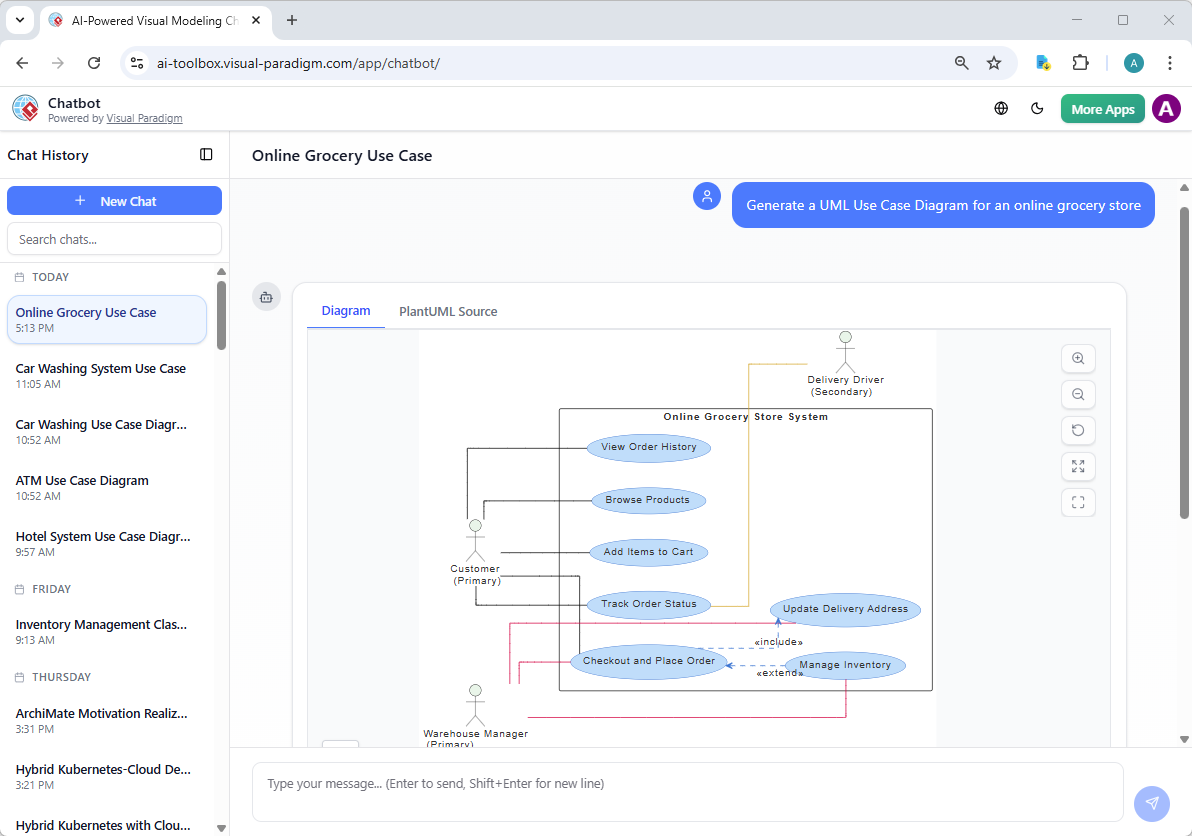
Visual Paradigm AI Chatbot for Visual Modelers
The AI Visual Modeling Chatbot turns diagramming into an interactive conversation. Available standalone or integrated with other platforms, it’s perfect for brainstorming, quick prototyping, and iterative design.
Why AI-Powered UML Works Better
Eliminates the “Blank Canvas” Problem
Starting from scratch is one of the biggest hurdles in modeling. AI removes this friction by offering a professional, structured starting point. Instead of wrestling with layout and notation, you focus on logic and behavior.
Lowers the Learning Curve
You don’t need to be a UML expert to create accurate models. Whether you’re a junior developer, product manager, or business analyst, AI lets you express system behavior in natural language and get a technically correct diagram in return.
Keeps Models “Living”
AI-generated diagrams aren’t static images. They’re editable, native projects that can be synchronized with source code (Java, C#, Python) and integrated into technical documentation via Visual Paradigm’s OpenDocs. This means your models evolve with your system, not just during planning.
Accelerates Agile Workflows
In agile environments, modeling often happens on the fly. AI enables just-in-time modeling—teams can visualize and validate architectural decisions in seconds, before writing a single line of code. This speeds up sprint planning, reduces rework, and improves communication across roles.
Use Case Example: E-Commerce System
Imagine you’re designing an online shopping platform. With AI, you can describe the core flow:
“A customer logs in, browses products, adds items to a cart, applies a discount, and completes the checkout process. An admin can view sales reports and manage inventory.”
The AI translates this into a Use Case Diagram with actors (Customer, Admin), use cases (Login, Add to Cart, Checkout), and relationships. You can then refine it with additional details—like error handling for failed payments or role-based access.
For deeper analysis, you can switch to a Sequence Diagram to model the interactions between the user, the frontend, the cart service, and the payment gateway. The AI generates the sequence, showing message flows and timing—helping identify potential bottlenecks.
The Future of Software Modeling
AI is not replacing software architects or designers—it’s augmenting their capabilities. By handling the mechanical aspects of diagram creation, AI frees up mental bandwidth for strategic thinking, system optimization, and innovation.
Tools like Visual Paradigm are setting a new standard: where modeling is intuitive, accurate, and integrated into the development lifecycle. Whether you’re a solo developer or a large team, AI-powered UML modeling makes it easier to build better software—faster and with fewer misunderstandings.
Reference List
- What is UML? – Visual Paradigm UML Guide: Foundational overview of the Unified Modeling Language as a standardized visual notation for specifying, visualizing, constructing, and documenting software systems; covers UML’s history, structural vs. behavioral diagrams, OMG standardization, and its essential role in object-oriented analysis, design, and communication across teams.
- Why Use UML Modeling? – Visual Paradigm: Explains UML’s key benefits: enhanced communication between stakeholders, clearer system architecture, early detection of design flaws, support for model-driven development, code generation/reverse engineering, maintainability, and standardization across software projects of any scale.
- Overview of the 14 UML Diagram Types – Visual Paradigm: Comprehensive summary of all 14 official UML 2.5 diagrams: structural (class, object, package, component, composite structure, deployment, profile) and behavioral (use case, activity, state machine, sequence, communication, interaction overview, timing); includes purpose, key elements, and when to use each for complete system modeling.
- AI-Assisted UML Class Diagram Generator – Visual Paradigm: Browser-based AI wizard that generates editable class diagrams from natural language or step-by-step prompts; identifies classes, attributes, operations, relationships (inheritance, association, aggregation, composition), multiplicities, and validations; includes PlantUML code preview, SVG export, AI critique, and project saving for rapid OO design.
- AI-Generated UML Communication Diagrams – Visual Paradigm: Demonstrates AI’s ability to create communication diagrams (showing object roles, links, and message sequences) from text scenarios; highlights focus on interactions without strict timing, automatic numbering, and refinement via chat for clearer object collaboration modeling.
- Generate UML Class Diagrams from Text with AI – Visual Paradigm: Practical guide to AI-powered class diagram creation: input system descriptions, let AI extract classes/relationships, generate layout, iterate via prompts, preview/export, and import to Visual Paradigm for code generation or further modeling.
- Comprehensive Guide: UML Sequence Diagrams with AI-Powered Generation – ArchiMetric: Step-by-step walkthrough of AI-assisted sequence diagram creation in Visual Paradigm: text-to-diagram for lifelines, messages, activations, combined fragments (alt, loop, par), refinements via chat, and best practices for capturing dynamic interactions and scenarios.
- Comprehensive Review: Visual Paradigm’s AI Diagram Generation Features – Fliplify: Third-party analysis evaluating AI tools for UML/BPMN/SysML: fast standards-compliant generation, conversational refinement, high accuracy, usability for all levels, integration with Visual Paradigm ecosystem, and substantial productivity gains in modeling workflows.
- Harnessing Visual Paradigm’s AI for Diagram Generation: The Ultimate 2026 Guide – ArchiMetric: Forward-looking resource on leveraging Visual Paradigm AI in 2026: advanced prompt techniques, multi-diagram consistency, intelligent suggestions, standards adherence, and evolving role of AI as a co-pilot in modern software architecture and systems modeling.
- AI Activity Diagram Generation in Visual Paradigm Desktop – Updates: Release notes on desktop AI feature for generating UML activity diagrams from text/use cases/workflows: automatic handling of actions, decisions, forks/joins, swimlanes, exceptions, intelligent layout, and seamless integration with other UML tools for process and workflow modeling.
- Use Case Modeling Studio – Visual Paradigm: AI-powered web tool that transforms high-level goals or text into detailed use case specifications, generates multiple diagrams (use case, activity, sequence, class, ERD), produces test cases, and enables interactive refinement to bridge requirements analysis to design and testing.
- UML Modeling Tool – Visual Paradigm: Comprehensive UML support with all 14 diagram types, drag-and-drop editing, model validation, code engineering (generation/reverse), documentation generation, teamwork features, and deep AI integration for accelerated diagram creation and refinement across the development lifecycle.
- AI Diagram Generator – Visual Paradigm: Instant text-to-diagram AI supporting UML (and other standards): generates clean, editable diagrams from natural language, automatic layout, contextual understanding, iterative chatbot refinement, and direct import to Visual Paradigm for professional modeling without manual effort.