


Creating professional slide decks has traditionally been a labor-intensive process, often requiring hours of wrestling with layout adjustments and complex animation timelines. Visual Paradigm’s AI Markdown Presentation Maker offers a streamlined alternative, utilizing artificial intelligence and Markdown syntax to convert raw ideas into polished, animated slideshows in seconds. This step-by-step guide will walk you through how to leverage this tool to generate, customize, and animate presentations with efficiency and style.
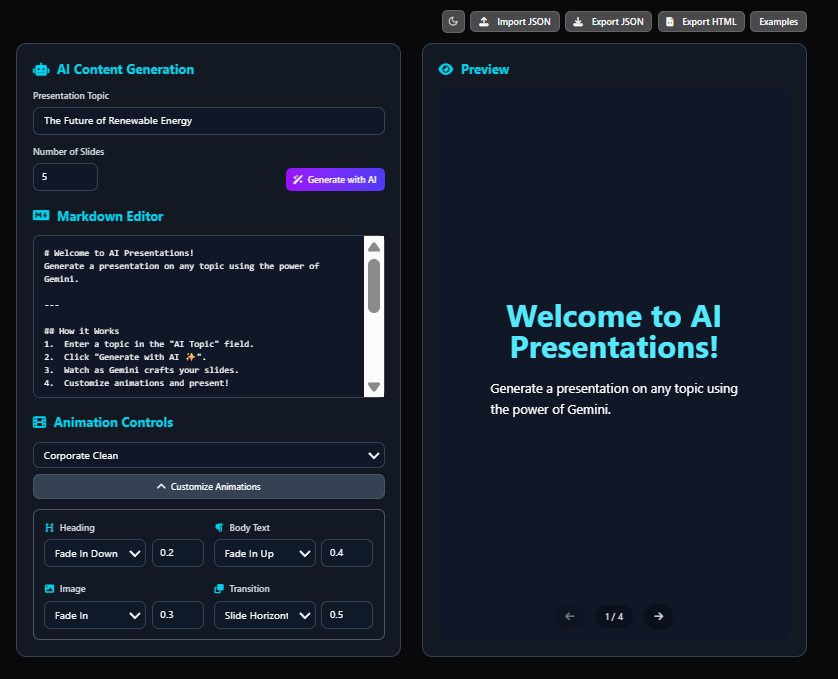
Step 1: Generating the Core Structure with AI
The first step in modernizing your presentation workflow is to bypass the blank canvas. Instead of manually creating slides one by one, you can use the AI accelerator to generate a comprehensive draft instantly.
To get started, simply input your central topic into the tool. Whether you need a quick 5-slide summary or an in-depth 20-slide lecture, the AI analyzes your request and auto-crafts a full slideshow. This includes appropriate titles, structured body content, and a logical flow. For example, inputting “Sustainable Energy Solutions” can instantly yield a 12-slide deck complete with headings and bullet points, saving you significant brainstorming and formatting time.
Step 2: Refining Content Using Markdown
Once the AI has generated the base content, the next phase is refinement. Unlike traditional presentation software that relies on drag-and-drop mechanics, this tool uses intuitive Markdown syntax. This approach allows for rapid editing without the learning curve of complex design interfaces.
You can edit your content on the fly using standard formatting keys you are likely already familiar with. The Real-Time Preview feature ensures that every keystroke—whether adding bold text, creating lists, or inserting links—is immediately reflected on the slide. This split-screen approach allows you to rehearse and perfect your delivery visually while editing the text source, eliminating guesswork.
Step 3: Applying Cinematic Animation Effects
Static slides often fail to retain audience attention. Visual Paradigm distinguishes itself by integrating a robust animation engine based on Reveal.js, allowing for Hollywood-level motion effects with minimal effort. There are two ways to approach animation within the tool.
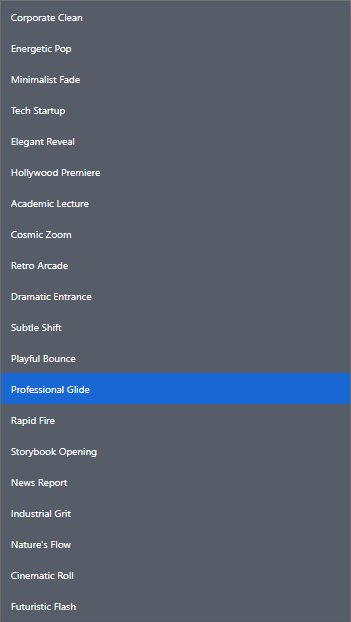
Method A: Using Packaged Animation Presets
For users who want instant results, the tool offers a library of over 20 pre-configured animation profiles. These presets apply a coordinated style across the entire deck with a single click. Depending on your audience, you might select:
- Corporate Clean: Sleek and professional, ideal for boardrooms.
- Energetic Pop: Bold transitions suitable for product launches.
- Hollywood Premiere: Dramatic entrances designed for high-stakes reveals.
- Professional Glide: Smooth, authoritative movements that serve as the gold standard for business.
Method B: Customizing Element Animations
For advanced users requiring granular control, the “Customize Animations” mode allows for fine-tuning specific elements. You can adjust the duration, delay, direction, and specific effect for headings, body text, and images. This is essential for building suspense or ensuring complex diagrams build sequentially.
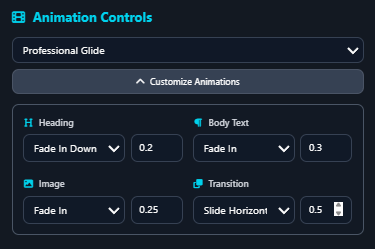
Below is an example of the default settings for the “Professional Glide” preset, illustrating how different elements are timed for a cohesive flow:
| Element | Animation Effect | Duration | Visual Result |
|---|---|---|---|
| Heading | Fade In Down | 0.2s | Title glides in smoothly from the top. |
| Body Text | Fade In | 0.3s | Text appears cleanly shortly after the title. |
| Image | Fade In | 0.25s | Visuals emerge with precise timing. |
| Slide Transition | Slide Horizontal | 0.5s | Slides glide left or right, mimicking high-end decks. |
Step 4: Exporting for Universal Compatibility
The final step is sharing your masterpiece. Traditional presentation files can be large and require specific software to run. Visual Paradigm solves this by allowing you to export your deck as a standalone HTML file.
This export method ensures that your presentation is lightweight, buttery-smooth, and compatible with any web browser. Because the animations are built on Reveal.js, the exported file works flawlessly even without an internet connection. This “no bloatware” approach is ideal for educators, entrepreneurs, and marketers who need to present offline or share their work across different operating systems without compatibility issues.
Conclusion
By shifting from manual slide design to an AI-driven Markdown workflow, you can create presentations up to 10 times faster than with traditional tools. Whether you are a student simplifying complex topics or a business professional pitching investors, Visual Paradigm’s AI Markdown Presentation Maker provides the speed of AI and the visual impact of high-end animation software, giving you a distinct advantage in communication.
-
Revolutionize Your Slides: Meet Visual Paradigm’s AI Markdown Presentation Maker!: 9 Introducing Visual Paradigm’s AI Markdown Presentation Maker
-
How to Create Stunning Animated Presentations with Visual Paradigm’s AI Markdown Presentation Maker: A step-by-step guide on leveraging AI-powered Markdown tools within Visual Paradigm to design visually engaging and dynamic presentations effortlessly.
-
Mission Model Canvas | AI-Powered Strategy Tool by VP: Coordinate live sessions with your team using the built-in timer and export your final canvas or reports into professional formats such as Word, Markdown, or CSV.
-
Mastering Visual Paradigm’s Markdown Presentation Maker: Step-by-Step Guide with AI Image Generation: This page provides a technical walkthrough of creating presentations using Markdown in Visual Paradigm, enhanced with AI-generated images for dynamic content.
-
Comprehensive Tutorial: How to Master AI Tree Diagram Maker: The AI Tree Diagram Maker (branded as IntelliTree) from Visual Paradigm is one of the most powerful AI-assisted hierarchical diagramming tools.