


Introduction
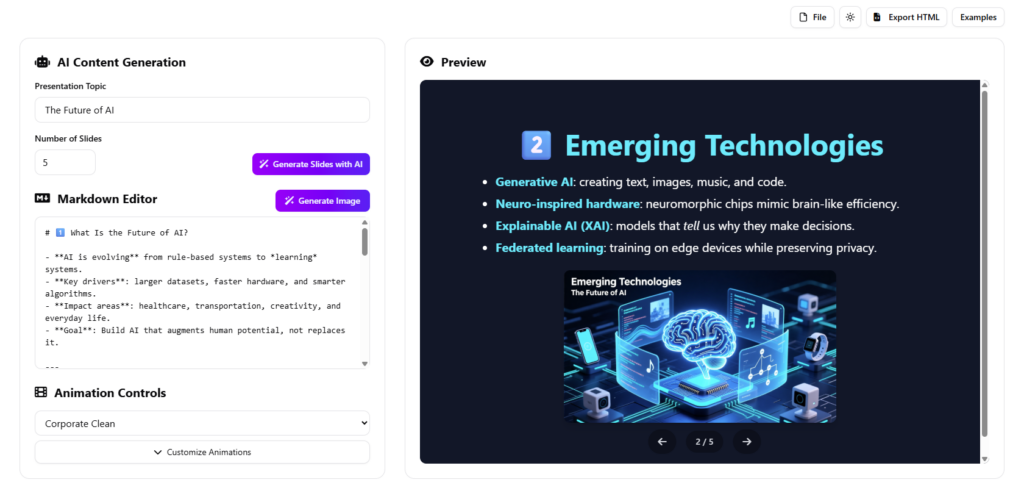
In the fast-paced world of business and academia, the ability to communicate ideas effectively is paramount. Yet, traditional slide software often creates a bottleneck, requiring hours of formatting to produce decks that frequently lack engagement. Visual Paradigm has addressed this challenge with the AI Markdown Presentation Maker, a tool designed to convert raw text and ideas into professional, animated HTML presentations in seconds. This guide explores the technical capabilities, workflow enhancements, and creative potential of this innovative platform.
Key Concepts
To fully leverage the power of this tool, it is essential to understand the foundational technologies and terms that drive it:
- Markdown: A lightweight markup language with plain text formatting syntax. It allows users to write using an easy-to-read, easy-to-write plain text format, which the software then converts into valid HTML for the presentation slides.
- Reveal.js: An open-source HTML presentation framework. Visual Paradigm leverages this technology to ensure presentations are web-based, responsive, and support advanced transitions and animations natively in a browser environment.
- AI Content Generation: The integration of Artificial Intelligence (Natural Language Processing) to interpret brief topics or prompts and automatically structure them into a coherent slide deck with appropriate titles, bullet points, and hierarchy.
- Standalone HTML Export: The ability to save a presentation as a single file that contains all necessary code and assets, allowing it to be viewed offline or shared without requiring specific proprietary software installed on the viewer’s machine.
The Core Engine: Speed and Efficiency
The primary value proposition of the AI Markdown Presentation Maker is its ability to accelerate the creation process by up to 10x compared to traditional tools. This efficiency is achieved through a three-pronged approach: Instant Generation, Intuitive Editing, and Real-Time Preview.
1. AI-Driven Content Creation
Users can input a single topic, and the underlying AI engine constructs a full narrative flow. Whether the requirement is a quick 5-slide summary or an in-depth 20-slide lecture, the tool auto-generates structured content, ensuring that the narrative arc is logical and comprehensive.
2. Markdown-Based Editing
Unlike drag-and-drop interfaces that can become cluttered, this tool utilizes Markdown syntax. This allows for rapid text formatting—such as creating bold text, lists, and links—without navigating complex menus. The learning curve is minimal, favoring users who prioritize speed and content over manual layout tweaking.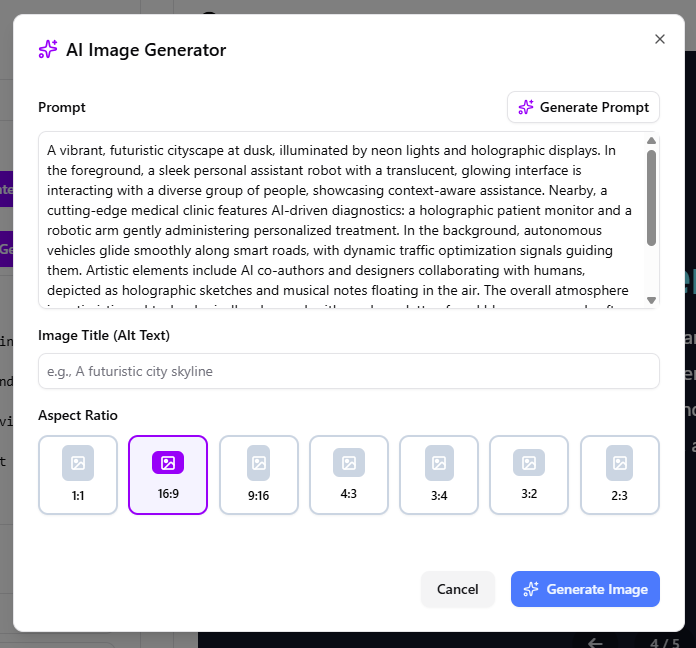
3. Live Visualization
The platform features a split-pane interface where changes in the Markdown editor are instantly reflected in a live preview. This real-time feedback loop eliminates guesswork, allowing presenters to rehearse and refine their delivery simultaneously.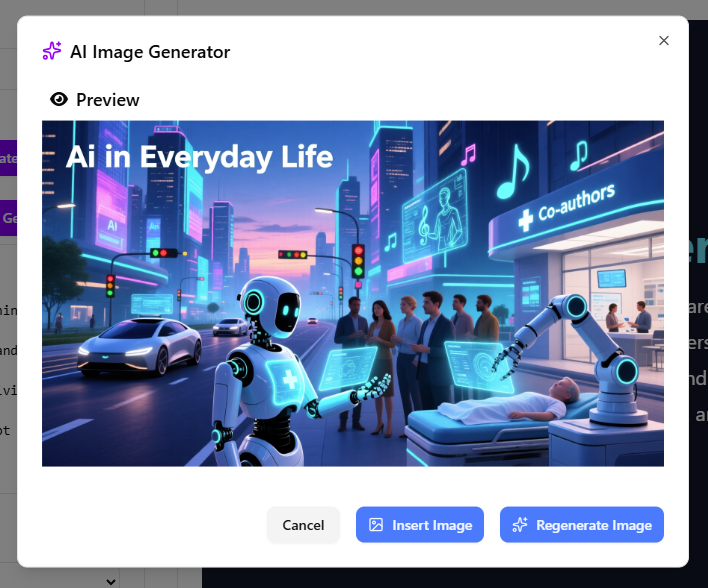
Advanced Animation Capabilities
Visual Paradigm differentiates itself from standard Markdown editors by integrating cinema-grade animations powered by Reveal.js. These are not merely static transitions but dynamic effects that enhance storytelling.
Animation Presets
The tool offers over 20 pre-configured animation profiles designed to suit various presentation tones. These presets apply a cohesive style across the entire deck with a single click. Notable styles include:
- Corporate Clean: Optimized for boardrooms and professional updates.
- Energetic Pop: High energy, suitable for product launches.
- Tech Startup: Modern and futuristic aesthetics.
- Hollywood Premiere: Dramatic entrances for high-impact storytelling.
- Academic Lecture: Clear, logical flow for educational settings.
Customizing Element Animations
For users requiring granular control, the tool allows for the customization of individual elements. Below is an example of how the “Professional Glide” preset manages timing and effects for a standard slide:
| Element | Animation Effect | Duration | Result |
|---|---|---|---|
| Heading | Fade In Down | 0.2s | Title glides in smoothly from top |
| Body Text | Fade In | 0.3s | Text appears cleanly after title |
| Image | Fade In | 0.25s | Visuals emerge with perfect timing |
| Slide Transition | Slide Horizontal | 0.5s | Slides glide left/right like a pro deck |
These settings—duration, delay, and direction—can be adjusted globally or per slide to control the pacing and build suspense.
Recent Enhancements: AI Image Generation and Workflow
As of late 2025, Visual Paradigm has introduced significant updates to further streamline the presentation workflow, specifically focusing on visual assets and collaboration.
Integrated AI Image Generation
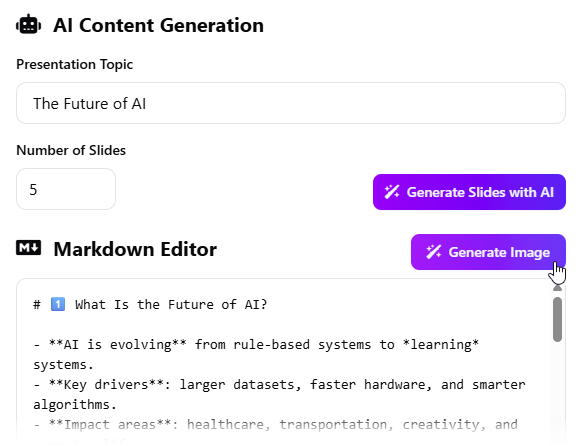
Visual appeal is critical for retention. The tool now features an embedded AI image generator, removing the need to search for stock photos or switch to external graphic design tools. The workflow involves:
- Prompt Engineering: Users describe the desired image or use the “Generate Prompt” feature to let the AI suggest a description based on the slide’s context.
- Customization: Users can select aspect ratios (16:9, 1:1, 4:3, etc.) to fit specific slide layouts and add alt text for accessibility.
- Direct Insertion: Once generated, the image is inserted directly into the active slide within the Markdown syntax.
Cloud integration and Sharing
To support modern collaborative environments, the tool now supports:
- Workspace Saving: Presentations can be saved directly to a personal user workspace, ensuring data persistence and easy access across different sessions.
- URL Sharing: After saving, users can generate a unique URL to share the presentation. This transforms the deck into a web-accessible resource, ideal for remote teams and client deliverables.
Who Benefits?
The versatility of the AI Markdown Presentation Maker makes it suitable for a wide range of professionals:
- Business Executives & Entrepreneurs: For creating persuasive investor pitches and internal updates rapidly.
- Educators: For transforming complex curriculum notes into digestible, animated lessons.
- Marketers: For developing engaging explainer content and promotional reels.
- Students: For producing high-quality academic presentations without spending excessive time on design.
Conclusion
Visual Paradigm’s AI Markdown Presentation Maker represents a significant leap forward in presentation technology. By combining the speed of Markdown, the intelligence of AI content and image generation, and the visual power of Reveal.js, it offers a robust solution for anyone looking to create high-impact presentations with minimal effort. Whether for a high-pressure corporate environment or an interactive classroom, this tool provides the technical edge required to captivate audiences.
-
Revolutionize Your Slides: Meet Visual Paradigm’s AI Markdown Presentation Maker!: 9 Dec 2025 · Introducing Visual Paradigm’s AI Markdown Presentation Maker – the game-changing tool that turns your raw ideas into stunning, animated …
-
How to Create Stunning Animated Presentations with Visual Paradigm’s AI Markdown Presentation Maker: A step-by-step guide on leveraging AI-powered Markdown tools within Visual Paradigm to design visually engaging and dynamic presentations effortlessly.
-
Mastering Visual Paradigm’s Markdown Presentation Maker: Step-by-Step Guide with AI Image Generation: This page provides a technical walkthrough of creating presentations using Markdown in Visual Paradigm, enhanced with AI-generated images for dynamic content.
-
AI-Powered Markdown Presentation Maker: An AI-driven tool that generates professional presentations from Markdown input, leveraging intelligent formatting and design suggestions.
-
Create Presentations Freely with Markdown and AI: AI Markdown Presentation Maker Transform your Markdown into dynamic, animated presentations with AI assistance. Easily create, customize, and share compelling slideshows for any occasion.