


In today’s fast-paced world of software development, systems engineering, and business strategy, visual modeling is no longer optional—it’s essential. Whether you’re designing a new app, documenting enterprise architecture, or planning a product roadmap, clear, structured diagrams help teams align, communicate, and execute.
While AI tools like Mermaid, draw.io with AI plugins, or free LLMs (like Llama 3, Mistral, or ChatGPT) have made it easier than ever to generate diagrams with a few prompts, they come with a critical flaw: they produce static, uneditable, and disconnected images.
Enter Visual Paradigm (VP)—a multi-platform AI ecosystem that doesn’t just generate diagrams. It creates intelligent, editable, traceable, and production-ready models that integrate seamlessly with real-world development and documentation workflows.
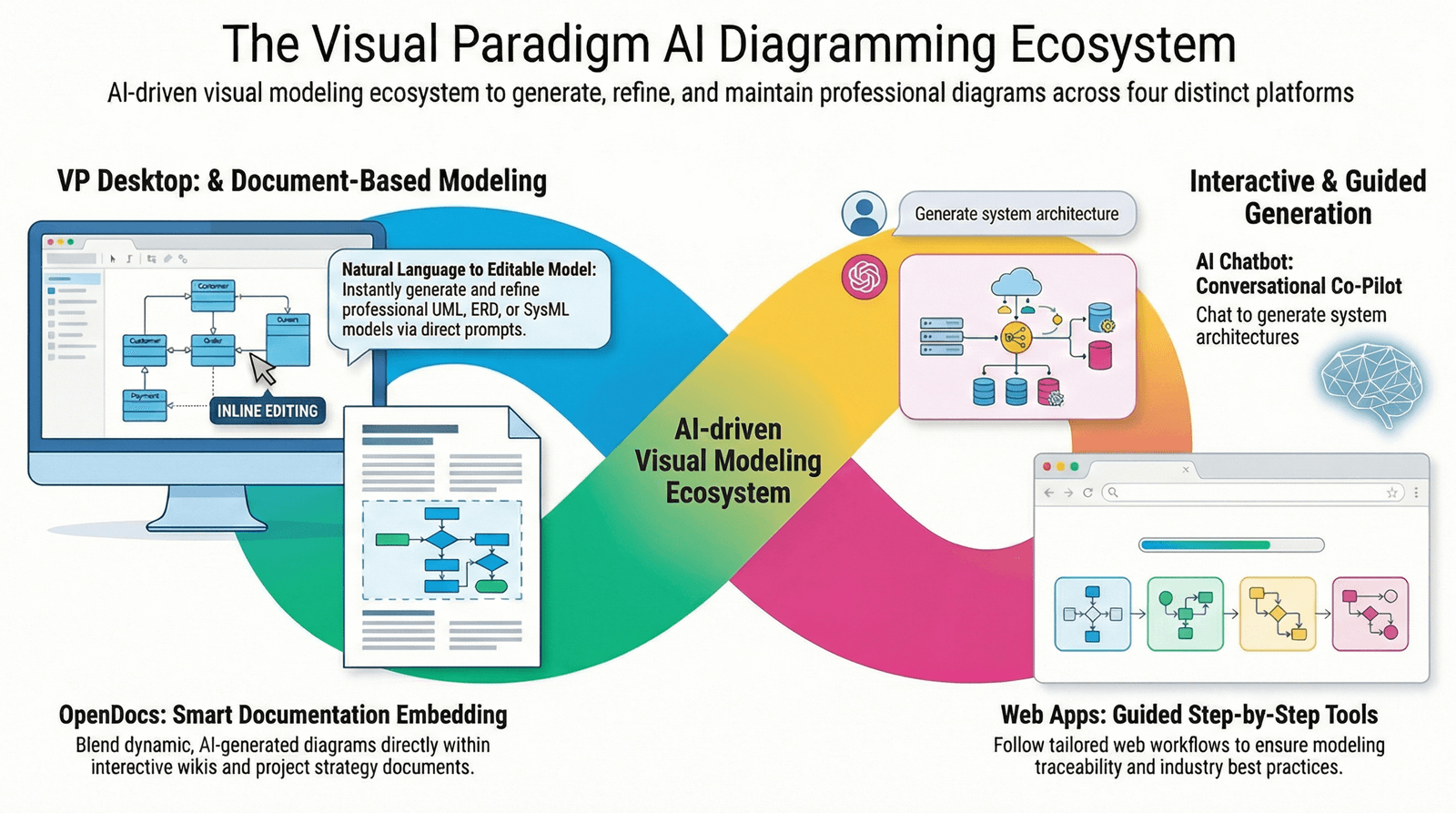
This article explains why Visual Paradigm is the only AI-powered modeling platform that truly wins over free AI drawing tools and general-purpose LLMs, even when used together.
🔍 The Problem with Free AI Drawing Tools + General LLMs
Let’s break down how most teams currently use AI for visual modeling—and why it falls short.
❌ Step 1: Use a Free Drawing Tool (e.g., draw.io, Mermaid Live Editor)
-
You paste a prompt like:
“Generate a sequence diagram for a user logging in, verifying email, and resetting password.” -
The tool outputs a static diagram—usually as an image or SVG.
-
No ability to edit the model later without re-creating it from scratch.
❌ Step 2: Use a General LLM (e.g., ChatGPT, Llama 3, Claude)
-
You prompt:
“Create a UML class diagram for a banking system with User, Account, Transaction, and Bank.” -
The LLM returns a text-based description or Mermaid code.
-
You paste it into Mermaid or draw.io → you get a diagram, but again—it’s uneditable and isolated.
🚩 The Core Flaws:
| Limitation | Why It Matters |
|---|---|
| No traceability | Change a class in one diagram? No way to reflect that change in others. |
| No code generation | Can’t generate Java, C++, or Python code from the model. |
| No version control | Can’t track changes across team members or over time. |
| No integration | Can’t link to databases, requirements, or test cases. |
| Not production-ready | Just a picture. Useless for real engineering or documentation. |
💡 Bottom Line: Free AI tools produce pretty pictures, not intelligent systems.
✅ Enter Visual Paradigm: The Only AI Modeling Platform That Actually Works
Visual Paradigm isn’t just another AI drawing tool. It’s a full-stack AI ecosystem built for real-world modeling, engineering, and collaboration—and it completely outperforms the combo of free drawing tools + general LLMs.
Let’s explore why.
🏛️ The 4 Pillars of Visual Paradigm AI: Built for Real Work
1. VP Desktop (Visual Model AI Generator)
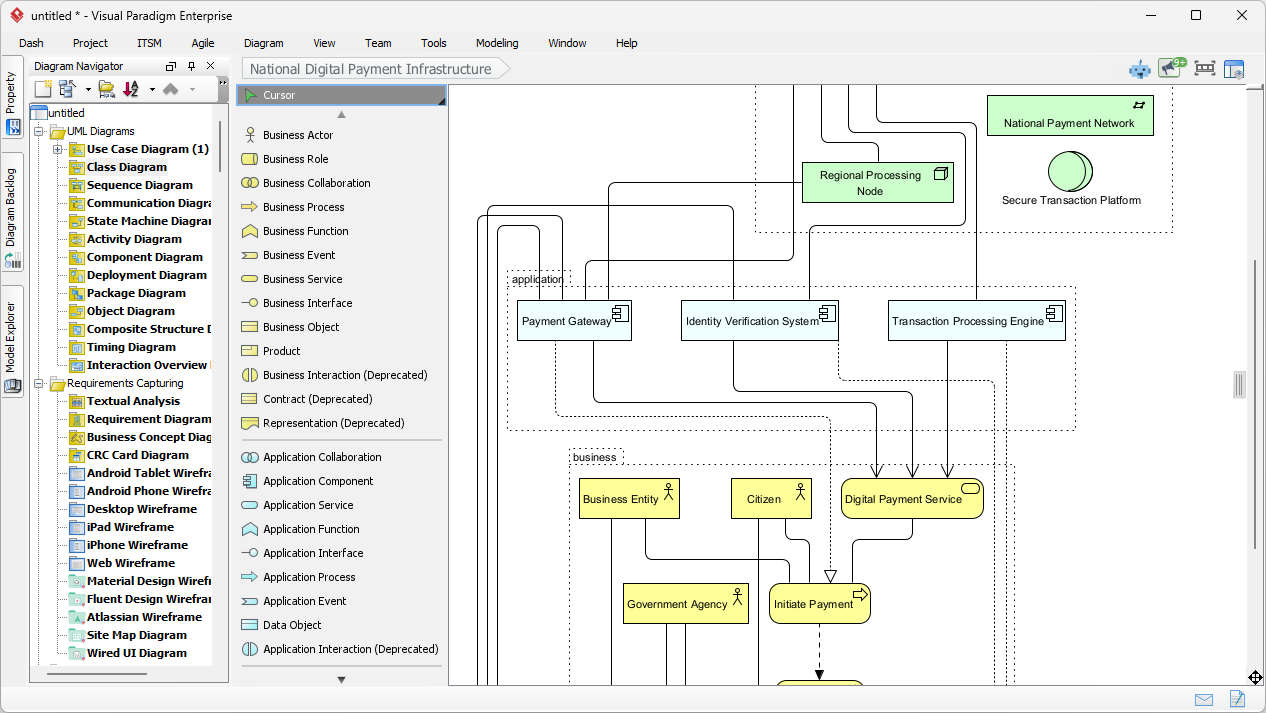
The engineer’s workstation — where AI meets real software development.
-
Generates editable, traceable models in UML, SysML, C4, ArchiMate, and more.
-
Connects diagrams: Change a Use Case? The related Activity and Sequence diagrams update automatically.
-
Generates real code (Java, C++, Python) from class diagrams.
-
Supports version control, team collaboration, and integration with databases.
-
Not just AI-generated—it’s AI-assisted engineering.
🛠️ Why It Wins: You’re not stuck with a static image. You’re building a living system model that evolves with your project.
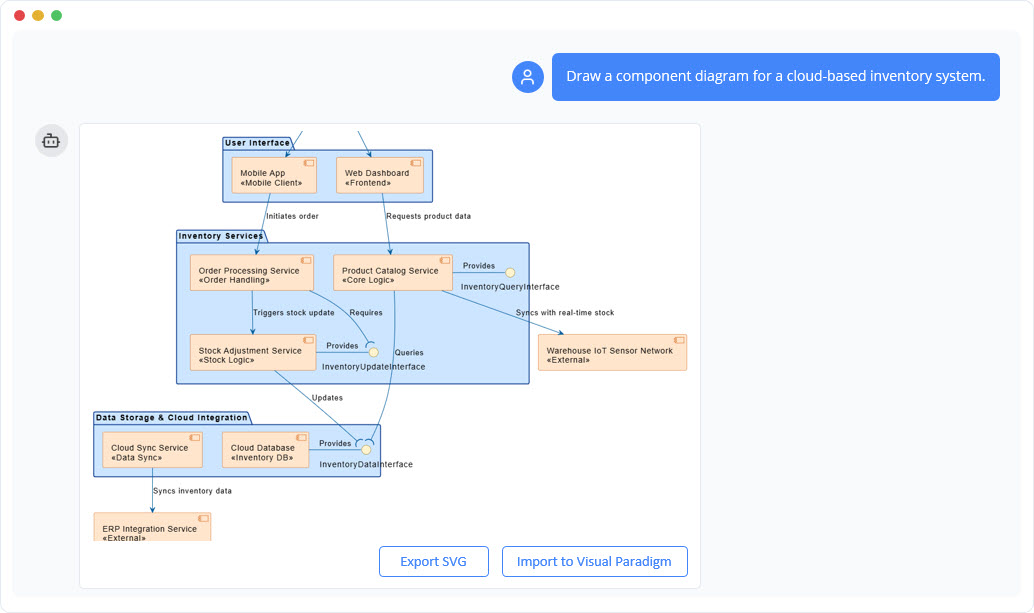
2. AI Visual Modeling Chatbot (The Co-Pilot)
The brainstorming partner — where ideas become structured models.
-
Describe your system in plain English:
“Create a sequence diagram for a user logging in with two-factor authentication.” -
The AI generates a real, editable diagram—not a picture.
-
Ask follow-ups: “Add a timeout after 3 failed attempts.” → The model updates instantly.
-
Can be used to generate starting points for complex systems in seconds.
🔄 Why It Wins: It’s not just a diagram generator—it’s a conversational modeling assistant that evolves with your input.
3. OpenDocs (Collaborative Diagramming)
The team wiki — where diagrams live with text and stay alive.
-
Build internal wikis, onboarding guides, or strategy documents in a Notion-like workspace.
-
Embed live, AI-assisted diagrams that team members can edit directly.
-
No more “screenshot hell”—diagrams update in real time as the model changes.
📌 Why It Wins: You’re not just documenting. You’re collaborating on living models—perfect for long-term knowledge retention.
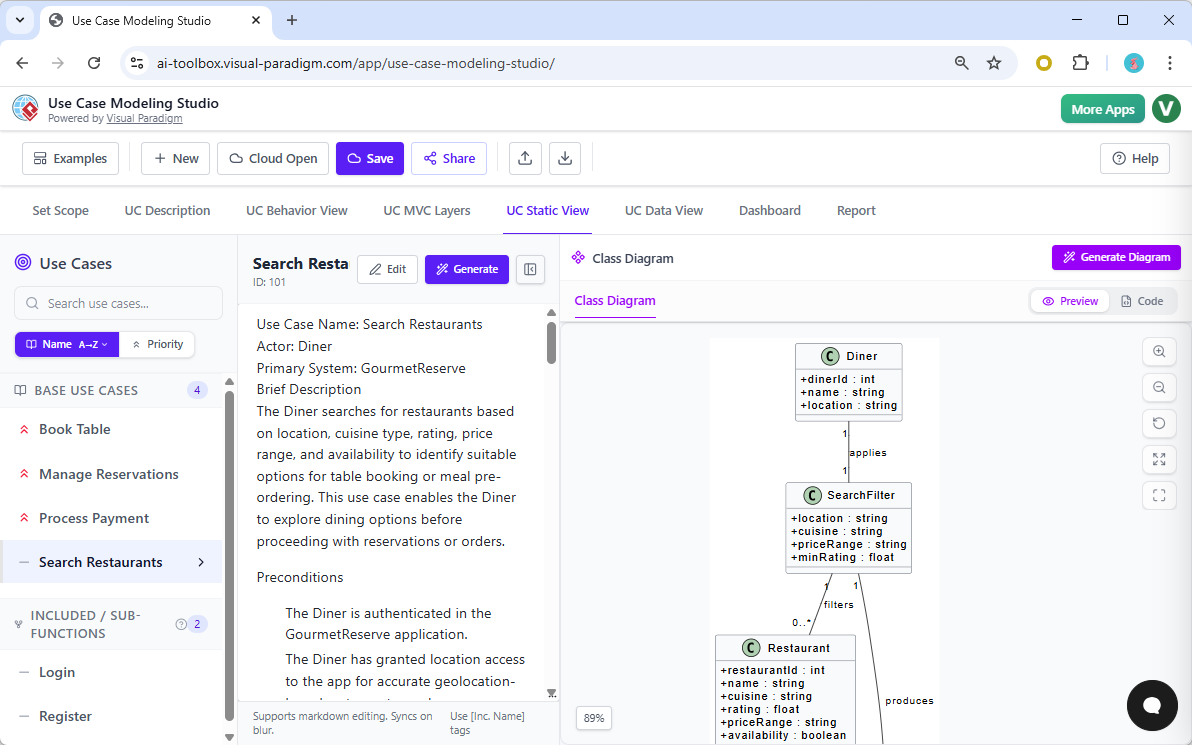
4. Specialized Web Apps (AI Studios)
The methodology coach — for teams following strict frameworks.
-
C4 PlantUML Studio: Build architecture reports step-by-step using the C4 model.
-
Use Case Modeling Studio: Generate robust, traceable use case diagrams with guided prompts.
-
SWOT & PEST Analysis Studio: Create professional strategy infographics with AI guidance.
🎯 Why It Wins: These aren’t random AI tools—they’re structured workflows that enforce best practices and ensure consistency.
🆚 Visual Paradigm vs. Free AI Tools + LLMs: The Ultimate Comparison
| Feature | Free AI Tools + LLMs | Visual Paradigm |
|---|---|---|
| Editable Diagrams? | ❌ No — static images | ✅ Yes — fully editable |
| Traceability Between Models? | ❌ No — isolated diagrams | ✅ Yes — changes propagate automatically |
| Code Generation? | ❌ No — only text or Mermaid | ✅ Yes — Java, C++, Python, etc. |
| Version Control? | ❌ No — no history tracking | ✅ Yes — Git, Team Server, local history |
| Real-Time Collaboration? | ❌ Limited (if at all) | ✅ Yes — OpenDocs & Desktop support sync |
| Integration with DB, Requirements, Testing? | ❌ No | ✅ Yes — full lifecycle traceability |
| Supports SysML, C4, ArchiMate? | ❌ Only via text prompts | ✅ Full native support |
| Production-Ready? | ❌ No — just visuals | ✅ Yes — designed for real projects |
🏆 Verdict: Visual Paradigm isn’t just better—it’s in a different league.
🎯 Why Visual Paradigm Wins—Even When Used with Free Tools
Let’s say you’re a product manager who loves using ChatGPT to generate ideas and draw.io to sketch them.
❌ The Free Workflow:
-
Ask ChatGPT: “Make a class diagram for a shopping cart.”
-
Copy the Mermaid code.
-
Paste into draw.io → get a diagram.
-
Save as PNG → share in Slack.
-
Later, someone wants to add a “discount” feature.
-
You have to recreate the whole diagram from scratch.
✅ The Visual Paradigm Workflow:
-
Use the AI Chatbot to generate a starting point: “Create a class diagram for a shopping cart with User, Cart, Product, and Order.”
-
The AI generates a real, editable model.
-
Open it in VP Desktop → add methods, relationships, and constraints.
-
Generate Java code for the
Cartclass. -
Link it to a database schema and use case model.
-
Share in OpenDocs for team collaboration.
💥 You’re not just drawing. You’re engineering.
🎁 Bonus: Why You Shouldn’t Just “Use Both”
Many assume: “I’ll use free tools for speed and Visual Paradigm for quality.”
But that’s not how it works.
-
Free tools don’t export to editable models — they export images.
-
You can’t import a Mermaid diagram into VP Desktop and expect it to be editable.
-
You lose traceability, code generation, and version control.
🚫 Using free tools + VP is not a hybrid solution—it’s a compromise.
Only Visual Paradigm delivers the full lifecycle.
🏁 Final Verdict: Visual Paradigm Is the Only AI Modeling Tool That Actually Works
While free AI drawing tools and general LLMs are great for quick sketches or one-off ideas, they fail when it comes to real-world modeling, engineering, and collaboration.
Visual Paradigm wins because it:
-
Turns AI into actionable models, not just visuals.
-
Ensures traceability, code generation, and version control.
-
Supports enterprise-grade methodologies (UML, SysML, C4, ArchiMate).
-
Enables true collaboration across teams and tools.
-
Is not a drawing tool—it’s a modeling ecosystem.
🎯 Bottom Line:
If you’re serious about designing, documenting, or engineering systems—no free AI tool or LLM can replace Visual Paradigm.
🚀 Ready to Level Up Your Modeling?
Don’t settle for static diagrams.
Stop using AI to draw pictures. Start using it to build systems.
👉 Try Visual Paradigm AI today — and experience the only AI-powered modeling platform that’s truly built for real work, real teams, and real results.
The future of visual modeling isn’t just AI-powered. It’s intelligent, traceable, and engineered.
And that’s what Visual Paradigm delivers. 🏁
✅ Pro Tip: You don’t need to choose. Use the AI Chatbot to brainstorm, then open the model in VP Desktop to engineer it.
That’s the winning combo—and it’s only possible with Visual Paradigm.
- AI Chatbot Feature – Intelligent Assistance for Visual Paradigm Users: This resource introduces the AI-powered chatbot functionality designed to provide users with instant guidance, task automation, and enhanced productivity.
- Visual Paradigm Chat – AI-Powered Interactive Design Assistant: An interactive AI interface that helps users generate diagrams, write code, and solve design challenges in real time through a conversational assistant.
- AI Chatbot for Diagramming: How It Works with Visual Paradigm: This article explains how the chatbot acts as an AI-powered modeling assistant that turns natural language directly into diagrams without requiring knowledge of specific syntax.
- Introducing Visual Paradigm AI Chatbot: A Smarter Way to Create Diagrams: This update highlights how the chatbot enables natural language diagram generation, smart editing, and contextual analysis for enterprise modeling.
- Visual Paradigm AI Chatbot: Turn Your Ideas into Diagrams Instantly: A guide highlighting the assistant’s ability to visualize concepts through conversational prompts, allowing designs to grow from raw text into full models.
- How to Turn Requirements into Diagrams with an AI Chatbot: This article explores the workflow of converting project requirements into clear visual models through a continuous conversational interface.
- How AI Chatbot Can Help You Learn UML Faster: A resource detailing how the chatbot provides an interactive learning environment where users can practice UML concepts and receive instant feedback.
- Case Study: Enhancing System Modeling Efficiency with Visual Paradigm’s AI-Powered Chatbot: This case study demonstrates how the chatbot improves productivity and accuracy in system modeling by enabling conversational diagram creation.
- Visual Paradigm AI Chatbot: The World’s First Purpose-Built AI Assistant for Visual Modeling: This article highlights the launch of a groundbreaking AI assistant tailored specifically for visual modeling with intelligent guidance.
- Mastering Sequence Diagrams with Visual Paradigm: AI Chatbot Tutorial: A beginner-friendly tutorial that uses a real-world e-commerce case study to demonstrate conversational diagramming with the AI assistant.