
In the fast-paced world of software development, clarity is currency. Teams that communicate effectively ship better products, faster. At the heart of this communication lies the user story. It is not merely a ticket in a backlog; it is a promise of conversation, a vehicle for value, and a tool for alignment.
This guide walks you through the mechanics of crafting high-quality user stories. We will move from basic definitions to advanced techniques like mapping and refinement. By the end, you will have a practical framework for writing stories that developers understand, testers can validate, and stakeholders can prioritize. Let us begin.
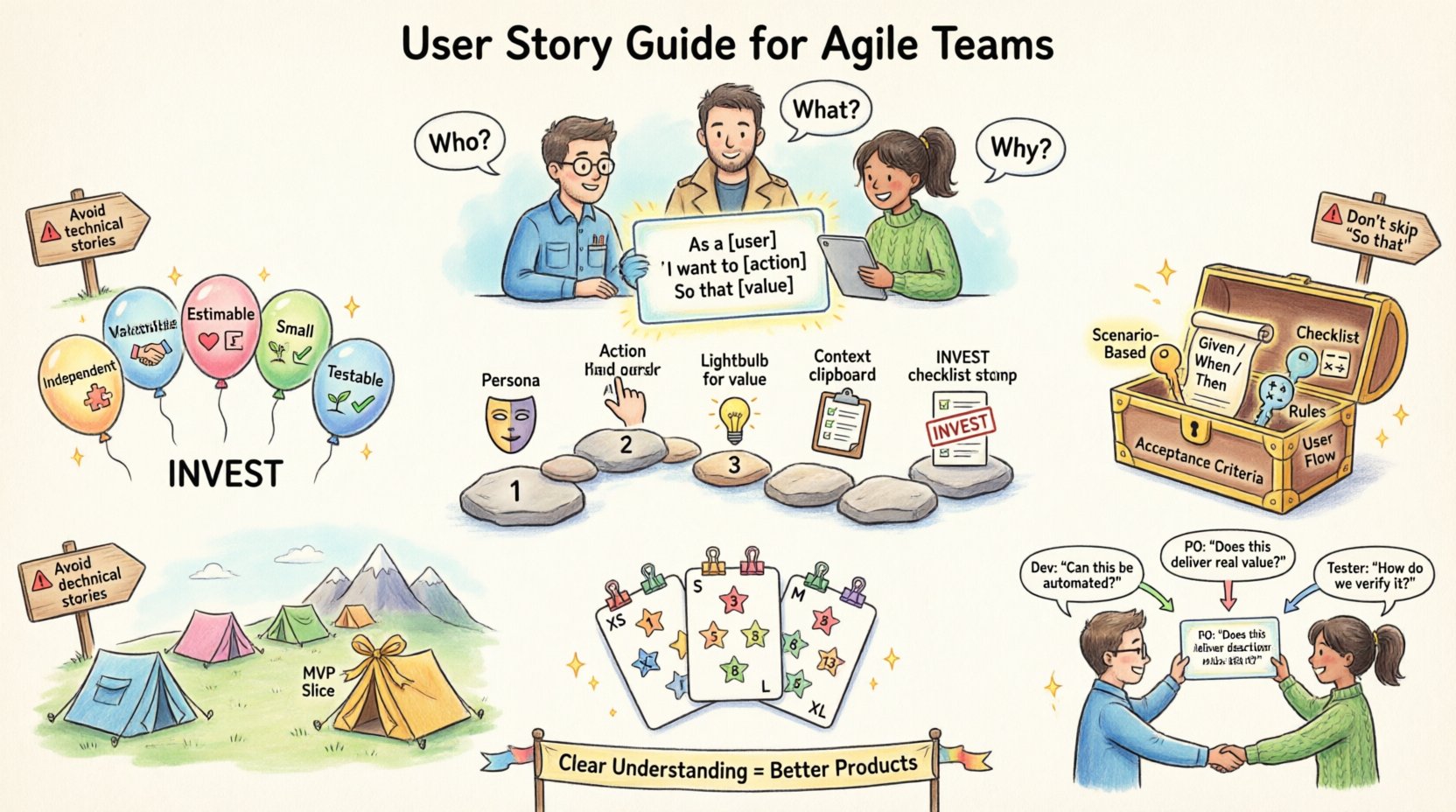
What Exactly Is a User Story? 🤔
A user story is a short, simple description of a feature told from the perspective of the person who desires the new capability, usually a user or customer of the system. It is not a specification document. It is a placeholder for a conversation.
Unlike traditional requirements documents, which can be rigid and lengthy, user stories are designed to be lightweight. They focus on the who, the what, and the why.
The Standard Format
Most Agile teams utilize a standard template to ensure consistency. This template helps keep the focus on the user value rather than the technical implementation details.
- As a: I want to: So that:
- As a: [user role]
- I want to: [action or feature]
- So that: [benefit or value]
Consider a scenario where a user needs to reset their password. A poorly written requirement might say, “System shall allow password reset via email.” A user story would read:
- As a registered user
- I want to reset my password via email
- So that I can regain access to my account without contacting support
This format forces the team to think about the underlying value. It shifts the conversation from “how do we build this button” to “why does the user need to access this button”.
The INVEST Model: Criteria for Quality Stories 🌟
Not all user stories are created equal. Some are vague, some are too large, and some are technically impossible to test. To filter out low-quality items, teams often use the INVEST model. This acronym stands for Independent, Negotiable, Valuable, Estimable, Small, and Testable.
Independent
A story should be as independent as possible. If a story relies on another story being completed before it can even be discussed, it creates bottlenecks. While dependencies exist in software, they should be managed explicitly. Ideally, a team should be able to pick up a story and complete it without needing a specific upstream task.
Negotiable
The story description is not a contract. It is a reminder of a conversation. The details should be negotiated between the development team and the product owner. This flexibility allows the team to suggest technical solutions that might be better than the initial request.
Valuable
Every story must deliver value. If a story does not provide value to the user or the business, it should not exist. Value can be functional, technical (like reducing debt), or compliance-related. If you cannot articulate the value, the story is likely unnecessary.
Estimable
The team must be able to estimate the effort required to complete the story. If a story is too vague or relies on unknown technology, it cannot be estimated. In these cases, the story needs to be broken down further or researched through a spike.
Small
Stories should be small enough to be completed within a single sprint. If a story is too large, it becomes a project. Large stories are hard to test, hard to estimate, and hard to prioritize. Breaking them down into smaller increments allows for faster feedback.
Testable
A story must have clear conditions of satisfaction. If you cannot write a test case for it, you cannot verify if it is done. This ties directly into the definition of done.
| Criterion | Question to Ask | Example Issue |
|---|---|---|
| Independent | Can we build this without another story? | “Login” depends on “User Profile” |
| Negotiable | Are we open to changing the solution? | “Use API X” instead of “Use Feature Y” |
| Valuable | Does this help the user? | “Change font color to match brand” |
| Estimable | Do we know how long this takes? | “Integrate with unknown third party” |
| Small | Can this fit in one sprint? | “Build entire dashboard” |
| Testable | Can we write a test for this? | “Make the app faster” |
Step-by-Step: Writing a User Story 🛠️
Writing a user story is an iterative process. It rarely happens in one sitting. Here is a systematic approach to drafting a story that holds up to scrutiny.
Step 1: Identify the User Persona
Before writing a single word, identify who you are writing for. A story for an administrator is different from a story for a casual browser. Use persona cards or existing profiles to ensure you understand their goals and limitations.
Step 2: Define the Action
Be specific about what the user wants to do. Avoid vague verbs like “manage” or “handle.” Use action verbs like “click,” “save,” “delete,” or “export.” This clarity helps developers understand the specific interaction required.
Step 3: Articulate the Value
This is the most critical part. Why does the user care? If you skip the “So that” part, you risk building features that nobody uses. Regularly challenge the team to explain the benefit.
Step 4: Add Context and Constraints
Sometimes a story needs additional context. This might include technical constraints, regulatory requirements, or edge cases. Place this information in the description field or as comments attached to the story, not in the title.
Step 5: Review Against INVEST
Before adding the story to the backlog, run it through the INVEST checklist. Does it fit? If not, refine it. It is better to spend five minutes refining a story now than five hours fixing a misunderstanding during development.
Acceptance Criteria: The Boundary of Done ✅
Acceptance criteria define the boundaries of a story. They are the conditions that must be met for the story to be considered complete. Without them, “done” is subjective.
Types of Acceptance Criteria
There are several ways to structure acceptance criteria. The most effective approach often depends on the team’s workflow.
- Scenario-Based: Using Given/When/Then syntax helps clarify the logic flow.
- Checklist: Simple bullet points that verify specific outcomes.
- Rules: Mathematical or logical rules that must be satisfied.
- User Flow: Describing the journey a user takes through the feature.
Examples of Acceptance Criteria
Let us look at how criteria differ based on the story type.
| Story Focus | Acceptance Criteria Example |
|---|---|
| Functionality | |
| Security | |
| Performance | |
| Usability |
Writing Effective Criteria
When writing these criteria, keep them atomic. Do not combine multiple conditions into one sentence. Each criterion should be a single testable condition. This makes it easier for testers to validate the work and for developers to know exactly what is required.
Avoid subjective terms like “fast,” “easy,” or “modern.” Replace them with measurable terms like “under 200ms,” “less than 3 clicks,” or “compliant with WCAG 2.1.”
User Story Mapping: Visualizing the Journey 🗺️
Sometimes a list of stories is not enough. You need to see the big picture. User story mapping is a technique used to visualize the user experience and organize stories into a cohesive release plan.
Creating the Backbone
Start by identifying the main activities a user performs. These are your horizontal backbone. For an e-commerce site, these might be: Browse, Search, Add to Cart, Checkout, and Manage Account.
Adding Steps
Beneath each activity, list the specific steps required. These are your user stories. Arrange them horizontally in the order they are performed. This creates a spine of the user journey.
Prioritizing for Release
Once the map is built, you can slice it horizontally. The top row represents the Minimum Viable Product (MVP). The next row adds more value. This helps teams prioritize what to build first based on user value, rather than technical convenience.
Benefits of Mapping
- Provides a holistic view of the product.
- Identifies gaps in the user flow.
- Facilitates better planning and release scheduling.
- Encourages collaboration between designers and developers.
Refinement and Estimation 📏
Writing the story is only half the battle. The team must understand the scope and effort involved. This happens during refinement sessions.
Clarifying Ambiguity
During refinement, the team asks questions. “What happens if the user has no internet?” “How do we handle duplicate emails?” These questions surface hidden complexity. Do not wait until the sprint starts to ask these questions.
Sizing Stories
Teams often use relative sizing rather than hours. This acknowledges that estimating time is difficult and varies by individual. Common methods include:
- Planning Poker: Team members vote on the size using cards.
- Story Points: A numeric value representing complexity, effort, and risk.
- T-Shirt Sizes: Small, Medium, Large, X-Large for high-level planning.
Regardless of the method, the goal is consensus. If the team disagrees significantly, the story needs to be broken down further or researched more deeply.
Common Pitfalls to Avoid ⚠️
Even experienced teams make mistakes when handling user stories. Awareness of these common pitfalls can save significant time and frustration.
1. Writing Technical Stories as User Stories
Tasks like “Refactor database schema” or “Upgrade library version” are important, but they are not user stories. They are technical tasks. While they should exist in the backlog, they should be framed as technical debt or infrastructure work, not as direct user value. If you must write a story for this, frame it as “As a developer, I want to update the library so that we avoid security vulnerabilities.”
2. Ignoring the “So That”
Skipping the benefit clause leads to feature creep. Teams build things that look good but do not solve a problem. Always force the team to justify the value.
3. Overloading the Description
A story description should not be a novel. If the story requires 10 pages of documentation, it is too big. Break it down. The description should be a summary, with links to detailed specs if necessary.
4. Treating Stories as Fixed Contracts
Remember the negotiable aspect. If the team finds a better way to solve the problem, they should propose it. Rigid adherence to the initial request can stifle innovation.
5. Neglecting Edge Cases
Stories often focus on the happy path. Testers and developers must explicitly call out edge cases. What happens if the input is null? What if the network fails? These must be part of the acceptance criteria.
Collaboration and Communication 🗣️
The user story is a tool for collaboration. It brings together the product owner, the development team, and the testers. Without communication, the story is just text on a screen.
The Three Amigos
A common practice is the “Three Amigos” meeting. This involves the Product Owner, a Developer, and a Tester discussing a story before it enters the sprint. They review the story together to ensure understanding and coverage.
- Product Owner: Confirms the value and priority.
- Developer: Confirms technical feasibility and complexity.
- Tester: Confirms testability and edge cases.
Continuous Feedback
Do not wait for the sprint review to get feedback. Share drafts of stories with stakeholders early. Get their input on the wording and the value proposition. This reduces the risk of building the wrong thing.
Visual Aids
Text is not enough. Use wireframes, mockups, or diagrams to supplement the story. A picture can explain a complex workflow faster than a paragraph of text. Attach these artifacts directly to the story record.
Final Thoughts on Story Craft 🎯
Mastering the art of user stories takes practice. It requires a shift in mindset from writing requirements to facilitating conversations. The goal is not to create perfect documents, but to create clear understanding.
Start small. Focus on the INVEST model. Ensure every story delivers value. Be willing to break things down further if they feel too large. Engage your team in the writing process.
When done well, user stories become the backbone of your delivery. They align the team, clarify the vision, and ensure that every line of code serves a purpose. Keep refining your approach, and let the stories guide your work.