


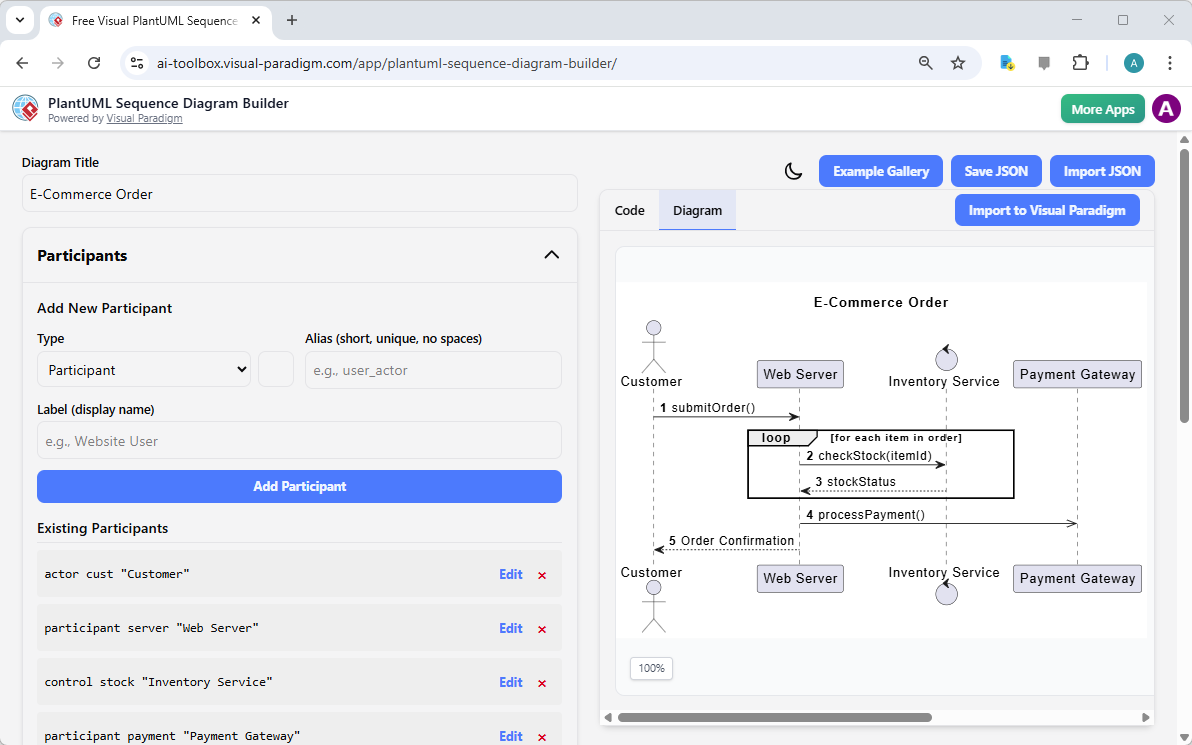
Ever stared at a complex system and thought, “How on earth do all these pieces actually talk to each other?” If you’re a software architect, a business analyst, or just someone trying to make sense of a system’s behavior, you need a clear map. That’s where the PlantUML Sequence Diagram Builder from Visual Paradigm comes in. It’s an online tool that lets you create professional, easy-to-understand sequence diagrams without needing to write a single line of code. The best part? It’s completely free to use and works right in your browser. The image you see here is a perfect example: a real-world “E-Commerce Order” process, showing how a customer’s order flows through a web server, inventory service, and payment gateway. This tool turns that complexity into a simple, visual story.
What is the PlantUML Sequence Diagram Builder?
Think of this tool as your personal diagramming assistant. It’s an intuitive, web-based platform designed to help you create, customize, and visualize sequence diagrams using the powerful PlantUML syntax. Instead of wrestling with text-based code, you use simple forms to define the players in your system (like the “Customer,” “Web Server,” and “Payment Gateway” you see in the image) and the sequence of messages they exchange over time. As you build, the tool does the heavy lifting: it automatically generates the corresponding PlantUML code and renders a live visual preview. It’s like having a visual editor for your system’s dynamic behavior.
Key Features That Make It a Game-Changer
Let’s break down what makes this tool so powerful, using the e-commerce example as our guide:
-
Structured Input Forms: The left panel is your command center. You can easily add and manage all the “Participants” in your system—actors, components, databases. In the image, you can see the “Customer,” “Web Server,” “Inventory Service,” and “Payment Gateway” listed. This is your cast list, and it’s crucial for defining the scope of your diagram.
-
Live Code & Visual Preview: This is the magic. As you add a message, like “submitOrder()” from the Customer to the Web Server, the tool instantly generates the PlantUML code in the right-hand pane and renders the visual diagram. The live preview in the image shows the message flow, including the “loop” fragment for checking stock, which is a perfect example of a control flow that’s easy to model.
-
Comprehensive Sequence Control: You’re not limited to simple messages. You can add complex logic like “alt” (alternative flows), “opt” (optional steps), and “loop” (repetitions). The “loop” around the “checkStock()” and “processPayment()” steps in the image is a great example of how you can model a process that repeats for each item in an order.
-
Local Save/Load (JSON): Your work is safe. When you’re done, you can click “Save JSON” and your entire project is saved as a file on your computer. This means you have full control and privacy, and you can easily pick up where you left off.
Who Can Benefit from This Tool?
Anyone who needs to document or understand how different parts of a system interact. It’s not just for developers.
-
Software Architects & Engineers: Use it to design and document the dynamic behavior of your software systems. The visual representation makes it easier to spot potential bottlenecks or errors in the flow.
-
Business Analysts: Create clear diagrams to document business processes, user interactions, and system workflows. It’s a great way to ensure everyone—from stakeholders to the development team—is on the same page.
-
DevOps Teams: Map out the sequence of operations in deployment, monitoring, or incident response workflows. The clear visual flow helps in understanding and troubleshooting complex processes.
-
Students & Educators: An excellent learning tool for understanding sequence diagrams and PlantUML syntax in a practical, hands-on way.
Getting Started: Your First Diagram
It’s incredibly easy to start. Just open the PlantUML Sequence Diagram Builder. Here’s a quick workflow:
-
Set Your Title: Give your diagram a clear name, like “E-Commerce Order.”
-
Add Participants: In the “Participants” section, define all the entities involved. For our e-commerce example, that’s the Customer, Web Server, Inventory Service, and Payment Gateway.
-
Build the Sequence: In the “Sequence” section, add messages to show the flow. Start with “Customer -> Web Server : submitOrder()” and then add the subsequent steps like checking stock and processing payment.
-
Use Control Fragments: For the “loop” around stock checking, use the “Add Loop” button to create a conditional block.
-
Save and Export: Once you’re satisfied, save your project as a JSON file and export the visual diagram as an image or PDF.
Why This Tool is a Must-Have
The PlantUML Sequence Diagram Builder is more than just a tool; it’s a productivity booster. It simplifies a complex process, allowing you to focus on the logic of your system rather than the syntax of a diagramming language. The real-time feedback ensures your diagram is accurate and up-to-date. And because the output is text-based (PlantUML), it’s perfect for version control, making it easy to track changes over time. Best of all, you can use it without needing to sign up or log in, ensuring your data stays private.
Conclusion: See the Big Picture
Understanding how a system works is crucial, and the PlantUML Sequence Diagram Builder makes it simple and intuitive. It turns complex interactions into clear, visual stories. Whether you’re documenting a new feature, troubleshooting an issue, or teaching a concept, this tool provides the clarity you need. The example of the “E-Commerce Order” process in the image perfectly illustrates its power: from a simple idea to a fully visualized, interactive diagram.
Ready to see your own system’s behavior in action? Try the PlantUML Sequence Diagram Builder now and start creating your own clear, professional diagrams today.
Related Links
-
PlantUML Sequence Diagram Generator | Visual Builder Tool: Easily create professional UML sequence diagrams with our visual PlantUML generator. A step-by-step wizard for defining participants, messages, …
-
Free PlantUML Sequence Diagram Builder – Visual Paradigm AI: October 31, 2025 – Effortlessly create free and professional PlantUML sequence diagrams with our intuitive visual wizard. No coding required. Design, build, and export UML diagrams in minutes. Get started now!
-
Refine Your PlantUML Sequence Diagrams into MVC-Level Models …: Import PlantUML sequence diagrams into Visual Paradigm Generate structured MVC-level models for better system design This tool is ideal for software engineers, architects, and developers looking …
-
Free PlantUML Sequence Diagram Builder – Visual Paradigm Product Updates: September 12, 2025 – Effortlessly create PlantUML sequence diagrams with our free online builder. No syntax required. Use our visual wizard to generate code and diagrams instantly.
-
Free Visual PlantUML Sequence Diagram Builder | Visual Paradigm Online: Effortlessly create professional Free PlantUML sequence diagrams with our intuitive visual wizard. No coding required. Design, build, and export UML diagrams in minutes. Get started now!
-
Why Sequence Diagrams Are Commonly Stored in PlantUML – Visual Paradigm AI: November 3, 2025 – You can paste or type your PlantUML code, render it, let AI decompose it into view and model objects, and then generate a more detailed diagram . From there, you can export the results as SVG or open them in Visual Paradigm …