


Introduction
As a Product Manager with over seven years of experience bridging the gap between technical engineering and business strategy, I have witnessed the “documentation debt” crisis firsthand. We spend hours crafting precise architecture diagrams in specialized tools, only to see them become obsolete the moment code is merged. The traditional workflow—screenshot, paste into Confluence or Word, forget—is broken. It erodes team trust and slows down onboarding for new engineers.
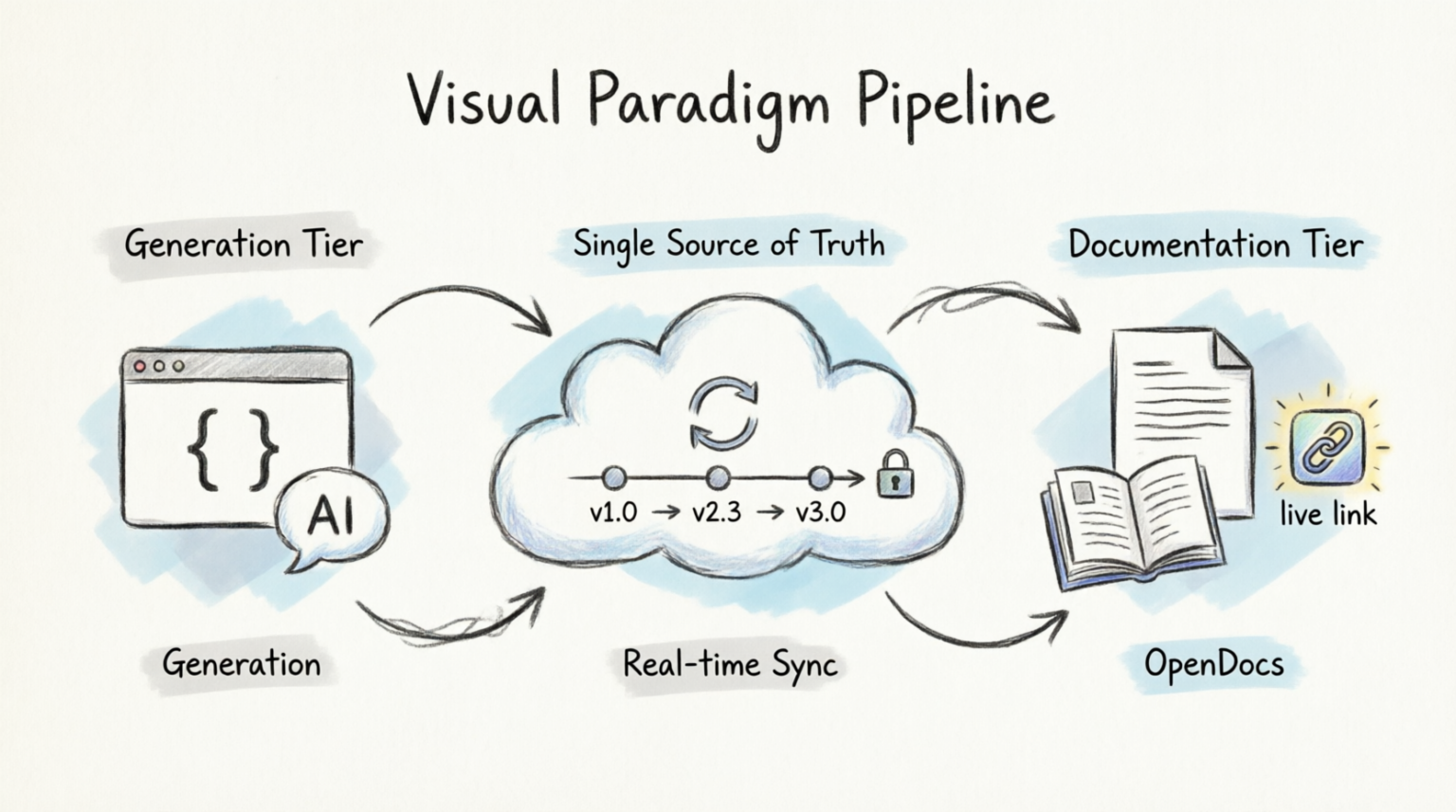
Recently, I explored the Visual Paradigm Pipeline, a cloud-based ecosystem designed to solve this exact friction point. This isn’t just another diagramming tool; it is a connective tissue that links dynamic visual modeling with AI-powered documentation (OpenDocs). In this review, I will share my experience setting up this workflow, testing its bidirectional sync capabilities, and evaluating whether it truly delivers on the promise of a “single source of truth” for product teams.
🔄 Understanding the Ecosystem: The Three-Tier Architecture
Before diving into the setup, it is crucial to understand how Visual Paradigm structures its environment. Think of it as a central nervous system connecting three distinct layers:
-
The Generation Tier: This is where the raw visuals are created. It is flexible enough to accommodate different working styles:
-
Visual Paradigm Desktop: For complex, enterprise-grade modeling.
-
Visual Paradigm Online: For collaborative, browser-based diagramming.
-
VPasCode: A code-first approach for developers who prefer typing PlantUML over dragging shapes.
-
AI Chatbot: For generating diagrams instantly via natural language prompts.
-
-
The Pipeline (Transit Tier): The secure cloud repository. It acts as the bridge, accepting artifacts, logging comments, managing revision history, and serving assets to the documentation layer.
-
The Documentation Tier (OpenDocs): An AI-powered workspace where teams build comprehensive manuals. Here, visual assets are embedded directly from the Pipeline, ensuring they are always up-to-date.
🛠️ Step-by-Step Workflow: From Code to Live Documentation
To test the system, I decided to document a common feature: a user login flow. I chose VPasCode for the generation tier because it allows for version-controllable text definitions, which aligns well with engineering workflows.
Step 1: Creating the Asset in the Generation Tier
I started by defining a sequence diagram using standard PlantUML syntax. This approach is particularly appealing for technical PMs and engineers because the diagram definition lives in text, making it easy to review in Git pull requests.
Example: PlantUML Sequence Diagram for User Login
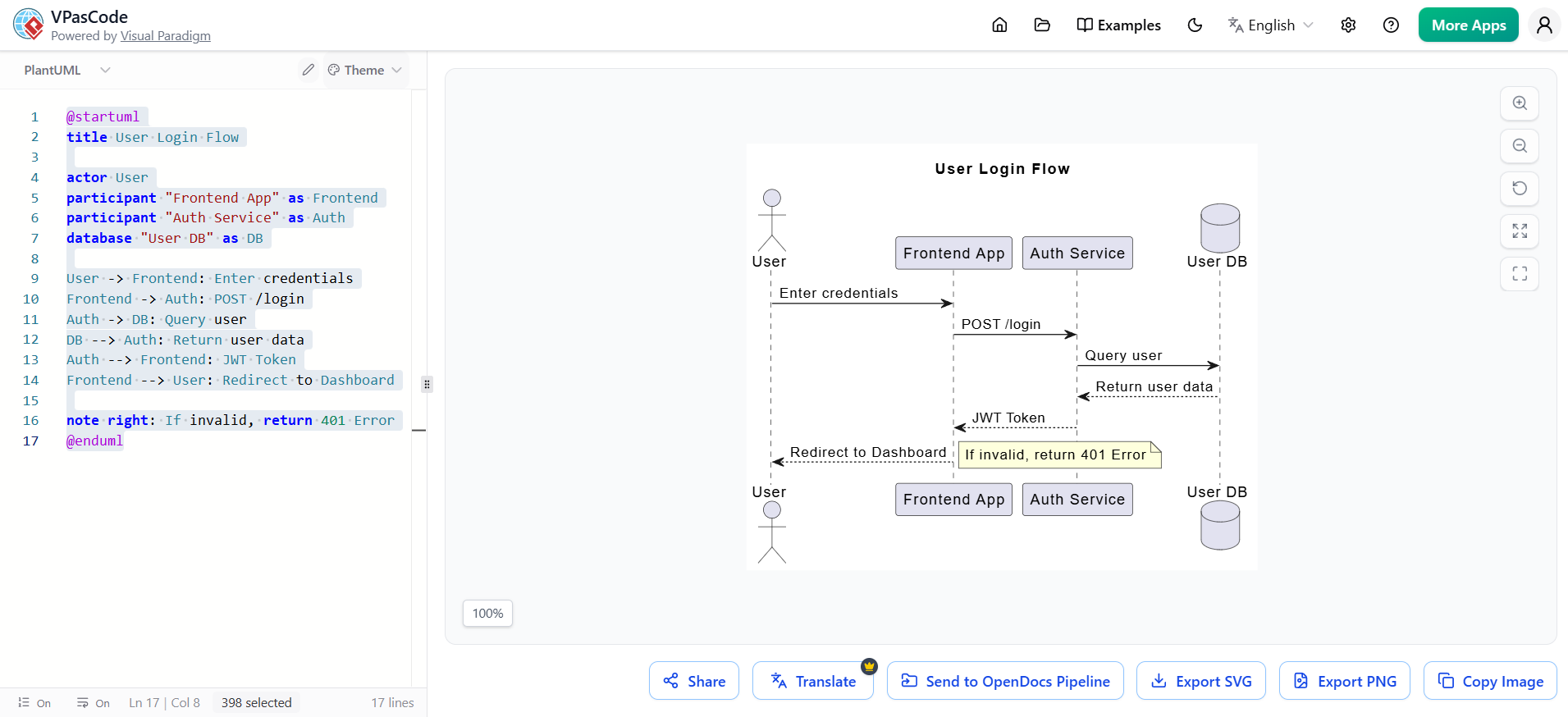
PlantUML Edit PlantUML in VPasCode
@startuml
title User Login Flow

actor User
participant "Frontend App" as Frontend
participant "Auth Service" as Auth
database "User DB" as DB

User -> Frontend: Enter credentials
Frontend -> Auth: POST /login
Auth -> DB: Query user
DB --> Auth: Return user data
Auth --> Frontend: JWT Token
Frontend --> User: Redirect to Dashboard

note right: If invalid, return 401 Error
@enduml
How to do it:
-
Open VPasCode or the Visual Paradigm AI Chatbot.
-
Paste the code above, or prompt the AI: “Create a sequence diagram for a user login flow involving a frontend, auth service, and database.”
-
Save/Commit the diagram. This action pushes the artifact into the Pipeline.
Pro Tip: If you’re using Visual Paradigm Desktop, you can export your diagram directly to the Pipeline via the “Share to Pipeline” option in the toolbar.
Step 2: The Pipeline Takes Over (Transit Tier)
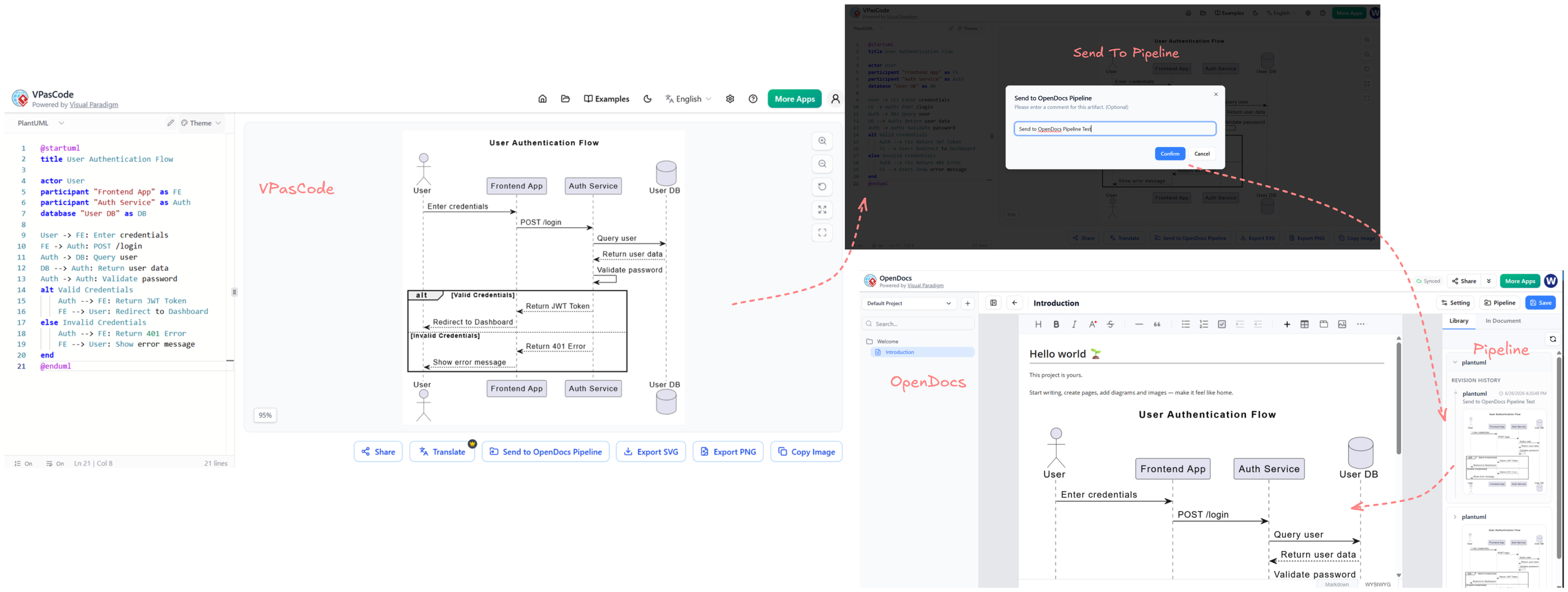
Once saved, the Pipeline automatically handles the heavy lifting:
-
Stores the diagram as a reusable asset.
-
Generates a unique ID for embedding.
-
Logs the initial version in its revision history.
-
Makes it accessible to all authorized team members in your organization.
This step eliminated the need for me to download PNGs or manage file paths. The Pipeline handled storage and versioning securely in the cloud.
Step 3: Embedding Live Assets in OpenDocs (Documentation Tier)
With the asset in the Pipeline, I moved to OpenDocs to create the actual documentation.
-
Created a new document titled “Authentication Module Specification.”
-
In the editor, typed
/diagramor clicked the Insert Visual Asset button. -
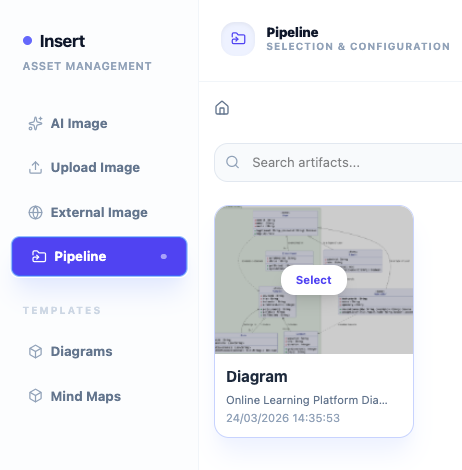
Searched for my “User Login Flow” diagram from the Pipeline.
-
Selected it. The diagram appeared in the document not as a static image, but as a live embed.
Step 4: Experiencing Bidirectional Sync
The true test of any documentation system is how it handles change. Suppose the engineering team decides to add a Multi-Factor Authentication (MFA) step.
-
I went back to VPasCode.
-
Updated the PlantUML code to include an MFA service:
PlantUML Edit PlantUML in VPasCode
participant "MFA Service" as MFA
Auth -> MFA: Send OTP
MFA --> Auth: Verify OTP
-
Saved/Committed the change.
What happens next?
-
The Pipeline detected the new version.
-
In OpenDocs, a small update indicator (usually a blue dot or icon) appeared next to the embedded diagram.
-
Clicking the indicator gave me two choices:
-
Update to Latest: Instantly refreshed the diagram in my document.
-
View History: Allowed me to see previous versions or roll back if needed.
-
There were no screenshots to retake, no re-uploads, and no broken links. The documentation remained alive and accurate.
💡 Realistic Use Cases for Product Teams
Beyond simple login flows, I identified several high-impact use cases for Product Managers and Technical Leads:
Example 1: Product Roadmap Alignment
-
Generation Tier: Use Visual Paradigm Online to create a Gantt chart or timeline for Q3 features.
-
Pipeline: Stores the roadmap.
-
Documentation Tier: Embed the roadmap in your Product Requirements Document (PRD) in OpenDocs. When stakeholders request changes, update the chart in VP Online, and the PRD updates automatically.
Example 2: Microservices Architecture
-
Generation Tier: Use the AI Chatbot to generate a C4 Context Diagram for a new microservice. Prompt: “Draw a C4 context diagram for a Payment Service interacting with Stripe and an Order Service.”
-
Pipeline: Captures the AI-generated diagram.
-
Documentation Tier: Include it in the System Architecture Guide. As services evolve, regenerate the diagram via AI or manually edit it, and keep the docs in sync.
Example 3: API Documentation
-
Generation Tier: Use VPasCode to create sequence diagrams for key API endpoints (e.g.,
POST /orders). -
Pipeline: Manages versions of each endpoint’s flow.
-
Documentation Tier: Build an API Reference Manual in OpenDocs. Each endpoint section has its live sequence diagram. Developers always see the current logic, reducing support tickets.
🌟 Key Strategic Benefits
After integrating this pipeline into my workflow, several strategic advantages became clear:
-
Single Source of Truth: Engineering, architecture, and business teams work from identical, accurate data. No more “which version is correct?” debates.
-
Elimination of Documentation Debt: Replace static, outdated images with dynamic embeddings. Your docs stay alive as your product evolves.
-
Automated Version Tracking: The Pipeline handles revision history automatically. Every save creates a new checkpoint without manual file management.
-
Cross-Tool Interoperability: Whether you start in Desktop, Online, VPasCode, or AI, the output flows seamlessly into the same Pipeline and OpenDocs workspace.
-
Time Savings: Eliminate hours spent on screenshotting, cropping, uploading, and fixing broken links. Focus on content, not formatting.
Conclusion
The Visual Paradigm Pipeline transforms documentation from a chore into a seamless extension of your design process. By bridging the gap between dynamic visual modeling and living documentation, it ensures that your team’s knowledge base is always accurate, accessible, and aligned with reality.
For Product Managers, this means less time chasing down updated diagrams and more time focusing on strategy and user value. For engineers and technical writers, it means freedom from the tedious cycle of manual updates. While there is a learning curve to adopting a new ecosystem, the long-term ROI in terms of clarity and efficiency is substantial.
My recommendation? Start small. Pick one critical diagram in your current project, push it to the Pipeline, and embed it in OpenDocs. Experience the sync firsthand, and you’ll likely find, as I did, that you never want to go back to static screenshots again.
References
-
From Diagram to Documentation: A Beginner’s Guide to the Visual Paradigm Pipeline: A comprehensive guide detailing the three-tier ecosystem and step-by-step setup for linking diagrams to documentation.
-
Bridging Design and Documentation: How Visual Paradigm’s Pipeline Transforms Technical Knowledge Management: An analysis of how the Pipeline serves as a central nervous system for technical assets.
-
Mastering the Pipeline in Visual Paradigm OpenDocs: A Complete Guide to Streamlined Knowledge Management: Detailed strategies for managing asset transit and version control within the ecosystem.
-
From Code to Clarity: A Beginner’s Guide to Seamless Diagramming with VPasCode and OpenDocs: A tutorial focused on using text-based diagramming tools like VPasCode for efficient documentation.
-
From Concept to Documentation: How Visual Paradigm OpenDocs Unifies AI-Powered Modeling and Knowledge Management: Overview of AI integration in modeling and documentation processes.
-
From Model to Manual: A Software Engineer’s Guide to Syncing Visual Paradigm Desktop Diagrams with OpenDocs: Practical advice for engineers transitioning from desktop modeling to live documentation.
-
From Concept to Knowledge Base: A Third-Party Review of Visual Paradigm’s OpenDocs Workflow: An external perspective on the usability and effectiveness of the OpenDocs platform.
-
Visual Paradigm OpenDocs: The Complete Developer’s Guide to AI-Powered Technical Documentation: A developer-focused guide to leveraging AI features within OpenDocs.
-
Visual Paradigm OpenDocs: The Complete Guide to AI-Powered Knowledge Management and Diagram Generation: Comprehensive coverage of knowledge management strategies using Visual Paradigm tools.
-
Visual Paradigm’s Pipeline: Hands-On Review of Visual Paradigm’s Desktop to OpenDocs Integration: A hands-on evaluation of the integration capabilities between desktop tools and OpenDocs.
-
My Journey to Seamless Documentation: Sending Visual Paradigm Creations Directly to OpenDocs: A personal account of implementing the Pipeline for streamlined documentation workflows.
-
Sync AI Diagram to OpenDocs Pipeline Guide: Official release notes and guides for syncing AI-generated diagrams to the Pipeline.
-
From Static Snapshots to Living Knowledge: Unifying Documentation and Modeling with Visual Paradigm OpenDocs: Discussion on moving away from static images toward dynamic, living documentation.
-
My Journey with Visual Paradigm Pipeline: How This Asset Transit Hub Transformed My Documentation Workflow: A user story highlighting the transformational impact of the Pipeline on daily workflows.
-
Visual Paradigm Pipeline Tutorial Video: A video walkthrough demonstrating the setup and usage of the Visual Paradigm Pipeline.
-
A Case Study on Streamlining Knowledge Management with Visual Paradigm OpenDocs Pipeline: A detailed case study showcasing real-world applications and benefits of the Pipeline.
Related posts:
 Comprehensive UML State Diagram Case Study: Smart EV Charging Station
Transforming Visual Modeling: How Visual Paradigm’s AI Diagram Generation Revolutionizes UML Design
Avoiding Pitfalls with AI Class Diagram: Building Campus Access Control & Attendance System
AI-Generated State Machine Diagram Case Study: Managing Order Lifecycle States
Comprehensive UML State Diagram Case Study: Smart EV Charging Station
Transforming Visual Modeling: How Visual Paradigm’s AI Diagram Generation Revolutionizes UML Design
Avoiding Pitfalls with AI Class Diagram: Building Campus Access Control & Attendance System
AI-Generated State Machine Diagram Case Study: Managing Order Lifecycle States