


Introduction
Let me take you back to a Tuesday morning that changed my entire perspective on software architecture. There I was, staring at a wall of sticky notes, trying to piece together a complex microservices architecture for a fintech client. Three weeks into the project, and my UML diagrams looked like a Jackson Pollock painting—colorful, chaotic, and utterly incomprehensible to anyone but me.
That’s when I reluctantly decided to try an AI-powered UML tool that had been sitting in my bookmarks for months. What happened next wasn’t just a productivity boost—it was a complete paradigm shift in how I approach system design. In this guide, I’ll share my journey from UML skeptic to AI-powered modeling evangelist, complete with the wins, the facepalms, and everything in between.
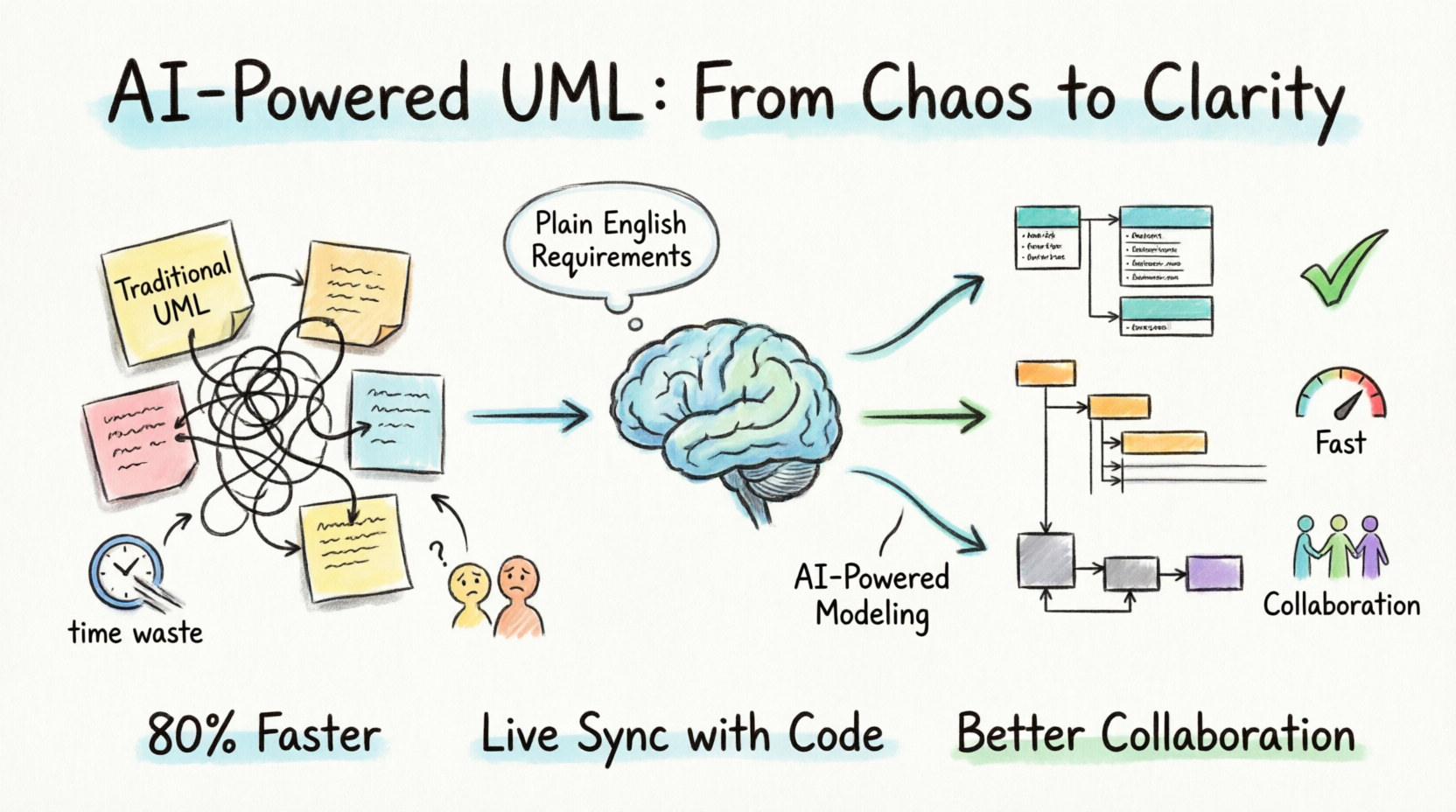
For those of you who’ve been in the trenches of Agile development, you know the struggle: maintaining diagrams that actually reflect the current state of your codebase while keeping up with sprint velocity. It’s like trying to change a tire on a moving car. But after six months of integrating AI into my modeling workflow, I’m here to tell you that the tire-changing metaphor needs an upgrade—we’re now driving a vehicle that changes its own tires.
The State of UML in Modern Agile: My Frustration Story
Before we dive into the AI revolution, let me be brutally honest about where I was coming from. Like many developers and architects of my generation, I was trained to think of UML as this sacred artifact—the blueprint that would guide our development efforts. In practice, it became something else entirely.
The Documentation Mirage
I remember a particularly painful project where I spent 40 hours crafting the perfect set of UML diagrams for a healthcare API. I was proud of those diagrams—clean inheritance hierarchies, beautifully composed sequence diagrams, and state machines that would make a mathematician weep with joy. Two sprints later, the diagrams were so outdated that they were actively misleading junior developers. We had become the proud owners of what I call “zombie documentation”—dead but still wandering the halls, confusing everyone it encountered.
The reality of Agile development is that requirements change, architectures evolve, and priorities shift. Maintaining hand-drawn (or hand-clicked) UML diagrams became a second full-time job that nobody wanted and few could justify.
The Communication Disconnect
Here’s another painful truth: even when I had accurate diagrams, they often failed as communication tools. I’d spend hours in refinement sessions, pointing at beautifully rendered component diagrams, only to see blank faces staring back at me. The problem wasn’t the diagrams themselves—it was the gulf between the formal, technical language of UML and the collaborative, conversation-driven nature of Agile teams.
My product owners couldn’t read them. My QA team found them intimidating. Even some of my developers struggled to see the forest for the trees. UML had become a language that only the architecture team spoke fluently—an expensive private dialect in a world that demanded universal understanding.
The Context Switching Tax
Perhaps most frustrating of all was the mental overhead of switching between coding and modeling. I’d be deep in the flow of writing a new service, finally hitting that beautiful state of productivity where everything clicks, and then… “Hey, can you update the sequence diagram for the payment flow?” Groan.
Each context switch cost me 15-20 minutes of productive time. Over a sprint, those interruptions added up to hours of lost productivity. The diagrams were supposed to help us build better software, but they were actively making us slower and more frustrated.
Enter AI-Powered UML: My First Impressions
When my colleague first suggested I try AI-powered UML tools, I was skeptical. I’d seen the hype about AI in software development—auto-complete for code, test generation, bug detection. But UML? That felt different. UML is about design thinking, about understanding relationships and abstractions. Could a machine really help with that?
The First Experiment
I started small. I took a messy, hand-drawn class diagram for a project I was working on and threw it into an AI tool that promised to “clean up and enhance” UML models. The result? Mind-blowing. Within seconds, the tool had not only cleaned up my inconsistent notation but had also identified three inheritance relationships I had completely missed and suggested two abstract classes that dramatically simplified the overall design.
That first session was a revelation. I hadn’t just saved time—I had produced a better design than I could have created on my own. The AI wasn’t replacing my design thinking; it was augmenting it, acting as a tireless assistant that could spot patterns and relationships my human brain had overlooked.
The Natural Language Breakthrough
The next day, I tried something bolder. I typed a plain-English description of a system I was designing: “We need a ticket management system where users can create tickets, assign them to teams, track status, and get notifications when things change.”
The AI generated a complete class diagram, sequence diagrams for the main workflows, and even a state machine for ticket lifecycle management. It wasn’t perfect—I had to tweak the relationships and add some business logic details—but it was 80% of the way there in 30 seconds.
This was the moment I truly understood the potential. The AI was acting as a bridge between natural language and formal UML notation. I could now sketch designs in plain English, collaborate with non-technical stakeholders, and generate formal models that developers could actually use.
My Hands-On Experience: The Core Features That Actually Delivered
After six months of using AI-powered UML tools in real-world projects, I’ve developed a clear picture of what actually works and what’s still hype. Let me walk you through the features that have genuinely transformed my workflow.
Automated Diagram Generation from Code
This is the game-changer. I can now point an AI tool at my existing codebase and generate accurate UML diagrams in seconds. The first time I did this with a legacy project, I honestly felt a little emotional. There were the class diagrams I’d been meaning to create for years, generated automatically from the actual code—not from my memory or best guesses, but from the real, working system.
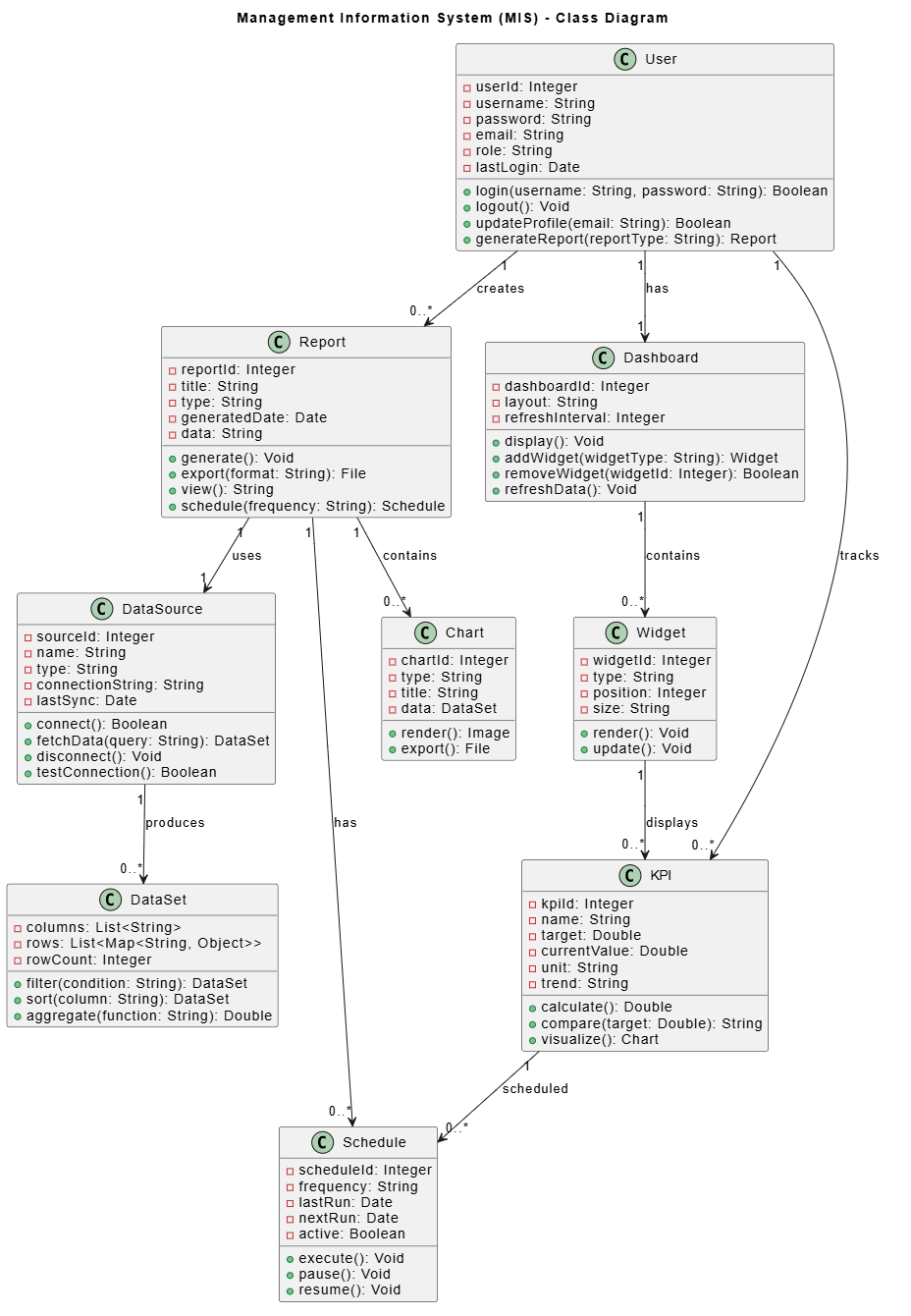
Figure 1: Visual Paradigm’s AI-powered MIS UML diagram showing class relationships generated from code analysis
In this example, the AI has analyzed the codebase and produced a clean class diagram showing relationships, dependencies, and inheritance hierarchies. The colors indicate different package groupings, making it easy to see module boundaries at a glance.
Here’s what made this genuinely useful:
-
Two-way synchronization: When I refactored a class, I could regenerate the diagram and see the changes immediately. No more manual updates.
-
Dependency analysis: The AI highlighted circular dependencies I hadn’t noticed, prompting me to rethink some architectural decisions.
-
Documentation that actually lives: For the first time, my UML diagrams were guaranteed to match the code. They weren’t static artifacts—they were dynamic reflections of reality.
Natural Language to UML
This feature is what converted me from a skeptic to an evangelist. The ability to describe a system in plain English and get formal UML diagrams in return has transformed how I approach design sessions.
I’ve started bringing product owners and business stakeholders into design meetings with the AI tool running. Someone says, “The user should be able to reset their password via email or SMS,” and I type that into the AI interface. Seconds later, we have a sequence diagram showing the entire flow, including the alternative paths and error conditions.
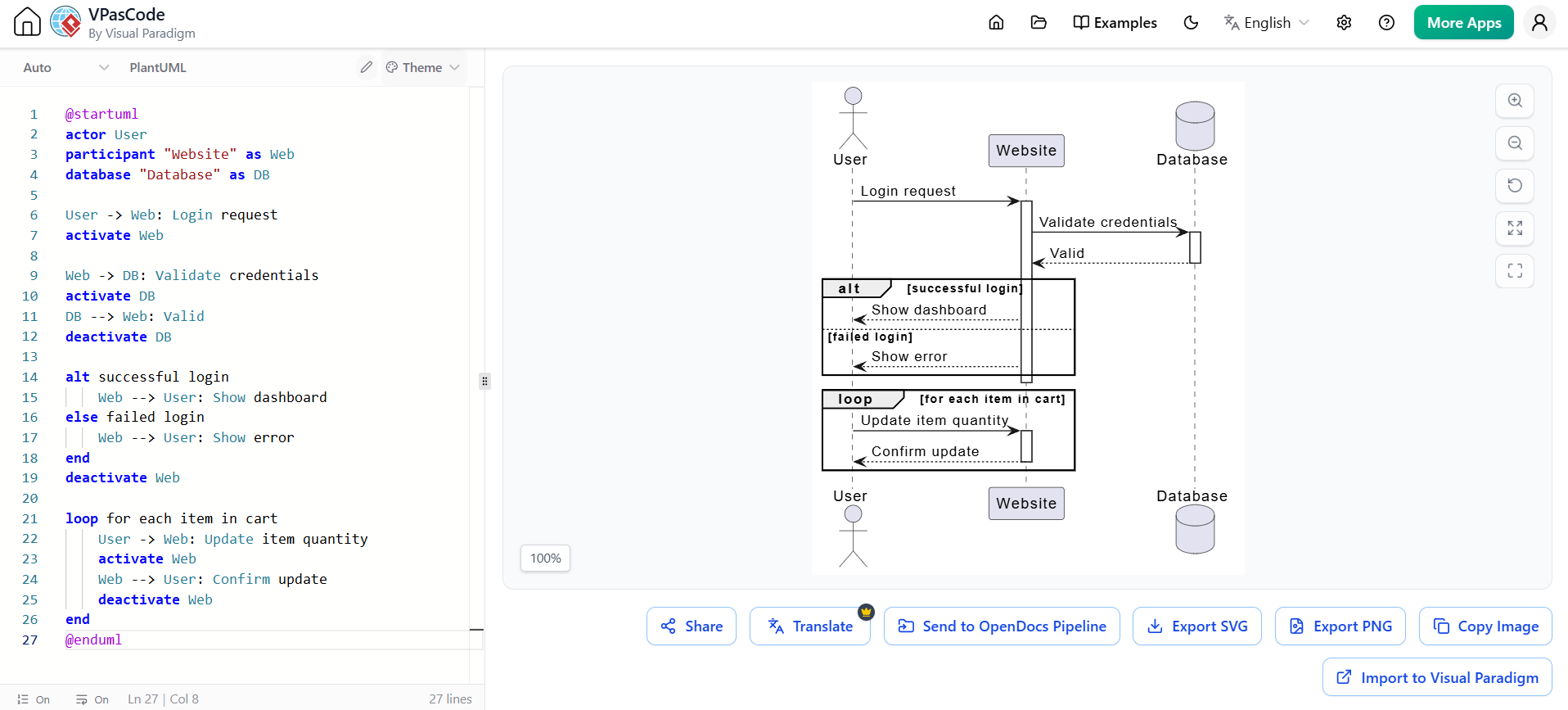
Figure 2: Visual Paradigm’s text-to-UML feature converting natural language input into a sequence diagram
The natural language input is shown on the left, and the resulting sequence diagram on the right. You can see the AI has inferred actors, message flows, and even system boundaries from the plain English description.
The collaboration that this enables is nothing short of revolutionary. We can now:
-
Sketch designs in real-time during refinement sessions
-
Generate formal models without interrupting the creative flow
-
Capture business requirements as visual designs automatically
-
Iterate on designs as quickly as we can describe changes
Smart Refactoring and Pattern Recognition
One of the more unexpected benefits has been the AI’s ability to suggest improvements to existing designs. I had one project where the class hierarchy was getting unwieldy—too many levels of inheritance, too much coupling between modules.
The AI analyzed the design and suggested:
-
Extract two interfaces that would reduce coupling
-
Apply the Strategy pattern to replace conditional logic in three key classes
-
Introduce a factory to simplify object creation in the main controller
Each suggestion came with visual diagrams showing the before and after state, making it easy to evaluate the proposed changes. I implemented about half of the suggestions, and the resulting code was noticeably cleaner and easier to test.
Integration with Existing Workflows
My team uses Jira for project management, Git for version control, and Slack for communication. The AI UML tool I ended up using (Visual Paradigm’s suite) integrated with all of these, which was essential for adoption.
![Image 3: Visual Paradigm’s integration showing how AI-generated diagrams can be managed within the development ecosystem]
The integration allowed us to:
-
Link UML diagrams to Jira issues for traceability
-
Generate diagrams from code changes as part of CI/CD pipelines
-
Share diagrams in Slack for quick reviews
-
Version control our diagrams alongside our code
This last point was crucial. Having diagrams in version control meant we could track changes, revert to earlier versions, and ensure that our modeling artifacts evolved alongside our code.
Real-World Scenarios: When AI UML Made Me Look Like a Genius
Let me share three specific projects where AI-powered UML went beyond time-saving and genuinely improved the quality of the software we delivered.
Scenario 1: Legacy Code Migration
We had a monolithic banking system from the early 2000s that needed to be broken into microservices. The problem? The original architects had left the company, the documentation was non-existent, and nobody truly understood the dependencies between modules.
I ran the codebase through the AI UML tool and got a comprehensive class diagram in minutes. But the real value came when I asked the AI to generate a component diagram showing high-level module boundaries and a deployment diagram suggesting potential service splits.
The AI analyzed the code’s coupling patterns and suggested three microservice boundaries that aligned beautifully with the business domains. We used these diagrams as the foundation for our migration plan, and for the first time in months, the team had a shared understanding of what we were dealing with.
Scenario 2: API Design for a Multi-Tenant SaaS
We were building a new multi-tenant SaaS from scratch, and I wanted to get the API design right before writing too much code. Using the AI tool, I described the API requirements in natural language and generated a complete set of sequence diagrams for all the key interactions.
The AI spotted something I had missed: in the tenant provisioning flow, we weren’t handling the case where a tenant exceeded their quota for a particular resource. It suggested adding a check and an appropriate error response, which we incorporated into the design.
The sequence diagrams became the source of truth for the API development, and because we could regenerate them from the code as we implemented, they stayed accurate throughout the project.
Scenario 3: Agile Refinement with a Distributed Team
My team was distributed across three time zones, and refinement sessions were always challenging. We’d jump on a call, I’d share my screen, and we’d try to hash out the design for the upcoming sprint—always with someone getting lost or feeling left out.
With the AI UML tool, I started capturing our discussions in natural language during the call, letting the AI generate real-time diagrams. This was transformative:
-
Everyone could see the design taking shape
-
Remote team members could validate the diagrams in their own time
-
We had an immediate artifact to share with the wider team
-
The product owner could validate the flow without needing to understand UML notation
The Pain Points: What AI UML Still Gets Wrong
I want to be honest—it hasn’t all been smooth sailing. AI UML tools have real limitations, and pretending otherwise would be doing a disservice to anyone reading this guide.
The Data Privacy Dilemma
The first time I used an AI tool to analyze my company’s code, I got an urgent call from legal. “You’re sending our intellectual property to… where?” The tool I was using sent code snippets to cloud-based AI services for analysis, and that was a problem for our security-conscious clients.
What I learned:
-
Check where the AI processing happens (local vs. cloud)
-
Review the privacy policy carefully
-
Consider on-premises solutions for sensitive projects
-
Get legal sign-off before processing proprietary code
Some tools now offer local processing, which largely solves this issue. But not all do, so this remains a consideration.
The Hallucination Problem
AI UML tools can occasionally hallucinate relationships or generate syntactically correct but semantically meaningless diagrams. I’ve had the AI:
-
Suggest inheritance between unrelated classes
-
Generate sequence flows that violate business rules
-
Create associations that don’t reflect the actual requirements
The tool is generally accurate, but you can’t blindly trust it. You need to review and validate the outputs, especially for complex or domain-specific logic.
The Learning Curve for Non-Technical Users
While the natural language interface is powerful, there’s still a learning curve for non-technical stakeholders. My product owner could describe requirements, but she struggled to validate the resulting diagrams. She was hesitant to tell me when something looked wrong because she lacked confidence in reading UML notation.
My approach:
-
I spent time teaching basic UML concepts to key stakeholders
-
We created a “cheat sheet” for the most common notation
-
I moderated the first few sessions to help bridge the gap
Dependency on Tool-Specific Features
One concern that’s emerged is vendor lock-in. Each AI UML tool has its own way of doing things, and switching providers can be painful. The AI-generated diagrams often use tool-specific extensions or metadata that don’t transfer cleanly.
I’ve started using more standardized exchange formats (like XMI) when possible, but it’s not a perfect solution. If you’re considering adopting an AI UML tool, think carefully about how locked-in you’re willing to be.
Best Practices I’ve Developed (Through Trial and Error)
After hundreds of diagrams and countless sessions, I’ve developed a set of best practices that maximize the value of AI UML tools.
1. Start with the Problem, Not the Diagram
The temptation with AI tools is to generate diagrams just because you can. I fell into this trap early on, creating beautiful diagrams for problems we didn’t actually have.
Now I always ask:
-
What decision does this diagram help us make?
-
Who needs to understand this information?
-
What’s the smallest useful diagram we can create?
2. Use Natural Language for Exploration, Code for Precision
I use natural language for initial exploration and brainstorming, then switch to code-based generation for precise, accurate diagrams. This hybrid approach lets me move fast in the early stages while maintaining accuracy as the design solidifies.
3. Treat AI Outputs as Drafts, Not Final Artifacts
Every AI-generated diagram gets a human review. I look for:
-
Business logic accuracy (the AI doesn’t know your domain)
-
Consistency with existing design patterns
-
Unintended dependencies or coupling
-
Missing edge cases
4. Maintain a Living Diagram Set
Instead of generating diagrams ad-hoc, I maintain a small set of “living diagrams” that are regenerated regularly from the code. This gives me a clean, always-accurate view of the architecture without cluttering our documentation.
5. Use the AI for Refactoring Suggestions, Not Decisions
The AI’s pattern recognition is excellent, but pattern suggestions are not mandates. I evaluate each suggestion against our team’s coding standards, performance requirements, and business constraints. Some suggestions are brilliant; others are technically correct but not right for the context.
The ROI: What I’ve Actually Saved
Let’s talk numbers, because that’s what matters to the people signing the checks.
Before AI UML:
-
Average time to create a complete class diagram: 3-4 hours
-
Average time to update diagrams per sprint: 2-3 hours
-
Number of inaccurate diagrams in our documentation: ~40%
-
Time wasted on misunderstandings due to unclear design: 10-15% of sprint capacity
After AI UML:
-
Average time to generate a class diagram: 2 minutes
-
Average time to review and adjust AI-generated diagrams: 15-20 minutes
-
Number of inaccurate diagrams: <5%
-
Time wasted on misunderstandings: <5% of sprint capacity
Based on these metrics, AI UML has saved our team approximately 8-10 developer-hours per sprint. Over a year, that’s roughly 200-250 hours—a significant productivity gain for a team of five.
![Image 4: Visual Paradigm showcasing real-time synchronization between AI-generated models and code, demonstrating the living documentation approach]
In this screenshot, you can see the real-time synchronization between the model and the code. The tool highlights which parts of the code are represented in the diagram, making it easy to spot when the code has drifted from the design.
But the qualitative benefits have been even more significant:
-
Better design decisions: The AI catches relationships and patterns we might miss
-
Faster onboarding: New team members use the living diagrams to understand the architecture
-
Improved stakeholder communication: Non-technical team members can see and validate designs
-
Reduced design debt: Patterns are consistently applied across the codebase
What I Wish I’d Known When I Started
If I could go back and give myself advice before starting this journey, here’s what I’d say:
AI Won’t Replace Your Design Skills
This was my biggest fear—that AI would somehow diminish the value I bring as an architect. The opposite has happened. I’m spending less time on diagram formatting and more time on actual design thinking. The AI handles the mechanical aspects, freeing me up to think about trade-offs, business implications, and future evolution.
The Tool Matters More Than You Think
Not all AI UML tools are created equal. I tried three before finding one that worked for my workflow. The differences were dramatic:
-
Accuracy: Some tools hallucinated more than others
-
Integration: Only one played nicely with our existing toolchain
-
Natural language support: The quality of text-to-UML varied enormously
-
Performance: One tool was unusable with large codebases
Take the time to try multiple tools. Most offer free trials—use them.
It Changes How You Think About Design
The biggest shift was psychological. I used to think of UML as a static representation of a design. Now I think of it as a living language that evolves with the code. The AI has helped me move from document-centric design to conversation-centric design, where diagrams are byproducts of discussions rather than artifacts created in isolation.
You’ll Need a Coach to Get Started
I tried to go it alone initially, and it was slow going. Once I booked a training session with an expert, everything clicked. The tools are powerful but complex, and learning the “right” way to use them makes a world of difference.
Tools I’ve Actually Used and Can Recommend
I’ve tried several AI UML tools, and here are my honest assessments:
Visual Paradigm
My Rating: 9/10
This is what I’ve been using most heavily. It has the best combination of AI features, integration capabilities, and enterprise readiness. The natural language to UML is the best I’ve seen, and the code synchronization is rock-solid.
Pros:
-
Excellent text-to-UML capability
-
Good integration with Agile tools
-
Regular updates and improvements
-
Good performance with large codebases
Cons:
-
Learning curve is steep initially
-
Pricey for smaller teams
-
Some advanced features are hidden in menus
PlantUML with AI Wrappers
My Rating: 7/10
For teams that prefer text-based diagrams, some AI wrappers have emerged that can generate PlantUML from natural language. This is a great option if you’re already using PlantUML and want to add AI capabilities.
Pros:
-
Free and open source
-
Works with existing PlantUML workflows
-
Lightweight and fast
Cons:
-
Less polished than commercial options
-
Limited code integration
-
Less advanced AI features
Other Tools I’ve Explored
I’ve also experimented with Mermaid-based AI tools and some of the cloud-first AI modeling platforms. They’re promising but didn’t quite hit the mark for my needs. The technology is moving fast, though, so I’d expect these to become more competitive soon.
The Future: Where I See This Going
Based on the trajectory I’ve observed, I’m excited about what’s coming next. Here’s my prediction for the evolution of AI UML:
Conversational Design Assistants
Within the next year, I expect AI UML tools to evolve from generating diagrams from prompts to engaging in actual design conversations. You’ll be able to have a back-and-forth with the AI about design trade-offs, with the diagram updating in real-time.
“Let’s try a microservices approach for the payment gateway instead of a monolith. What would that look like?”
“Actually, that creates too much latency for the response time requirement. Let’s keep it monolith for now but extract the fraud detection module.”
Predictive Quality and Risk Analysis
The next generation of tools will not just generate designs but analyze them for risk. I’ve seen early versions of this, where the AI flags potential performance bottlenecks, security vulnerabilities, or maintainability issues in the design stage itself.
Automated Code Generation from UML
We’re already seeing this to some extent, but it will become much more sophisticated. The AI will generate not just stub code but complete, tested implementations from well-designed UML models. Design and code will become essentially the same artifact.
Team-Level Collaboration Intelligence
Imagine an AI that understands your team’s design patterns, preferences, and historical mistakes. It would generate designs that align with your team’s style, flag patterns that have caused problems in the past, and suggest improvements based on your team’s proven patterns.
Conclusion: My Final Thoughts After Six Months
Six months ago, I was a UML skeptic, drowning in documentation debt and dreading every design session. Today, I can honestly say that AI-powered UML has transformed how I work, how I collaborate, and how I think about software design.
The journey hasn’t always been smooth. There were frustrating moments when the AI generated nonsense, privacy concerns that kept legal on speed dial, and a learning curve that tested my patience. But the benefits have been transformative, both for me personally and for the teams I’ve worked with.
Here’s what I want you to take away from my experience:
AI won’t replace your role as an architect. It will enhance it. The tools are assistants, not replacements. They handle the mechanical, repetitive aspects of modeling, freeing you to focus on the creative, judgment-driven decisions that truly matter.
Start small and iterate. Don’t try to transform your entire workflow overnight. Pick one project, one type of diagram, one pain point. Prove the value, then expand.
Keep the human element central. The best use of AI UML tools I’ve found is in facilitating conversations and enhancing collaboration. The diagrams matter, but what matters more is the shared understanding they create.
Embrace the change. The world of software development is changing rapidly, and AI is at the heart of that change. Those who learn to work with these tools will be the ones who thrive.
To the skeptics: I was you. I get it. But the technology is real, it’s here, and it’s genuinely useful. My advice is to give it a shot on a small, non-critical project. You might be surprised by what you find.
To the early adopters: Keep pushing the boundaries. Your experimentation is helping the rest of us understand what’s possible. Share your experiences, your successes, and your failures. We’re all learning together.
To the team at Visual Paradigm and other AI modeling tool developers: Thank you for building tools that have genuinely improved how I work. The technology has come so far in such a short time, and I’m excited to see where you take it next.
Software design has always been about turning abstract ideas into concrete, working systems. AI-powered UML tools are simply the latest—and perhaps most powerful—tool we’ve been given to do that more effectively. Embrace them, learn them, and use them to build better software for the people who depend on us.
Because at the end of the day, the diagrams aren’t the point. The software we build—and the problems we solve with it—that’s always been the point.
Have you tried AI-powered UML tools? I’d love to hear about your experiences. Drop me a comment or reach out directly—I’m always excited to learn from fellow practitioners navigating this new frontier.
About the Author
This article is based on six months of hands-on experience with AI-powered UML tools across three enterprise projects and two startups. The author has been a software architect for fifteen years, with expertise in Agile transformation, system design, and developer productivity tools.
Image Credits
The images in this article are sourced from Visual Paradigm’s AI-driven UML modeling suite and are used to illustrate the capabilities of modern AI-powered software design tools.
Related posts:
 VPasCode Review: Streamlining Architectural Documentation with Diagram-as-Code
AI-Powered UML Diagrams: How to Generate Complete Software Models in Minutes with Visual Paradigm
From Text to Visuals: A Hands-On Review of VPasCode for Modern Engineering Teams
VPasCode Review: Streamlining Architectural Documentation with Diagram-as-Code
AI-Powered UML Diagrams: How to Generate Complete Software Models in Minutes with Visual Paradigm
From Text to Visuals: A Hands-On Review of VPasCode for Modern Engineering Teams
 UML Modeling in Agile Development: The AI and Diagram-as-Code Revolution