
Mastering BPMN Modeling: How to Establish Clear Process Boundaries
In the complex world of Business Process Management (BPM), clarity is king. One of the most common pitfalls in process modeling is creating “spaghetti diagrams”—overly broad, cluttered charts that try to capture every possible event in a system. To avoid this, you must establish clear process boundaries.
This tutorial explores the critical concept of process scoping, using the “Order Fulfillment” example to illustrate how to define what is inside your process and what is outside its scope.
Defining Scope: The Inside vs. The Outside
Every BPMN (Business Process Model and Notation) diagram should have a distinct beginning and a definitive end. Establishing a boundary acts as a filter, allowing you to focus on the specific workflow you are designing while acknowledging, but excluding, external factors.
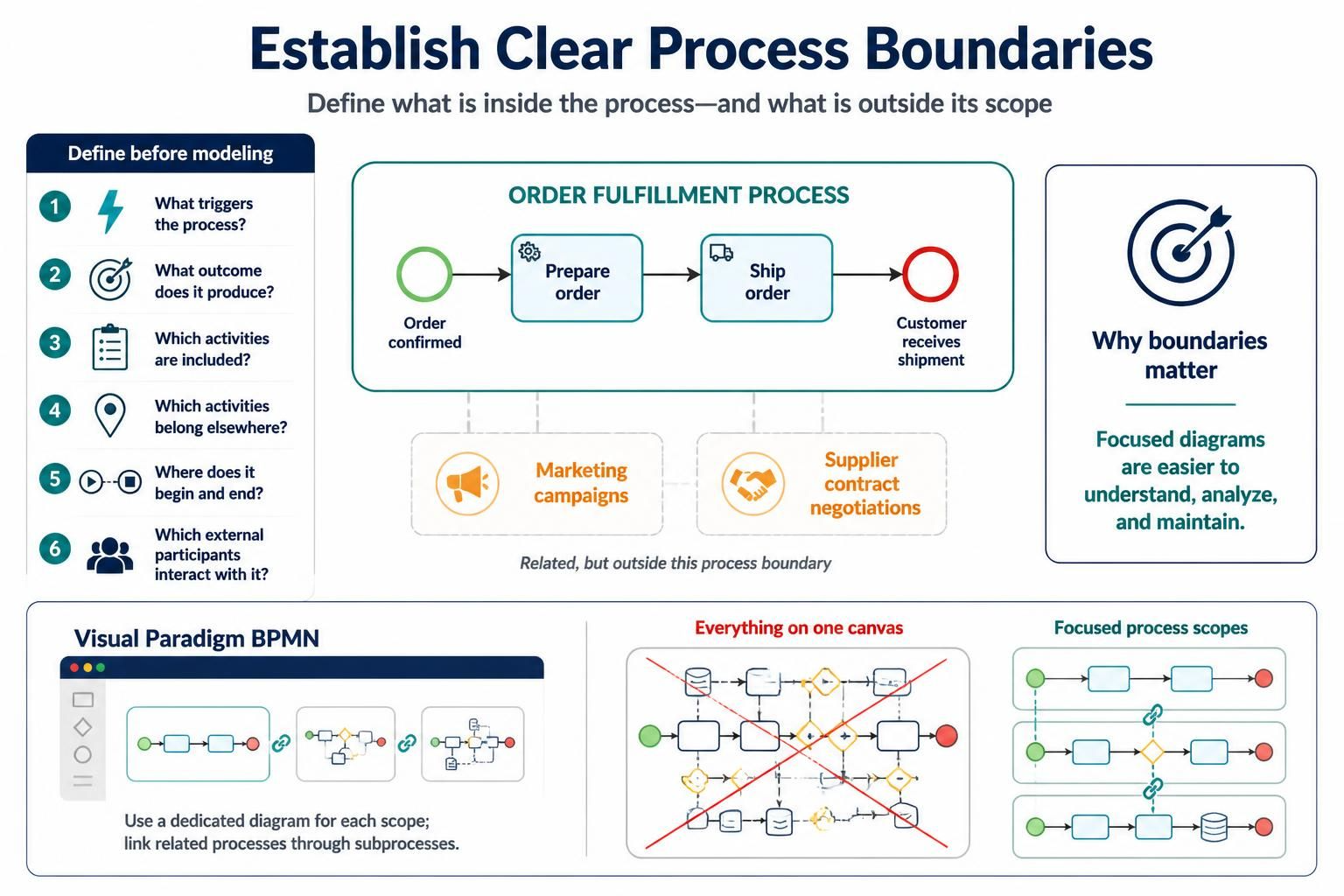
Consider the Order Fulfillment process. This is a classic example where scope is often confused with related activities:
- Inside the Boundary: The process begins specifically when an Order is Confirmed. It includes the logical steps of preparing that order, shipping it, and tracking it.
- Outside the Boundary: While Marketing Campaigns generate the leads that lead to orders, they are not part of the fulfillment logic. Similarly, Supplier Contract Negotiations are a prerequisite activity, but they belong to a procurement or legal process, not the fulfillment process itself.
By drawing a clear line around the process, you ensure that the diagram remains a focused representation of the specific lifecycle you are managing.
The Pre-Modeling Checklist
Before you open your modeling tool and place a single shape on the canvas, you must answer a series of diagnostic questions. These questions act as your compass to determine the extent of your process scope.
Key Questions to Ask
- What triggers the process? Is it a specific event (e.g., an email arrival, a button click) or a condition? In the Order Fulfillment example, the trigger is the confirmation of an order.
- What outcome does the process produce? Every process must have a value. Here, the outcome is the customer receiving the shipment.
- Which activities are included? Only the steps necessary to move from the trigger to the outcome.
- Which activities belong elsewhere? Identify “noise.” Marketing and contract negotiations are related to the business, but they do not belong on the fulfillment diagram.
- Where does the process begin and end? Define the Start Event and the End Event with precision.
- Which external participants interact with it? Are there customers, suppliers, or systems that interact with the process but are not part of the core workflow?
Why Boundaries Matter
Why go through the effort of defining these limits? The answer lies in maintainability and understanding. Focused diagrams are easier to understand, analyze, and maintain.
When a diagram contains too much context, it becomes difficult for stakeholders to trace the specific flow of logic. If a process is too broad, it often leads to high cognitive load, making it hard to identify bottlenecks or inefficiencies.
Best Practice: The Visual Paradigm Approach
How do you handle the complexity of a large system without cluttering a single diagram? The industry-standard approach, often seen in tools like Visual Paradigm, is to use dedicated diagrams for each process scope.
The “Everything on One Canvas” Fallacy
It is tempting to put every step of a business operation into one massive diagram. However, this creates a chaotic visual representation that is difficult to read. As illustrated in the concept of “Everything on one canvas,” attempting to model the entire enterprise workflow on a single sheet often results in a tangled mess of connectors and symbols.
The Solution: Linked Subprocesses
Instead of one giant diagram, you should create separate, focused diagrams for distinct scopes. For example:
- Create a specific BPMN diagram for Order Fulfillment.
- Create a separate diagram for Supplier Negotiations.
- Create another for Marketing Campaigns.
How do these connect? You link related processes through subprocesses. If the “Order Fulfillment” process requires checking inventory, you can model that as a subprocess that links to a more detailed “Inventory Management” diagram. This modular approach keeps your diagrams clean and your logic hierarchical.
Summary
Clear boundaries are the foundation of effective process modeling. By rigorously defining what triggers a process, what outcomes it produces, and what is strictly excluded, you create diagrams that are actionable and maintainable. Remember: use dedicated diagrams for specific scopes and link them via subprocesses to manage complexity effectively.