
Mastering BPMN 2.0: A Step-by-Step Guide to the Recommended Modeling Workflow
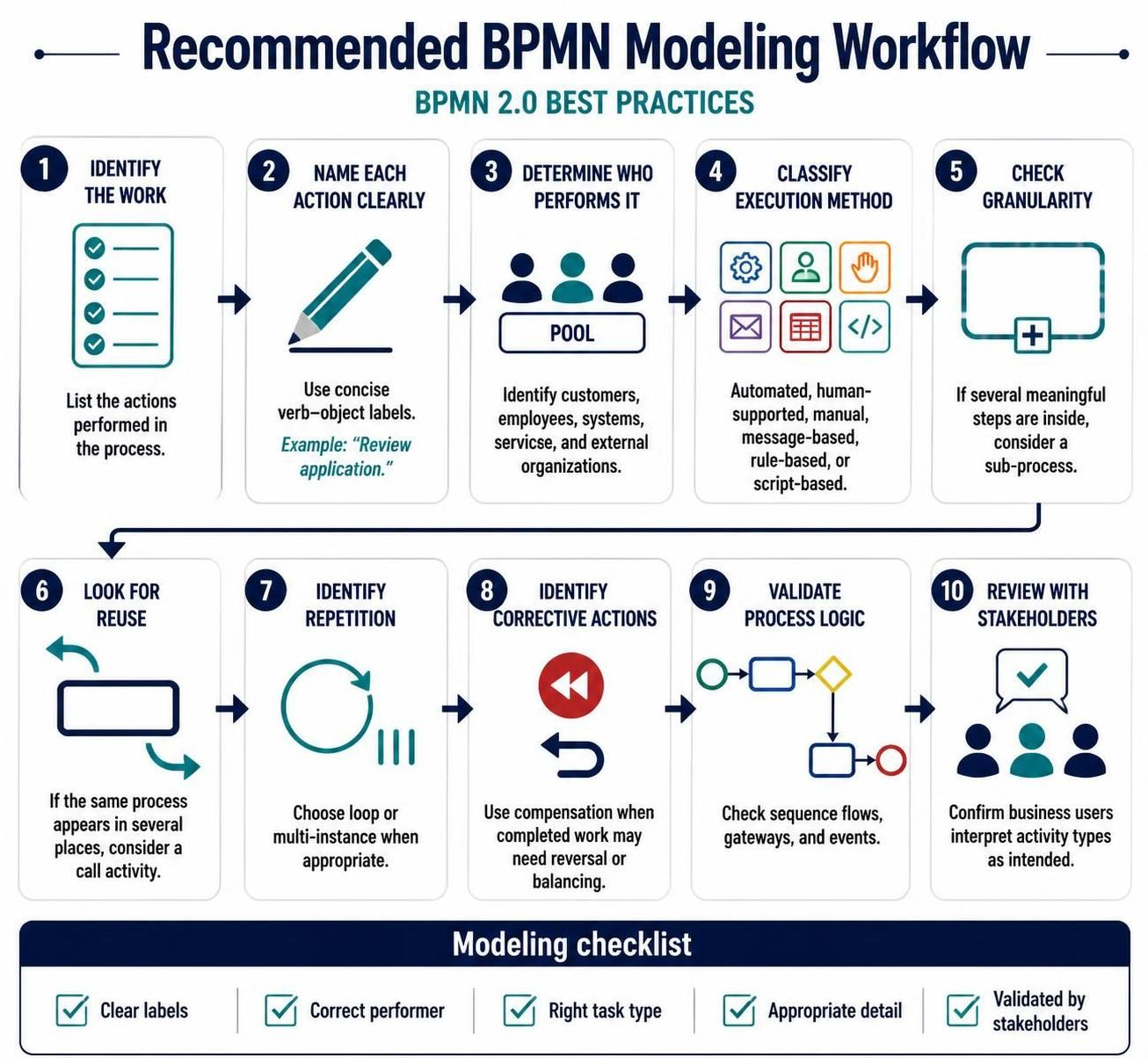
Business Process Model and Notation (BPMN) is the global standard for business process management. However, creating a diagram that is both technically accurate and business-readable requires a disciplined approach. Based on the industry’s best practices, this tutorial walks you through a comprehensive 10-step recommended modeling workflow to ensure your diagrams are robust, scalable, and clear.
Phase 1: Foundation and Definition
The first phase of modeling is about understanding the scope and defining the elements precisely. Rushing into drawing shapes without a plan often leads to “spaghetti diagrams” that are difficult to maintain.
1. Identify the Work
Before placing a single shape on the canvas, you must list the actions performed in the process. This is the “what” of your process. Take a high-level view and brainstorm every step required to move from the start event to the end event. Do not worry about the logic yet; focus on capturing the raw list of activities.
2. Name Each Action Clearly
Clarity is the currency of BPMN. When labeling your activities, use concise verb-object labels. This ensures that the diagram reads like a sentence or a clear instruction. For example, instead of a vague label like “Review,” use “Review Application.”
// Good Labeling Practice
Action: Review Application
Action: Approve Loan
Action: Send Invoice

// Avoid these vague labels
Action: Review
Action: Process
Action: Do it
3. Determine Who Performs the Work
A process is a collaboration, not just a sequence of tasks. You must identify the actors involved. In BPMN, these are represented within Pools and Lanes. Your list of performers should include:
- Customers: External entities initiating the process.
- Employees: Human resources performing manual tasks.
- Systems: Automated software components.
- Services: External service providers.
- External Organizations: Third parties like banks or regulatory bodies.
4. Classify the Execution Method
Not all tasks are created equal. It is crucial to classify the execution method to understand how the process flows. When modeling, decide if the activity is:
- Automated: Handled entirely by a system without human intervention.
- Human-supported: A human performs the task with system assistance.
- Manual: A purely human effort.
- Message-based: Waiting for an external communication.
- Rule-based: Triggered by specific logic conditions.
- Script-based: Executed via a specific script or code.
5. Check the Activity’s Granularity
Granularity refers to the level of detail in your diagram. If an activity box contains several meaningful steps inside it, your diagram is likely too cluttered. In this case, you should consider breaking it down into a Sub-Process. This keeps the main process map clean and allows for drilling down into details only when necessary.
Phase 2: Refinement and Logic
Once the basic elements are defined, the second phase focuses on optimizing the structure and ensuring the logic holds together.
6. Look for Reuse
Efficiency is key in process modeling. If you notice that the same process or sequence of activities appears in several places, do not copy and paste the diagram. Instead, consider using a Call Activity. This references a separate, reusable process, making your model modular and easier to maintain.
7. Identify Repetition
Real-world processes often involve loops. If a step needs to be repeated until a condition is met, or if a set of tasks must be performed multiple times (e.g., processing 100 orders), choose a Loop or Multi-Instance Marker when appropriate. This accurately reflects the iterative nature of the work.
8. Identify Corrective Actions
Processes rarely go perfectly. You must account for scenarios where completed work needs to be reversed or balanced. For instance, if a payment fails after an item is shipped, you need a return process. Use Compensation activities to model these “undo” or “correction” flows explicitly.
9. Validate the Process Logic
This is the technical quality check. You must verify that activities connect logically. Ensure that:
- Sequence flows are continuous and unbroken.
- Gateways (decision points) have both an incoming and an outgoing flow.
- Events properly trigger the start and end of flows.
- No dead ends exist where a process flow stops without reason.
Phase 3: Validation and Conclusion
10. Review with Stakeholders
The final step is often the most critical. A diagram is useless if the business users do not understand it. Review the diagram with stakeholders to confirm that they interpret the activity types and logic as intended. This feedback loop ensures the model is a true representation of reality.
Conclusion
By adhering to this 10-step recommended workflow, you ensure that your BPMN diagrams are not just pictures, but functional blueprints for business operations. This structured approach minimizes ambiguity and maximizes the value of your process documentation.
For the implementation of this workflow, we recommend utilizing Visual Paradigm BPMN as your primary tooling. Visual Paradigm offers robust support for all the elements discussed above, from complex sub-processes to multi-instance markers. Furthermore, to accelerate the creation and validation of your diagrams, you should leverage the integrated AI capabilities provided within the platform. AI assistance can help generate initial process drafts, suggest optimizations, and automatically check for logic errors, significantly enhancing the efficiency of your modeling efforts.