
Mastering Custom AI Endpoints in Visual Paradigm BPMN + AI
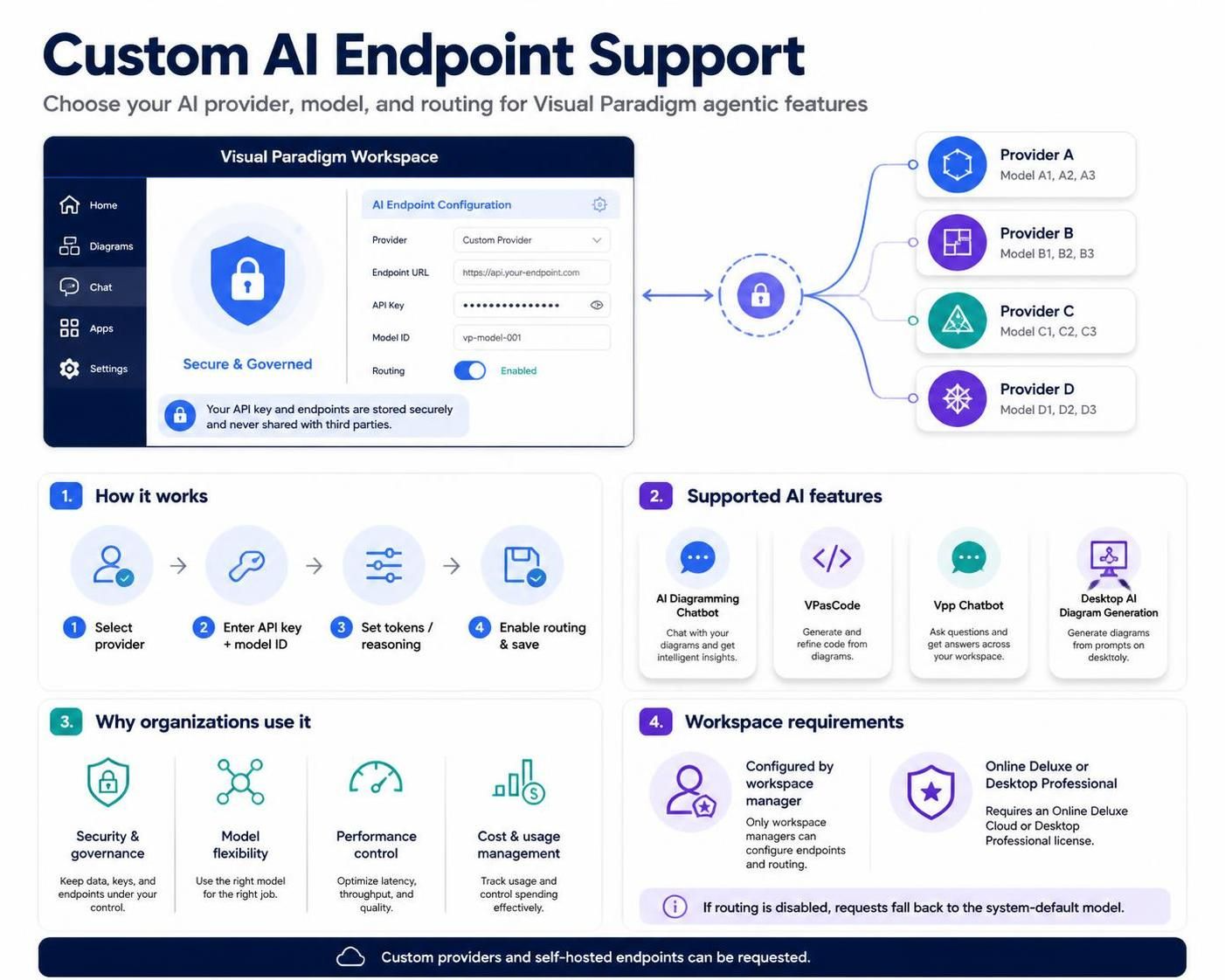
In the realm of Business Process Management (BPM), the integration of Artificial Intelligence has transformed how we model, analyze, and automate workflows. However, for enterprise environments, relying on a single, default AI provider often presents challenges regarding data sovereignty, cost, and specific model capabilities. Visual Paradigm addresses this through Custom AI Endpoint Support, a feature that acts as a gateway, allowing organizations to route AI requests through their own approved infrastructure.
This tutorial explores the architecture of Custom AI Endpoints, explaining how it shifts the paradigm from a “one-size-fits-all” approach to a flexible, governed enterprise standard. We will dissect the configuration hierarchy, the routing logic, and the specific benefits for BPMN modeling and code generation.
Architectural Overview: The Request Routing Flow
At its core, the Custom AI Endpoint functionality creates an abstraction layer between the Visual Paradigm Workspace and the underlying AI providers. Instead of the application making direct calls to a public cloud API, it sends requests to a defined configuration managed by the workspace administrator.
The architecture operates on a central hub-and-spoke model, as illustrated in the system diagram. The workspace acts as the central node, capable of pointing to specific providers or models based on the configuration rules.
- The Workspace Configuration: The process begins at the workspace level. An administrator defines the “AI Endpoint Configuration,” specifying the Provider, API Key, and Model ID.
- The Routing Switch: A toggle switch determines whether the system should route requests through this custom configuration or revert to the system default.
- The External Provider: Once routing is enabled, the request is transmitted to the selected provider (e.g., Provider A, B, or C), which processes the request and returns the result.
Configuration Mechanics and Security
Setting up a Custom AI Endpoint involves precise technical configuration. This is not merely a setting change but a security and infrastructure decision. The configuration parameters include:
- Provider Selection: Identifying the AI service provider (e.g., OpenAI, Azure, or a self-hosted LLM).
- API Key Management: Securely inputting the authentication credentials. Crucially, Visual Paradigm ensures that these keys are stored securely and are never shared with third parties.
- Model ID: Specifying the exact model to be used (e.g.,
vp-model-001). This allows teams to lock in a specific version of an AI model for consistency. - Output Token Limits: Setting constraints on the maximum output tokens to manage costs and response lengths.
- Reasoning Settings: Where supported, administrators can configure reasoning or “thinking” settings to optimize complex logic tasks.
The Logic of Routing
Understanding the routing logic is critical for workspace managers. The system operates on a binary decision tree:
- Routing Enabled: All supported AI requests within the workspace are intercepted and directed through the custom endpoint configuration. This ensures consistent model behavior and security compliance across all eligible users.
- Routing Disabled: If the configuration is not enabled, the system defaults to the Visual Paradigm system-default model. This allows for a fallback mechanism where users can still access AI features if the custom endpoint is temporarily unavailable or misconfigured.
Supported Features in BPMN and Code Contexts
Custom AI Endpoint support is not universal across every single feature in the suite; it is targeted at specific high-value applications. In the context of BPMN and software development, the following features leverage these endpoints:
- AI Diagramming (Chatbot): Facilitates AI-assisted diagramming conversations. When modeling a process, users can chat with the bot to generate BPMN flows, with the AI response coming from the custom model.
- VPasCode: This is a critical component for technical modeling. VPasCode uses the custom endpoint for:
- Diagram generation from text prompts.
- Diagram modification and refactoring.
- Code error fixing and translation.
- C4 diagram importing.
- Vpp Chatbot: AI-assisted interactions specifically within the Vpp Chatbot environment.
- Desktop AI: Generates diagrams directly within the desktop application.
Strategic Advantages for Enterprise Modeling
Why go through the effort of configuring a custom endpoint? The benefits are multifaceted, addressing the specific pain points of enterprise IT and architecture teams.
1. Security and Governance
In strict regulatory environments (such as banking or healthcare), data cannot leave the corporate network or must be processed through specific providers. Custom endpoints allow organizations to use an AI provider and account approved by their security teams. This aligns with internal policies regarding credentials, access control, and data privacy.
2. Infrastructure Control
Teams gain the ability to manage provider relationships, API keys, and quotas. Instead of individual developers managing their own API keys, the workspace manager controls the infrastructure. This centralization allows for better monitoring of usage and ensures that the AI service adheres to organizational standards.
3. Model Flexibility and Optimization
Different modeling tasks require different AI strengths. A custom endpoint allows a team to select a model based on specific criteria:
- Response Quality: Choosing a model better suited for complex BPMN logic.
- Speed: Selecting a faster model for rapid prototyping.
- Cost: Switching to a more cost-effective model for high-volume tasks.
- Region/Network: Optimizing for latency by choosing a provider closer to the organization’s infrastructure.
4. Operational Consistency
By configuring the endpoint at the workspace level, the organization ensures that all users are working with the same AI capabilities. There is no need for individual users to configure AI services, reducing the “shadow IT” risk and ensuring a uniform experience across the team.
Technical Implementation: Setting Up the Endpoint
To implement this architecture, the workspace manager must navigate to the AI Endpoint Configuration settings. The process involves selecting the provider, entering the API key, and defining the model ID. Below is a conceptual representation of the configuration logic.
// Visual Paradigm Custom Endpoint Configuration Logic

Configuration = {
    Provider: "Custom Provider",
    Endpoint_URL: "https://api.your-endpoint.com",
    API_Key: "********", // Stored securely
    Model_ID: "vp-model-001",
    Routing: "Enabled"
}

Decision_Flow:
IF (Routing == Enabled) {
    Route_Request(Workspace_AI_Request, Configuration);
} ELSE {
    Route_Request(Workspace_AI_Request, System_Default_Model);
}
Conclusion
Visual Paradigm’s Custom AI Endpoint Support represents a significant leap forward in enterprise-grade AI integration. By decoupling the AI service from the application, it empowers organizations to take control of their security, costs, and model performance. Whether you are refining complex BPMN diagrams or generating code via VPasCode, the ability to route requests through a custom endpoint ensures that your AI workflows align perfectly with your technical standards and regulatory requirements.