
Mastering BPMN 2.0: Events, Activities & Gateways for AI Chatbots
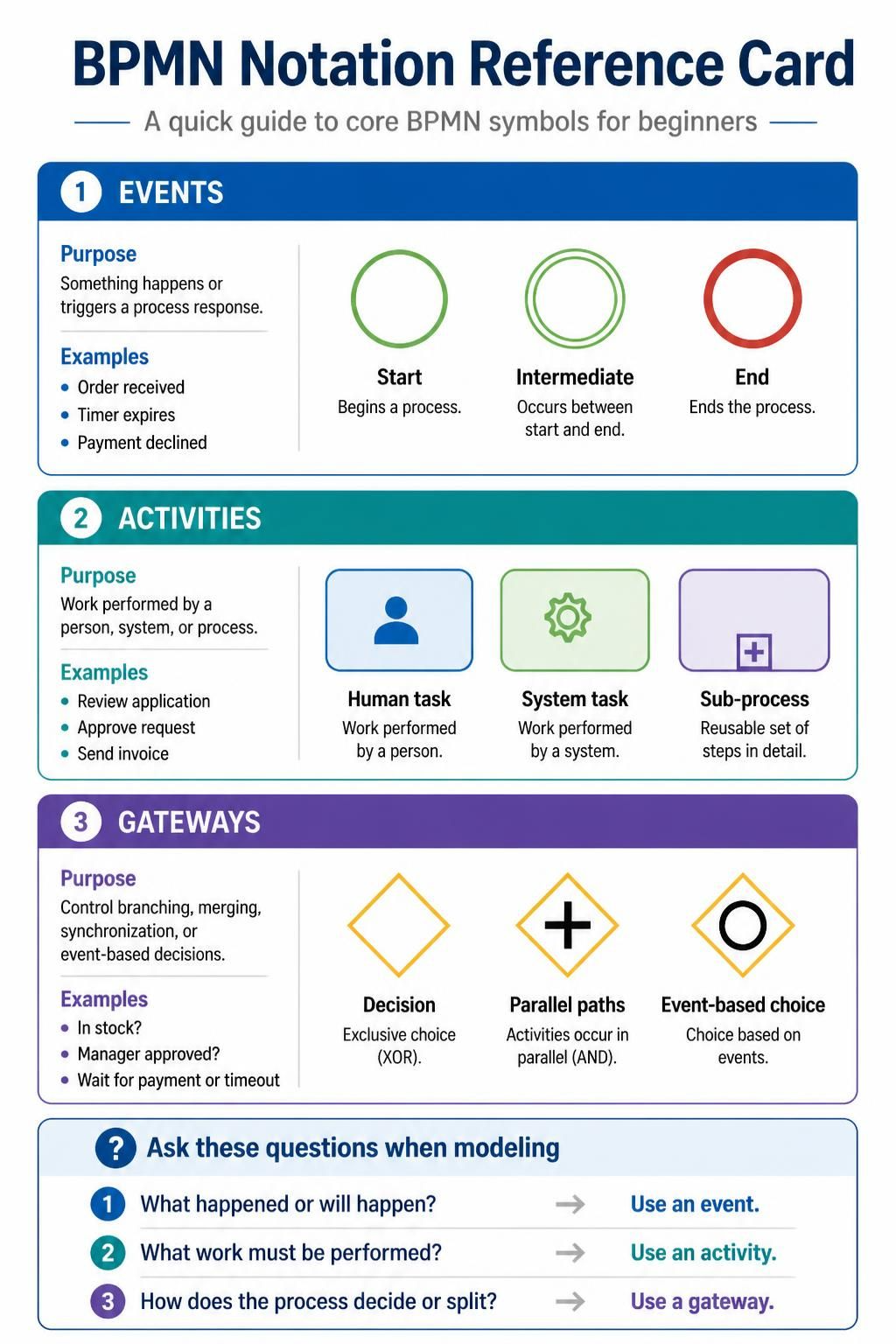
Welcome to your comprehensive guide on Business Process Model and Notation (BPMN). Whether you are a business analyst, a process owner, or a developer, understanding the core building blocks of process modeling is crucial. BPMN provides a standardized visual language that bridges the gap between business stakeholders and IT systems.
In this tutorial, we will deconstruct the three fundamental pillars of BPMN: Events, Activities, and Gateways. By mastering these elements, you will be able to translate complex business logic into clear, executable diagrams.
1. Events: The Lifeblood of Your Process
Events are the most critical components in defining the lifecycle of a process. They represent something that happens or triggers a response. In BPMN, events are visualized as circles. They are passive objects; they do not perform work themselves but rather signal the occurrence of an action.
Key Event Types
- Start Events: These are the initiators. A green circle indicates the beginning of a process. It signifies the trigger that kicks off the workflow, such as an order being received or a timer expiring.
- Intermediate Events: These occur between the start and the end. They can represent a delay (like waiting for a response) or a message passing between participants.
- End Events: Represented by a thick red circle, these mark the termination of the process. Examples include a payment being declined or an invoice being sent.
2. Activities: The Work Being Done
If events are the triggers, Activities are the actual work. This is the “meat” of your process diagram. Activities represent a unit of work performed by a human, a system, or the process itself. Visually, they are represented by rectangles with rounded corners.
Types of Activities
- Tasks (Human): These are specific steps performed by a human actor. In a diagram, this is often indicated by a small person icon.
- Example: Review application, Approve request.
- Tasks (System): These are automated steps performed by a computer system or software application. This is often indicated by a gear icon.
- Example: Calculate tax, Send invoice.
- Sub-processes: When a task is too complex to be represented in detail on the current level, it is collapsed into a sub-process. This allows for “drill-down” modeling where a high-level view exists alongside a detailed view.
- Example: A “Fulfill Order” activity that contains dozens of smaller steps.
3. Gateways: The Decision Makers
Real-world processes are rarely linear. They involve branching paths based on data, time, or external events. Gateways are the traffic controllers of BPMN, visualized as diamonds. They control how the flow moves through the process.
Common Gateway Patterns
- Exclusive Gateway (XOR): The classic “Decision” point. It forces a choice. Only one path out of the gateway will be taken based on a condition (e.g., “Is stock available?”).
- Use Case: “Manager approved?” -> Yes or No?
- Parallel Gateway (AND): This gateway splits the flow into multiple paths that occur simultaneously. It does not make a choice; it duplicates the flow.
- Use Case: When an order is placed, you might simultaneously reserve inventory AND send a confirmation email.
- Event-Based Gateway: This is a unique type of gateway that waits for one of several events to occur. It acts like a race condition where the first event to trigger wins.
- Use Case: “Wait for payment or timeout.”
Modeling Strategy: The Three Golden Questions
When you sit down to model a new process, it is easy to get overwhelmed. To simplify your thought process, apply these three questions to every element you draw:
- What happened or will happen? If you are defining a trigger or a result, use an Event.
- What work must be performed? If you are defining a step that consumes time or resources, use an Activity.
- How does the process decide or split? If you are managing logic, branching, or synchronization, use a Gateway.
Tooling: Accelerating Collaboration with Visual Paradigm
While understanding the theory is essential, implementing these concepts requires the right tools. Modern process modeling is no longer about drawing static pictures; it is about creating executable blueprints.
Visual Paradigm stands out as a premier tool for BPMN modeling, offering a seamless integration that significantly boosts team collaboration and productivity. Its architecture supports the entire lifecycle of process management:
- Visual Paradigm BPMN: Provides a robust, drag-and-drop interface that strictly adheres to BPMN 2.0 standards. It ensures that your diagrams are not just pretty pictures, but valid technical specifications ready for execution.
- Seamless Integration: Unlike siloed tools, Visual Paradigm integrates directly into your development ecosystem (such as Git, Jira, and CI/CD pipelines). This allows for real-time collaboration where developers, analysts, and business users can view and edit process models simultaneously.
- AI-Driven Efficiency: By integrating AI capabilities, Visual Paradigm can auto-generate diagrams from natural language descriptions or legacy code, reducing the time spent on manual modeling. This “BPMN + AI” approach allows teams to focus on optimization rather than creation.
By combining a solid understanding of BPMN elements with powerful tools like Visual Paradigm, organizations can achieve a level of operational transparency and agility that drives business success.