
Mastering the BPMN Parallel Gateway (AND Gateway) for Process Synchronization
In the world of Business Process Model and Notation (BPMN), managing the flow of work is critical. While many processes are linear, real-world business logic often requires tasks to happen simultaneously. This is where the Parallel Gateway, also known as the AND Gateway, becomes indispensable. This tutorial breaks down the architecture of parallel execution, how to model it correctly using the diamond symbol with a plus sign, and how to leverage modern AI-assisted tooling to implement it efficiently.
Understanding the Mechanics of the Parallel Gateway
The Parallel Gateway is a control flow element used to split a single incoming path into multiple outgoing paths that execute simultaneously, or to synchronize multiple incoming paths into a single outgoing path. It represents a point of concurrency in your process.
The Split: Activating Multiple Paths
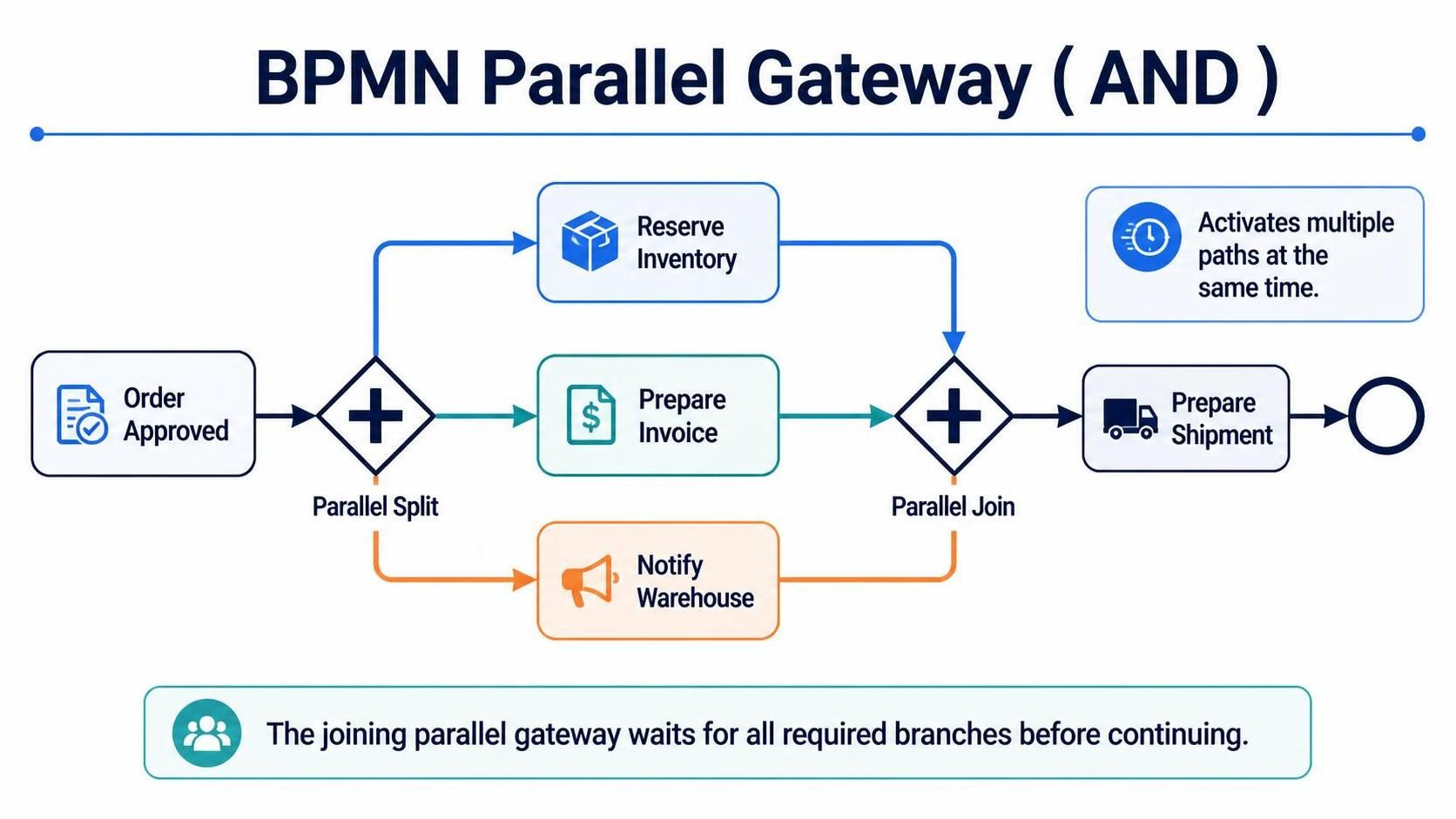
When an execution flow reaches a Parallel Split (indicated by a diamond with a plus sign +), the process does not choose just one path. Instead, it activates all outgoing sequence flows at the same time. This is ideal for scenarios where independent tasks can be performed in parallel to save time.
Consider the example of an Order Approval process. Once an order is approved, the system needs to perform three distinct actions: reserve the inventory, prepare the invoice, and notify the warehouse. These actions do not depend on each other; they can all happen immediately after approval.
// Conceptual Logic for Parallel Split
on Order_Approved:
    spawn_task("Reserve Inventory")
    spawn_task("Prepare Invoice")
    spawn_task("Notify Warehouse")
    // All three tasks start concurrently
The Join: Synchronizing Concurrency
A common pitfall in modeling is forgetting the Join. If you split a process into three paths, you must eventually bring them back together to ensure the process doesn’t end prematurely. The Parallel Join acts as a barrier. It waits for all incoming branches to complete their tasks before allowing the flow to proceed to the next step.
In our example, the “Prepare Shipment” task cannot begin until all three of the following are done: the inventory is reserved, the invoice is ready, and the warehouse has been notified. The Parallel Join ensures this synchronization.
Common Modeling Errors: Parallel vs. Exclusive
The most frequent error when using Parallel Gateways is confusing them with Exclusive Gateways (XOR). An Exclusive Gateway asks, “Which option applies?” and chooses one path. A Parallel Gateway asks, “What needs to be done?” and chooses all paths.
- Use Parallel Gateway (AND) when: Tasks are independent and can happen at the same time (e.g., “Send email AND Send SMS”).
- Use Exclusive Gateway (XOR) when: Tasks are mutually exclusive (e.g., “Approve OR Reject the order”).
If your process logic requires a decision based on a condition where only one branch is valid, do not use a Parallel Gateway. It will force all branches to execute, potentially causing data conflicts or unnecessary work.
Tooling: Visual Paradigm BPMN + AI Assisted Feature
Implementing complex concurrency logic like Parallel Gateways can be tedious when done manually in diagramming tools. Modern tooling, specifically the integration of Visual Paradigm BPMN with AI-Assisted Features, transforms this workflow.
Boosting Team Collaboration and Productivity
By combining standard BPMN modeling with AI capabilities, teams can move from abstract requirements to concrete diagrams in seconds. Here is how this synergy works in practice:
- Natural Language to Diagram: Instead of manually dragging and dropping gateways, users can type a process requirement like, “Split the flow to reserve inventory and notify the warehouse, then join them before shipping.” The AI interprets this intent and automatically generates the correct Parallel Split and Join structure.
- Consistency Checks: AI assistants can instantly scan your diagram to identify modeling errors, such as a Parallel Split without a corresponding Join, or the misuse of Exclusive gateways where Parallel ones were intended.
- Seamless Integration: The AI features are built directly into the Visual Paradigm environment, allowing for real-time feedback. This eliminates the back-and-forth between business analysts and modelers.
Usage Cases
- Rapid Prototyping: Quickly generate multiple versions of a process flow to test different concurrency strategies before settling on the final architecture.
- Legacy Migration: Use AI to analyze existing documentation or text descriptions of processes and automatically convert them into structured BPMN models with accurate gateway logic.
- Training and Education: Use the AI to explain why a specific gateway type was chosen, serving as an interactive tutor for junior analysts learning the nuances of AND vs. XOR gateways.
By leveraging these tools, organizations ensure that their process models are not just visually accurate, but logically robust, handling the complexities of parallel execution with precision.