
Mastering System Architecture: A Complete Guide to UML Structural and Behavioral Diagrams
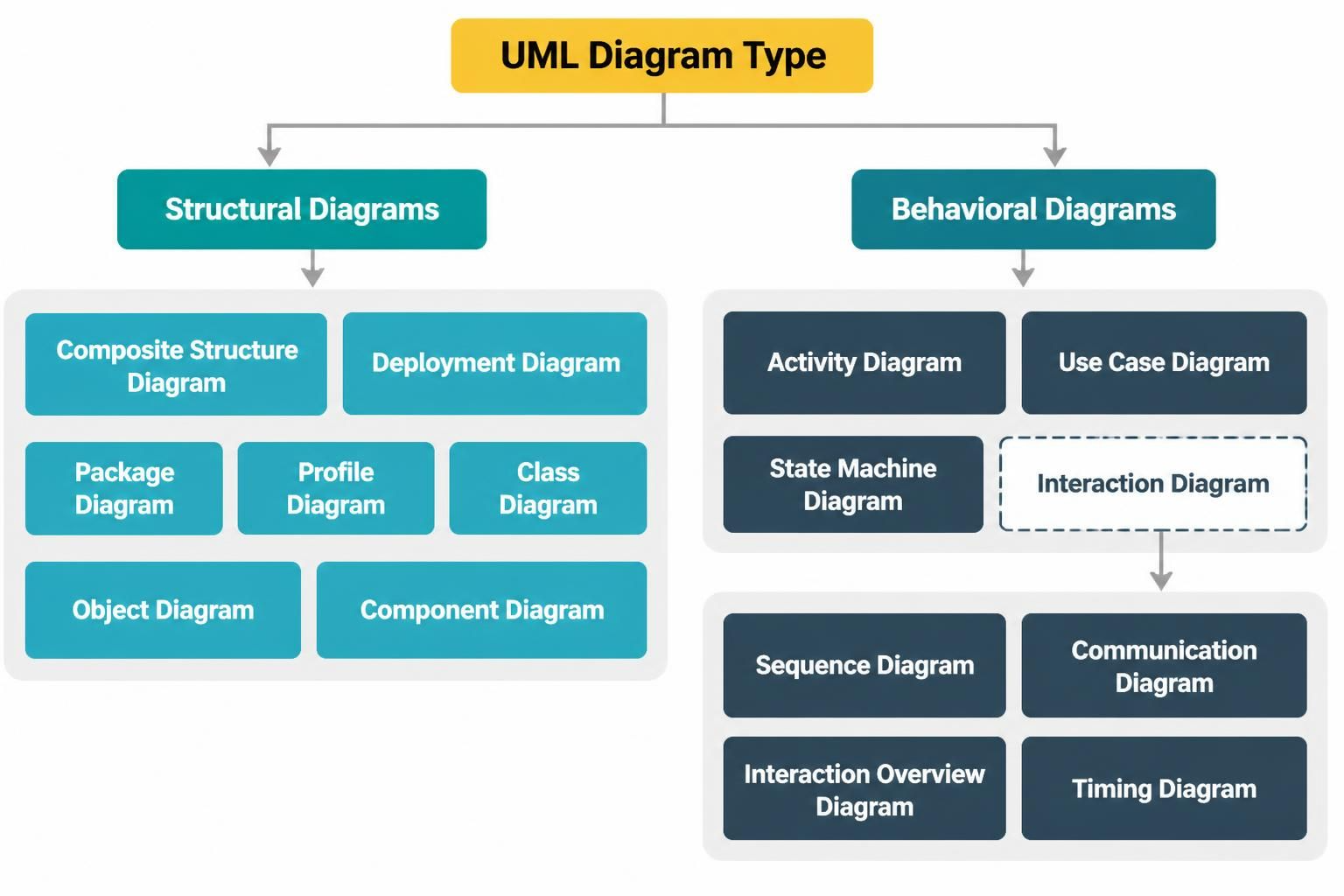
When approaching complex software architecture, the Unified Modeling Language (UML) acts as the universal blueprint. Just as an architect uses blueprints to visualize a building’s structure before laying a single brick, software engineers use UML to visualize system requirements and logic before writing code. Understanding the distinct categories of these diagrams is the first step toward effective system design.
This guide breaks down the two primary pillars of UML—Structural and Behavioral diagrams—and explores how modern tooling like Visual Paradigm integrates these concepts to streamline development workflows.
1. Structural Diagrams: The Static Blueprint
Structural diagrams describe what a system is made of. They focus on the static aspects of the architecture, representing the physical and logical structure of the software. These diagrams are akin to the floor plan of a house, showing rooms, walls, and connections without depicting how people move through them.
Key Structural Diagram Types
- Class Diagram: The backbone of object-oriented design, showing classes, attributes, and relationships like inheritance and association.
- Component Diagram: Focuses on the high-level organization of code modules and their dependencies.
- Deployment Diagram: Visualizes the physical hardware and software nodes where the system actually runs.
- Object Diagram: Represents a snapshot of data at a specific moment in time, often used to verify the structure of a Class Diagram.
- Composite Structure Diagram: Shows the internal structure of a class or component, detailing the collaboration of its parts.
- Package Diagram: Organizes elements into groups (packages) to manage complexity and dependencies.
- Profile Diagram: Allows for the customization of UML to specific domains or platforms.
Why Use Structural Diagrams?
These diagrams are essential for database design, code generation, and understanding the “skeleton” of the application. They ensure that the building blocks of your software are robust, scalable, and correctly interconnected.
2. Behavioral Diagrams: The Dynamic Flow
If structural diagrams are the blueprint, behavioral diagrams are the movie script. They describe what the system does and how it behaves over time. These diagrams capture the dynamic aspects of the system, such as user interactions, state changes, and data flow.
Key Behavioral Diagram Types
- Use Case Diagram: Captures functional requirements by illustrating how actors (users) interact with the system.
- Activity Diagram: Similar to a flowchart, this maps out the workflow of a process, showing decision points and parallel actions.
- State Machine Diagram: Describes the different states an object can be in and the transitions triggered by events.
- Interaction Diagrams: These focus on the exchange of messages between objects. Key sub-types include:
- Sequence Diagram: Shows interactions organized by time.
- Communication Diagram: Shows interactions organized by object structure.
- Interaction Overview Diagram: A high-level view of interactions.
- Timing Diagram: Focuses on time constraints and changes in state over time.
3. Tooling: Integrating Visual Paradigm for Team Success
While understanding the theory is crucial, the practical application of these diagrams requires powerful tooling. Visual Paradigm stands out as a comprehensive solution that seamlessly integrates UML standards into a collaborative environment.
By unifying the core pillars of modeling, Visual Paradigm significantly boosts team collaboration and productivity. Here is how it leverages the structural and behavioral categories discussed above:
Seamless Integration of Core Pillars
Visual Paradigm allows teams to switch fluidly between structural and behavioral views. For instance, a developer can design a Class Diagram (Structural) and immediately generate a Sequence Diagram (Behavioral) to validate the logic of the class methods. This bidirectional flow ensures that the static structure and dynamic behavior remain perfectly synchronized.
Boosting Team Collaboration
- Real-time Sync: Multiple team members can work on different parts of the architecture simultaneously without version conflicts.
- Centralized Repository: All diagrams, requirements, and code snippets are stored in a single repository, making it easy for stakeholders to view the system’s current state.
- Code Engineering: Teams can reverse engineer existing codebases into UML diagrams to document legacy systems or forward engineer diagrams into new codebases, drastically reducing boilerplate coding time.
Practical Usage Cases
Imagine a scenario where a product manager wants to understand how a “Checkout” process works. A Use Case Diagram provides a high-level overview. The architect then refines this into a Sequence Diagram to show the API calls involved. Finally, the developer uses a Class Diagram to implement the backend logic. Visual Paradigm connects these artifacts, ensuring that when the API logic changes, the developer is instantly aware of the impact on the system’s structure.
Conclusion
Mastery of UML requires a clear distinction between the “what” (Structural) and the “how” (Behavioral). By utilizing tools that integrate these categories seamlessly, teams can move from abstract concepts to concrete, high-quality software architecture with greater speed and precision.