
Mastering UML Interaction Overview Diagrams: Orchestrating Complex System Flows
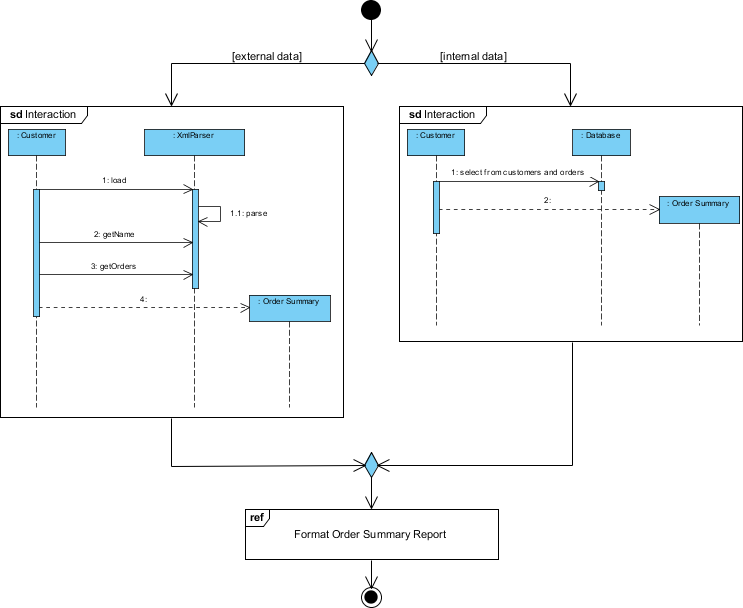
In the world of software architecture, designing a system is like directing a complex play. You have individual scenes where actors (objects) interact in specific ways, but you also need a master script that dictates the order of events, branching paths, and how different scenes fit together to tell the whole story. This is precisely what an Interaction Overview Diagram (IOD) achieves in the Unified Modeling Language (UML).
An Interaction Overview Diagram is a control flow diagram that uses standard flowchart notation to show the flow of control among interaction diagrams. It is a hybrid diagram, combining the structural elements of a control flow chart (like decision nodes and loops) with the behavioral elements of Interaction Diagrams (such as Sequence or Communication diagrams). This tutorial will guide you through the architecture of the “Order Reporting” system, illustrating how to model conditional logic and modularize complex processes.
Deconstructing the System Architecture
Let’s examine the “Order Reporting” scenario provided in the diagram. The system’s primary goal is to generate and format an order summary report. However, the data source is not static; it depends entirely on the type of customer. This introduces a classic decision point in system logic: External vs. Internal Data Sources.
The IOD serves as the “conductor” for this process. It starts at the initial node (the solid black circle) and immediately faces a decision diamond. This diamond represents a conditional branching point based on the availability or nature of the data.
1. The Decision Point: External Data
If the data is marked as [external data], the flow diverts to the left branch. Here, the system interacts with a Customer actor and an XmlParser object. This path represents a scenario where the data comes from an external system, likely via XML files.
- Step 1: The
Customerinitiates aloadaction to theXmlParser. - Step 2: The parser retrieves the customer’s name.
- Step 3: The parser retrieves the order details.
- Step 4: The data is passed to an
Order Summaryobject.
2. The Decision Point: Internal Data
Conversely, if the data is marked as [internal data], the flow moves to the right branch. This path represents a scenario where the system queries its own internal infrastructure.
- Step 1: The
Customersends a request to theDatabase. - Step 2: The database executes a query to
select from customers and orders. - Result: The data is returned to form the
Order Summary.
Advanced Modeling Concepts in Interaction Overviews
What makes an Interaction Overview Diagram powerful is its ability to abstract complexity. Notice how the diagram handles the final step of the process.
Modularity with the Reference Frame
After the data is gathered from either the XML parser or the database, the flows merge back together. The next step is to “Format Order Summary Report.” In a traditional sequence diagram, you might draw out every single message passing required to format a string, calculate totals, and apply styles. This would create a cluttered, unreadable diagram.
Instead, the IOD utilizes a Reference Interaction Frame (the box labeled ref).
- Abstraction: It signals to the reader that a detailed sequence diagram exists elsewhere that handles this specific sub-process.
- Focus: It allows the architect to maintain the high-level logic of the report generation without getting bogged down in the minutiae of the formatting logic.
Visualizing the Flow with Mermaid
To help you understand how to implement this logic in code or modeling tools, here is the logical flow represented in Mermaid syntax. This demonstrates how the decision diamond and alternative paths are structured programmatically.
flowchart TD
    Start([Start]) --> Decision{Data Source?}

    Decision -- "External Data" --> BranchExternal[Process XML]
    BranchExternal --> |"1: load"| Parser[XmlParser]
    Parser --> |"2: getName"| Parser
    Parser --> |"3: getOrders"| Parser
    Parser --> |"4: Get Summary"| Summary1[Order Summary]

    Decision -- "Internal Data" --> BranchInternal[Process Database]
    BranchInternal --> |"1: select from customers"| DB[(Database)]
    DB --> |"2: Retrieve Orders"| Summary2[Order Summary]

    Summary1 --> MergeNode
    Summary2 --> MergeNode

    MergeNode --> Format[Format Order Summary Report]
    Format --> End([End])

    subgraph Interaction External
    direction TB
    Parser
    Summary1
    end

    subgraph Interaction Internal
    direction TB
    DB
    Summary2
    end
Why Use Interaction Overview Diagrams?
You might ask, “Why not just use a Sequence Diagram?” The answer lies in scale and complexity.
- Handling Alternatives: Sequence diagrams are linear. If you have multiple “if/else” branches involving different actors, you end up drawing multiple separate sequence diagrams. An IOD ties them all together into a single view.
- Complex Logic: They can represent loops (using “Loop” frames) and complex control flows that are difficult to express in a standard sequence diagram.
- High-Level Design: They are perfect for showing the “Big Picture” of a system’s behavior to stakeholders without overwhelming them with message details.
Conclusion
The Interaction Overview Diagram is a vital tool in the UML toolbox. It bridges the gap between the abstract flow of control and the concrete interactions of objects. By using decision nodes to branch between external and internal data sources, and utilizing reference frames to abstract complex formatting tasks, we can design systems that are both robust and understandable.