
Mastering AI-Driven Diagram Generation with VPasCode and PlantUML
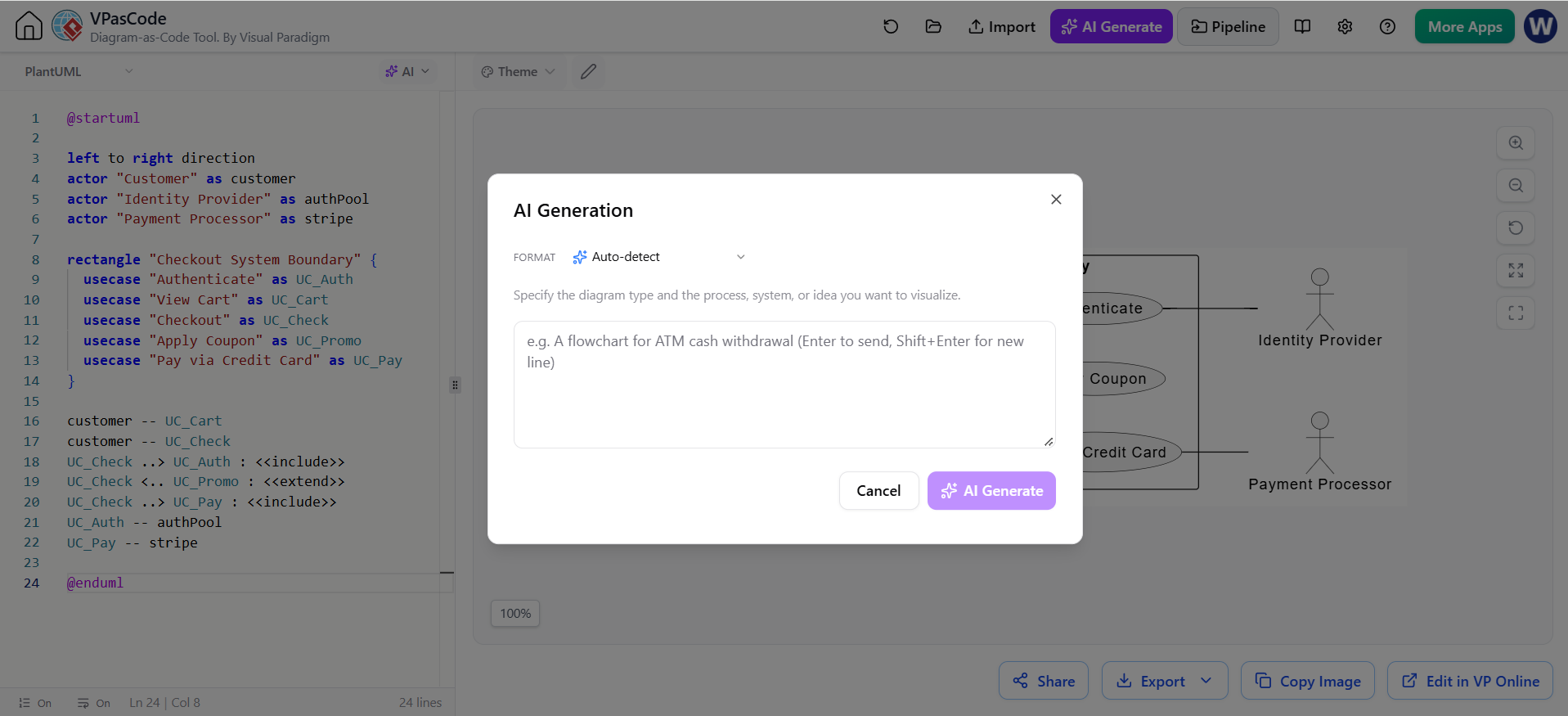
In modern software architecture, the gap between conceptual design and implementation documentation is often bridged by “Diagram as Code” tools. Visual Paradigm’s VPasCode leverages this philosophy, integrating powerful AI generation directly into the coding workflow. This tutorial explores how to leverage VPasCode’s AI features to generate complex system diagrams, specifically focusing on the robust PlantUML syntax for use cases and sequence flows.
The Architecture of AI Diagram Generation
The core value proposition of AI-driven diagramming lies in its ability to translate natural language requirements into structured syntax. Instead of manually drawing boxes and arrows, architects define the what and the who, while the AI handles the how.
When using the VPasCode interface, the system operates on a “Context-Aware” model. The AI does not merely guess; it relies on a specific set of variables to construct a valid diagram. To achieve high-fidelity results, the prompt must explicitly define:
- The Target Language: In this tutorial, we utilize
PlantUMLfor its rich library of diagram types (Sequence, Use Case, Class). - The System Context: Defining the boundaries (e.g., “Checkout System Boundary”).
- The Actors and Components: The external entities and internal services involved.
- The Relationships: How these components interact (e.g.,
--for association,::>>for inclusion).
Step-by-Step: Generating a Use Case Diagram
Let us walk through the creation of a Use Case diagram for an e-commerce checkout process, similar to the example found in the VPasCode interface. This diagram visualizes the interactions between a customer, payment processors, and the internal system logic.
1. Defining the Actors
The first step in any PlantUML diagram is defining the participants. In VPasCode, you must explicitly declare actors and their aliases to ensure the code is readable. The syntax actor "Label" as alias is preferred to keep the graph layout clean.
@startuml
left to right direction
actor "Customer" as customer
actor "Identity Provider" as authPool
actor "Payment Processor" as stripe
2. Establishing System Boundaries
Use Case diagrams require a clear distinction between the system being modeled and the outside world. In PlantUML, this is achieved using the rectangle block. This creates a visual container for the internal logic.
rectangle "Checkout System Boundary" {
    usecase "Authenticate" as UC_Auth
    usecase "View Cart" as UC_Cart
    usecase "Checkout" as UC_Check
    usecase "Apply coupon" as UC_Promo
    usecase "Pay via Credit Card" as UC_Pay
}
3. Mapping Relationships and Logic
The most critical part of the architecture is defining the flow. PlantUML uses specific operators to denote relationships:
--: Standard association (solid line).::>>: Inclusion (include) – implies the base use case must execute the included use case.::<..: Extension (extend) – implies the base use case may execute the extended use case under specific conditions.
Here is the complete logic for the checkout process, linking the customer to the internal use cases:
customer -- UC_Cart
customer -- UC_Check
UC_Check ..> UC_Auth : <>
UC_Check ..> UC_Promo : <>
UC_Check ..> UC_Pay : <>
UC_Auth -- authPool
UC_Pay -- stripe
4. Finalizing the Code
Always ensure the diagram is closed with the @enduml directive. This tells the rendering engine that the syntax block is complete.
@endumlIntegrating AI into the Workflow
The VPasCode interface simplifies this process by allowing users to input natural language prompts into the “AI Generation” dialog. Instead of writing the code above manually, you can simply type:
“Create a Use Case diagram for an e-commerce checkout system. Actors are Customer, Identity Provider, and Payment Processor. Include flows for authentication, coupon application, and credit card payment.”
VPasCode parses this intent and generates the structured PlantUML code, ready to be rendered instantly.
Conclusion
By mastering the syntax of PlantUML and understanding the architectural components of use case diagrams, you can leverage VPasCode to rapidly prototype system designs. This approach ensures that your documentation remains as maintainable as your actual codebase.