
Bridging the Gap: Visual Paradigm Desktop to OpenDocs Integration Workflow
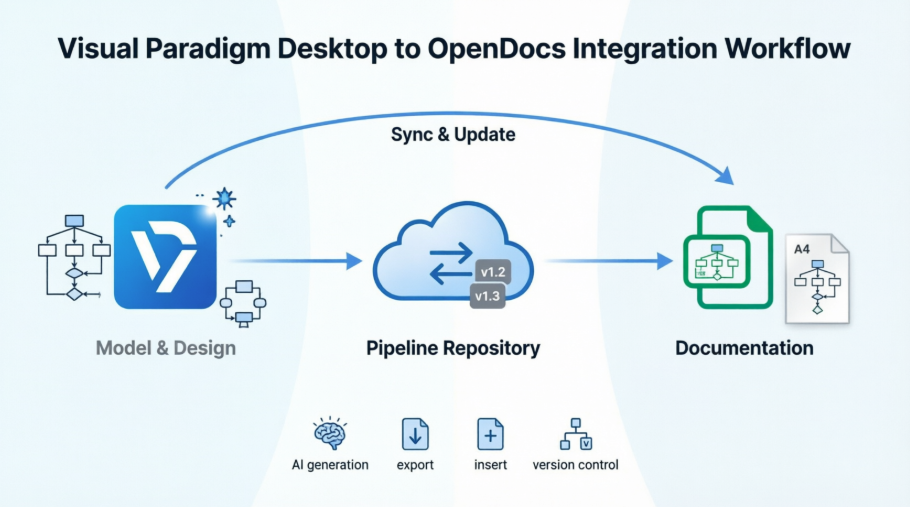
In modern software development, the “living documentation” gap is a persistent source of technical debt. Engineers often spend hours creating diagrams in tools like Visual Paradigm Desktop, only to export them as static images that immediately become stale upon insertion into wikis or Confluence pages. This disconnect creates ambiguity during code reviews and forces teams to maintain parallel, often conflicting, sources of truth.
This tutorial explores the architectural bridge between Visual Paradigm Desktop and Visual Paradigm OpenDocs. By utilizing the Pipeline artifact repository, we can establish a seamless, version-controlled pipeline where documentation evolves in lockstep with your designs.
The Core Architecture: From Model to Knowledge
The integration workflow operates on a bidirectional bridge principle. It eliminates the friction of manual file exports and email attachments by introducing a synchronized cloud layer. The architecture consists of three primary stages:
- Model & Design (Source): Engineers create or refine diagrams in the Visual Paradigm Desktop environment. This phase supports UML, BPMN, and ERD modeling, often enhanced by AI-assisted generation.
- Pipeline Repository (Synchronization Layer): A cloud-based artifact repository acts as the central hub. It handles secure storage, version tracking (e.g., v1.2 to v1.3), and cross-tool interoperability.
- Documentation (Consumer): OpenDocs serves as the knowledge management platform. It does not just display static images; it embeds live, editable diagram components directly into the document.
Step-by-Step: The Workflow Mechanics
To understand how the data flows through this system, let’s break down the technical process of moving from a desktop model to a published web document.
1. The Desktop Model Environment
The process begins in Visual Paradigm Desktop. This is a comprehensive suite supporting various modeling standards. Whether you are manually drawing an ArchiMate enterprise model or using AI to generate a UML sequence diagram, the model is saved locally. The key feature here is the ability to utilize professional tooling for high-fidelity design.
2. Export to Pipeline
Instead of saving a PNG or JPG to a local hard drive, the user pushes the diagram to the secure Pipeline repository. This action is critical because it attaches metadata to the diagram. The repository tracks the authorship, comments, and specific version history. This ensures that the “source of truth” is a digital object, not a raster image.
3. Embedding in OpenDocs
Once the artifact is in the Pipeline, it becomes accessible to OpenDocs. In the OpenDocs web interface, users can insert these diagrams into their pages. Unlike traditional workflows where you upload a file and lose editability, the diagram here is a linked component. If the diagram in the repository is updated, the document reflects that change.
Key Technical Components
Understanding the specific capabilities of the tools involved is essential for effective implementation.
- Visual Paradigm OpenDocs: A web-based knowledge management platform featuring a rich text editor with live preview. It allows for hierarchical organization via a “Knowledge Tree” and secure sharing via read-only links.
- The Pipeline: This is the synchronization layer. It supports cross-tool interoperability (Desktop → Online → OpenDocs → Chatbot). It also enables AI-powered content assistance and metadata support.
Prerequisites & Engineering Checklist
Before implementing this workflow, ensure your environment meets the following technical requirements to avoid synchronization errors.
1. Licensing Requirements
Access to this workflow requires specific licensing. You must hold a Visual Paradigm Professional Edition or higher license to access the full modeling features and the integration protocols.
2. Network Configuration
Since the Pipeline is cloud-based, your network infrastructure must permit outbound traffic. Ensure your firewall rules allow HTTPS access to *.visual-paradigm.com to facilitate the synchronization between Desktop and the cloud.
3. Authentication Setup
The system relies on robust identity management. You should configure Single Sign-On (SSO) or ensure that your team has valid VP account credentials that are recognized by both the Desktop client and the OpenDocs web portal.
Best Practices for Implementation
To maximize the value of this integration, engineering teams should adopt the following best practices:
- Establish Naming Conventions: Define a strict naming protocol for artifacts (e.g.,
proj-module-diagram-v1.2) to ensure easy retrieval in the repository. - Version Control Discipline: Treat diagram versions with the same rigor as code versions. Use the Pipeline’s revision history to track changes over time.
- Sandbox Testing: Before rolling out to the whole team, set up a sandbox project to test the export and sync capabilities.
By following this structured approach, teams can eliminate the context-switching associated with static documentation and foster a culture of continuous, accurate technical communication.