
Mastering Sequence Diagrams with VPasCode: UML Modeling for Complex Order Flows
In modern software architecture, understanding the temporal flow of data is just as critical as understanding the static structure of your system. Sequence diagrams are the industry standard for visualizing how objects or actors interact over time. Using a tool like VPasCode allows developers to write these diagrams as code, ensuring version control and consistency while generating professional UML visuals instantly.
This tutorial will guide you through the essential elements of sequence diagrams, strategic modeling practices, and how to leverage VPasCode to model complex interactions like payment processing, including both success and failure paths.
5.1 The Anatomy of a Sequence Diagram
A sequence diagram is a time-ordered interaction diagram. It answers the question: “How do these participants exchange messages to achieve a specific goal?” To create an effective diagram, you must understand the core building blocks.
The typical elements you will encounter include:
- Actors: External entities (users, other systems) initiating the interaction.
- Objects/Services: The internal components processing the logic.
- Lifelines: Vertical dashed lines extending from participants, representing their existence over time.
- Messages: Horizontal arrows indicating the flow of data or commands.
- Activation Bars: Rectangular boxes on lifelines showing when an object is actively performing an operation.
- Return Messages: Dashed arrows indicating a response to a synchronous call.
- Conditions/Loops: Frames that group interactions based on logic (e.g., loops, if-else conditions).
5.2 Strategic Modeling: When to Draw a Sequence Diagram
One of the most common pitfalls in system design is creating diagrams for every single use case. This leads to documentation bloat and maintenance nightmares. You should use sequence diagrams strategically to focus on scenarios that are:
- Business-critical: Core workflows that define the value of the application.
- Technically risky: Complex logic where the implementation details are uncertain.
- Integration-heavy: Flows involving multiple microservices or external APIs.
- Security-sensitive: Authentication and authorization flows.
- Transactional: Processes that require strict data consistency.
Typical examples that demand a sequence diagram include User Authentication, Payment Processing, File Uploads, Order Submission, and Failure Recovery mechanisms.
5.3 Synchronous vs. Asynchronous Interactions
Distinguishing between how messages are sent is vital for understanding system behavior. In VPasCode, the notation reflects this distinction clearly.
- Synchronous Calls (Solid Arrow): The sender waits for the receiver to process the message and return a result before continuing. This is common in user-facing operations (e.g., a user clicking “Submit” and waiting for the screen to update).
- Asynchronous Calls (Dashed Arrow or Open Arrow): The sender dispatches the message and continues immediately without waiting. This is crucial for scalability, background job execution, and event publication.
Using the wrong interaction type can hide architectural problems. For instance, making a long-running database operation synchronous in a web UI will lead to timeouts and poor user experience.
5.4 Modeling Failure Paths and Alternative Scenarios
A sequence diagram that only shows the “Happy Path” (the scenario where everything goes right) is incomplete and potentially dangerous for system design. It hides major risks.
Use alt (alternative) and else fragments to explicitly model:
- Validation failures (e.g., invalid input).
- Authorization failures (e.g., unauthorized access).
- Timeouts and service unavailability.
- Retry logic and partial failures.
By visualizing the “Payment Declined” scenario alongside the “Payment Approved” scenario, you ensure your developers have planned for error handling and rollback procedures.
Hands-On: The Order Processing Workflow
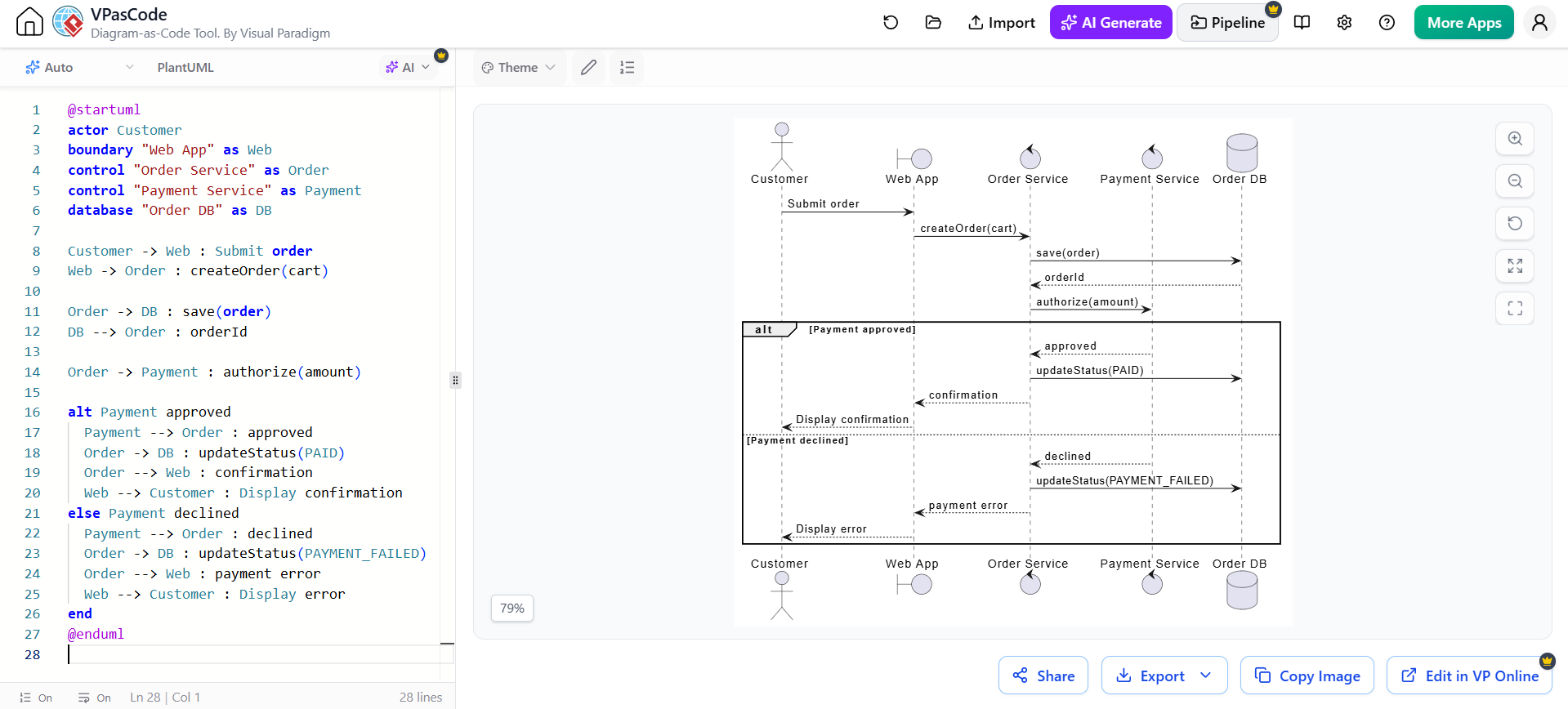
Let’s walk through a comprehensive example of an Order Processing system using VPasCode. This example demonstrates defining actors, services, and database lifelines, followed by a complex alt block to handle payment outcomes.
Here is the complete PlantUML code used in the VPasCode editor:
@startuml
actor Customer
boundary "Web App" as Web
control "Order Service" as Order
control "Payment Service" as Payment
database "Order DB" as DB

Customer -> Web : Submit order
Web -> Order : createOrder(cart)
Order -> DB : save(order)
DB --> Order : orderId
Order -> Payment : authorize(amount)

alt Payment approved
  Payment --> Order : approved
  Order -> DB : updateStatus(PAID)
  Order --> Web : confirmation
  Web --> Customer : Display confirmation
else Payment declined
  Payment --> Order : declined
  Order -> DB : updateStatus(PAYMENT_FAILED)
  Order --> Web : payment error
  Web --> Customer : Display error
end
@enduml
Notice how the alt block encapsulates the branching logic. The code on the left is the source, and the diagram on the right is the rendered visualization. This “Diagram-as-Code” approach allows you to treat your architecture diagrams like software code.
Conclusion
Sequence diagrams are powerful tools for communication between developers, architects, and stakeholders. By using VPasCode, you can maintain these diagrams with the same rigor as your application code, ensuring your system architecture remains clear, robust, and ready for failure scenarios.