
Mastering Use Case Modeling with UML: The Map and The Route
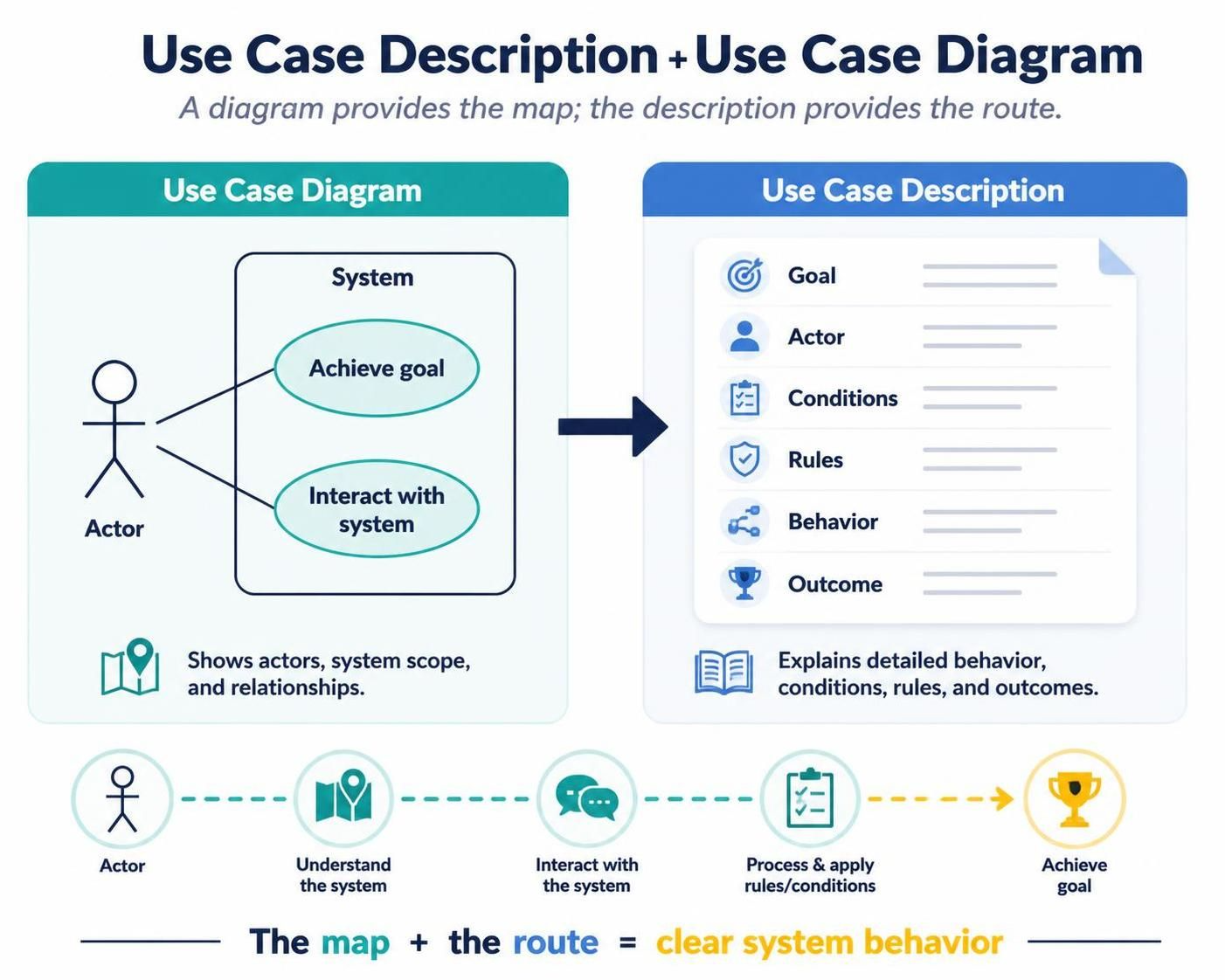
In the realm of systems analysis and design, clarity is paramount. One of the most common pitfalls developers and analysts face is relying solely on visual diagrams or solely on text descriptions. The true power lies in the combination of both.
Think of a Use Case Diagram as a city map. It shows you where you are, where the destinations are, and the general layout of the streets. However, a map doesn’t tell you which traffic lights to stop at or the specific rules of the road. That is where the Use Case Description comes in—it provides the route, the detailed navigation instructions, and the logic required to get from point A to point B safely and efficiently.
1. The Core Concept: Goals vs. Interactions
A use case is not just a list of functions; it represents a valuable goal that an external actor accomplishes through the system. When you model a system, you must focus on what value is being delivered to the user, not just what the computer is doing.
Consider the following examples of valuable goals:
- Customer places an order: This is a clear, valuable goal.
- Employee submits an expense claim: This solves a specific business need.
- Patient schedules an appointment: This is a direct interaction resulting in a scheduled event.
- Administrator creates a user account: A maintenance goal essential for system access.
What Makes a Good Use Case?
To ensure your models are robust and maintainable, a good use case must adhere to these principles:
- Goal-oriented: It must achieve a specific result.
- Valuable to an actor: It must provide benefit to the user or system.
- User perspective: It should be described from the user’s point of view, not the developer’s.
- UI Independent: It should not depend on specific screen layouts or button clicks.
- Observable behavior: It must focus on what the system does, not how it is built.
2. Refining Your Use Case Names
One of the most common errors in modeling is naming a use case based on the interface rather than the goal. This creates “coupling” to the UI, meaning if you change the screen layout, you have to rename the entire use case.
Compare these poor naming conventions against improved alternatives:
| Poor Name (UI/Function) | Improved Name (Goal) | Reason |
|---|---|---|
| Login screen | Authenticate user | Describes a goal, not a screen. |
| Database update | Record payment | Describes business value, not a technical action. |
| Click submit button | Submit expense claim | Avoids UI-specific wording. |
| Validate account | Create customer account | Makes the final outcome clear. |
| Process order | Place order | Uses an actor-centered goal. |
Best Practice: Always use a short Verb–Noun phrase. Examples include Submit Expense Claim, Track Shipment, or Approve Loan Application.
3. Key Modeling Concepts
3.1 Actors: The External Roles
An Actor is an external role that interacts with the system. It is crucial to remember that an actor is a role, not necessarily a specific individual.
- Types of Actors:
- A person (e.g., Customer, Administrator)
- An organization (e.g., Warehouse)
- Another software system (e.g., Payment Gateway)
- A hardware device (e.g., Barcode Scanner)
- A time trigger (e.g., Scheduled Job)
Primary vs. Supporting Actors:
- Primary Actor: Initiates the use case to achieve a goal. (e.g., The Customer placing an order).
- Supporting Actor: Assists the system during execution. (e.g., The Payment Gateway authorizing the funds).
3.2 The System Boundary
The system boundary (the box in your diagram) defines what is inside the system being modeled versus what is outside. This prevents confusion regarding responsibility.
- Inside the Boundary: Browse Products, Add Product to Cart, Place Order, Make Payment.
- Outside the Boundary: Customer, Payment Gateway, Delivery Company, Email Provider.
3.3 Preconditions and Postconditions
To fully define the behavior of a use case, you must establish the state of the world before and after the interaction.
Preconditions
These are conditions that must already be true before the use case starts. They are not actions performed by the use case.
- Bad Example: “The customer logs in.” (This is an action, usually a prerequisite use case).
- Good Example: “The customer is authenticated.”
- Good Example: “The product is available for sale.”
- Good Example: “The shopping cart contains at least one item.”
Postconditions
These describe the state of the world after the use case finishes. They should describe results, not implementation details.
- Bad Example: “The orders table is updated.”
- Good Example: “The order is stored and available for fulfillment.”
- Good Example: “The order is recorded.”
- Good Example: “Payment is authorized.”
4. Structuring Your Use Case Description
While the diagram gives you the map, the description provides the route. A comprehensive Use Case Description typically follows this structure:
USE CASE: Place Order

ACTORS:
- Primary: Customer
- Supporting: Payment Gateway

DESCRIPTION:
A customer selects products, provides delivery information, pays for the order, and receives an order confirmation.

PRECONDITIONS:
1. The customer has an active account.
2. The product is available for sale.

POSTCONDITIONS:
1. The order is recorded.
2. Payment is authorized.
3. A confirmation email is sent.

MAIN FLOW (The Route):
1. Customer adds items to cart.
2. Customer clicks "Place Order".
3. System prompts for shipping details.
4. Customer enters details.
5. System validates details.
6. System invokes Payment Gateway.
7. Payment Gateway confirms success.
8. System generates Order ID.
9. System sends confirmation.
By combining the visual clarity of the Use Case Diagram with the logical rigor of the Use Case Description, you create a complete specification that is easy for stakeholders to understand and developers to implement.