
Mastering ERD Design: A UML-Style Deep Dive into Database Modeling
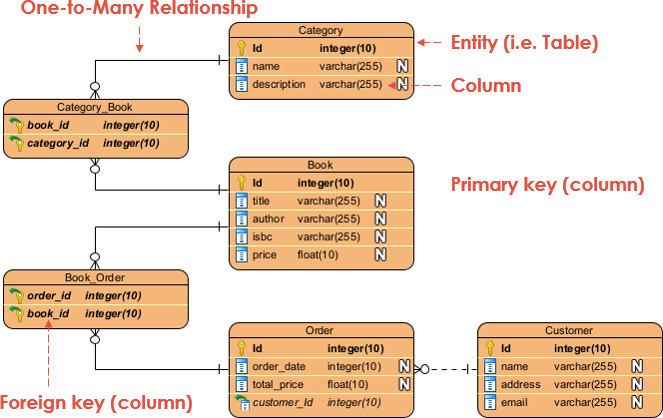
Designing a robust database is the backbone of any successful software application. Whether you are a novice developer or a seasoned architect, understanding how to translate abstract business requirements into concrete data structures is a critical skill. This tutorial explores the fundamentals of Entity Relationship Diagrams (ERD), a vital tool for visualizing database schemas. We will analyze a specific scenario involving books, categories, and orders to explain core modeling concepts like Primary Keys, Foreign Keys, and One-to-Many relationships.
What is an Entity Relationship Diagram (ERD)?
An Entity Relationship Diagram (ERD) is a visual representation of the logical structure of a database. It maps out the data entities, their attributes, and the relationships between them. In the context of modern development workflows, tools like Visual Paradigm allow developers to generate these diagrams automatically from Class Diagrams, ensuring that the database structure perfectly mirrors the application’s object-oriented design.
ERDs are not just drawings; they are the blueprint for your SQL database. They define how data is stored, retrieved, and related to other data points. By mastering ERD notation, you can prevent common database design pitfalls such as data redundancy, integrity issues, and inefficient query performance.
Core Components of an ERD
To understand an ERD, you must first recognize its building blocks. The diagram provided in our context highlights four essential elements:
1. Entity (Table)
In a database context, an Entity represents a specific object or concept that we want to store data about. In the diagram, this is visualized as the rectangular box labeled “Category,” “Book,” or “Order.” When this model is translated into a relational database, an Entity becomes a Table.
2. Column (Attribute)
The details within an entity are called attributes. In the diagram, these appear as rows inside the entity box. For example, the “Book” entity has attributes like title, author, and price. In database terms, these correspond to Columns or fields within a table.
3. Primary Key
To ensure data integrity, every table must have a unique identifier for each record. This is the Primary Key. In the visual notation, this is often indicated by a key icon or the label “PK”. In our diagram, the Id column in every table serves as the Primary Key, guaranteeing that no two books or orders have the same ID.
4. Foreign Key
Relationships between tables are established using Foreign Keys. A Foreign Key is a column (or set of columns) in one table that refers to the Primary Key in another table. In the diagram, you can see “foreign key (column)” pointing to columns like bookid in the “CategoryBook” table. This creates the link that allows the database to relate a specific book to a specific category.
Understanding Relationships: The One-to-Many Concept
One of the most common patterns in database design is the One-to-Many relationship. This occurs when one record in a table can be associated with many records in another table, but each record in the second table is associated with only one record in the first table.
Consider the relationship between Category and Book:
- One Category can have Many Books. For example, the “Fiction” category contains hundreds of books.
- One Book belongs to One Category. (For simplicity in this model, a book is assigned to a single primary category).
In the provided diagram, the crow’s foot notation (the line ending in three branches) indicates the “many” side of the relationship. The line connects the “Category” table to the “Book” table, illustrating that the “Category” is the parent, and “Book” is the child.
Advanced Relationships: Many-to-Many and Junction Tables
While One-to-Many is common, databases often need to handle Many-to-Many relationships. This happens when one entity can relate to multiple instances of another, and vice versa. For example, a single Book might belong to multiple Categories (e.g., “Science” AND “History”), and a single Category might contain many Books.
Relational databases cannot directly model Many-to-Many relationships. Instead, they use a Junction Table (also known as a bridge or linking table). In the diagram, this is the CategoryBook table.
The CategoryBook table contains foreign keys from both the “Category” and “Book” tables. This structure breaks the complex relationship into two manageable One-to-Many relationships:
- One Category links to many entries in the
CategoryBookjunction table. - One Book links to many entries in the
CategoryBookjunction table.
By using this intermediate table, we maintain data integrity while allowing flexible categorization of books.
From Class Diagram to ERD: The Modeling Workflow
The process of creating these diagrams often starts with object-oriented modeling. Developers typically design a Class Diagram first, defining the structure of their software objects. Using tools like Visual Paradigm, this Class Diagram can be automatically transformed into an ERD.
When this translation happens, the software performs several logical mappings:
- Class to Table: The class name becomes the table name.
- Fields to Columns: Class attributes are mapped to database columns with specific data types (e.g.,
Stringbecomesvarchar,intbecomesinteger). - Associations to Keys: Relationships between classes are converted into Foreign Keys in the resulting ERD.
This automation ensures that the database schema remains consistent with the application code, reducing the risk of human error during manual database creation.
Conclusion
Mastering ERDs is essential for building scalable and efficient systems. By understanding the roles of Entities, Attributes, Keys, and Relationships, you can design databases that accurately reflect the complexities of real-world data. Whether you are modeling a simple library system or a complex e-commerce platform, the principles of normalization and relationship mapping remain the same.