
From BPMN Workflow to RACI Clarity: Mastering Role-Based Accountability in Visual Paradigm
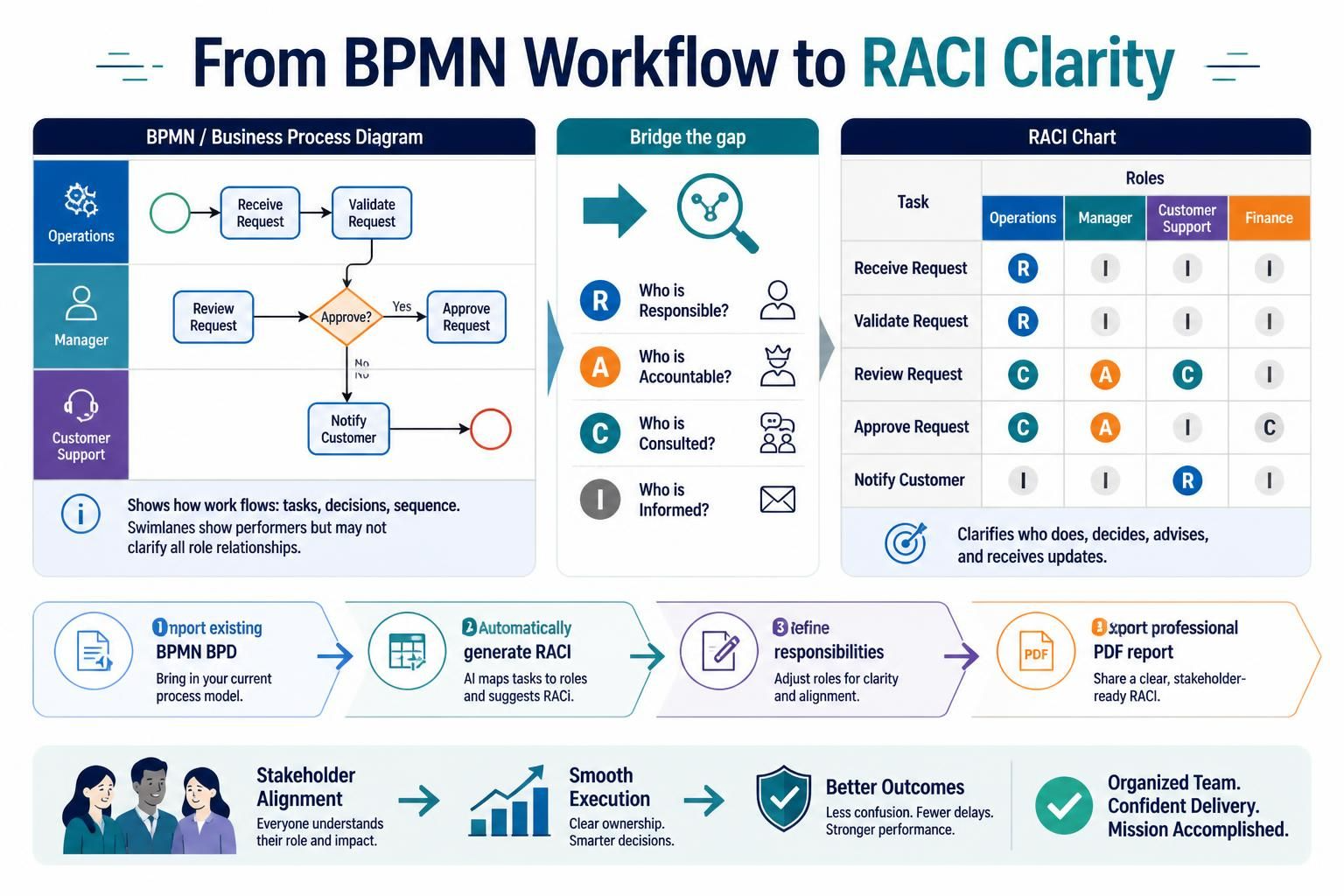
Business Process Model and Notation (BPMN) diagrams are the industry standard for visualizing the “how” of a workflow. They excel at depicting the sequence of tasks, decision points, and the flow of information. However, while a BPMN swimlane diagram can tell you who performs a specific activity, it often falls short in clarifying the nuanced “who” behind the scenes. It rarely explicitly shows who needs to be consulted for advice, who holds final accountability, or who simply needs to be kept in the loop.
This gap between process visualization and role-based accountability is where the RACI chart becomes essential. By bridging this divide, teams can eliminate ambiguity and ensure smooth project execution. This tutorial explores how to use Visual Paradigm to automatically generate a RACI chart directly from your existing BPMN Business Process Diagrams (BPD), refine the responsibilities, and export the results into a professional PDF report for stakeholder alignment.
Understanding the RACI Framework
Before diving into the tooling, it is crucial to understand the four pillars of the RACI matrix. This framework ensures that every task in your business process has clear ownership and communication lines.
- R – Responsible: The participant who actually executes the task or activity. They are the ones doing the work.
- A – Accountable: The ultimate approving authority. This person verifies the completeness and correctness of the activity. There should generally be only one “A” per task.
- C – Consulted: Subject matter experts or stakeholders who provide advisory input, feedback, or two-way communication before the task is completed.
- I – Informed: Participants who need to be kept updated on progress or outcomes but do not actively contribute to the execution. This is typically one-way communication.
Visual Paradigm: Bridging the Gap
In Visual Paradigm, you can automate the creation of this matrix. Instead of manually mapping tasks to a spreadsheet, the software analyzes your BPMN elements and suggests the most likely role assignments based on your swimlane data.
The Workflow:
- Import or Create BPMN: Start with your existing Business Process Diagram. Ensure your swimlanes (Partitions) are correctly labeled with roles (e.g., Operations, Manager, Customer Support).
- Generate RACI: Use the AI-driven feature to map tasks to roles. The system scans the diagram and populates the matrix.
- Refine Responsibilities: Adjust the roles for clarity and alignment. The visual interface makes it easy to change a “Consulted” role to “Responsible” if needed.
- Export Report: Share a clear, stakeholder-ready RACI report in PDF format.
Step-by-Step: Generating Your RACI Chart
To get started, open your BPMN file in Visual Paradigm. Navigate to the diagram containing your process flow.
1. Verify Your Swimlanes
The accuracy of your RACI chart depends entirely on the accuracy of your BPMN diagram. Ensure that every task (Activity) is placed within the correct swimlane. The swimlane header acts as the primary role definition for the “Responsible” party.
2. Generate the Matrix
Locate the Generate or Report menu in the toolbar. Select the option to create a RACI Matrix. Visual Paradigm will parse the diagram, identifying tasks and their associated swimlanes.
System Logic:
For each Task in BPMN Diagram:
  1. Identify the Swimlane owner -> Assign 'R'
  2. Identify parent/manager swimlanes -> Suggest 'A' or 'C'
  3. Identify parallel stakeholders -> Suggest 'I'
3. Refine and Edit
Once the chart is generated, you will see a table where tasks are listed as rows and roles as columns. You can manually edit these cells. For example, if a task requires approval from a Finance department that isn’t directly performing the work, you can change the cell from ‘I’ (Informed) to ‘A’ (Accountable) or ‘C’ (Consulted) directly within the grid.
Exporting for Stakeholder Alignment
The final step is to communicate this clarity to your team. Visual Paradigm allows you to export the RACI chart as part of a professional PDF report. This ensures that stakeholders receive a static, read-only document that clearly defines who does what, preventing future confusion during project execution.
Conclusion
By moving from a simple BPMN workflow to a comprehensive RACI chart, you transform a visual diagram into a management tool. It shifts the focus from “how the work flows” to “who owns the work,” ensuring that every step of your business process has clear ownership and communication lines.