
Mastering Diagram-as-Code: A Step-by-Step Guide to VPasCode Architecture & Workflows
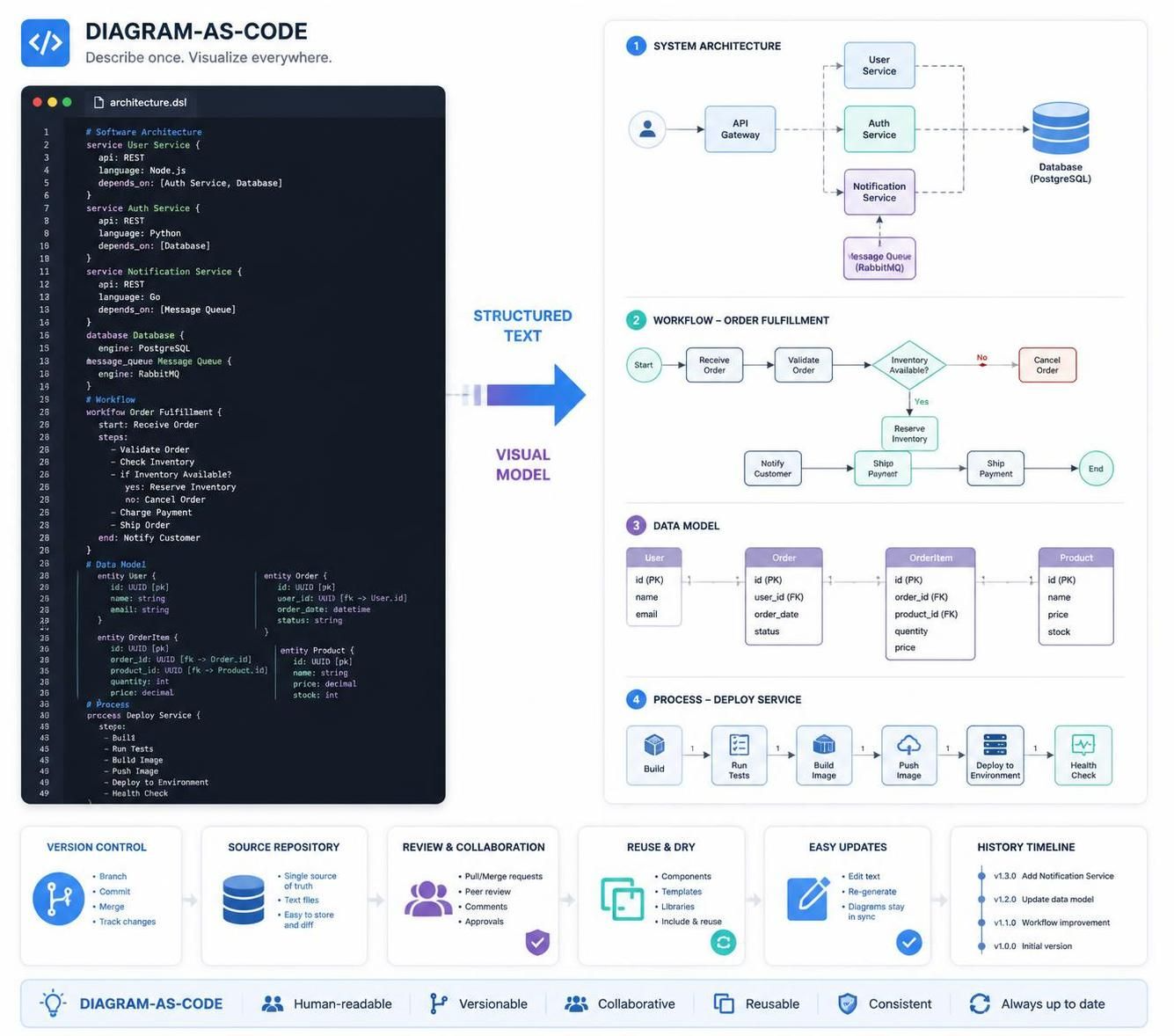
In the modern era of software development, the gap between design and implementation is often bridged by documentation. However, traditional diagramming tools often create a bottleneck: diagrams become static snapshots that quickly rot, becoming outdated the moment code changes. This tutorial explores a transformative approach known as Diagram-as-Code (Dac). By utilizing the VPasCode tool within Visual Paradigm, we move away from manual canvas dragging and toward a structured, text-based modeling paradigm that integrates seamlessly with version control systems.
The Paradigm Shift: From Canvas to Code
Traditionally, architects and developers draw system architectures, workflows, and data models using drag-and-drop interfaces. While intuitive for initial sketches, this method struggles with complexity and maintenance. Diagram-as-Code flips this script. Instead of positioning shapes by hand, you describe the system using structured text. A compatible rendering engine then compiles that text into a high-fidelity visual model.
This shift offers three critical advantages:
- Version Control: Like your source code, your diagrams can be committed, branched, and merged in Git.
- Collaboration: Changes are reviewed via text diffs, making it easier to spot exactly what shifted in the architecture.
- Reusability: Components defined in code can be imported and reused across multiple diagrams instantly.
Core Concepts in VPasCode DSL
The VPasCode language (Domain Specific Language) is designed to be human-readable and expressive. It allows you to define four primary pillars of system design: Software Architecture, Workflows, Data Models, and Processes. Let’s break down how to model each of these.
1. Defining Software Architecture
Software architecture diagrams visualize the high-level structure of a system, including services, databases, and user roles. In VPasCode, you define “services” and “databases” as objects and describe their relationships.
Consider a scenario where you have a User Service built in Node.js that relies on an Auth Service. You can define this hierarchy directly in the text file:
service User Service {
    api: REST
    language: Node.js
    depends_on: [Auth Service, Database]
}

service Auth Service {
    api: REST
    language: Python
    depends_on: [Database]
}

service Notification Service {
    api: REST
    language: Go
    depends_on: [Message Queue]
}

database Database {
    engine: PostgreSQL
}

message_queue Message Queue {
    engine: RabbitMQ
}
This snippet defines the components and their dependencies. The rendering engine interprets depends_on to automatically draw the connecting lines between the boxes, ensuring the diagram reflects the architectural truth.
2. Modeling Workflows
Business logic often follows a linear path with decision points. Modeling workflows manually often leads to tangled “spaghetti” diagrams. VPasCode allows you to define a logical flow using a workflow block.
For an Order Fulfillment process, you can define the start, the steps, and the conditional branches (Yes/No) clearly:
workflow Order Fulfillment {
    start: Receive Order
    steps:
        - Validate Order
        - Check Inventory
        - if Inventory Available?
            yes: Reserve Inventory
            no: Cancel Order
        - Charge Payment
        - Ship Order
    end: Notify Customer
}
This structured text automatically generates a flowchart. The if statement creates a diamond shape for the decision point, and the yes and no labels are automatically assigned to the respective outgoing paths.
3. Structuring the Data Model
Data modeling is crucial for ensuring data integrity. In VPasCode, you can define entities (tables) and their attributes (columns) using an entity block. Relationships are defined using Foreign Key (FK) notation.
# Data Model
entity User {
    id: UUID [pk]
    name: string
    email: string
}

entity Order {
    id: UUID [pk]
    user_id: UUID [fk -> User.id]
    order_date: datetime
    status: string
}

entity OrderItem {
    id: UUID [pk]
    order_id: UUID [fk -> Order.id]
    product_id: UUID [fk -> Product.id]
    quantity: int
    price: decimal
}

entity Product {
    id: UUID [pk]
    name: string
    price: decimal
    stock: int
}
The syntax [pk] marks a Primary Key, while [fk -> ...] automatically draws the relationship lines between the entities, visualizing the database schema instantly.
4. Visualizing Processes
Finally, operational processes, such as deployment pipelines, are best represented using the process keyword. This is ideal for DevOps workflows.
# Process
process Deploy Service {
    steps:
        - Build
        - Run Tests
        - Build Image
        - Push Image
        - Deploy to Environment
        - Health Check
}
Benefits of the “Describe Once” Philosophy
The power of VPasCode lies in its ability to maintain a single source of truth. When you update the text file, you update the diagram. This eliminates the notorious issue where a diagram in a PowerPoint slide no longer matches the actual code in the repository.
- Review & Collaboration: Teams can use Pull Requests to review architectural changes just like code changes.
- History Timeline: You can track the evolution of your system architecture over time, seeing exactly when a service was added or a dependency changed.
- Easy Updates: Refactoring a diagram is as simple as editing a line of text.
Conclusion
By adopting Diagram-as-Code with VPasCode, you are not just drawing pictures; you are engineering your documentation. You bring the rigor of software engineering to system architecture, ensuring that your visual models are always versionable, collaborative, and up-to-date. Whether you are designing a microservices architecture or a simple deployment pipeline, describe it once, and visualize it everywhere.