
Architecting the VP AI Ecosystem: VPaCode as the Connected Diagramming Hub
In the modern landscape of software engineering and systems design, the ability to visualize complex architectures is just as critical as the code itself. However, a common challenge remains: fragmentation. Teams often struggle to bridge the gap between the rapid ideation of AI, the deep structural analysis of desktop modeling tools, and the need for maintainable, living documentation.
This tutorial explores the architecture of a unified design workflow, centered around VPasCode. By positioning VPasCode as the central diagramming layer, organizations can create a seamless ecosystem connecting AI assistants, technical documentation (OpenDocs), and robust desktop modeling environments (Visual Paradigm Desktop). This approach transforms diagramming from a static drawing exercise into a dynamic, code-driven component of the software development lifecycle.
The Core Architecture: VPasCode as the Central Hub
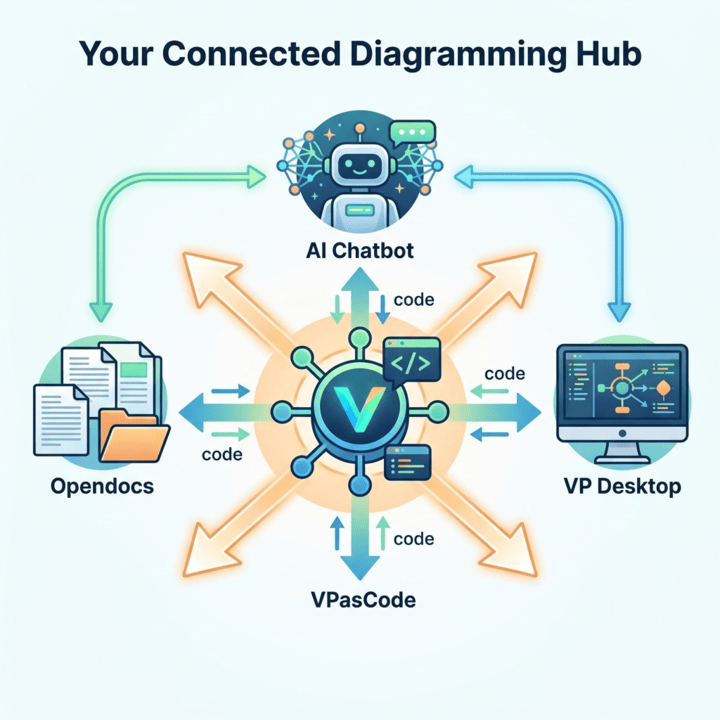
The visual architecture of the Visual Paradigm ecosystem revolves around a central node: VPasCode. Unlike traditional modeling tools that rely solely on a graphical user interface (GUI), VPasCode utilizes a text-based approach. This fundamental difference allows it to function as an interoperable hub.
Imagine VPasCode as the “universal translator” of your design process. While other tools speak their own languages—whether it’s the natural language of an AI, the binary files of a desktop application, or the HTML of a documentation site—VPasCode standardizes communication using industry-standard diagramming syntaxes like PlantUML, Mermaid, and Graphviz.
- Centralized Source of Truth: By storing diagram definitions as text (code), the system ensures that the source of truth is version-control friendly and human-readable.
- Real-time Synchronization: Changes made in the text code are instantly reflected in the visual output, allowing for immediate feedback loops across the entire ecosystem.
- Tool Agnosticism: Because the underlying format is text-based, the central hub can push data to any connected tool that supports these standards.
Workflow Phase 1: From AI Ideation to Live Visualization
The first stage of this integrated workflow leverages the speed of Artificial Intelligence to accelerate the initial design phase. Historically, the transition from a brainstorming session to a formal diagram was slow and friction-heavy. This new architecture streamlines that path.
The AI-to-VPasCode Pipeline
- Natural Language Input: The process begins with the user describing a system, process, or architecture in plain English (or any natural language) to an AI chatbot.
- Code Generation: The AI assistant analyzes the requirements and generates the corresponding diagram code. This is typically output in a format like PlantUML or Mermaid, which are widely supported by the VPasCode engine.
- Integration: The generated code is pasted directly into the VPasCode environment.
- Live Review: VPasCode immediately renders the code into a visual diagram. The user can now review the structure, refine the syntax if necessary, and adjust the visual layout.
- Refinement: Once the diagram meets the design criteria, it is ready to be shared or published.
This workflow significantly reduces the time-to-value for new system designs. It allows developers to validate architectural concepts instantly without getting bogged down in the manual drawing of shapes and connectors.
Workflow Phase 2: Bridging Modeling and Documentation
A major pain point in enterprise architecture is the “documentation gap”—the disconnect between the design diagram and the written explanation of that design. This ecosystem solves that by integrating VPasCode with OpenDocs.
The VPasCode-to-OpenDocs Integration
By connecting the diagramming engine to the documentation platform, organizations can achieve “Living Documentation.” This means the documentation is never stale because it is always derived directly from the source code.
- Publishing with Context: Diagrams can be published alongside explanatory text, providing a comprehensive view of the system.
- Source and Visual Unity: The system keeps the source code (the text definition) and the visual output (the rendered image) together. If the code changes, the documentation updates automatically.
- Reusable Pages: Teams can build reusable technical pages that serve as a central repository for project stakeholders.
This ensures that technical documentation remains a reliable asset throughout the project lifecycle, rather than a static artifact that quickly becomes obsolete.
Workflow Phase 3: Deep Modeling and Lifecycle Management
While text-based diagramming is excellent for speed and documentation, complex enterprise projects often require deep analysis, extensive requirements management, and strict lifecycle governance. For these tasks, the ecosystem integrates with Visual Paradigm Desktop.
Division of Responsibilities
This tiered approach allows teams to utilize the right tool for the specific job at hand:
- AI for Brainstorming: Use the speed of AI to generate first drafts and initial concepts.
- VPasCode for Editing: Use the text-based editor for fast, precise syntax editing and instant previews.
- Visual Paradigm Online for Refinement: Utilize the browser-based graphical interface for fine-tuning visual details and layout.
- Visual Paradigm Desktop for Deep Modeling: When the project requires advanced analysis, requirements management, or enterprise architecture capabilities, the workflow moves to the Desktop environment.
The integration ensures that a model created or edited in the Desktop environment can be synchronized with the VPasCode layer, maintaining consistency across the entire toolchain.
Conclusion
The integration of VPasCode with the broader Visual Paradigm ecosystem represents a shift towards more agile, automated, and interconnected design processes. By treating diagrams as code and leveraging the strengths of AI, documentation tools, and deep modeling software, teams can create a robust “Connected Diagramming Hub.”
This architecture empowers organizations to move faster from idea to implementation while maintaining the high standards of documentation and architectural rigor required for enterprise-grade software development.