
Master Model-Driven Docs with Visual Paradigm & OpenDocs Pipeline
In the modern landscape of software engineering, the gap between design artifacts and project documentation is often the source of significant friction. Teams frequently spend hours manually recreating diagrams in word processors or wikis, leading to outdated documentation and a lack of trust in technical records. Visual Paradigm addresses this challenge through its robust integration with OpenDocs, a platform designed to bridge the divide between visual modeling and technical writing.
This tutorial explores the architecture of this integration, focusing on the “Pipeline” mechanism that allows for real-time synchronization between your Visual Paradigm models and your OpenDocs documentation.
Understanding the Architecture: The Pipeline Concept
The core of the Visual Paradigm ecosystem lies in its ability to treat diagrams not merely as static images, but as dynamic data objects. When you utilize the OpenDocs integration, you are essentially setting up a bidirectional data stream.
1. The Source of Truth
Your Visual Paradigm Desktop application serves as the repository for your system architecture. Whether you are working on a Use Case Diagram for a hotel booking system or a complex SysML model, the diagram on your canvas is the “source of truth.” It contains the metadata, relationships, and structural logic of the system.
2. The Pipeline Mechanism
The “Pipeline” acts as the transport layer. Instead of exporting a static JPEG or PNG, the system exports a structured definition of the diagram. This allows OpenDocs to render the diagram dynamically. This means that if you change a connector in Visual Paradigm, the change is not just a visual update; it is a logical update that propagates to the documentation.
Step-by-Step: Pushing Models via the Pipeline
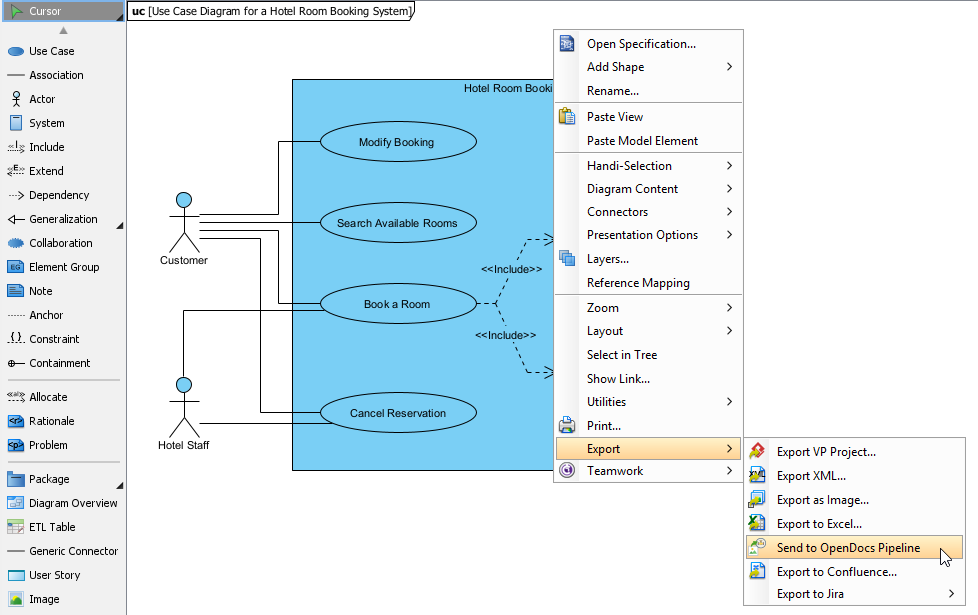
The workflow demonstrated in the provided screenshot highlights the “Send to OpenDocs Pipeline” feature. This action transforms a local design element into a global documentation asset. Here is how the process functions technically:
- Selection: In the Visual Paradigm interface, the user identifies the specific diagram or component they wish to document. In the example provided, a Use Case Diagram for a “Hotel Room Booking System” is selected.
- Context Menu Trigger: The user performs a right-click action on the diagram workspace. This opens the context menu, providing access to export and collaboration tools.
- Export Configuration: The user navigates to the Export submenu. Here, the system distinguishes between standard file exports (like XML or Image) and the specialized Pipeline export.
- Pipeline Transmission: By selecting Send to OpenDocs Pipeline, the user initiates a secure transmission. The system packages the diagram data and pushes it to the OpenDocs server.
Why This Matters
Standard export methods are “one-way” and static. If you export a diagram to an image, the text inside the diagram becomes uneditable. If you export to a document, the diagram is “baked in.” The Pipeline method ensures that the diagram remains “live.” It retains its semantic structure, allowing for future updates to be tracked and managed.
The Collaborative Workflow
The true power of this architecture is realized in the collaboration phase. Once the model is pushed to OpenDocs, the workflow evolves from a solitary design task to a team-based review process.
Workflow A: The Synchronization Loop
Consider a scenario where a Lead Architect finalizes a component diagram. They utilize the Send to OpenDocs Pipeline button to push this model to the “System Architecture” page. Two weeks later, the development team refactors a service.
- The architect updates the Desktop model to reflect the new service.
- The system detects this change and flags the update in the OpenDocs interface.
- The Product Manager reviews the change log directly in the documentation.
- Upon acceptance, the documentation is updated automatically.
This eliminates the need for manual redrawing and ensures that the documentation is never more than a few hours out of sync with the design.
Workflow B: AI-Enhanced Documentation
Visual Paradigm extends this capability beyond static diagrams. Through the OpenDocs interface, users can leverage AI prompts to generate architecture documentation from scratch. For instance, a product owner can request a “User Flow Diagram” for a checkout process. The AI generates a preliminary flowchart, which can then be tweaked using the WYSIWYG editor and published via secure links.
Conclusion
Visual Paradigm OpenDocs represents a significant evolution in how technical teams manage knowledge. By merging AI-powered authoring with live diagram integration and robust version control via the Pipeline, it eliminates the disconnect between design and documentation. For organizations looking to maintain high-quality, up-to-date technical records without sacrificing speed, this integration provides a comprehensive solution that scales with your project’s complexity. Whether you are working solo or in a large distributed team, the ability to keep your models and your words in sync is invaluable.