
Mastering Poker Logic: A UML Sequence Diagram Tutorial for Betting Rounds
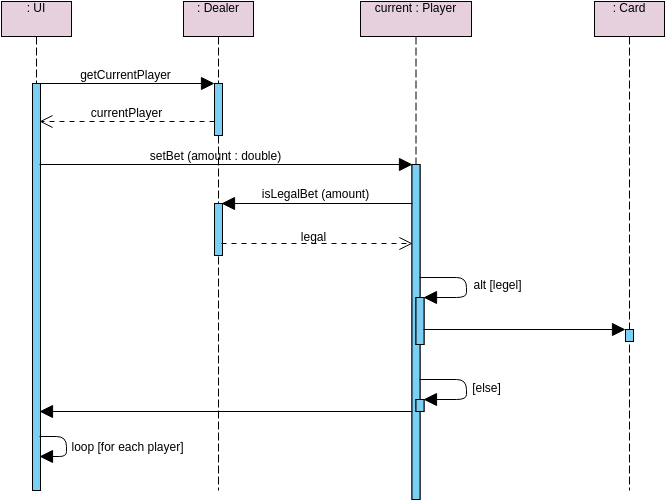
In the world of software engineering, few scenarios are as complex or logic-heavy as a casino poker game. Translating these intricate rules into a system architecture requires precision. This tutorial utilizes a specific sequence diagram from a “Poke Player” module to demonstrate how to model a betting round, validate user input, and handle control flow using Visual Paradigm.
By analyzing the interaction between the User Interface (UI), the Dealer, and the Player, we can construct a robust model that ensures game integrity before a single card is dealt. This guide will walk you through the modeling concepts, the specific syntax used in the diagram, and the architectural decisions behind this betting logic.
Understanding the Actors and Lifelines
Before diving into the logic, we must identify the participants in our system. In a Sequence Diagram, these are represented as “Lifelines”—vertical dashed lines extending from the top of the diagram. Each lifeline represents an object or a class that plays a role in the interaction.
In our “Poke Player” context, we have four distinct actors:
- : UI (User Interface): This is the entry point for the human player. It captures raw input (mouse clicks, keyboard presses) and converts it into system messages.
- : Dealer: Often the “Controller” or “Manager” of the game state. This component holds the rules and coordinates between the UI and the game logic.
- current : Player: An instance of the Player class. This represents the specific user acting in the current turn.
- : Card: A reference to the deck or the card management system, used here to validate the legality of a bet against the current game state.
Tracing the Interaction Flow
Sequence diagrams are read from top to bottom, representing the passage of time. Let’s break down the sequence of events occurring in this specific betting round.
1. Retrieving the Active Player
The process begins with the UI attempting to get the current state. It sends a synchronous message to the Dealer:
getCurrentPlayer
The Dealer processes this request and returns a reference to the active player object. In the diagram, this is shown as a dashed line with an open arrowhead:
currentPlayer
This establishes the context: we are now dealing with a specific player instance.
2. The Betting Logic (setBet)
Once the UI has the player context, it sends a request to set a bet. This is a critical moment where the system must validate data.
setBet (amount : double)
The message is sent from the UI to the current : Player lifeline. Notice the activation bar (the blue rectangle) appearing on the Player’s lifeline. This indicates that the Player object is now “active”—it is executing logic in response to this message.
3. Validation and Guard Conditions
The core complexity lies in how the system handles the bet amount. The Player object does not simply accept the money; it must verify that the bet is legal.
The Player delegates this check to the Dealer (or a validation service) via the message:
isLegalBet (amount)
The Dealer responds with a boolean result (represented by the message legal). This is where the alt (Alternative) fragment comes into play. In Visual Paradigm, an “alt” frame represents an if-else logic block.
There are two possible paths:
- [legal]: If the bet is valid, the system proceeds to the next step, interacting with the : Card lifeline (likely to update the deck or remove chips).
- [else]: If the bet is invalid (e.g., the player doesn’t have enough chips or it violates table limits), the system triggers the [else] path, which typically involves an error message or a request for a new input.
Advanced Modeling: Loops and Iterations
One of the most powerful features of this diagram is the loop frame found at the bottom.
loop [for each player]
In a real poker game, the betting round does not end with just one player’s action. It must continue for every participant at the table. The loop frame tells us that the logic within the box (or the logic following it) is repeated until a condition is met.
While the diagram shows a self-loop on the UI (likely iterating through a collection of player objects), the architectural implication is clear: the system must iterate through the list of all players, triggering the setBet sequence for each one individually until the betting round is complete.
Why Use Visual Paradigm for This?
Using a tool like Visual Paradigm allows developers to visualize these state changes before writing a single line of code. The diagram effectively acts as a blueprint, showing that the Dealer is responsible for validation, while the Player is responsible for the action. This separation of concerns makes the code easier to maintain and test.
Conclusion
Modeling a poker betting round requires careful attention to control flow. By using Sequence Diagrams with alt and loop fragments, we can create a clear, unambiguous specification for developers. Whether you are building a simple web game or a complex financial trading system, understanding these interaction patterns is key to architectural success.