
Mastering Cross-Functional Workflows with BPMN: Order Processing Architecture
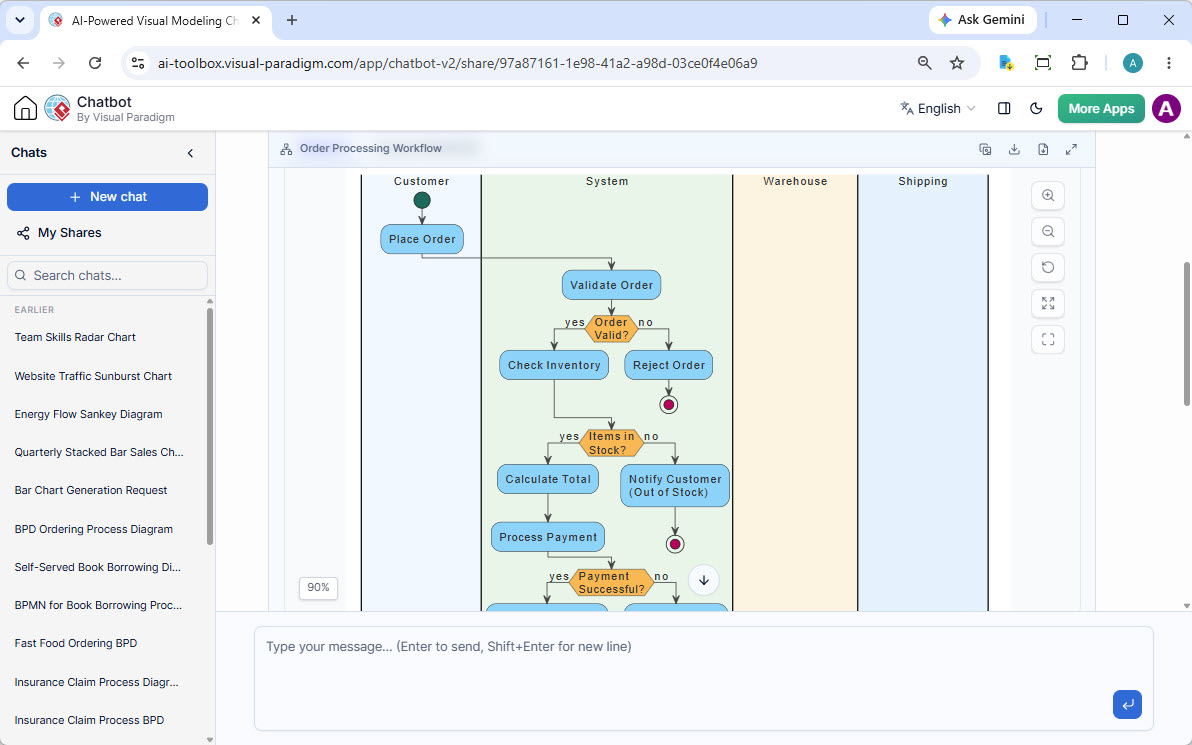
In modern software engineering and business process management, understanding the flow of data across different organizational units is critical. The Order Processing Workflow is a classic example of a cross-functional process, often visualized using a “Swimlane” diagram. This tutorial explores the architecture behind such a system, deconstructing the interactions between the Customer, the central System, the Warehouse, and the Shipping department.
Whether you are designing a new e-commerce platform or optimizing legacy logistics, mastering the logic of validation, inventory checks, and payment processing is the first step toward a robust architecture.
Understanding the Architecture: The Swimlane Model
The diagram provided illustrates a vertical swimlane architecture. This modeling technique is essential for clarifying who is responsible for what within a complex process. It prevents the common pitfall of ambiguity where it is unclear whether a specific task belongs to the software developer, the warehouse manager, or the customer.
1. The Customer Lane
The process initiates outside the system boundaries in the Customer lane. The entry point is the Place Order action. This represents the external trigger—a user submitting a request via a web interface or mobile application. In system architecture, this is often the moment an API request is received, transitioning the system from an idle state to an active processing state.
2. The System Lane: Logic & Validation
The System lane is the “brain” of the workflow. It handles the business logic that dictates the path of the order. The diagram reveals a rigorous validation sequence:
- Validate Order: Before any physical action occurs, the system performs an initial syntax and format check. Is the shipping address valid? Are the payment details formatted correctly?
- Check Inventory: If the order is valid, the system queries the database. This is a critical concurrency point; the system must ensure that multiple users cannot purchase the same last item simultaneously.
- Calculate Total: Once stock is confirmed, the system aggregates costs, applying taxes and shipping fees dynamically.
- Process Payment: The final system-level gate before fulfillment is the financial transaction. This step ensures funds are available before the warehouse commits inventory.
3. The Warehouse & Shipping Lanes
Once the system clears the order, the workflow moves downstream to the physical world. The Warehouse and Shipping lanes represent the execution phase. While the diagram shows the initiation of these tasks, in a full BPMN model, this would involve picking lists, packing slips, and tracking numbers being generated.
Step-by-Step Logic Analysis
To truly understand the system architecture, we must analyze the decision diamonds (the orange shapes) and the flow paths (the “yes” and “no” branches). The diagram demonstrates a “Fail-Fast” strategy, ensuring that orders are rejected or halted as early as possible to save resources.
- The Validation Gate: The first decision point asks, Order Valid?. If the answer is no, the system immediately Rejects Order and terminates the flow. This saves the system from attempting to check stock for malformed data.
- The Inventory Gate: If the order is valid, the system checks Items in Stock?. If no, the system triggers a notification to the customer (“Out of Stock”) and terminates the specific order flow, likely creating a backorder or refund workflow.
- The Payment Gate: Finally, even if stock exists, the system asks, Payment Successful?. If the bank declines the card, the process stops here, preventing a “sell-through” scenario where the customer is charged but cannot receive goods.
Tooling for Success: Visual Paradigm
Creating accurate diagrams like the one above requires robust modeling software. Visual Paradigm is a premier BPMN tool designed specifically for enterprise-grade modeling. It allows teams to transition seamlessly from high-level architecture to detailed logic.
Using Visual Paradigm, you can leverage the Swimlane feature to automatically align your actors. This ensures that your diagrams are not just pretty pictures, but executable specifications. The tool supports:
- Drag-and-Drop Architecture: Easily assign tasks to the System, Warehouse, or Customer lanes.
- Smart Connectivity: Automatic alignment of decision diamonds and flow paths.
- Validation: Built-in checks to ensure your BPMN diagrams are syntactically correct.
Conclusion
The Order Processing Workflow is more than just a diagram; it is a blueprint for business logic. By clearly separating the concerns of the Customer, the System, and the Logistics teams, Visual Paradigm helps engineers build systems that are resilient, logical, and easy to maintain.