
Choosing the Right Visual Paradigm Edition: A Guide for Students, Developers, and Architects
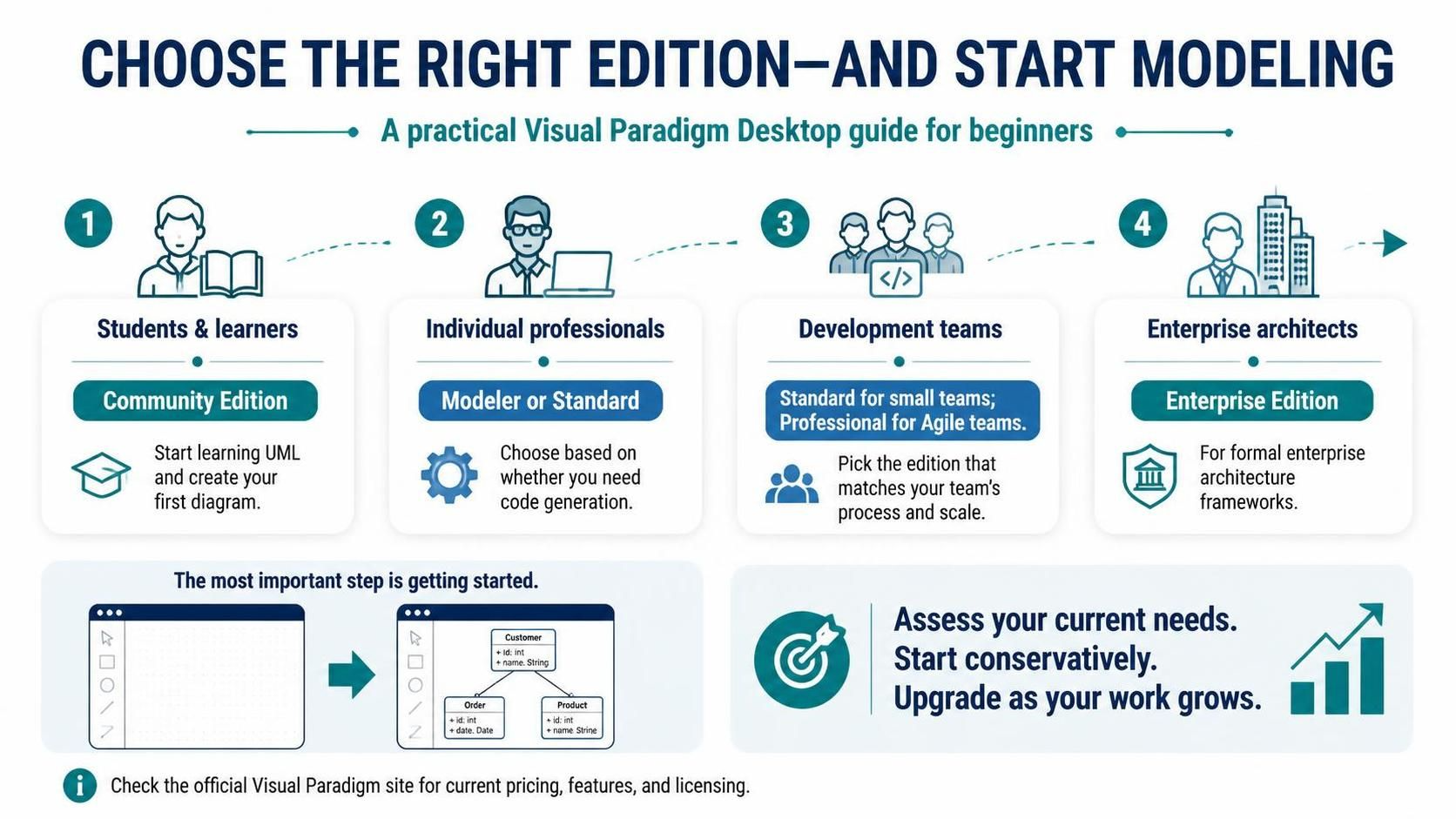
Welcome to your comprehensive guide on navigating the Visual Paradigm Desktop ecosystem. As a technical tutor, I often see users struggle not with the software itself, but with choosing the right entry point. Visual Paradigm is a robust, feature-rich platform that scales from simple student learning tools to complex enterprise architecture solutions. This tutorial will walk you through the four primary user archetypes, helping you match your specific technical needs with the correct software edition.
1. The Student & Learner: Starting with Community Edition
If you are new to Unified Modeling Language (UML) or system design, the barrier to entry should be zero. Visual Paradigm recognizes this by offering the Community Edition. This version is free and fully functional for learning purposes.
Why Choose This?
- Zero Cost: It removes financial risk for students and hobbyists.
- Core Functionality: It includes the necessary tools to create diagrams, understand UML syntax, and visualize system logic.
- Foundation Building: It is the perfect sandbox to create your first Class Diagram, Use Case Diagram, or Sequence Diagram without worrying about licensing limitations.
2. The Individual Professional: Modeler vs. Standard
Once you move beyond learning and enter the professional realm, your requirements often shift towards automation and efficiency. Individual professionals typically choose between the Modeler and Standard editions.
Decision Logic: Do You Need Code Generation?
The critical differentiator between these two editions is Code Generation (also known as Forward Engineering).
- Modeler Edition: Ideal for architects and designers who focus purely on the visual representation of systems. If your workflow involves creating diagrams to document existing code or communicate with stakeholders, but you do not need to generate new code from scratch, this is the most cost-effective choice.
- Standard Edition: Choose this if you require the ability to generate code skeletons from your diagrams. This is essential for developers who want to reverse-engineer existing codebases or forward-engineer new projects directly from their models.
3. The Development Team: Scaling for Collaboration
Software development is rarely a solo endeavor. When you transition from an individual contributor to a Development Team, the focus shifts to collaboration, version control, and Agile methodology.
Team Structure Recommendations
- Small Teams (Standard Edition): For smaller groups that need to share models and perhaps utilize code generation features, the Standard edition provides the necessary licensing to facilitate this work.
- Agile Teams (Professional Edition): If your team utilizes Scrum, Kanban, or other Agile frameworks, the Professional Edition is the superior choice. It includes specialized tools for backlog management, user story mapping, and integrated project planning that syncs with your development cycle.
4. The Enterprise Architect: Framework Compliance
At the highest level of abstraction, Enterprise Architects deal with massive scale, complex regulations, and strict industry standards. This is the domain of the Enterprise Edition.
Why Enterprise Edition is Essential
- Framework Support: Enterprise architecture often requires adherence to standards like TOGAF or ArchiMate. The Enterprise Edition is designed to support these formal frameworks.
- Comprehensive Compliance: It provides the depth required to manage large-scale systems that span multiple business units or technical domains.
- Strategic Alignment: This edition ensures that your modeling efforts align with high-level organizational goals and compliance requirements.
The Path Forward: Start Conservatively
The most important step in your journey is simply to begin. Do not over-analyze the feature set before you have started modeling. The recommended strategy is to start conservatively.
Download the Community Edition today. Create your first diagram. Experience the power of model-driven development firsthand. As your needs evolve—whether you need code generation, team collaboration, or enterprise frameworks—you can upgrade your license. Visual Paradigm is designed to grow with you.
For the most up-to-date pricing and feature details, always refer to the official Visual Paradigm website. Happy modeling!