
Mastering Flowchart Quality: A Visual Paradigm Design Guide
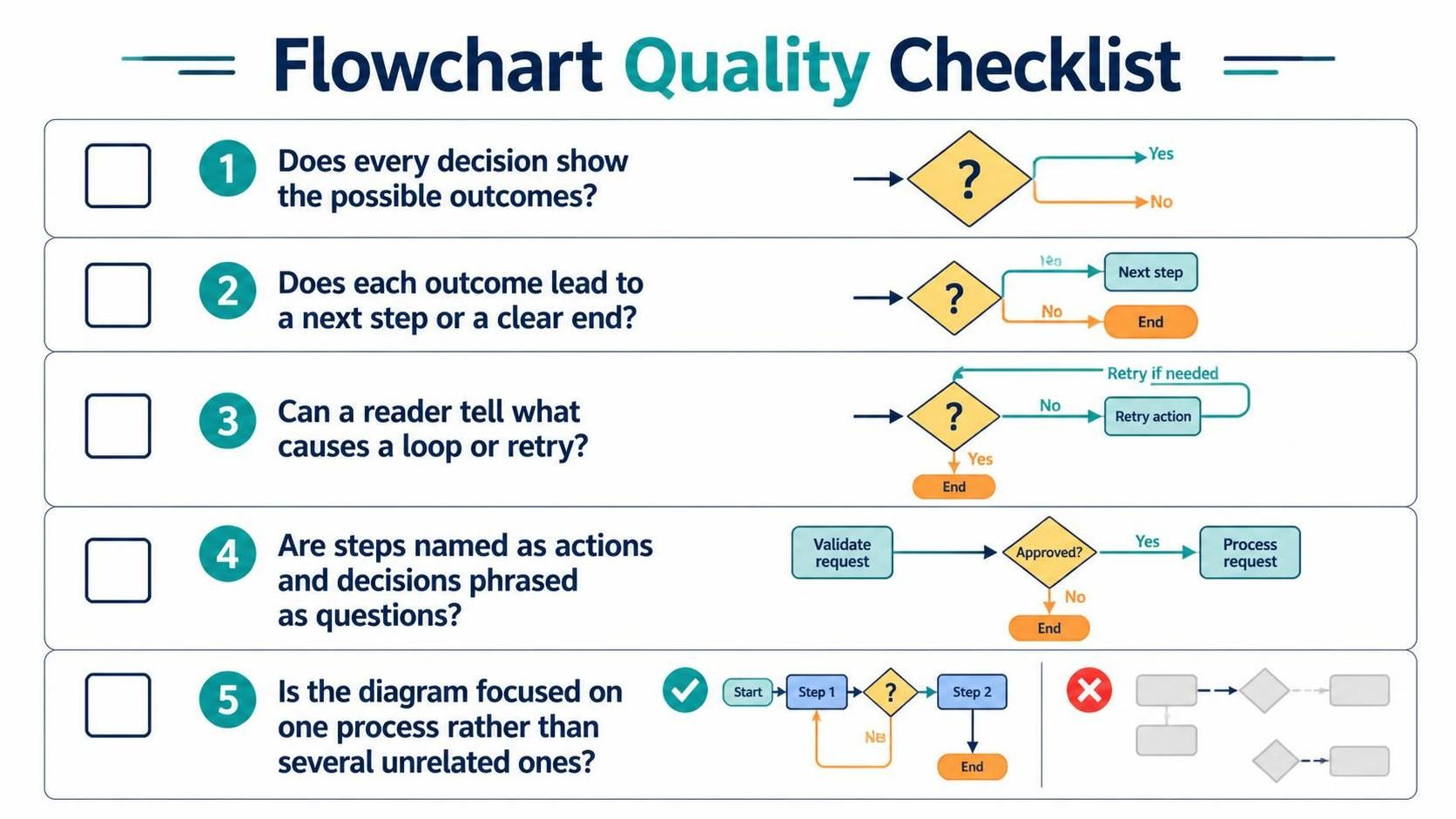
Creating a flowchart is often mistaken for simply drawing boxes and connecting them with lines. However, a high-quality flowchart is a rigorous technical document that serves as a blueprint for logic, a guide for developers, and a communication tool for stakeholders. When utilizing advanced modeling tools like Visual Paradigm, you are not just creating a drawing; you are engineering a process.
This tutorial breaks down the five critical pillars of flowchart quality, transforming a basic sketch into a professional, unambiguous system diagram.
1. Completeness of Decision Logic
The most common failure in process modeling is incomplete logic. A decision point (the diamond shape) represents a fork in the road. If a path is missing, the process is incomplete. In technical terms, every decision node must have an explicit exit path for every possible boolean outcome.
Consider a simple “Approve Request” scenario. If the logic dictates “Yes,” the process continues. But what happens if the answer is “No”? Without a defined “No” branch, the system logic is broken. A rigorous checklist ensures that every decision point has at least two distinct paths: one for a positive outcome and one for a negative outcome.
Visual Paradigm Best Practice
When designing in Visual Paradigm, ensure your connector labels are explicit. Don’t just rely on the flow direction. Always label the branches to prevent ambiguity.
2. Linear Continuity and Termination
A flowchart must guide the reader from a starting point to a logical conclusion without getting lost. This concept is known as Linear Continuity. Every outcome generated by a decision must lead immediately to either a new action step or a definitive end state.
In many poorly designed diagrams, arrows point into the void. This represents a “Dead End” in the logic that is not an actual termination point. Conversely, every path must eventually converge or terminate. If a “No” outcome from a decision leads nowhere, the process is invalid.
The Rule of Outcomes
- Positive Outcome: Should lead to the next logical step in the forward flow.
- Negative Outcome: Should lead to a specific error handling step, a retry mechanism, or a clear “End” terminator.
3. Explicit Loop and Retry Logic
Processes often require iteration. Perhaps a user enters a password incorrectly, or a system check fails. In these cases, the flowchart must clearly visualize a Loop. A loop occurs when the process flow returns to a previous step to attempt the action again.
A high-quality diagram does not just draw a curved line back to a previous box. It must explicitly state why the loop is happening. Labels like “Retry if needed” or “Count < 3" are essential. Without these labels, a reader cannot distinguish between an infinite loop (an error) and a controlled retry mechanism.
Example of Clear Loop Logic
graph TD
    A[Start] --> B{Check Input}
    B -- Valid --> C[Process]
    B -- Invalid --> D[Retry Action]
    D --> E{Retry Needed?}
    E -- Yes --> B
    E -- No --> F[End Error]
In this structure, the loop is explicit. The decision diamond determines if the loop continues, and the arrow returning to Check Input is clearly associated with the “Yes” condition.
4. Semantic Naming Conventions
Clarity is king. The text within your shapes must follow strict grammatical rules to ensure the diagram reads like a set of instructions rather than a list of nouns.
- Process Steps (Rectangles): Must be named as Actions (Verbs).
- Bad: “The Database”
- Good: “Query Database”
- Decision Points (Diamonds): Must be phrased as Questions.
- Bad: “Approved”
- Good: “Is it Approved?”
Using verbs for steps and questions for decisions allows the flowchart to be read aloud as a coherent narrative. “Validate request, then Is it approved?” This reduces cognitive load for anyone reviewing the architecture.
5. Scope and Process Isolation
A common pitfall in enterprise modeling is “Process Overload.” A single flowchart should focus on one specific process. If you try to cram unrelated sub-processes, administrative workflows, and system checks into a single diagram, you create a “Spaghetti Diagram” that is impossible to maintain.
Visual Paradigm supports Swimlanes and Sub-processes specifically to solve this. Instead of drawing one giant, confusing chart, isolate distinct workflows. If a process becomes too complex, create a “Sub-process” call that links to a separate, detailed diagram.
Checking Scope
Before finalizing your diagram, ask: “Does this diagram explain one complete journey from start to finish?” If the answer involves jumping between unrelated systems or departments without a clear logical connection, the scope is too wide.
Summary Checklist
To ensure your next diagram meets the highest standards of quality, use this final summary:
- Outcome Check: Does every diamond have a “Yes” and a “No” path?
- Flow Check: Does every path lead to a step or an end?
- Loop Check: Is the condition for retrying clearly labeled?
- Naming Check: Are steps actions and decisions questions?
- Focus Check: Is the diagram focused on a single, cohesive process?
By adhering to these principles, you transform a simple diagram into a powerful technical asset that drives better system architecture and clearer communication.