
Mastering the VP AI Ecosystem Pipeline: From Modeling to Living Documentation
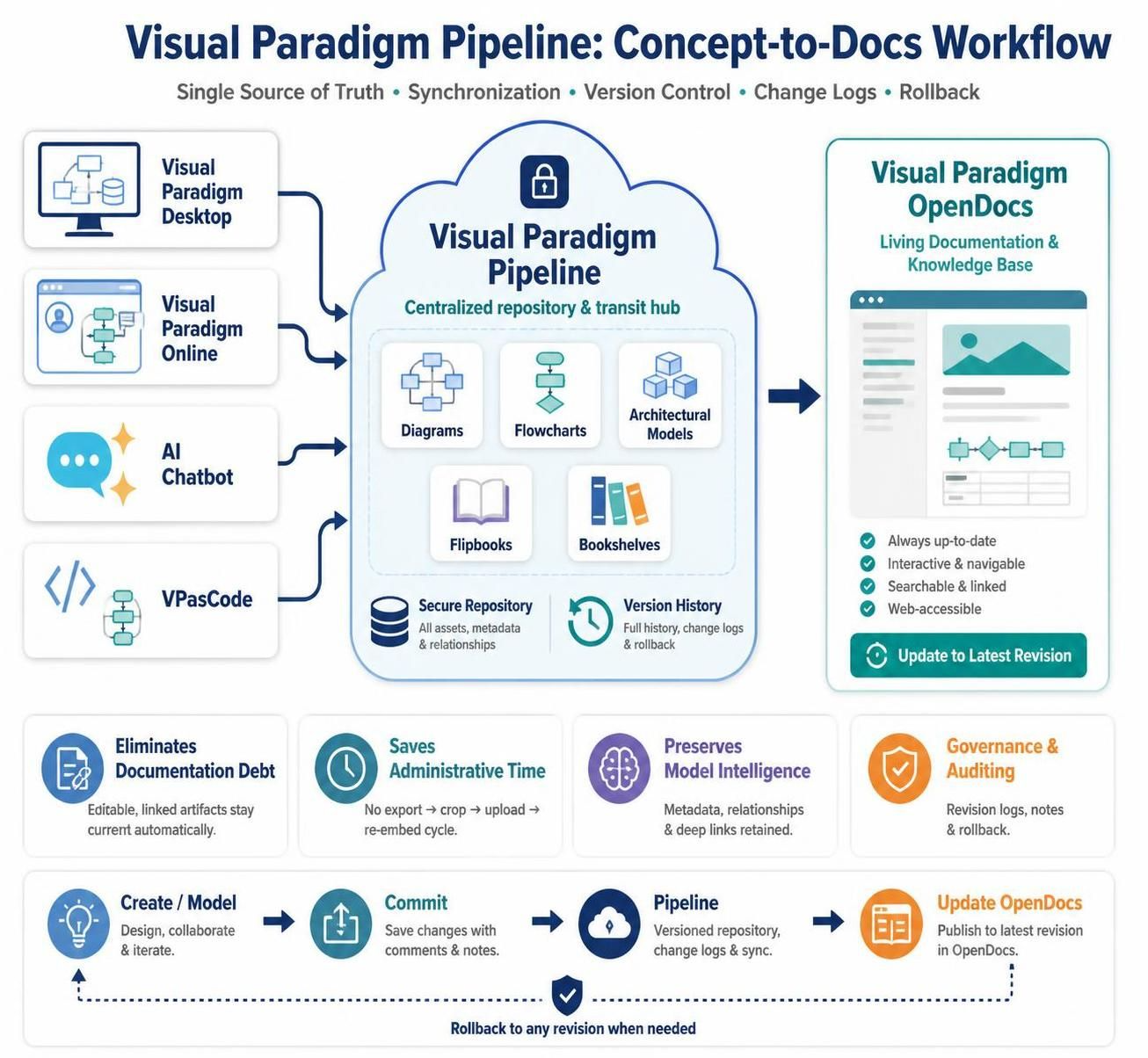
In modern enterprise architecture and software development, the gap between “design” and “documentation” is often a source of significant friction. Engineers create complex models in tools like Visual Paradigm, export them as static images, and then upload them to wikis or documentation platforms like OpenDocs. This traditional workflow creates “documentation debt”—where the diagram in the wiki is inevitably outdated the moment the source model changes.
The Visual Paradigm Pipeline solves this by acting as a centralized connection layer. It transforms visual assets from static snapshots into managed, living artifacts that synchronize automatically between your modeling tools and your documentation.
1. The Ecosystem: Four Layers of Creation
The Pipeline is not a single tool but an ecosystem that integrates four distinct “Generation Layers.” These are the sources where your visual intelligence is created before it enters the central repository.
- Visual Paradigm Desktop: The heavy-lifter for advanced enterprise modeling. Use this for database design (ERD), UML, BPMN, and complex software architecture.
- Visual Paradigm Online: A browser-based solution for collaborative planning and agile diagramming.
- AI Diagramming Chatbot: Accelerates the initial creation phase. You can describe a system in natural language, and the AI generates the structured visual model.
- VPasCode: For the developers and DevOps engineers. This allows you to create diagrams using text-based languages like PlantUML, Mermaid, or Graphviz, treating diagrams as code.
2. The Pipeline: Centralized Repository & Transit Hub
Once a diagram is created in any of the tools above, it is “committed” to the Pipeline. This is the core of the architecture.
The Pipeline functions as a transit and management layer with three critical capabilities:
- Centralized Storage: It stores assets in a shared, cloud-based repository. This eliminates the need for local files or email attachments.
- Revision Management: Every time you commit a change, the Pipeline records a new revision. You can review what changed, who made the update, and restore earlier versions if necessary.
- Relationship Maintenance: This is the most vital function. The Pipeline maintains a logical link between the source model and the published asset. It remembers that “Diagram A” in the documentation is actually “Database Model B” from the source tool.
3. The Documentation Layer: Visual Paradigm OpenDocs
The final destination for the Pipeline is Visual Paradigm OpenDocs. Unlike traditional document editors where you insert a static PNG or JPG file, OpenDocs allows you to embed “Managed Elements.”
When you embed a diagram from the Pipeline into OpenDocs, you are not embedding a picture; you are embedding a live reference. This enables:
- Live Synchronization: If a developer updates a sequence diagram in VP Desktop, OpenDocs detects that a newer revision is available.
- Single Source of Truth: There is only one authoritative version of the diagram stored in the Pipeline.
- Rollback Capability: If a new revision breaks the documentation or logic, you can easily rollback to the previous version directly within OpenDocs.
4. Core Concepts: Managed Assets & Revisions
To fully leverage this architecture, it is essential to understand two specific concepts defined by the Pipeline:
Managed Asset
A managed asset is a visual artifact that is stored through the Pipeline. It retains its metadata, relationships, and model intelligence. Examples include System Architecture diagrams, User Journey flows, and Database models. Unlike a standard image file, a managed asset can be updated in place without breaking the link to the document.
Revision
A revision is a saved version of an asset. When a user changes a diagram and commits the update, a new revision ID is generated. The Pipeline tracks the sequence of changes, allowing teams to compare current states with previous ones or restore an earlier version when necessary.
5. The Workflow: From Concept to Docs
The end-to-end workflow provided by the Pipeline replaces the manual “Export-Upload-Replace” cycle with a streamlined process:
- Create / Model: Design, collaborate, and iterate in Desktop, Online, AI, or VPasCode.
- Commit: Save changes with comments and notes to the Pipeline.
- Pipeline Processing: The system versioning the repository, updating change logs, and syncing the asset.
- Update OpenDocs: The documentation platform publishes the latest revision. Authors can decide when to apply the update.
Summary: Why Use the Pipeline?
The Visual Paradigm Pipeline eliminates the administrative burden of documentation maintenance. By treating diagrams as managed assets rather than static images, teams ensure that their documentation is always up-to-date, accurate, and synchronized with the source models. This shift reduces uncertainty, saves administrative time, and preserves the integrity of the system’s design.