
Mastering the VP AI Ecosystem: Six Routes from Text to Diagram
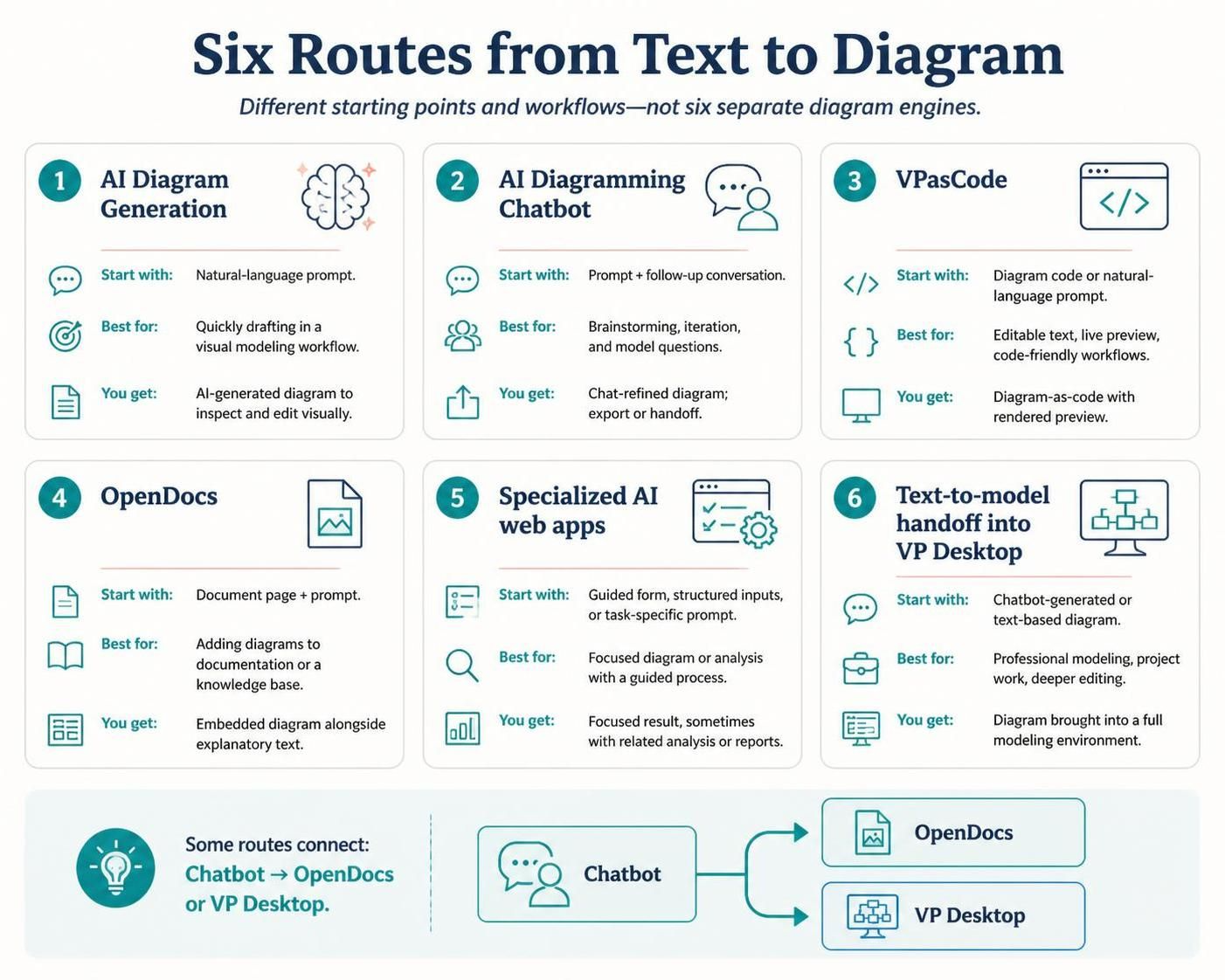
In the modern landscape of software architecture and system design, the barrier between an idea and a visual representation has never been lower. Visual Paradigm has revolutionized this transition by offering a robust ecosystem where “Text-to-Diagram” is not a single feature, but a comprehensive set of workflows. Understanding the distinction between these workflows is crucial for selecting the right tool for your specific modeling need.
This tutorial breaks down the six primary routes from text to diagram, clarifying their architectural differences and best-use cases.
The Core Concept: Not Six Engines, But Six Paths
It is a common misconception that Visual Paradigm contains six separate diagram engines. In reality, these six routes represent different entry points and workflows that may share underlying logic or even hand off tasks to one another. Whether you prefer a conversational approach or a code-centric workflow, there is a specific path designed for your methodology.
The six routes are categorized by their starting point, their ideal use case, and the final output format.
Route 1: AI Diagram Generation
This route is designed for speed and simplicity. It is the “quick entry” method for users who want to see a diagram appear without setting up a complex environment.
- Start With: A simple natural-language prompt. You might type, “Create a sequence diagram for a login system.”
- Best For: Quickly drafting a diagram within a visual modeling workflow. If you need to visualize a concept immediately to share with a team, this is the fastest path.
- You Get: An AI-generated diagram that is fully editable. The output is a standard model that you can inspect, refine, and manipulate visually using the standard editor tools.
Route 2: AI Diagramming Chatbot
Unlike the static generation of Route 1, the Chatbot approach is iterative and conversational. It treats the diagram as a collaborative partner rather than a finished product.
- Start With: A prompt followed by a conversation. You can ask follow-up questions like, “What happens if the user enters the wrong password?” or “Can you add a retry loop?”
- Best For: Brainstorming, rapid iteration, and asking specific questions about the model’s behavior. It is excellent for exploring edge cases.
- You Get: A chat-refined diagram. This workflow allows for deep refinement through dialogue. The result can be exported or handed off to other tools (like VP Desktop) for further professional development.
Route 3: VPasCode
VPasCode represents the “Diagram-as-Code” philosophy. It bridges the gap between traditional text-based development and visual modeling, catering to engineers who prefer version control and code-based workflows.
- Start With: Diagram code (syntax) or a natural-language prompt that is converted into code.
- Best For: Users who require editable text, live preview, or code-friendly workflows. It is ideal for integrating modeling into a CI/CD pipeline or managing documentation via Git.
- You Get: A rendered diagram alongside its source code. You get the visual representation but maintain the ability to edit the underlying text logic directly.
Route 4: OpenDocs
OpenDocs shifts the focus from the diagram file itself to the documentation environment. It treats the diagram as a living component of a larger document.
- Start With: A document page and a prompt. You work directly within the context of a report or knowledge base article.
- Best For: Adding diagrams directly into documentation or a knowledge base. It ensures that the diagram remains synchronized with the explanatory text surrounding it.
- You Get: An embedded diagram alongside explanatory text. This is the preferred route for technical writers and system architects creating comprehensive design documents.
Route 5: Specialized AI Web Apps
These are task-specific interfaces designed to guide the user through a structured process. They strip away the complexity of the full modeling environment to focus on a specific outcome.
- Start With: A guided form, structured inputs, or a task-specific prompt. The system constrains the input to ensure high-quality output for a specific diagram type.
- Best For: Generating a focused result, sometimes including related analysis or reports. It is excellent for standardizing outputs across a team.
- You Get: A focused result that may include analysis or reports, rather than just a raw diagram file.
Route 6: Text-to-Model Handoff into VP Desktop
This is the heavy-lifting route. It starts with text or chat but aims for professional-grade modeling capabilities that require the full power of the desktop environment.
- Start With: A chatbot-generated diagram or a text-based model.
- Best For: Professional modeling, project work, or deep editing. If you need to generate a massive project file with extensive relationships, this is the destination.
- You Get: A diagram brought into a full modeling environment. This allows for the application of enterprise-grade features, rigorous validation, and complex project management.
Interoperability: The Connected Ecosystem
One of the most powerful aspects of this architecture is the connectivity between routes. These are not siloed features. For example, the AI Chatbot (Route 2) can act as a gateway, handing off work to OpenDocs (Route 4) or exporting directly to VP Desktop (Route 6). This flexibility ensures that your workflow can evolve as the project grows in complexity.