
Mastering VP AI Ecosystem: C4 Workflow from Prompt to Living Docs
In modern software engineering, the gap between architectural design and technical documentation is often where projects lose momentum. Diagrams become outdated screenshots, documentation drifts from reality, and onboarding new team members becomes a tedious exercise in deciphering legacy artifacts.
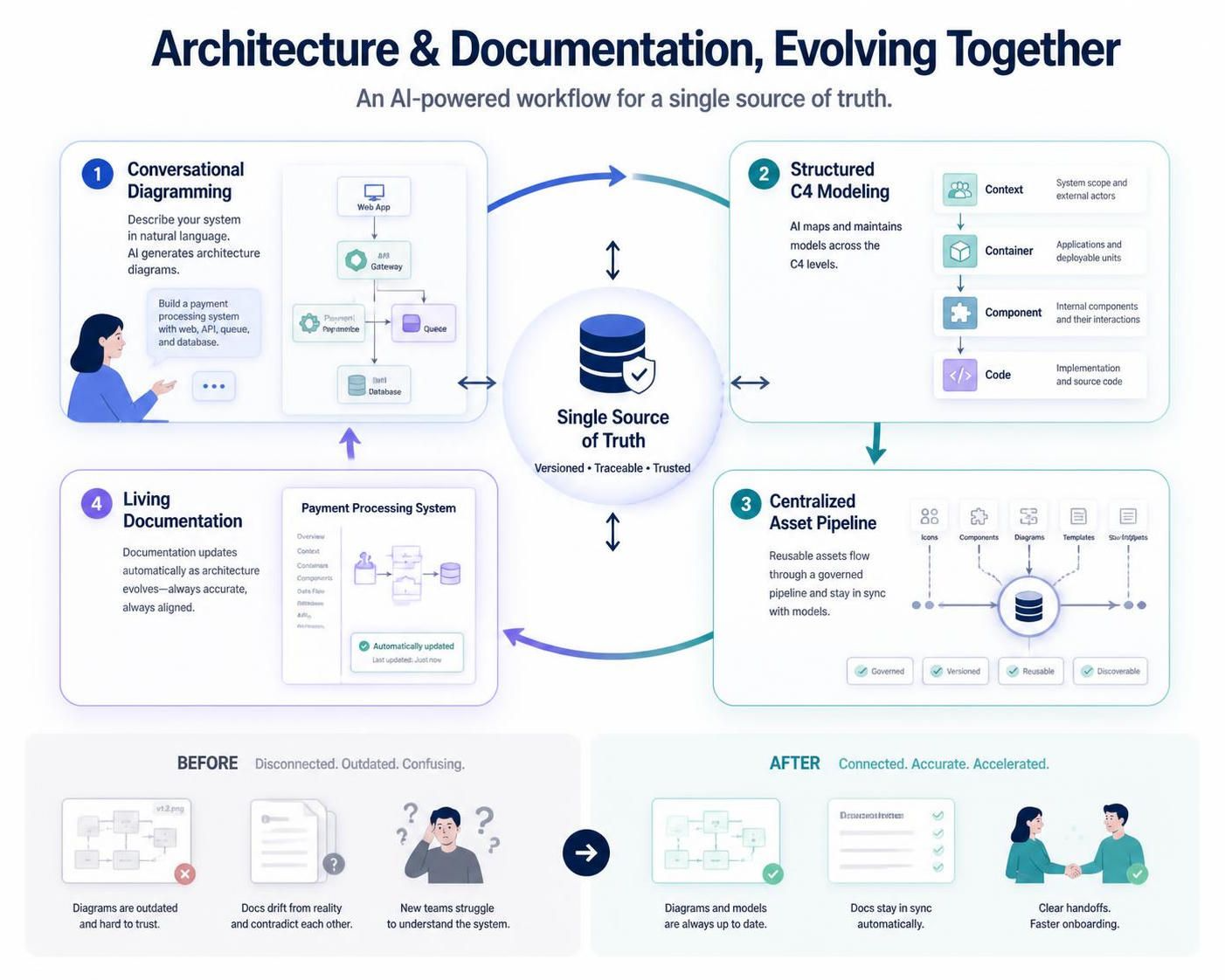
Visual Paradigm’s AI-powered ecosystem addresses this challenge by transforming how teams create and maintain technical documentation. By connecting conversational diagramming, structured C4 modeling, a centralized asset pipeline, and living documentation into one seamless workflow, it ensures that your architecture and your docs evolve together as a single source of truth.
Step 1: Conversational Diagramming
The workflow begins with the most natural interface possible: natural language. Instead of manually drawing boxes and arrows, the architect simply describes the system in plain English. The AI engine interprets these prompts to generate accurate architectural diagrams instantly.
This step significantly reduces the friction of starting a new project. You can describe high-level requirements, and the AI will propose the structure, allowing you to focus on logic rather than syntax.
AI Prompt Example
Imagine you need to design a backend for a payment processing service. You simply type the following prompt into the Visual Paradigm AI assistant:
"Build a payment processing system with a web app, an API Gateway, a payment service, a queue, and a database."The AI parses this request and generates the initial Context and Container diagrams, identifying the external actors and the major deployable units.
Step 2: Structured C4 Modeling
Once the initial diagram is generated, the system leverages the C4 model to structure the architecture. C4 is a powerful software architecture notation that provides a clear view of the system from four distinct levels of abstraction.
The Four Levels of Abstraction
- Level 1: Context Diagram – Shows the system as a single box and its relationships with users and other systems. This defines the scope.
- Level 2: Container Diagram – Breaks the system down into “containers” (e.g., web applications, mobile apps, microservices, databases).
- Level 3: Component Diagram – Zooms into a specific container to show the internal components (e.g., classes, functions, modules) and their interactions.
- Level 4: Code – Represents the implementation details and source code structure.
Visual Paradigm’s AI maps the natural language description to these specific C4 levels automatically. This ensures that the documentation is not just a collection of pretty pictures, but a structured, navigable model of the system.
PlantUML Representation of C4
Under the hood, Visual Paradigm often utilizes or generates standard modeling languages like PlantUML. Here is how the C4 relationship between a Web App and a Database is typically defined in code:
@startuml
title Container Diagram: Payment Processing System

person User, "End User", (user, #FF9900)
container WebApp, "Web Application", "Node.js, Express"
container_Ext API, "Payment Gateway API", "External REST API"
container Database, "Transaction Database", "PostgreSQL"

User --> WebApp : Uses
WebApp --> API : Process Payment
WebApp --> Database : Store Transactions
@enduml
Step 3: Centralized Asset Pipeline
A common pitfall in software development is the fragmentation of assets. Diagrams are often stored in images, while code is in Git, and documentation is in separate wikis. Visual Paradigm introduces a Centralized Asset Pipeline to solve this.
In this workflow, assets such as icons, component definitions, diagrams, templates, and snippets flow through a governed pipeline. This ensures that:
- Governed: Changes to standard components are approved and propagated.
- Versioned: You can track the history of architectural changes.
- Reusable: Components are stored in a central library for easy retrieval.
- Discoverable: Teams can search for existing assets rather than reinventing the wheel.
Step 4: Living Documentation
The final stage of this workflow is the publication of “Living Documentation.” Unlike static PDFs or Word documents that require manual updates, this documentation is dynamically linked to the central model.
As the architecture evolves—whether you add a new API endpoint or change a database schema—the documentation updates automatically. This creates a “Single Source of Truth” that is versioned, traceable, and trusted.
Before vs. After
The shift from disconnected workflows to this integrated AI approach transforms the developer experience:
- Before: Diagrams are outdated screenshots. Docs drift from reality. New teams struggle to understand the system because the documentation contradicts the code.
- After: Diagrams and models are always up to date. Docs stay in sync automatically. Handoffs are clear, and onboarding is accelerated.
Conclusion
By integrating AI-driven conversational design with the rigor of C4 modeling and a centralized asset pipeline, Visual Paradigm bridges the gap between design and documentation. This workflow ensures that your architecture is not just a diagram on a wall, but a living, breathing part of your development ecosystem.