
Perspective: the systems view. Not “how do I draw a box” but “how does a diagram get from an idea to a maintained artifact — and where does each tool sit in that pipeline?”
The Pipeline, Not the Product
A diagram is not a deliverable. It’s a node in a knowledge graph, and like any node it has inputs, outputs, and a maintenance cost. The interesting question is: what’s the shortest path from a question to a rendered, versioned, discoverable answer?
Five stages, always:
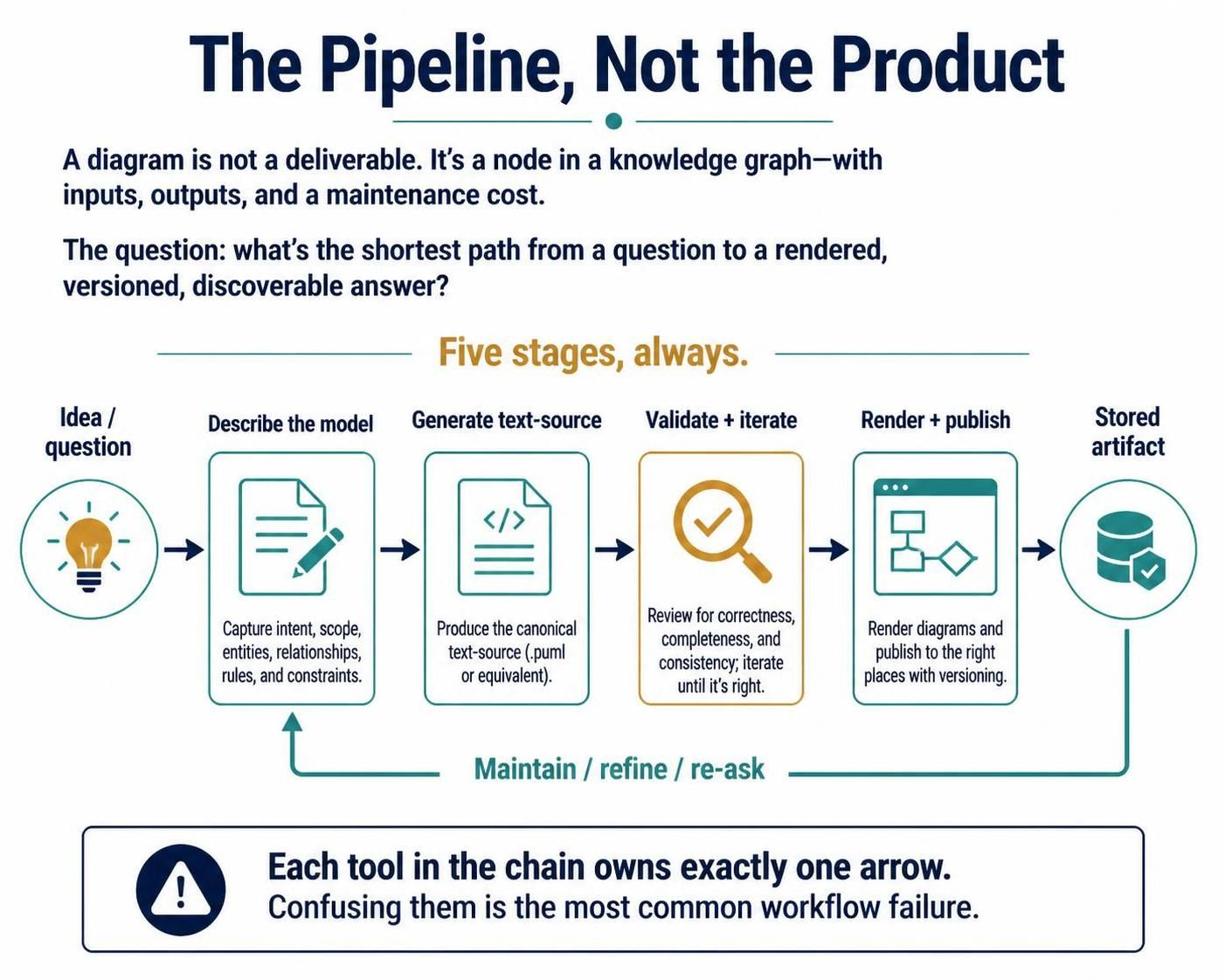
Each tool in the chain owns exactly one arrow. Confusing them is the most common workflow failure.
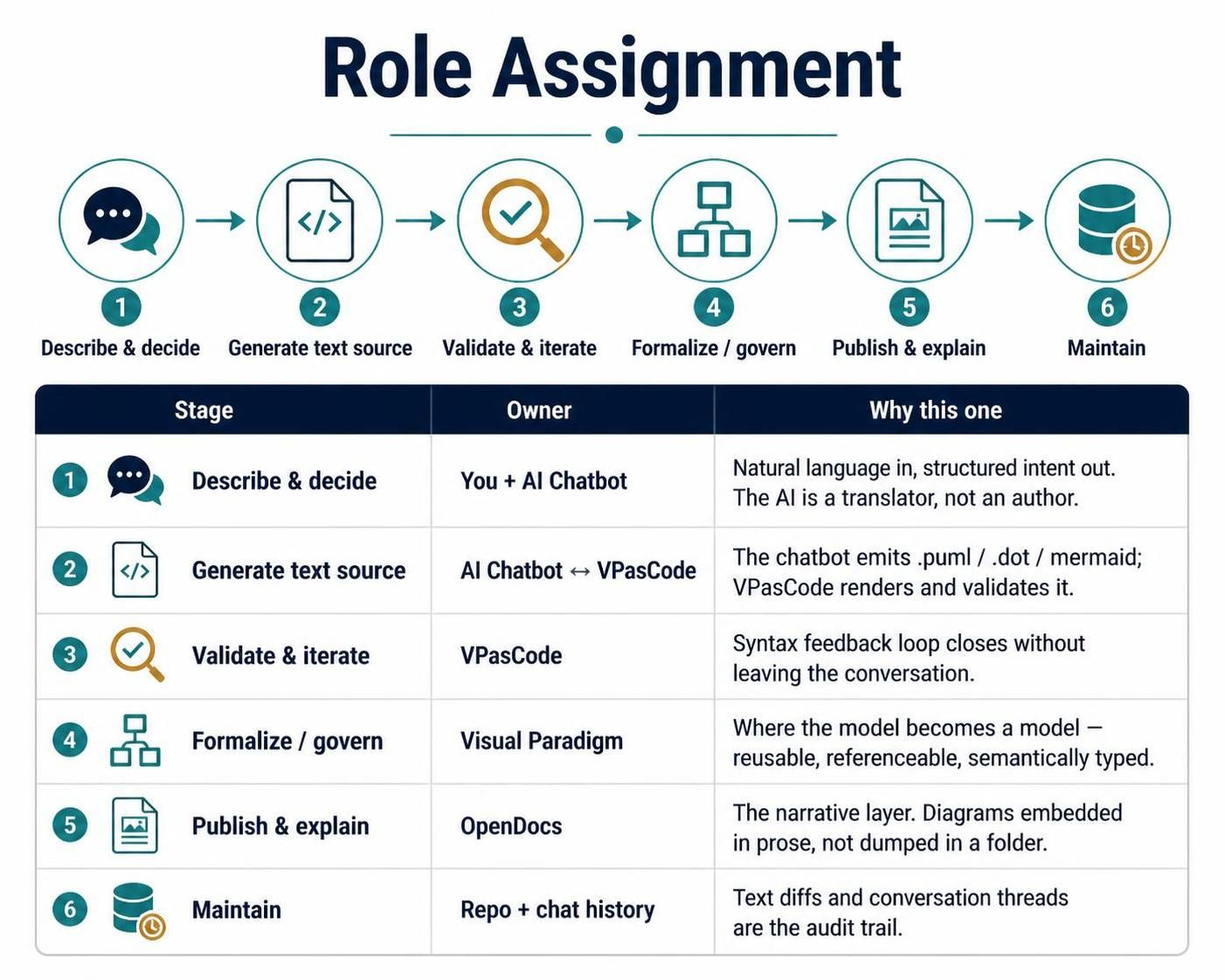
Role Assignment
| Stage | Owner | Why this one |
|---|---|---|
| Describe & decide | You + AI Chatbot | Natural language in, structured intent out. The AI is a translator, not an author. |
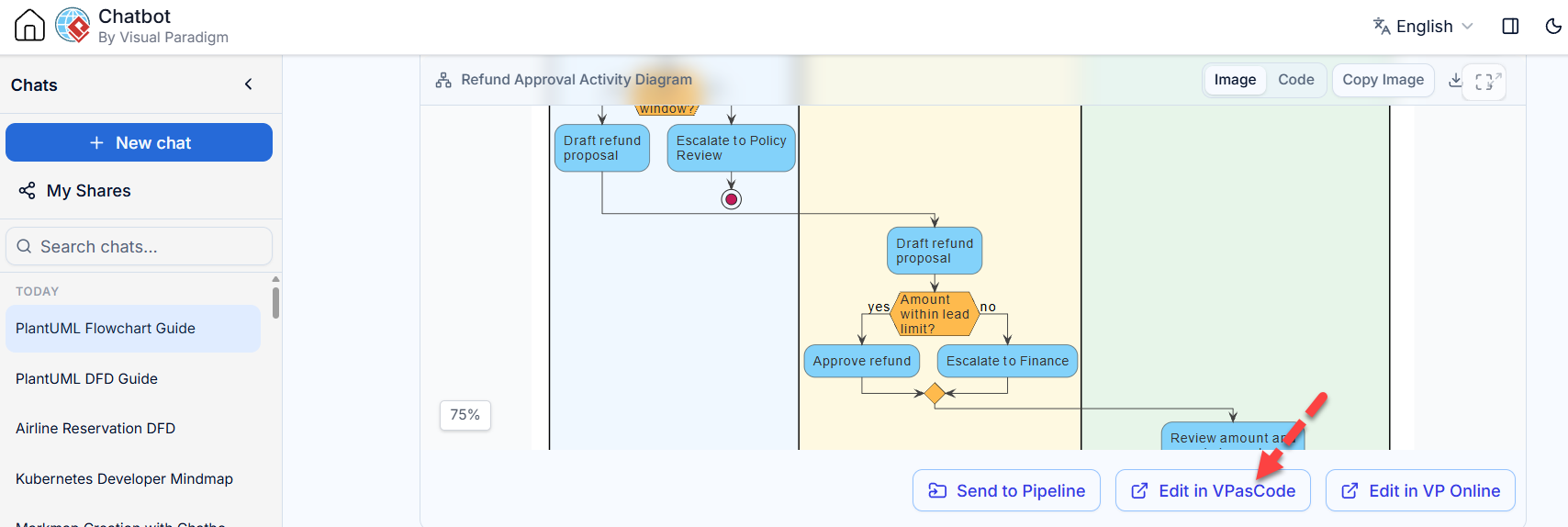
| Generate text source | AI Chatbot ↔ VPasCode | The chatbot emits .puml / .dot / mermaid; VPasCode renders and validates it. |
| Validate & iterate | VPasCode | Syntax feedback loop closes without leaving the conversation. |
| Formalize / govern | Visual Paradigm | Where the model becomes a model — reusable, referenceable, semantically typed. |
| Publish & explain | OpenDocs | The narrative layer. Diagrams embedded in prose, not dumped in a folder. |
| Maintain | Repo + chat history | Text diffs and conversation threads are the audit trail. |
Stage 1 — Describe (You + AI Chatbot)
The chatbot’s job is disambiguation, not decoration. The highest-value thing it does is refuse to guess.
A useful prompt has four parts:
-
The domain object — “a refund approval process,” not “a flowchart.”
-
The reader’s question — what should someone know after looking? (“who can block a refund?”)
-
The constraint — “must fit one slide,” “three swimlanes max,” “only actors we actually have.”
-
The output intent — “give me the source, I’ll iterate.”
Prompt #2 is the one people skip, and it’s the one that determines whether the diagram is useful or merely correct.
What to hand the chatbot rather than describe: paste the existing spec, the ticket, the error log, the code. Diagrams derived from real artifacts are wrong in interesting ways; diagrams derived from imagination are wrong in boring ways.
Stage 2 — Generate (Chatbot → VPasCode)
The chatbot writes source in a text-based DSL. Three families, and the choice matters more than any styling decision:
| DSL | Strength | Reach for it when |
|---|---|---|
| PlantUML | Widest UML/BPMN/ArchiMate coverage; swimlanes, forks, C4 | Formal models, process flows, architecture views |
| Graphviz (DOT) | Layout algorithm does the work; great for graphs and networks | Dependency graphs, ERD (Chen), data flow, anything with no natural “top” |
| Mermaid | Small, readable, embeds well in markdown | Docs-adjacent flows, org charts, quick sequence diagrams |
And a fourth family that isn’t a DSL at all: structured infographics (SWOT, PESTLE, Ansoff, mindmaps, ECharts) rendered as JSON. Use those when the artifact is an analytical framework rather than a system model — a matrix rendered as boxes-and-arrows is a category error.
The example
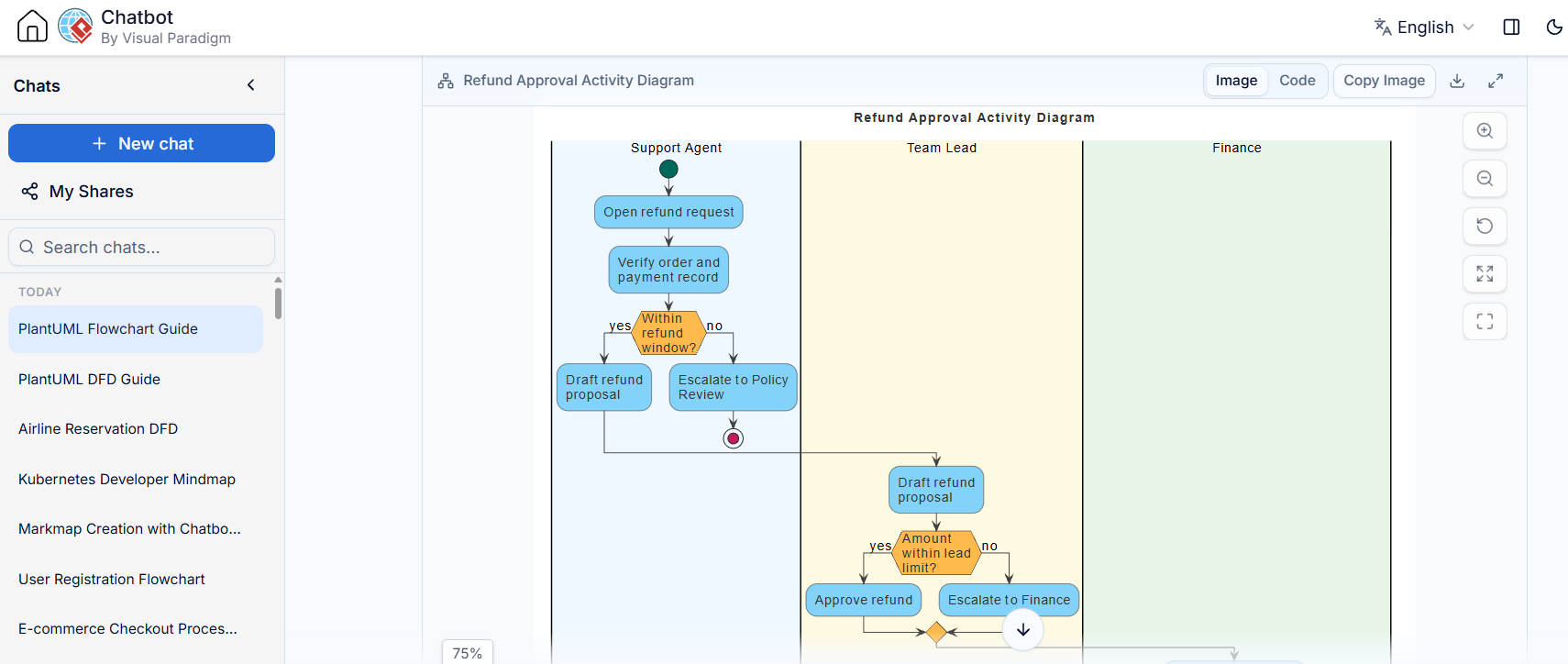
Say the request is: “show me who can block a refund, so support can tell the customer who to chase.”
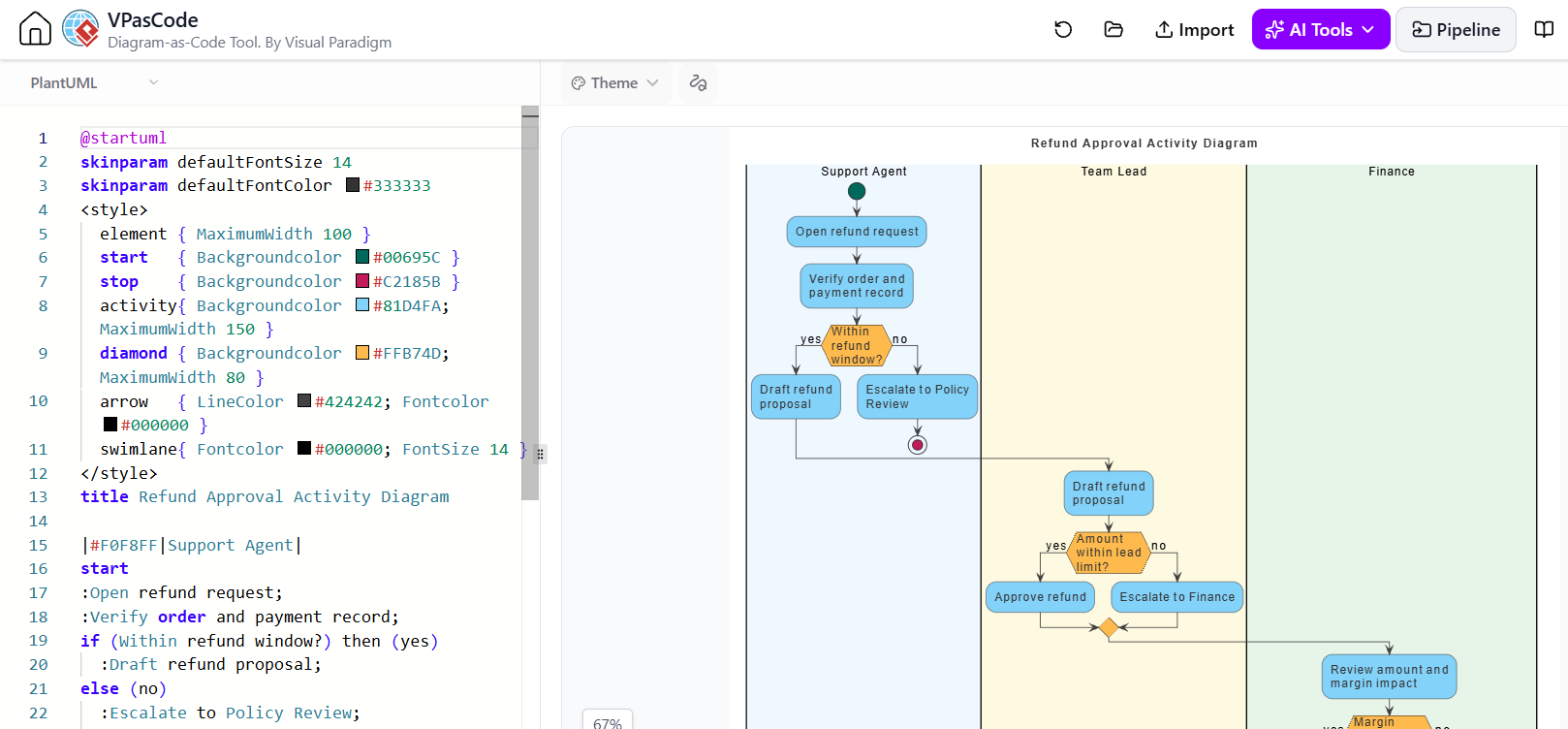
@startuml
skinparam defaultFontSize 14
skinparam defaultFontColor #333333
<style>
  element { MaximumWidth 100 }
  start   { Backgroundcolor #00695C }
  stop    { Backgroundcolor #C2185B }
  activity{ Backgroundcolor #81D4FA; MaximumWidth 150 }
  diamond { Backgroundcolor #FFB74D; MaximumWidth 80 }
  arrow   { LineColor #424242; Fontcolor #000000 }
  swimlane{ Fontcolor #000000; FontSize 14 }
</style>
title Refund Approval Activity Diagram

|#F0F8FF|Support Agent|
start
:Open refund request;
:Verify order and payment record;
if (Within refund window?) then (yes)
  :Draft refund proposal;
else (no)
  :Escalate to Policy Review;
  stop
endif

|#FFF8E1|Team Lead|
:Draft refund proposal;
if (Amount within lead limit?) then (yes)
  :Approve refund;
else (no)
  :Escalate to Finance;
endif

|#E8F5E9|Finance|
:Review amount and margin impact;
if (Margin impact acceptable?) then (yes)
  :Approve refund;
  :Release payment;
  :Notify customer of credit date;
  stop
else (no)
  :Decline with written rationale;
  :Notify support agent;
  stop
endif

@enduml
Notice what the swimlanes do that prose cannot: they answer “who to chase” at a glance. Three lanes, three potential blockers, visible in one look.
The pattern for this stage: generate → validate → revise. Never present source you haven’t confirmed parses. If validation fails, the error is the useful input — fix and re-run rather than hand-waving.
Stage 3 — Validate (VPasCode)
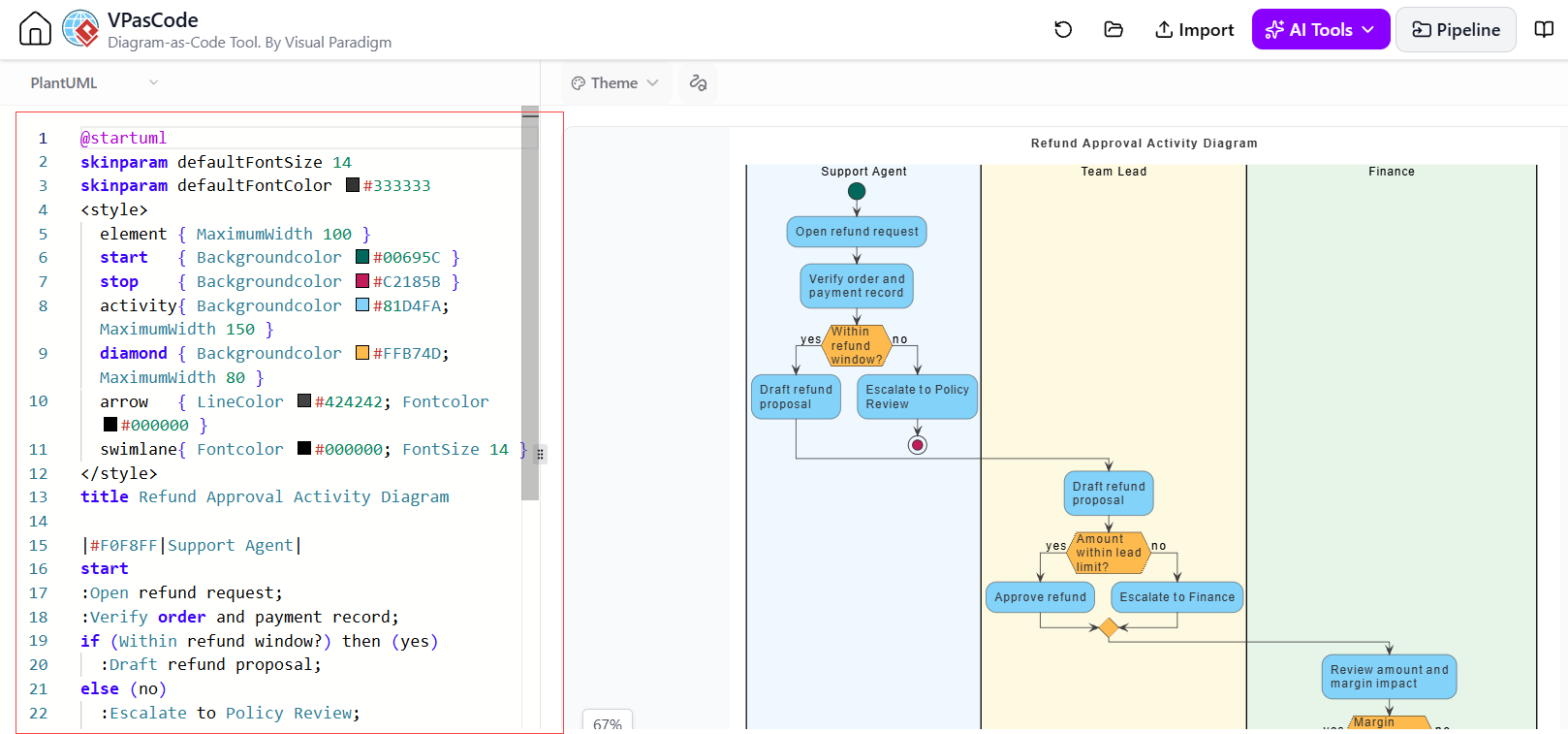
Validation is a gate, not a formality. Two distinct failure classes:
-
Syntactic — unclosed
if, missingendif, stray;inside an action label,//used as a comment,repeatwithoutrepeat while. These are cheap to catch and embarrassing to ship. -
Semantic — the source parses but the diagram lies. An unreachable branch. A diamond holding two questions. A lane no one ever returns to. Parallel forks drawn as sequential boxes.
No validator catches the second class. That’s what the reader’s question from Stage 1 is for. Close the loop: does this diagram answer the question it was commissioned for?
Do this in the same conversation turn. The iterative rhythm — source, error, fix, source — is where the time savings actually accrue.
Stage 4 — Formalize (Visual Paradigm)
This is the stage most teams skip, and it’s the one that decides whether your diagram has a half-life of months or years.
Text DSLs are excellent at expression. They are poor at governance. Visual Paradigm is where:
-
The boxes become typed elements in a repository — an actor is an actor, not a rectangle with a label.
-
The diagram becomes one view of a model — the same “Finance” actor appears in the refund flow, the architecture diagram, and the capability map, and changing it once changes it everywhere.
-
Relationships get reference-checked — you can ask “what breaks if this step disappears?” and get an answer.
-
Traceability exists — requirement → process → component → deployment, navigable.
When each is the right home
| Situation | Use |
|---|---|
| Sketching, exploring, one-off explanation | Chatbot → VPasCode → done |
| The model is the product (audit, compliance, ISO, regulated delivery) | Chatbot → VPasCode → import to Visual Paradigm |
| Multiple diagrams must stay consistent with each other | Visual Paradigm as source of truth |
| Diagram needs to be reviewed by non-engineers | Visual Paradigm (typed, navigable, reviewable) |
The bridge, concretely: generate the source conversationally for speed, then import it into Visual Paradigm to become managed model elements. You get the speed of an LLM and the rigor of a repository. Doing only the first gives you orphaned files; doing only the second gives you a slow diagram you’ll never make.
Stage 5 — Publish & Explain (OpenDocs)
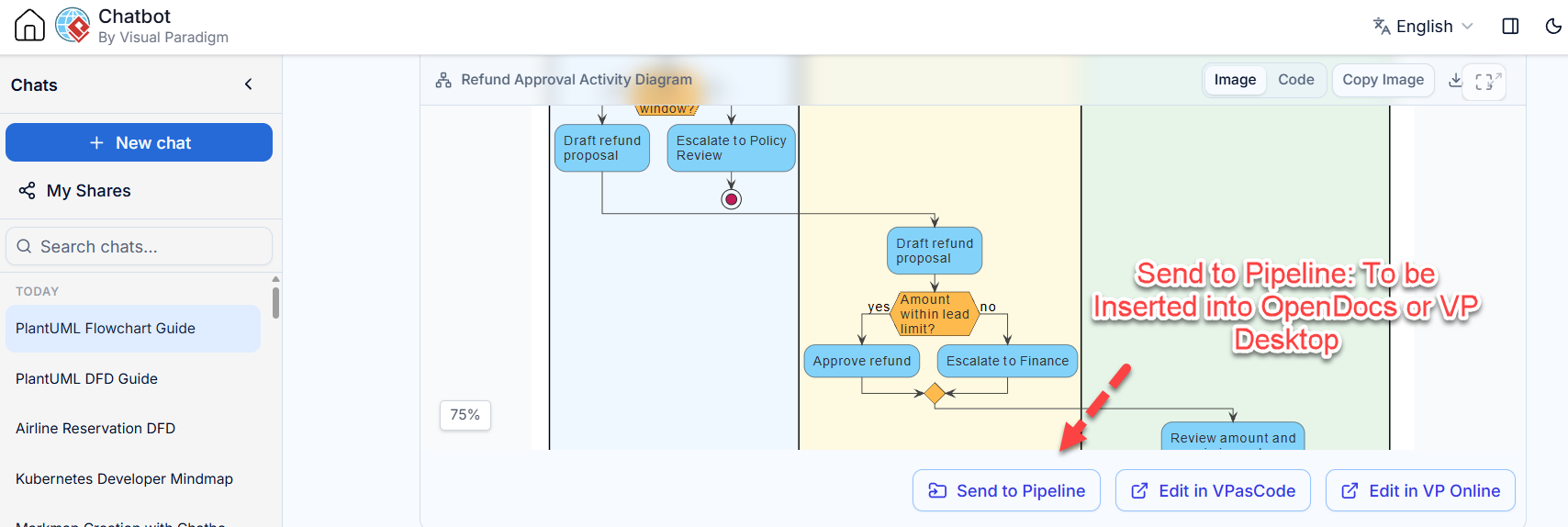
A diagram without prose is a puzzle. Prose without a diagram is a wall. OpenDocs exists because the explanation and the artifact must live in the same document, in the same version.
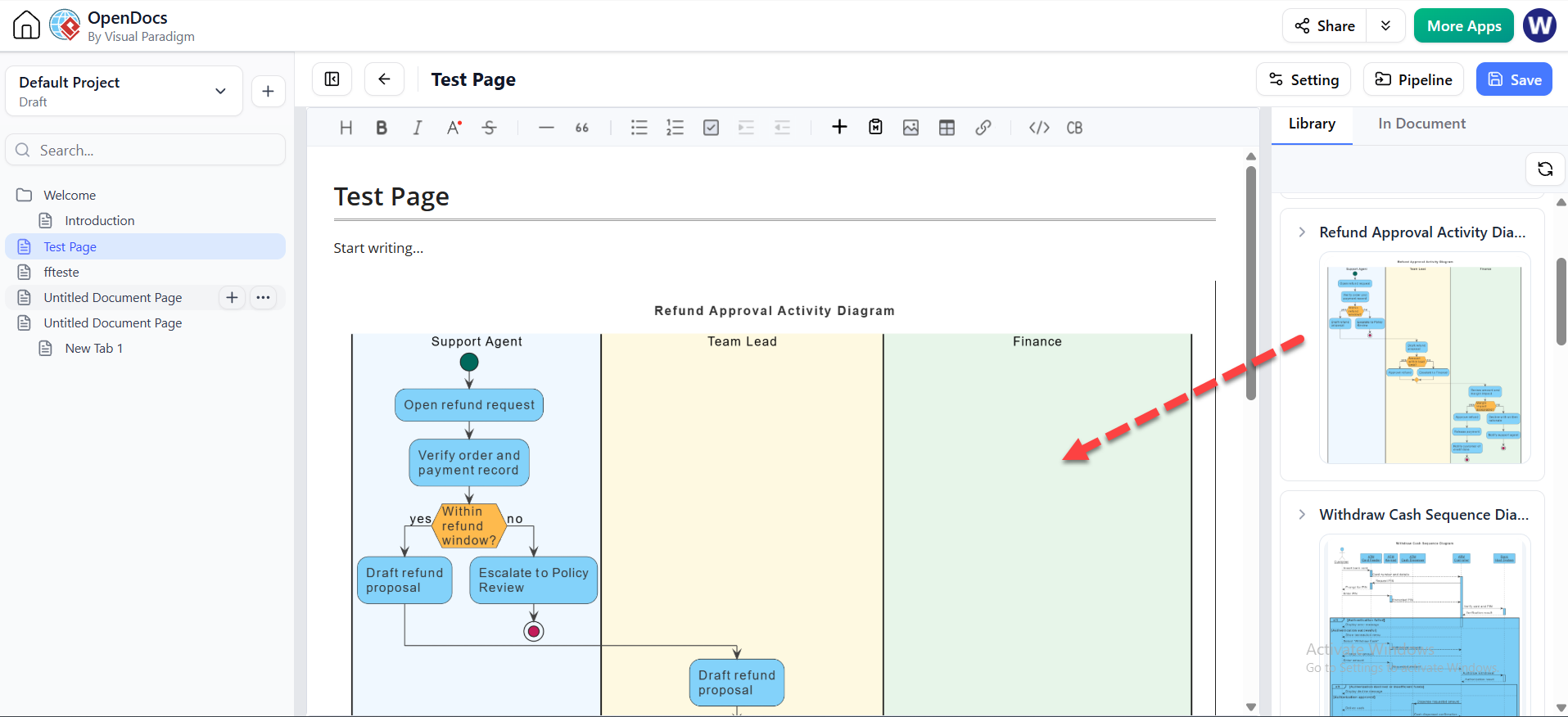
The rule: every diagram gets exactly one question it answers, and the surrounding text asks the question.
Bad pattern — a “Diagrams” folder with 40 exported PNGs and no captions. Nobody knows which is current, nobody knows what each is for, and within a quarter it’s a graveyard.
Good pattern — a living doc where each section reads:
Who can block a refund?
Three roles can: the Team Lead (amount above their limit), Finance (margin impact), and Policy Review (outside the refund window). The flow below traces each gate and where it hands off.[embedded refund diagram]
The pair is versioned, reviewed, and diffable together. The question is grep-able — which means the next person searching for it finds the answer instead of asking again.
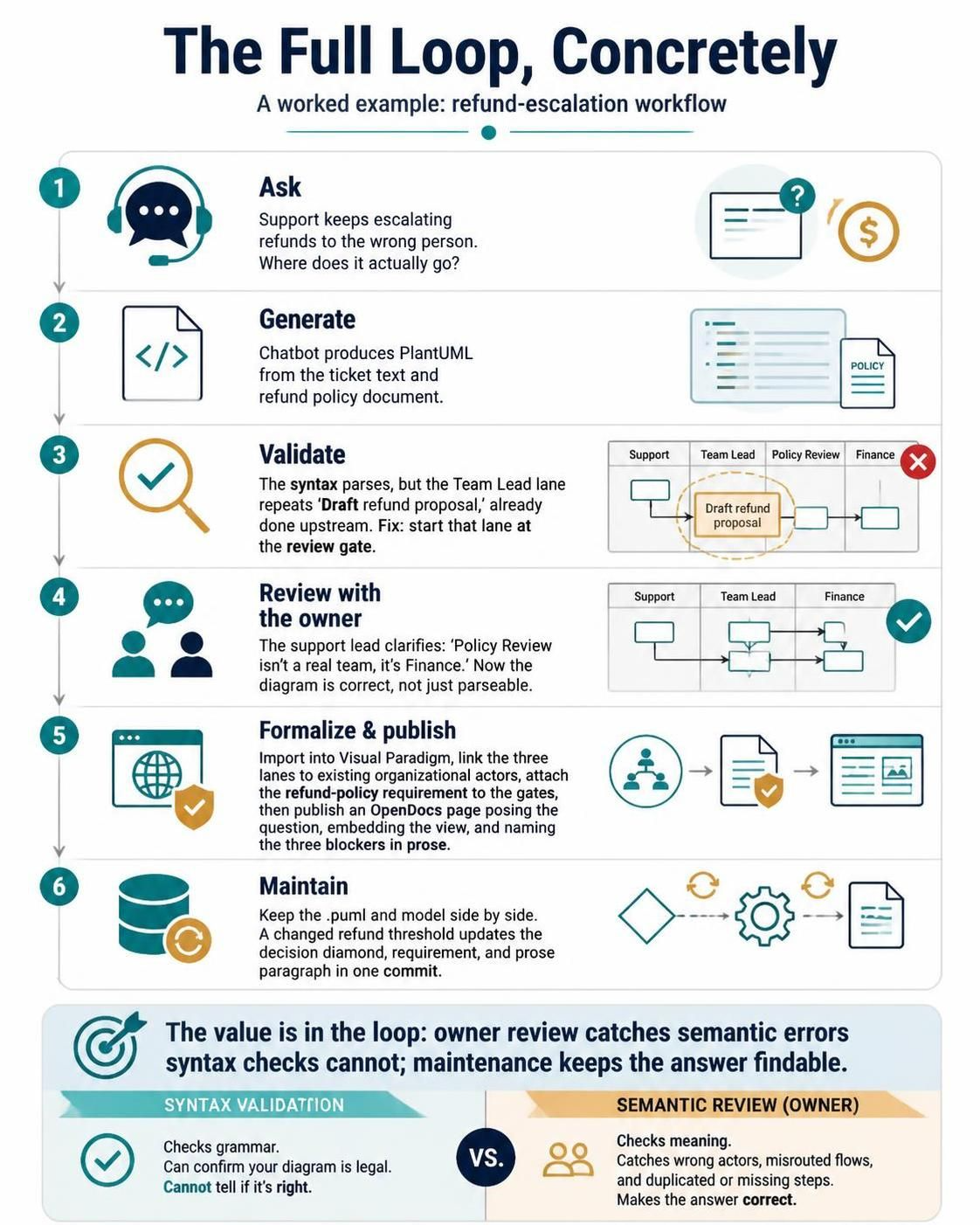
The Full Loop, Concretely
A worked pass through the whole chain:
-
Ask — “Support keeps escalating refunds to the wrong person. Where does it actually go?”
-
Generate — chatbot produces the PlantUML above from the ticket text and the refund policy doc.
-
Validate — parses clean; you spot that the “Team Lead” lane re-states “Draft refund proposal,” which is already done upstream. Fix: the lane should start at the review gate.
-
Review with the owner — support lead reads it: “Policy Review isn’t a real team, it’s Finance.” Now the diagram is correct, not just parsing.
-
Formalize — import to Visual Paradigm, link the three lanes to existing org actors, attach the refund policy requirement to the gates.
-
Publish — OpenDocs page posing the question, embedding the view, naming the three blockers in prose.
-
Maintain — the
.pumland the model live side by side; a change to the refund threshold touches the diamond and the requirement and the prose paragraph, all in one commit.
The value wasn’t in any single stage. It was that stage 4 caught a semantic error stage 3 could never catch, and stage 6 made the answer findable.
Anti-Patterns
Rendering as the goal. If the output is a PNG in a slide, you’ve optimized for one meeting and paid for it with zero maintainability. Render to something — a doc, a model, a repo.
Letting the chatbot choose the framework. An LLM asked for “something to show our strategy” will happily produce a flowchart of strategy. Ask for the framework (SWOT, PESTLE, Ansoff) when that’s what you need; ask for a process when you need a process. The two renderers are different for good reason.
Skipping validation because it “looks right.” The most expensive diagram bug isn’t broken syntax — it’s a if/endif that silently nested one level wrong and now asserts a policy you don’t have.
Duplicate sources of truth. A .puml in the repo and an uncoordinated model in Visual Paradigm is worse than either alone. Pick the owner, export to the other, and say which direction is authoritative.
Diagram per step, not per question. Forty diagrams each answering a fragment is a wiki nobody reads. Six diagrams each answering a real question is documentation.
Explaining everything. Gate notes on the two places a human decides — yes. A note on every box — wallpaper.
Cheatsheet: Which Tool for Which Move
| Your move | Tool | Output |
|---|---|---|
| “Help me think through this process” | Chatbot | Prose questions, then source |
| “Give me the PlantUML / DOT / Mermaid” | Chatbot + VPasCode | Validated text source |
| “Is this source valid?” | VPasCode | Pass / error message |
| “Make this a real, referenceable model” | Visual Paradigm | Typed elements, traceable views |
| “Explain it to a human in a document” | OpenDocs | Prose + embedded diagram, versioned |
| “Show me a strategy framework / matrix / chart” | Chatbot (infographic mode) | Structured JSON → framework render |
| “Keep it correct over the next two years” | Repo + model repository | Diffs, links, ownership |
The One-Sentence Version
Use the chatbot to translate intent into source, VPasCode to prove it parses, Visual Paradigm to make it a governed model when the model matters, and OpenDocs to make it discoverable — because a diagram nobody finds and nobody updates is just a screenshot with extra steps.